
Aowoil WBP-10
Aowoil 120W Water Pressure Booster Pump (Model WBP-10) Instruction Manual
Model: WBP-10
1. Introduction
Thank you for choosing the Aowoil 120W Water Pressure Booster Pump. This device is designed to enhance water pressure in various household applications, ensuring a consistent and strong water flow. Featuring a powerful 120W motor, a flow rate of 396 GPH, and an automatic water flow switch, this pump provides an efficient solution for insufficient water pressure. Please read this manual thoroughly before installation and operation to ensure safe and optimal performance.

Image 1.1: Aowoil 120W Water Pressure Booster Pump with Automatic Water Flow Switch. This image displays the main components of the booster pump, including the motor, brass pump head, and the separate automatic flow switch module.
2. Safety Information
Important Safety Instructions:
- Always disconnect the power supply before performing any installation, maintenance, or repair work on the pump.
- Installation should be performed by a qualified professional or a person with adequate knowledge of plumbing and electrical systems to prevent electric shock or damage.
- Ensure the pump is installed in a dry, well-ventilated area, protected from direct sunlight, rain, and freezing temperatures.
- Do not operate the pump if the power cord or plug is damaged.
- Ensure all electrical connections comply with local codes and regulations.
- The pump is designed for water only. Do not use it for flammable liquids or other corrosive substances.
- Keep children and unauthorized persons away from the pump during operation.
- The operating temperature range for the pump is 0℃-100℃ (0℉-212℉).
3. Package Contents
Verify that all items listed below are included in your package:
- Water Booster Pump × 1
- 3/4 to 1/2 NPT Connector × 1
- Water Flow Switch × 1
- Water-stop PTFE Tape × 1
- Seal Rubber × 4
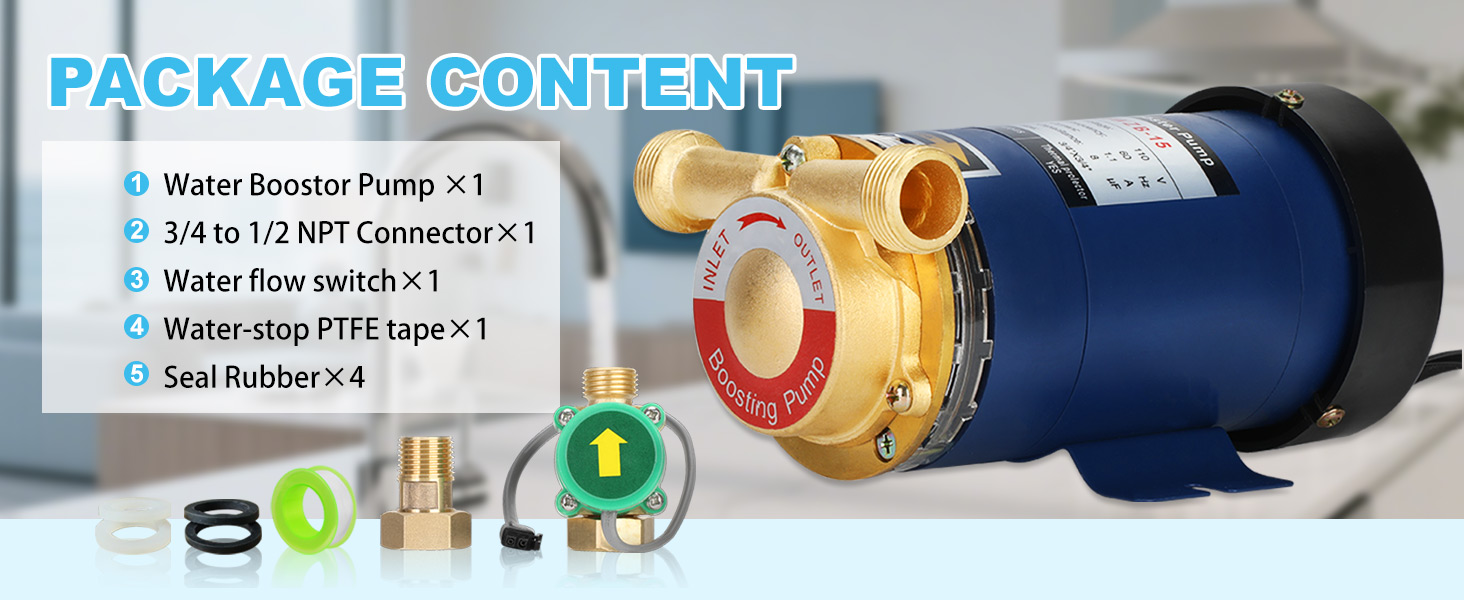
Image 3.1: Contents of the Aowoil Water Pressure Booster Pump package. This image shows the booster pump, NPT connector, water flow switch, PTFE tape, and seal rubbers.
4. Specifications
| Feature | Specification |
|---|---|
| Brand | Aowoil |
| Model Number | WBP-10 |
| Power Source | Corded Electric |
| Wattage | 120 Watts |
| Voltage | 110 Volts (115VAC) |
| Maximum Flow Rate | 396 GPH (6.6 Gallons Per Minute) |
| Maximum Pressure | 21.7 PSI (1.5 bar) |
| Maximum Lifting Height | 49.2 ft (15m) |
| Material | Brass (Pump Head) |
| Product Dimensions | 3.94"L x 3.6"W x 6.9"H |
| Item Weight | 6 Pounds |
| Connections | 1/2" NPT |
| Operating Temperature | 0℃-100℃ (0℉-212℉) |

Image 4.1: Detailed dimensions of the Aowoil Water Pressure Booster Pump and its components. This image provides measurements for the pump body, inlet/outlet connections, and the automatic flow switch.
5. Installation and Setup
The Aowoil Water Pressure Booster Pump is designed for straightforward installation. Follow these steps carefully:
- Prepare Connections: Ensure the power supply is disconnected. Apply PTFE tape (provided) to the threads of all pipe connections to ensure a watertight seal.
- Install Automatic Flow Switch: Connect the automatic flow switch to the pump's inlet or outlet, depending on your desired installation point. Ensure the arrow on the flow switch indicates the direction of water flow.
- Link Signal Line: Connect the signal line from the automatic flow switch to the designated port on the pump's control box.
- Connect Water Pipes: Securely attach your household water pipes to the pump's inlet and outlet using the provided 1/2" NPT connectors and a wrench. Ensure all connections are tight to prevent leaks.
- Mount the Pump: Place the pump on a stable, level surface. The pump features a stable base designed to minimize noise and vibration.
- Power Connection: Once all plumbing connections are secure and checked for leaks, connect the pump to a standard 110V electrical outlet.
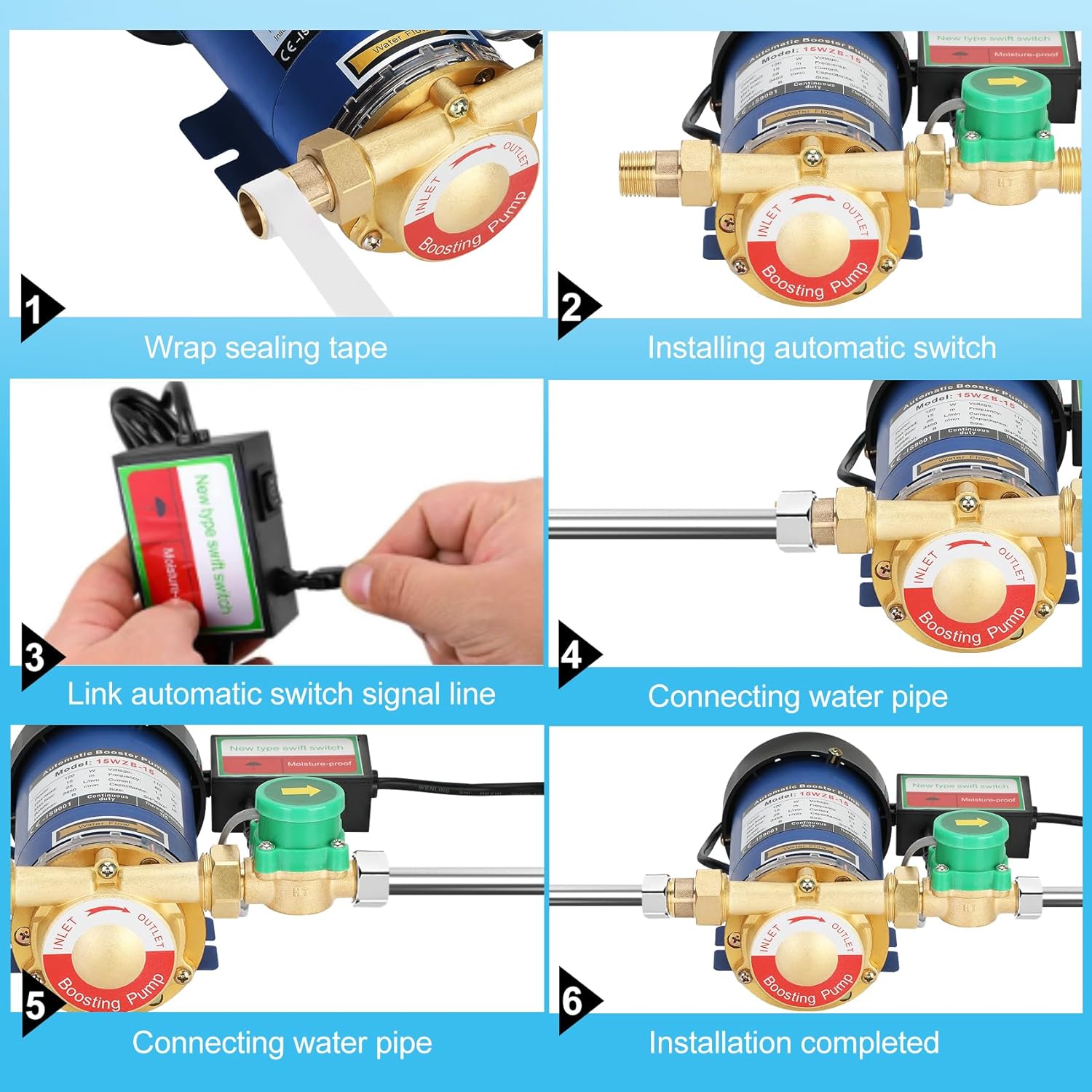
Image 5.1: Visual guide for the installation process, showing steps from applying sealing tape to connecting pipes and the automatic switch.
Installation Diagrams
Refer to the diagrams below for typical installation scenarios:

Image 5.2: Diagram illustrating the installation of the booster pump for water heater pressurization, showing connections to cold and hot water lines.

Image 5.3: Diagram showing the installation of the booster pump on the main water line of a house, typically after the water meter, to boost pressure for multiple fixtures.
6. Operating Instructions
The Aowoil Water Pressure Booster Pump is designed for automatic operation.
- Automatic Mode: Once installed and powered, the automatic flow switch will detect water flow when a faucet or appliance is turned on. The pump will then automatically activate to boost water pressure. When the water flow stops, the pump will automatically shut off.
- Manual Control: The pump also features a manual switch on the control box for direct activation or deactivation, if needed.
Applications: This booster pump is suitable for various household applications, including:
- Increasing water pressure for faucets in kitchens and bathrooms.
- Enhancing shower pressure.
- Boosting pressure for residential water heaters and solar water systems.
- Improving water flow for garden hoses.
- General household pipeline pressure enhancement.
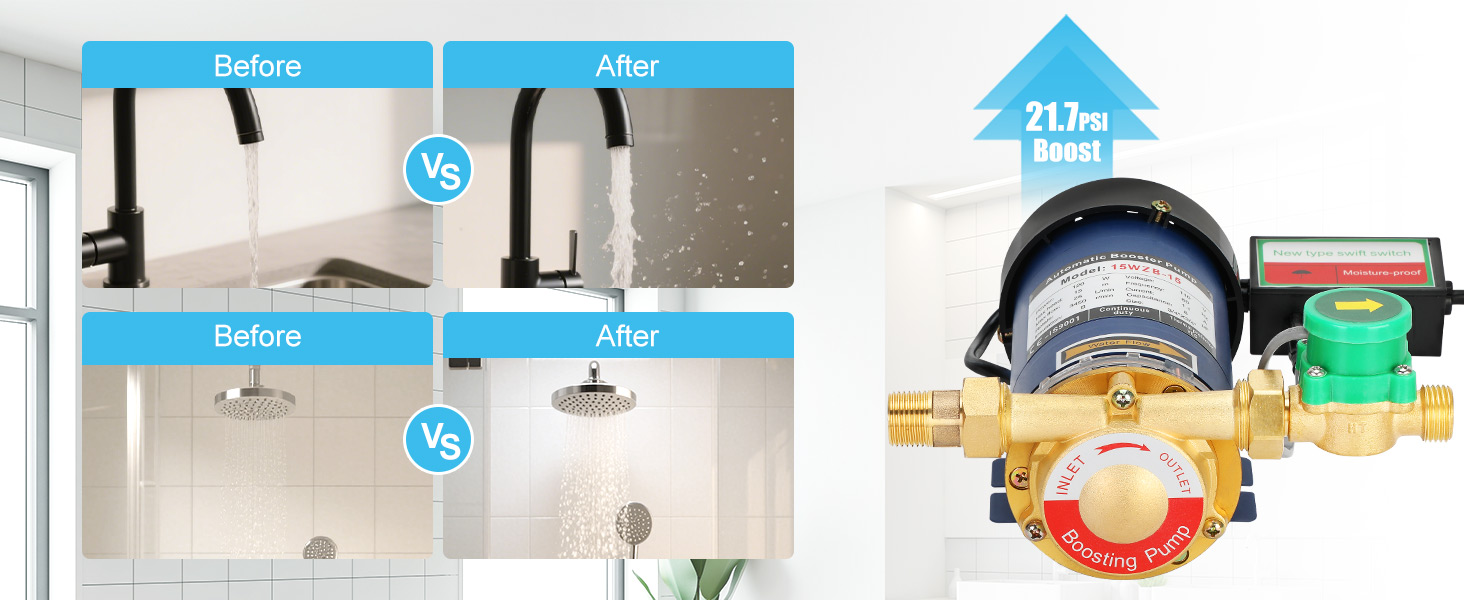
Image 6.1: Comparison of water flow before and after pump activation, demonstrating increased pressure at a faucet and showerhead.

Image 6.2: Illustration of the booster pump's versatility, showing its application across various household fixtures and floors to improve water pressure.
7. Maintenance
Regular maintenance helps ensure the longevity and efficient operation of your Aowoil Water Pressure Booster Pump.
- Regular Inspection: Periodically check the pump and all connections for any signs of leaks, corrosion, or damage. Address any issues promptly.
- Cleanliness: Keep the pump's exterior clean and free from dust and debris to ensure proper heat dissipation from the external cooling fan.
- Winterization (if applicable): If the pump is installed in an area prone to freezing temperatures, ensure it is properly drained or protected from frost to prevent damage.
- Impeller Check: If you suspect reduced performance, ensure the impeller is not obstructed or locked. Refer to the troubleshooting section for guidance.
8. Troubleshooting
If you encounter issues with your booster pump, refer to the following common problems and solutions:
| Problem | Possible Cause | Solution |
|---|---|---|
| Pump does not turn on. | No power supply; faulty wiring; automatic switch not detecting flow. | Check power connection and circuit breaker. Verify wiring. Ensure water is flowing through the system. Check manual switch. |
| Pump runs continuously or cycles on/off frequently without water use. | Small leak in the plumbing system; faulty automatic flow switch; air in the system. | Inspect all plumbing for leaks and repair. Ensure the automatic flow switch is correctly installed and functioning. Bleed air from the system if necessary. |
| Low water pressure despite pump running. | Impeller locked or obstructed; insufficient water supply to the pump; clogged filter (if applicable). | Disconnect power and inspect the impeller for obstructions. Ensure adequate water supply. Check for any upstream filters that might be clogged. |
| Pump is excessively noisy. | Air in the system; loose mounting; foreign object in pump. | Bleed air from the system. Ensure the pump is securely mounted on a stable surface. Disconnect power and inspect for foreign objects. |
| Pump leaks. | Loose connections; damaged seals. | Tighten all pipe connections. Inspect and replace damaged seal rubbers or PTFE tape. |
If you are unable to resolve the issue using the troubleshooting guide, please contact customer support.
9. Warranty and Support
Aowoil offers the following support for your water pressure booster pump:
- Return Policy: A 30-day free return policy is available from the date of purchase.
- Replacement Policy: A three-month free replacement policy is offered for product defects.
- Professional Support: For any issues encountered during use, you can access support from our professional team. Please navigate to "My Account" > "My Orders" on the platform where you purchased the product to contact support.
Please retain your proof of purchase for warranty claims.
Ask a question about this manual
Ask about setup, troubleshooting, compatibility, parts, safety, or missing instructions. Manuals+ will review the question and use this page’s manual context to help answer it.