
1. Introduction
This manual provides detailed instructions for the safe and effective use of your KINSEI Thermal Imaging Monocular TPC-K40-G13. Please read this manual thoroughly before operating the device and retain it for future reference.
Safety Information
- Do not look directly at strong light sources (e.g., the sun) through the device, as this may cause permanent eye damage.
- Keep the device away from extreme temperatures, humidity, and direct sunlight.
- Do not attempt to disassemble or modify the device. Repairs should only be performed by authorized personnel.
- Ensure the device is fully charged before extended use.
- The L-pointer automatically deactivates after 10 seconds to protect eyes from potential injury.

A detailed view of the KINSEI Thermal Imaging Monocular, showcasing its design and lens.
2. Package Contents
Verify that all items listed below are included in your package:
- KINSEI Thermal Monocular (x1)
- Plug Converter (x1)
- Micro Charge/Data Cable (x1)
- Carrying Bag (x1)
- User Manual (x1)
- Various Connectors (x4)

The KINSEI Thermal Monocular shown with water droplets, emphasizing its IP67 waterproof rating, alongside an illustration of the included accessories: thermal monocular, plug converter, micro charge/data cable, carrying bag, user manual, and various connectors.
3. Product Overview
The KINSEI Thermal Imaging Monocular is designed for enhanced observation in various conditions, including low light and complete darkness. It features a 13mm focal lens, 400x300 effective pixels, and 4x digital zoom.
Device Controls

A clear diagram labeling the controls of the KINSEI Thermal Monocular, including the Power On/Off button, Photo Capture button, Mode Switch, Digital Zoom buttons, and Diopter Adjustment knob.
- Power On/Off Button: Press and hold to power the device on or off.
- Photo Capture Button: Press to capture still images.
- Mode Switch Button: Cycles through display modes (Warm White, Warm Black, Warm Red, Heat Oxide).
- Digital Zoom Buttons: Adjusts digital magnification (1x, 2x, 3x, 4x).
- Diopter Adjustment Knob: Rotates to adjust the eyepiece focus for individual vision.
4. Setup
4.1 Charging the Battery
The device includes a built-in rechargeable Lithium-ion battery. To charge:
- Connect the micro charge/data cable to the device's charging port.
- Connect the other end of the cable to the provided plug converter and then to a power outlet.
- The charging indicator will show the charging status. A full charge provides approximately 5 hours of operation (with WiFi hotspot off at 25°C).
4.2 Powering On/Off
- To Power On: Press and hold the Power On/Off button until the display illuminates.
- To Power Off: Press and hold the Power On/Off button until the display shuts down.
4.3 Diopter Adjustment
Adjust the diopter to ensure a clear image for your individual eyesight:
- Look through the eyepiece.
- Rotate the Diopter Adjustment Knob until the image appears sharp and in focus.
5. Operating Instructions
5.1 Display Modes
The monocular offers four distinct display modes to optimize thermal imaging for different environments and preferences. Press the Mode Switch Button to cycle through them:
- Warm White: Hot objects appear white, colder objects appear black.
- Warm Black: Hot objects appear black, colder objects appear white.
- Warm Red: Highlights hotter areas in red, with varying shades for temperature differences.
- Heat Oxide: Provides a distinct color palette for thermal differentiation.

Illustration of the four thermal display modes: Warm White, Warm Black, Warm Red, and Heat Oxide, demonstrating how they help identify objects.
5.2 Digital Zoom
The device features a 4x digital zoom to magnify your view. Use the Digital Zoom buttons to adjust the magnification level:
- Press the '+' button to increase zoom (1x, 2x, 3x, 4x).
- Press the '-' button to decrease zoom.
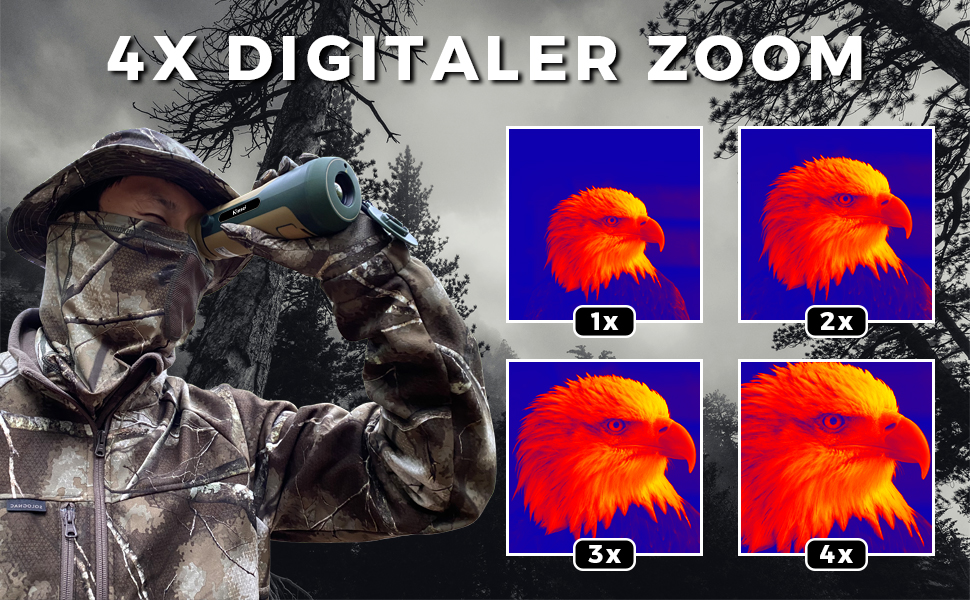
A visual representation of the 4x digital zoom feature, showing how the image can be magnified from 1x to 4x.
5.3 Automatic Distance Measurement
The monocular includes a distance measurement function:
- Highlight the top and bottom of a target on the screen.
- The user interface will automatically display the estimated distance to the target.
5.4 Photo Capture
To capture a still image of your view, press the Photo Capture button. Images are saved to the internal memory or an inserted Micro-SD card (not included).
5.5 L-Pointer Function
The L-pointer is used to indicate a position. For eye safety, the pointer automatically deactivates after 10 seconds of use.
6. Maintenance
6.1 Cleaning the Device
- Lens: Use a soft, lint-free cloth specifically designed for optical lenses. Gently wipe the lens surface. Avoid using abrasive materials or excessive force.
- Body: Wipe the device body with a soft, damp cloth. Do not use harsh chemicals or solvents.
6.2 Battery Care
- Charge the battery regularly, even if the device is not in frequent use, to maintain battery health.
- Avoid fully discharging the battery frequently.
- Store the device in a cool, dry place when not in use.
6.3 Storage
When storing the monocular for extended periods, ensure it is clean, dry, and stored in its protective carrying bag. Avoid storing it in areas with extreme temperatures or high humidity.
7. Troubleshooting
If you encounter issues with your KINSEI Thermal Imaging Monocular, refer to the following common problems and solutions:
| Problem | Possible Cause | Solution |
|---|---|---|
| Device does not power on. | Low or depleted battery. | Charge the device fully using the provided cable and adapter. |
| Image is blurry or out of focus. | Diopter not adjusted correctly. | Adjust the Diopter Adjustment Knob until the image is clear. |
| No image or distorted image. | Lens is dirty or obstructed. | Clean the objective lens with a soft, optical-grade cloth. |
| Buttons are unresponsive. | Temporary software glitch. | Power off the device and restart it. If the issue persists, contact customer support. |
8. Specifications
The following table outlines the technical specifications of the KINSEI Thermal Imaging Monocular TPC-K40-G13:
| Feature | Specification |
|---|---|
| Model Number | TPC-K40-G13 |
| Objective Focal Length | 13 mm |
| Effective Pixels | 400x300 (50 Hz) |
| Lens Coating | Fully Multi-Coated |
| Pixel Pitch | 17 µm |
| Magnification | 4x Digital Zoom |
| Display Modes | 4 (Warm White, Warm Black, Warm Red, Heat Oxide) |
| Operating Temperature | -20 °C to +55 °C |
| Waterproof Rating | IP67 |
| Detection Distance (Vehicles) | Up to 279 yards (255m) |
| Detection Distance (Animals) | Up to 107 yards (98m) |
| Screen Resolution | 1280 x 960 (0.4 inch LCD) |
| Video Compression | H.265 |
| Battery Type | 1 Lithium-ion (included) |
| Battery Life | Approx. 5 hours (WiFi off, @25°C) |
| Weight | 449.06 Grams |
| Dimensions (L x W x H) | 18.75 x 6.65 x 6.85 cm |

A table comparing the KINSEI Thermal Monocular's specifications with other brands.

13mm Objective Focal Length and Multi-Coated Lens.

400x300 Effective Pixels and 0.4-inch Screen.

H.265 Video Compression and 1280x960 Display.

IP67 Waterproof and Wide Operating Temperature.
9. Warranty and Support
9.1 Warranty Information
The KINSEI Thermal Imaging Monocular TPC-K40-G13 comes with a 2-year warranty from the date of purchase. This warranty covers manufacturing defects and ensures the product functions as intended under normal use. Please retain your proof of purchase for warranty claims.
9.2 Customer Support
For technical assistance, troubleshooting, or warranty inquiries, please contact KINSEI customer support. Refer to the contact information provided on the product packaging or the official KINSEI website.