1. Safety Information
Please read and understand all safety warnings and instructions before operating this vacuum pump. Failure to follow these instructions may result in electric shock, fire, or serious injury.
- Electrical Safety: Ensure the power supply matches the pump's voltage (110V). Do not operate in wet conditions. Always disconnect power before servicing.
- Personal Protective Equipment: Wear safety glasses and gloves when handling refrigerants and vacuum pump oil.
- Ventilation: Operate the pump in a well-ventilated area.
- Oil Handling: Use only recommended vacuum pump oil. Avoid skin contact and dispose of used oil responsibly.
- Refrigerant Handling: Be aware of the hazards associated with refrigerants. Follow all local and national regulations for refrigerant recovery and handling.
- Hot Surfaces: The pump may become hot during operation. Avoid touching hot surfaces.
2. Product Overview
The SPECSTAR 110V 1/4 HP 3.5 CFM Single Stage Rotary Vane HVAC Air Vacuum Pump is designed for efficient evacuation of HVAC and automotive AC systems. It features a robust construction and user-friendly design for reliable performance.

Image: The main unit of the SPECSTAR 3.5 CFM Single Stage Rotary Vane HVAC Air Vacuum Pump, showcasing its yellow and black housing with a carrying handle.
Key Features:
- Optimal Performance: Powered by a 1/4 HP (180W) motor running at 1728 r/min, delivering a flow rate of 3.5 CFM and reaching an ultimate vacuum of 2 Pa in just 3 minutes.
- Versatile Compatibility: Compatible with R134a, R12, R22, R502, and R410a (with a 5/16-inch adapter, not included). Features 1/4-inch SAE and 1/2-inch ACME inlet fittings.
- Durable Construction: Crafted with a one-piece die-cast aluminum housing and a four-pole pure copper motor for longevity and resistance against drops.
- Safe Operation: Engineered with advanced motor current protection to prevent damage from extended use. Includes a 304 stainless steel coarse filter and a cotton layer filter at the exhaust port to capture impurities.
- User-Friendly Design: Ergonomic grip handle, intuitive ON/OFF switch, dual oil filling ports with a clear viewing window, and a bottom oil drain port for easy maintenance. Low noise operation at approximately 65 dB.

Image: Diagram highlighting the pump's motor specifications: Four Pole Pure Copper Motor, 3.5 CFM Flow Rate, 1/4 HP Power, 2 Pa Ultimate Vacuum, and 1728 R/MIN Motor Speed.

Image: Illustration demonstrating the low noise operation of the SPECSTAR vacuum pump, indicating a sound level of less than 65 dB.
3. Specifications

Image: A visual representation of the vacuum pump with key specifications and dimensions labeled.
| Specification | Value |
|---|---|
| Model | VH1156US |
| Voltage | 110 Volts |
| Frequency | 60 Hz |
| Power | 1/4 HP (180W) |
| Flow Rate | 3.5 CFM (100 L/min) |
| Ultimate Vacuum | 2 Pa |
| Recommended Oil Capacity | 0.35 qt. (330ml) |
| Inlet Fitting | 1/4 in. SAE & 1/2 in. ACME |
| Duty Cycle | 30 min |
| Item Weight | 12.5 pounds |
| Product Dimensions | 11.6 x 4.8 x 9 inches |
4. Setup
4.1 Unpacking and Inspection
- Carefully remove the vacuum pump and all accessories from the packaging.
- Inspect the unit for any signs of damage during transit. Do not operate if damaged.
- Ensure all components listed in the 'What's in the Box' section are present.
4.2 Oil Filling
The vacuum pump is shipped without oil. It is crucial to fill the pump with the correct amount of vacuum pump oil before first use.
- Locate the oil filling ports, typically marked on the top of the pump.
- Remove the oil cap.
- Slowly pour the provided 330ml vacuum pump oil into the oil reservoir.
- Monitor the oil level through the clear viewing window. The oil level should be between the 'MIN' and 'MAX' marks. Do not overfill.
- Replace the oil cap securely.

Image: Close-up view of the oil filling ports and the exhaust port with a built-in cotton filter, showing the process of adding oil.
4.3 Connecting to System
The pump features both 1/4-inch SAE and 1/2-inch ACME inlet fittings for broad compatibility.

Image: Detailed view of the air inlet port, showing the 1/2" ACME and 1/4" SAE fittings, along with safe caps and an anti-backflow design.
- Select the appropriate fitting for your system.
- Connect the vacuum hose from your HVAC or AC manifold gauge set to the pump's inlet fitting. Ensure connections are tight to prevent leaks.
- If using R410a, a 5/16-inch adapter (not included) will be required.
5. Operating Instructions
5.1 Evacuating an AC/HVAC System
- Ensure the pump is filled with oil to the correct level.
- Connect the vacuum pump to the system using appropriate hoses and manifold gauges.
- Open the manifold gauge valves to the system.
- Plug the pump into a grounded 110V power outlet.
- Turn the pump ON using the intuitive ON/OFF switch.
- Allow the pump to run until the desired vacuum level is achieved (e.g., 2 Pa or lower for deep vacuum). This typically takes a few minutes, but can vary based on system size and condition.
- Once the desired vacuum is reached, close the manifold gauge valves to isolate the system from the pump.
- Turn the pump OFF and disconnect it from the power supply.
- Observe the manifold gauges for any rise in pressure, which would indicate a leak in the system.
6. Maintenance
Regular maintenance ensures the longevity and optimal performance of your vacuum pump.
6.1 Oil Change
Vacuum pump oil should be changed regularly, especially after each use or if it appears discolored or contaminated. The pump features a quick-drain port for hassle-free oil changes.

Image: Diagram illustrating the quick-drain port for easy oil changes and the visible scale marks (Min 300ml, Max 400ml) on the oil viewing window.
- Ensure the pump is cool and disconnected from power.
- Place a suitable container under the oil drain port.
- Remove the oil drain plug to allow the old oil to drain completely.
- Replace the drain plug securely.
- Refill with new vacuum pump oil as described in Section 4.2.
- Dispose of used oil according to local environmental regulations.
6.2 Filter Cleaning
The 304 stainless steel coarse filter and cotton layer filter at the exhaust port should be inspected and cleaned periodically to ensure efficient operation and prevent contaminants from entering the pump.
- Regularly check the filters for debris or saturation.
- Clean or replace filters as necessary.
7. Troubleshooting
This section addresses common issues you might encounter with your vacuum pump.
| Problem | Possible Cause | Solution |
|---|---|---|
| Pump does not start | No power, faulty switch, motor overload protection activated. | Check power connection, ensure switch is ON, allow pump to cool if overheated. |
| Poor vacuum performance | Low oil level, contaminated oil, leaks in connections, clogged filters. | Check/refill oil, change oil, tighten connections, clean/replace filters. |
| Excessive noise | Low oil level, worn components. | Check/refill oil. If noise persists, contact customer support. |
| Oil mist from exhaust port | Normal oil vapor (especially in cold), overfilled oil, contaminated oil, vacuum leaks, clogged oil mist separator. | A light oil mist is normal. Check oil level, change oil, check for leaks, inspect/clean oil mist separator. |

Image: Visual guide explaining common causes of exhaust port smoke, including normal oil vapor, overfilled oil, contaminated oil, vacuum leaks, and clogged filters.
8. Applications
The SPECSTAR vacuum pump is a versatile tool suitable for various applications:
- HVAC Servicing
- Automotive AC System Evacuation
- Vacuum Packaging
- Oil Distillation
- Resin Defoaming
- Wood Stabilizing
- Laboratory Use
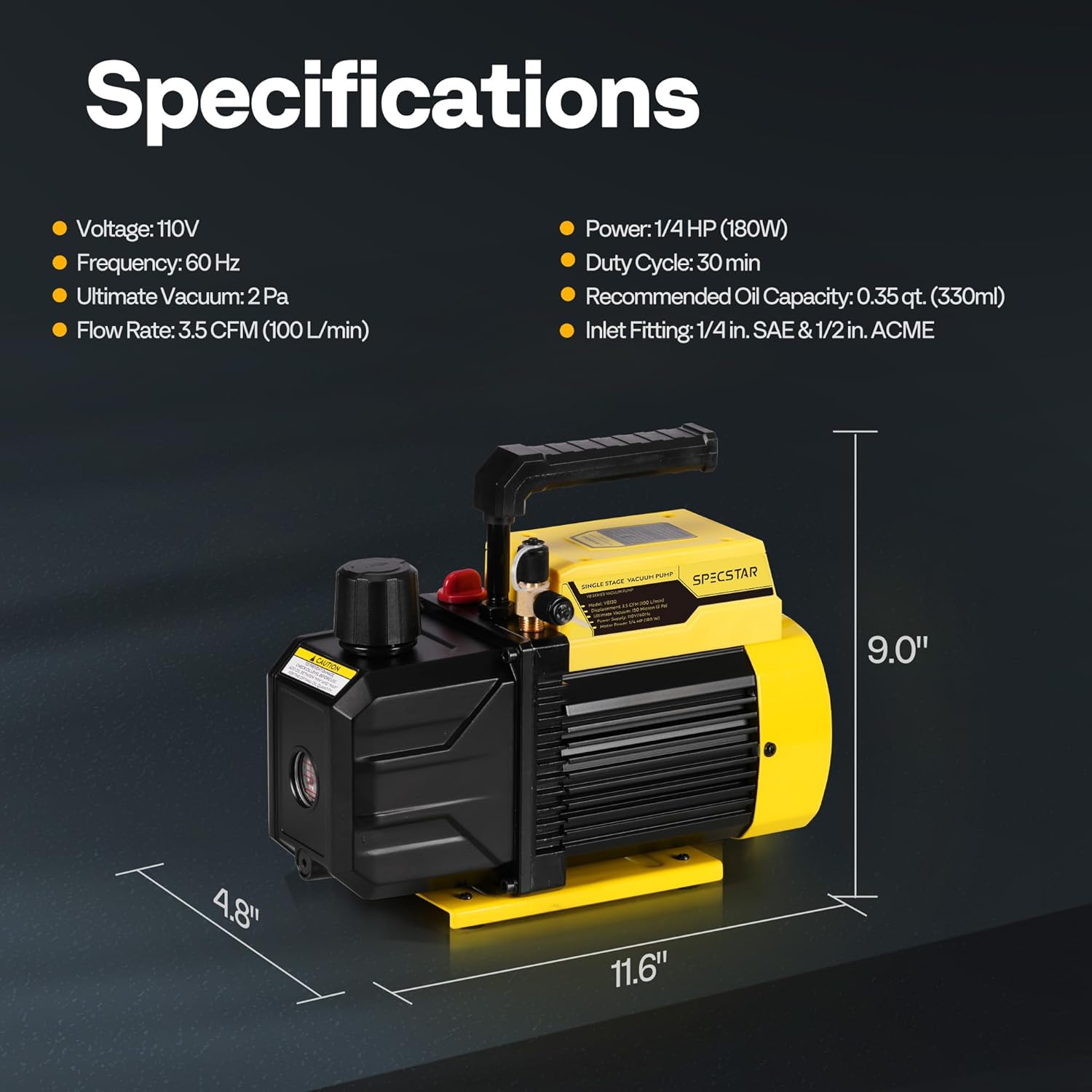
Image: A collage showing various applications of the vacuum pump, including HVAC servicing, automotive repair, woodworking & lamination, vacuum drying, solvent degassing, and material defoaming.

Image: A banner illustrating the multipurpose use of the vacuum pump in various settings such as vacuum ovens, vacuum packing, vacuum hold-down tables, processing industries, and laboratories.
9. What's in the Box
- 1 x SPECSTAR Vacuum Pump
- 1 x 330ml Vacuum Oil
- 1 x User Manual (this document)
10. Warranty and Support
For warranty information, technical support, or service inquiries, please refer to the contact details provided with your purchase documentation or visit the official SPECSTAR website. Keep your purchase receipt as proof of purchase for warranty claims.