
1. Introduction
Thank you for choosing the DESHUN DS-236 Window Intercom System. This wired two-way intercom system is designed to facilitate clear and real-time communication across barriers such as glass windows, making it ideal for various professional environments including banks, hospitals, post offices, securities windows, embassy visa offices, and more. This manual provides detailed instructions for the proper setup, operation, and maintenance of your intercom system to ensure optimal performance and a better user experience.
2. Product Overview
2.1 Included Components
- Intercom Host Unit
- Intercom Extension Unit
- Power Adapter
- Audio Connection Cable (4-core high strength aluminum foil shielding line)
- Double-sided Adhesive (for mounting)
- Instruction Manual
2.2 Key Features
- Wired Two-Way Intercom: Ensures real-time, delay-free communication.
- Built-in Microphone Design: Maximizes desktop space savings and offers a clean aesthetic.
- All-Metal Body: Provides enhanced durability and a robust build.
- Anti-Interference: The 4-core high-strength aluminum foil shielding line reduces howling and ensures clear, natural sound quality.
- Easy Installation: Designed for straightforward setup with minimal connections.

Figure 1: Overview of the DESHUN DS-236 Intercom System components and key features, including anti-interference, built-in microphone, clear speakers, auto noise reduction, aluminum alloy shell, external device interface, and low voltage safety equipment.

Figure 2: The intercom host unit featuring I-VOL (Inner Volume) and O-VOL (Outer Volume) adjustment knobs for easy control of speaker volume for both the host and extension units.

Figure 3: Illustrates the hidden microphone inside the product and the wall-mount capability. The back of the machine shows the four footpads to be removed for attaching double-sided tape and sticking it on glass.
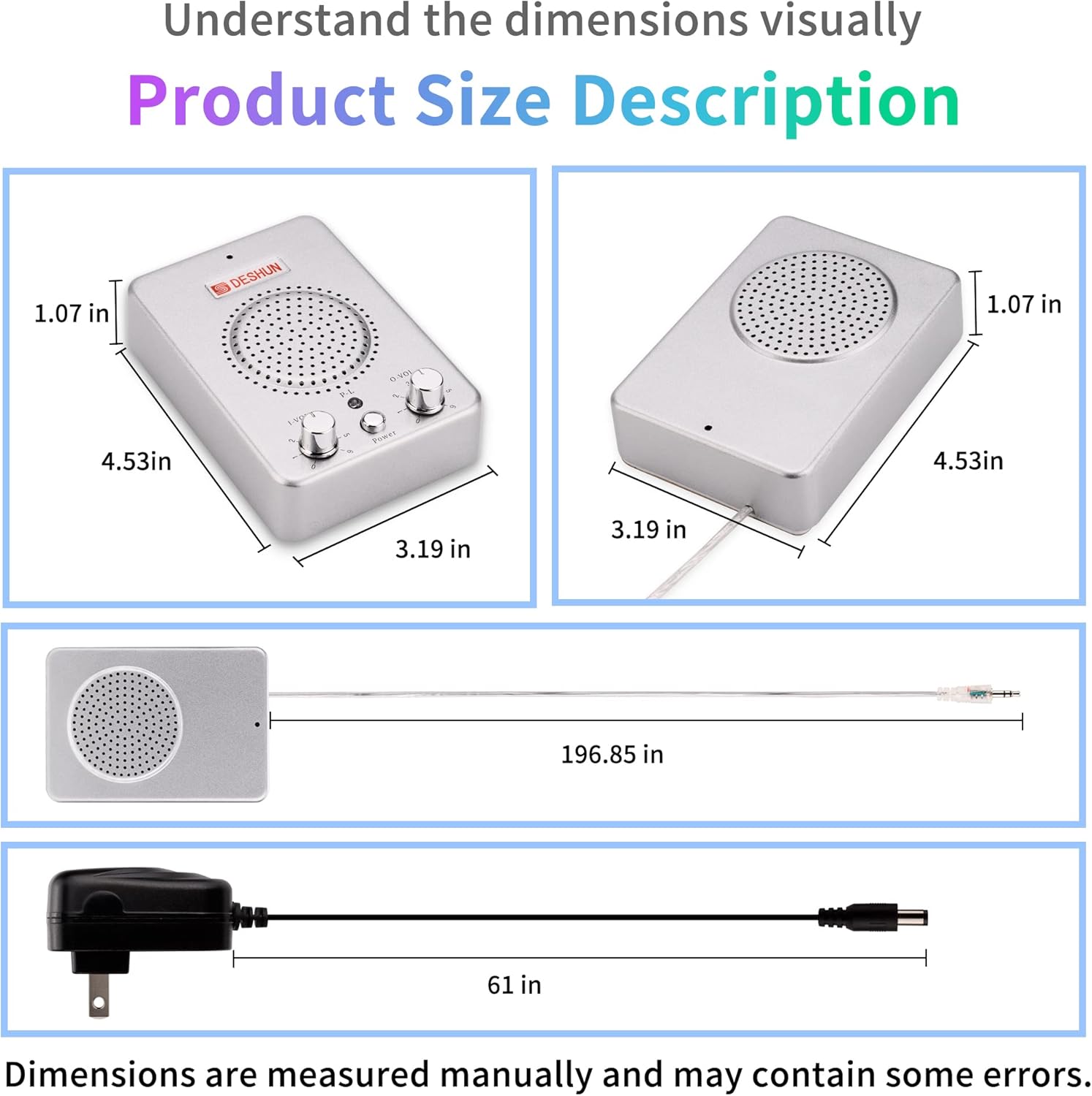
Figure 4: Highlights the aluminum alloy shell design and features of the audio cable, including its 196.85-inch length, 4-core aluminum foil shielding wire, securely connected 3.5mm plug, anti-interference clear sound, and loud speaker voice.
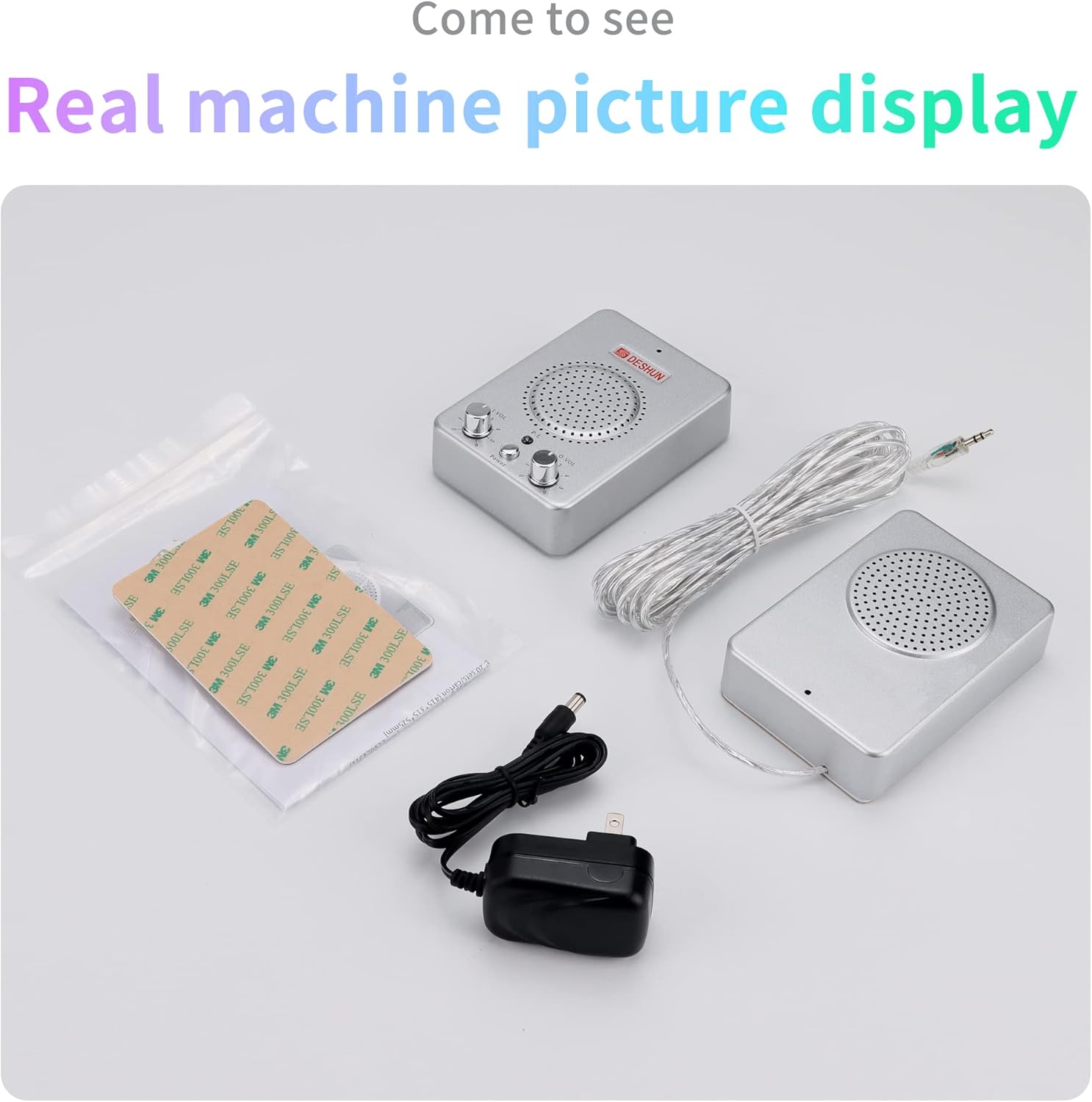
Figure 5: A complete view of the DESHUN DS-236 Intercom System, showing the host unit, extension unit, audio cable, power adapter, and double-sided adhesive for installation.
3. Safety Information
- Ensure the power adapter is connected to a compatible power source.
- Do not expose the device to water or excessive moisture, as it is not water resistant.
- Avoid placing the unit in direct sunlight or near heat sources.
- Keep out of reach of children.
- Do not attempt to disassemble or repair the unit yourself. Contact qualified personnel for service.
4. Setup
The DESHUN DS-236 intercom system is designed for easy installation. Follow these steps to set up your device:
- Connect the Units: Connect the intercom host unit and the intercom extension unit using the provided audio connection cable. Ensure the cable is securely plugged into the designated ports on both units.
- Connect Power: Plug one end of the power adapter into the host unit's power input, and the other end into a suitable power supply outlet.
- Mount the Extension Unit: The extension unit can be attached to a glass window or other smooth surface using the included double-sided adhesive. Remove the four footpads from the back of the extension unit, apply the double-sided tape, and firmly press it onto the desired surface.
- Power On: Switch on the power button on the host unit. The system is now ready for use.
Video 1: Official DESHUN video demonstrating the setup and basic functionality of the DS-236 Window Intercom System. This video shows how to connect the main unit, microphone, and extension speaker, and how to power on the device.
5. Operating Instructions
The DESHUN DS-236 provides clear two-way communication with easy-to-use controls.
5.1 Power On/Off
- To power on the system, press the Power button on the host unit. The power LED will illuminate.
- To power off the system, press the Power button again.
5.2 Volume Adjustment
The host unit features two volume control knobs:
- I-VOL (Inner Volume): Controls the speaker volume of the host unit (inside).
- O-VOL (Outer Volume): Controls the speaker volume of the extension unit (outside).
Adjust these knobs clockwise to increase volume and counter-clockwise to decrease volume to a comfortable listening level for both parties.
5.3 Two-Way Communication
The system is designed for automatic two-way communication. Once powered on and volumes are adjusted, both the person at the host unit and the person at the extension unit can speak and listen simultaneously without needing to press any buttons. The built-in microphones and speakers ensure clear audio transmission in both directions.

Figure 6: Visual representation of the two-way voice communication capability of the DESHUN DS-236 intercom system, showing how both inner and outer speakers amplify clearly for effective dialogue.
6. Maintenance
- Cleaning: Use a soft, dry cloth to clean the surfaces of the intercom units. Do not use liquid cleaners or aerosols.
- Cable Care: Regularly check the audio connection cable and power adapter for any signs of damage. Replace if necessary to ensure safe and reliable operation.
- Storage: If storing the unit for an extended period, disconnect it from the power supply and store it in a cool, dry place.
7. Troubleshooting
If you encounter any issues with your DESHUN DS-236 intercom system, please refer to the following common problems and solutions:
| Problem | Possible Cause | Solution |
|---|---|---|
| No sound or low volume | Power not connected; Volume knobs set too low; Loose cable connection. | Ensure power adapter is connected and unit is powered on. Adjust I-VOL and O-VOL knobs. Check all cable connections. |
| Howling or feedback noise | Volume set too high; Units too close together; Environmental interference. | Reduce volume levels. Ensure proper distance between host and extension units. The 4-core shielding cable helps minimize interference. |
| Unclear or distorted sound | Damaged cable; Microphone obstruction; Excessive background noise. | Check audio cable for damage and replace if necessary. Ensure microphones are not obstructed. Reduce ambient noise if possible. |
8. Specifications
| Feature | Specification |
|---|---|
| Model Number | DS-236 |
| Item Weight | 1.76 pounds |
| Product Dimensions | 3.19 x 1.07 x 4.53 inches |
| Number of Channels | 1 |
| Frequency Range | 400-470 MHz |
| Talking Range Maximum | 0.5 Meter |
| Water Resistance Level | Not Water Resistant |
| Included Components | Intercom host, intercom extension, power adapter, audio cable, instruction manual |

Figure 7: Visual description of the product dimensions for the DESHUN DS-236 intercom system, including the host unit, extension unit, audio cable, and power adapter.
9. Warranty and Support
For warranty information or technical support, please refer to the documentation provided with your purchase or contact the manufacturer directly. Keep your purchase receipt as proof of purchase for any warranty claims.