
DESHUN DS-2008
DESHUN Window Intercom System User Manual
Model: DS-2008
1. Introduction
The DESHUN DS-2008 Window Intercom System is designed to facilitate clear two-way communication across barriers such as glass windows in various professional environments. This system utilizes automatic two-way communication technology to ensure real-time, easy intercom without signal delay. Its robust all-metal body design enhances durability, and advanced features like volume adjustment and sound closure functions improve user experience. The system is equipped with a high-strength shielded wire for superior sound quality and anti-interference capabilities.

Figure 1: DESHUN DS-2008 Window Intercom System components.
2. Package Contents
Upon opening the package, please verify that all components are present and undamaged:
- Intercom host unit
- Intercom extension (external speaker)
- Power adapter
- Audio cable (4-core high strength aluminum foil shielding wire)
- Instruction manual (this document)

Figure 2: All components included in the DESHUN DS-2008 package.
3. Setup and Installation
The DESHUN DS-2008 intercom system is designed for straightforward installation. Follow these steps to set up your device:
- Position the Host Unit: Place the intercom host unit on the inside of the window or barrier where the operator will be located. Ensure the flexible microphone boom is positioned for comfortable use.
- Connect the Extension Speaker: Connect the intercom extension (external speaker) to the host unit using the provided audio cable. This speaker is designed to be placed on the outside of the window or barrier, facing the customer or visitor. The external speaker features double-sided adhesive for secure mounting.
- Connect Power: Plug one end of the power adapter into the designated power input port on the host unit. Plug the other end of the power adapter into a standard power supply outlet.
- Power On: Press the power button on the host unit to turn on the system.

Figure 3: Setup diagram for the DESHUN DS-2008 system.
4. Operating Instructions
The DESHUN DS-2008 system provides seamless two-way communication. Here's how to operate it:
- Automatic Two-Way Communication: The system automatically identifies voice signals, allowing for real-time, easy intercom without manual operation.
- Volume Adjustment: Use the dedicated function knobs on the host unit to adjust the volume for both the internal (I-VOL) and external (O-VOL) speakers independently. This allows for optimal sound levels on both sides of the barrier.
- Mute Function: The system includes internal (I-Mute) and external (O-Mute) one-button sound closure functions. Pressing these buttons will mute the respective speakers, reducing unnecessary mutual interference or allowing for private conversations.
- Flexible Microphone: The metal microphone rod on the host unit can be bent 360 degrees to adjust to the desired position for optimal voice capture. The length of the microphone rod is 19.68 inches.

Figure 4: Volume and mute controls on the host unit.

Figure 5: Principle of two-way voice communication.

Figure 6: Flexible microphone rod for optimal positioning.
5. Maintenance
The DESHUN DS-2008 intercom system features an all-metal body design for enhanced durability. To ensure optimal performance and longevity, follow these general maintenance guidelines:
- Cleaning: Use a soft, dry cloth to wipe down the host unit and external speaker. Avoid using abrasive cleaners or solvents that could damage the finish.
- Cable Management: Ensure the audio cable is not kinked or strained. Proper cable management helps prevent damage and maintains sound quality.
- Environmental Conditions: While the external speaker has a waterproof rating (IP67), it is recommended to protect the main host unit from direct exposure to extreme weather conditions or excessive moisture.

Figure 7: External speaker design and cable features.
6. Troubleshooting
The DESHUN DS-2008 intercom system is designed for reliable operation. If you encounter any issues, consider the following:
- No Sound/Low Volume:
- Check if the power adapter is securely connected and the unit is powered on.
- Verify that the volume knobs (I-VOL, O-VOL) are adjusted to an audible level.
- Ensure that the mute buttons (I-Mute, O-Mute) are not activated.
- Confirm that the audio cable connecting the host and extension is properly plugged in at both ends.
- Howling/Feedback:
- Reduce the volume of either the internal or external speaker.
- Ensure the microphone and speakers are not too close to each other, especially if not separated by a barrier.
- The system uses 4-core high-strength aluminum foil shielding wire to minimize interference and howling. If howling persists, check for strong electromagnetic interference in the environment.
- Unclear Sound:
- Check for any obstructions blocking the microphone or speaker grilles.
- Ensure the microphone is positioned correctly for the speaker.
- The system is designed to ensure sound is clearer and more natural. If sound quality is poor, check cable connections.
7. Specifications
Detailed technical specifications for the DESHUN DS-2008 Window Intercom System:
| Feature | Specification |
|---|---|
| Model Number | DS-2008 |
| Brand | DESHUN |
| Item Weight | 1.65 pounds (0.75 kg) |
| Product Dimensions (Host Unit) | 5.35 x 4.02 x 2.05 inches (13.59 x 10.21 x 5.21 cm) |
| Product Dimensions (External Speaker) | Diameter: 2.95 inches (7.49 cm), Height: 0.87 inches (2.21 cm) |
| Microphone Rod Length | 19.68 inches (50 cm) |
| Audio Cable Length | 78.74 inches (200 cm) |
| Material | All-metal body (Aluminum alloy shell) |
| Color | Silver |
| International Protection Rating (External Speaker) | IP67 (Waterproof) |
| Talking Range Maximum | 0.5 Meters |
| Special Feature | Noise Reduction |
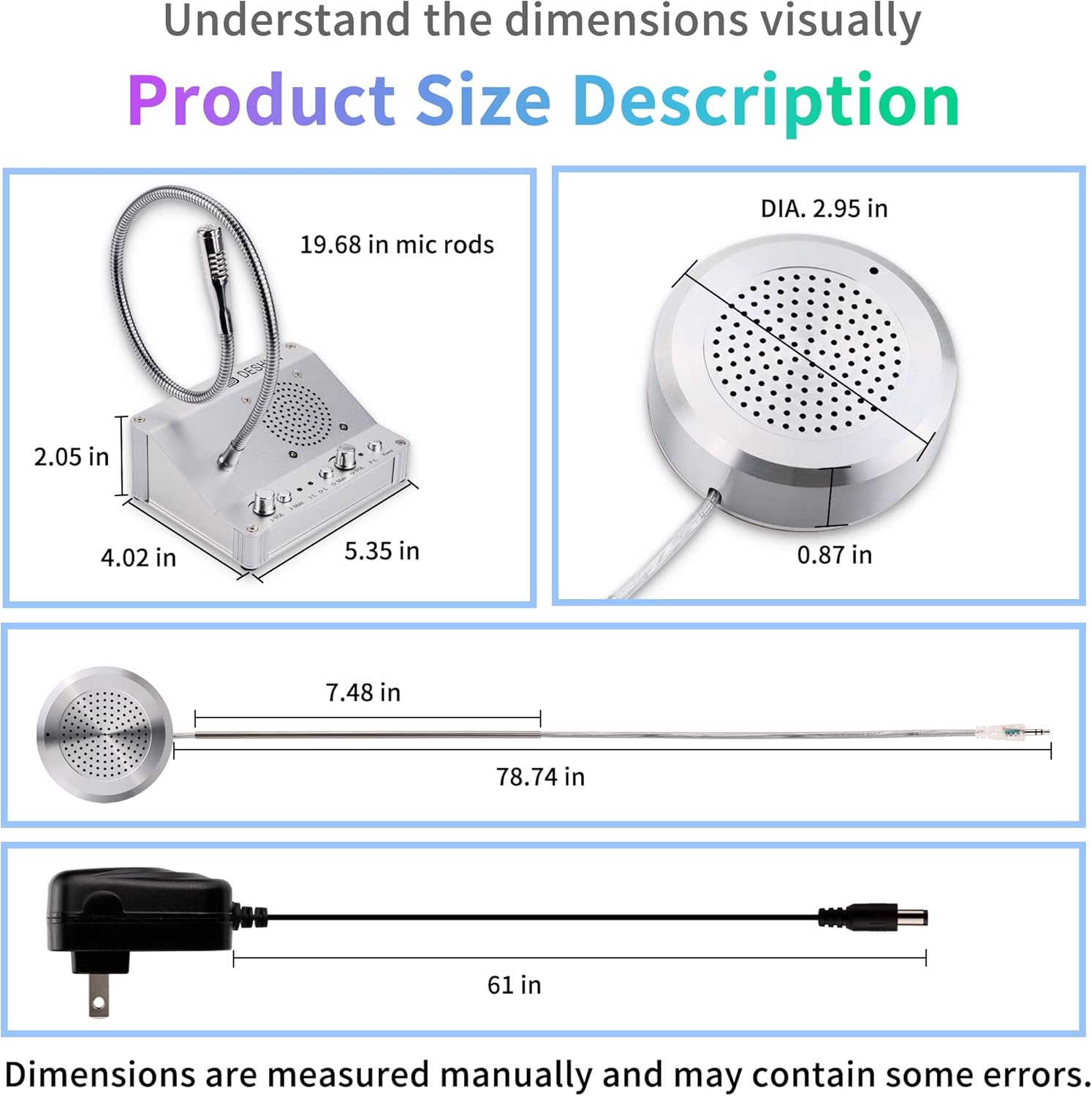
Figure 8: Visual representation of product dimensions.
8. Warranty and Support
For information regarding product warranty, returns, or technical support, please refer to the purchase documentation or contact your seller directly. DESHUN is committed to providing reliable communication solutions.
Ask a question about this manual
Ask about setup, troubleshooting, compatibility, parts, safety, or missing instructions. Manuals+ will review the question and use this page’s manual context to help answer it.