1. Introduction
This manual provides comprehensive instructions for the PERFASCIN DG11J1-72 DG11J1-71 replacement remote control, designed for use with various Hisense air conditioner models. Please read this manual carefully before using the remote control to ensure proper operation and to maximize its lifespan.
2. Product Overview
The PERFASCIN DG11J1-72 DG11J1-71 is a direct replacement remote control for compatible Hisense air conditioner units. It requires no programming or pairing; simply insert batteries to begin operation. This remote offers essential functions for controlling your air conditioner.

Figure 2.1: Front view of the PERFASCIN DG11J1-72 DG11J1-71 replacement remote control, showing the display screen and all control buttons.
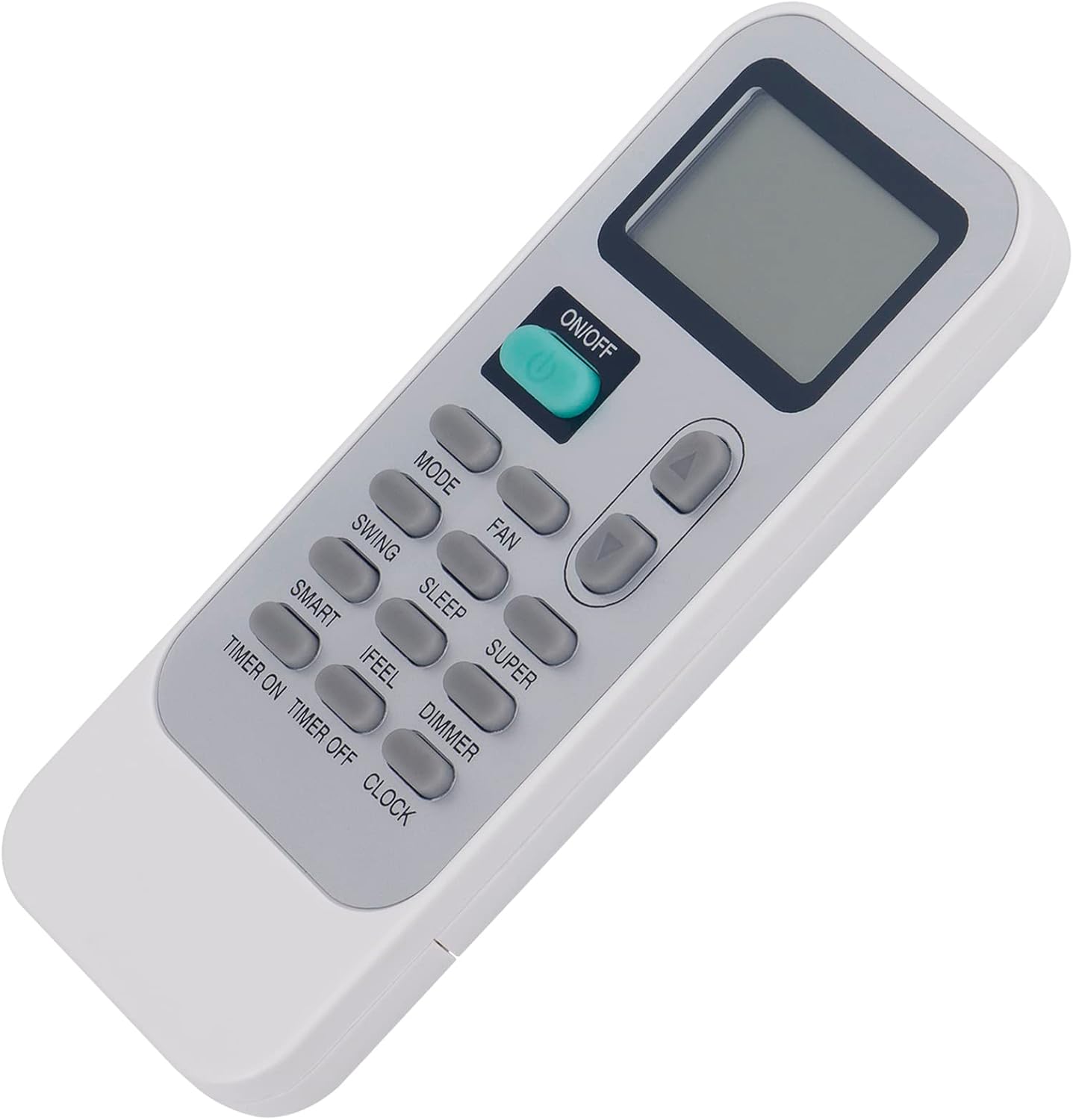
Figure 2.2: Angled view of the remote control, highlighting its ergonomic design.

Figure 2.3: Back view of the remote control with the battery compartment cover removed, showing the battery slots.
3. Setup
3.1 Battery Installation
- Locate the battery compartment on the back of the remote control.
- Slide the battery compartment cover downwards and remove it.
- Insert two (2) new 1.5V AAA alkaline batteries, ensuring the positive (+) and negative (-) terminals match the diagrams inside the compartment.
- Replace the battery compartment cover by sliding it back into position until it clicks securely.
The remote control is now ready for use. No additional programming or pairing is required.
4. Operating Instructions
Point the remote control directly at the air conditioner's receiver when operating. Ensure there are no obstructions between the remote and the unit.
- ON/OFF Button: Press to turn the air conditioner unit on or off.
- MODE Button: Cycles through available operating modes (e.g., Cool, Heat, Fan, Dry, Auto).
- FAN Button: Adjusts the fan speed (e.g., Low, Medium, High, Auto).
- SWING Button: Controls the vertical louver movement for air direction.
- SLEEP Button: Activates or deactivates the sleep mode, which adjusts temperature for comfortable sleep and energy saving.
- SUPER Button: Engages the rapid cooling or heating function for quick temperature changes.
- SMART Button: Activates intelligent mode, where the unit automatically selects the optimal operating mode based on room temperature.
- IFEEL Button: Activates the 'I FEEL' function, which senses the temperature at the remote control's location to provide more precise temperature control.
- DIMMER Button: Adjusts the brightness of the air conditioner's display panel.
- TIMER ON Button: Sets a timer for the air conditioner to turn on automatically.
- TIMER OFF Button: Sets a timer for the air conditioner to turn off automatically.
- CLOCK Button: Sets the current time on the remote control's display.
- Temperature Up/Down Buttons (▲ / ▼): Adjusts the desired temperature setting.
5. Maintenance
5.1 Cleaning
Wipe the remote control with a soft, dry cloth. Do not use liquid cleaners, abrasive materials, or chemical solvents, as these may damage the remote's surface or internal components.
5.2 Battery Replacement
Replace batteries when the remote's display becomes dim or if the remote fails to operate the air conditioner. Always replace both batteries at the same time with new 1.5V AAA alkaline batteries. Remove batteries if the remote will not be used for an extended period to prevent leakage.
6. Troubleshooting
- Remote not working:
- Ensure batteries are inserted correctly with the correct polarity.
- Replace old batteries with new ones.
- Check for any obstructions between the remote and the air conditioner unit.
- Ensure the remote is pointed directly at the air conditioner's receiver.
- Display shows Celsius instead of Fahrenheit:
- Some replacement remotes may default to Celsius and might not have a direct button to switch to Fahrenheit. Refer to your air conditioner's main unit manual for instructions on changing the temperature display unit, as this setting might be controlled by the air conditioner itself rather than the remote.
- If the remote has a hidden button or specific key combination for this function, it is not universally documented for this model.
7. Specifications
| Model Numbers | DG11J1-72, DG11J1-71 |
| Power Supply | 2 x 1.5V AAA Alkaline Batteries (Not Included) |
| Product Dimensions | 7 x 2 x 0.65 inches (approximately) |
| Item Weight | 1.76 ounces (approximately) |
| Compatible Devices | Hisense Air Conditioners |
8. Support
For any questions or concerns regarding the PERFASCIN DG11J1-72 DG11J1-71 replacement remote control, please contact our customer service. We are available to provide professional assistance and support.


