
NTQinParts MG3-R35602 RC82V #675
NTQinParts Replacement Remote Control User Manual
Model: MG3-R35602 RC82V #675
1. Introduction
This document serves as the official user manual for the NTQinParts Replacement Remote Control, specifically designed for compatibility with the AT&T TV DirecTV Streaming Box MG3-R35602 RC82V #675. This remote control provides a direct replacement solution, requiring no complex programming for initial use.
Key features include:
- Direct compatibility with AT&T TV DirecTV Streaming Box MG3-R35602 RC82V #675.
- No programming required; ready for use after battery installation.
- Operates on 2X 1.5V AA Alkaline Batteries.
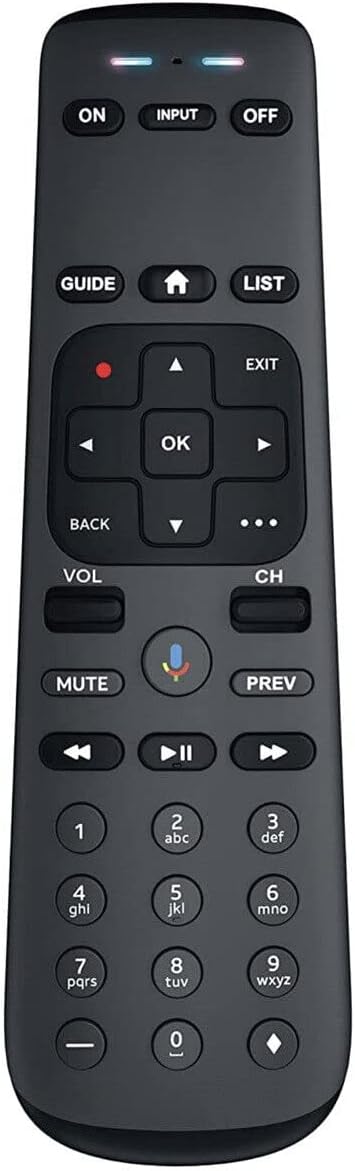
Figure 1.1: Front view of the NTQinParts Replacement Remote Control. This image displays the full layout of the remote's buttons, including power, input, navigation, volume, channel, and number keys.

Figure 1.2: The NTQinParts Replacement Remote Control shown alongside a compatible AT&T TV DirecTV Streaming Box, with various screens (TV, tablet, smartphone) in the background, illustrating its intended use within a multi-device entertainment setup.
2. Setup and Initial Use
The NTQinParts Replacement Remote Control is designed for immediate use with compatible AT&T TV DirecTV Streaming Boxes without the need for complex programming steps. Follow these instructions to prepare your remote for operation:
2.1 Battery Installation
- Locate the battery compartment on the back of the remote control.
- Slide the battery compartment cover downwards or outwards to open it.
- Insert two (2) 1.5V AA Alkaline Batteries, ensuring that the positive (+) and negative (-) terminals align correctly with the indicators inside the compartment.
- Replace the battery compartment cover by sliding it back into place until it clicks securely.
Once batteries are installed, the remote control is ready to operate your compatible AT&T TV DirecTV Streaming Box.
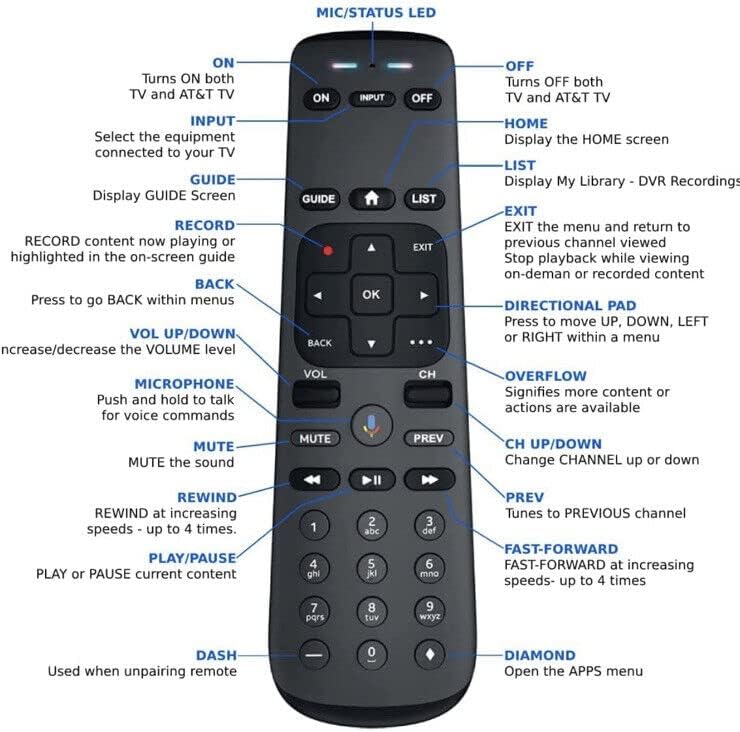
Figure 2.1: Front and back views of the NTQinParts Replacement Remote Control. This image illustrates the overall design, including the smooth back panel where the battery compartment is located.
3. Operating Instructions
This section details the functions of the various buttons on your NTQinParts Replacement Remote Control. Refer to the diagram below for button identification.
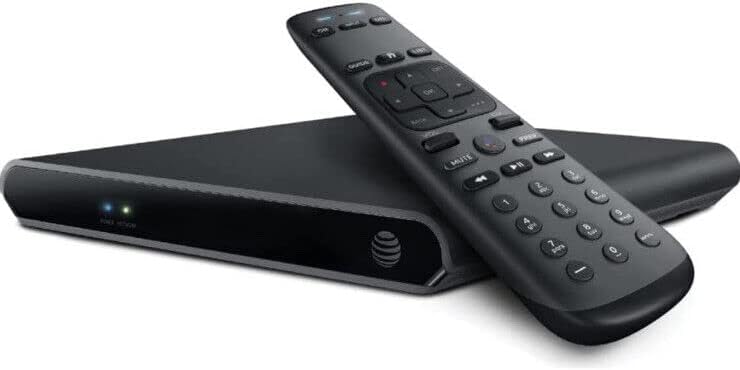
Figure 3.1: Detailed diagram of the NTQinParts Replacement Remote Control with labels indicating the function of each button. This visual guide is essential for understanding the remote's capabilities.
3.1 Button Functions
- ON: Turns on both the TV and AT&T TV device.
- INPUT: Selects the equipment connected to your TV.
- OFF: Turns off both the TV and AT&T TV device.
- GUIDE: Displays the GUIDE Screen.
- HOME: Displays the home screen.
- LIST: Displays My Library - DVR Recordings.
- RECORD (Red Dot): Records content currently playing or highlighted in the on-screen guide.
- EXIT: Exits the menu and returns to the previous channel viewed. Stops playback while viewing on-demand or recorded content.
- BACK: Press to go back within menus.
- DIRECTIONAL PAD (Up, Down, Left, Right): Moves up, down, left, or right within a menu.
- OK: Confirms selections.
- VOL UP/DOWN: Increases/decreases the volume level.
- CH UP/DOWN: Changes the channel up or down.
- MICROPHONE: Push and hold to talk for voice commands.
- MUTE: Mutes the sound.
- PREV: Tunes to the previous channel.
- REWIND: Rewinds at increasing speeds (up to 4 times).
- PLAY/PAUSE: Plays or pauses current content.
- FAST-FORWARD: Fast-forwards at increasing speeds (up to 4 times).
- DASH (-): Used when unpairing remote.
- DIAMOND (APPS): Opens the APPS menu.
- OVERFLOW (...): Signifies more content or actions are available.
4. Care and Maintenance
To ensure the longevity and optimal performance of your NTQinParts Replacement Remote Control, please follow these simple care and maintenance guidelines:
- Cleaning: Use a soft, dry cloth to wipe the surface of the remote. For stubborn dirt, slightly dampen the cloth with water or a mild, non-abrasive cleaner. Avoid using harsh chemicals or abrasive materials, as they can damage the remote's finish or internal components.
- Battery Replacement: Replace batteries promptly when the remote's performance degrades or it stops responding. Always use new 1.5V AA Alkaline Batteries and dispose of old batteries responsibly according to local regulations.
- Storage: Store the remote in a cool, dry place away from direct sunlight, extreme temperatures, and high humidity.
- Avoid Drops and Impacts: Protect the remote from physical shocks. Dropping the remote can damage internal circuitry or external casing.
- Liquid Exposure: Keep the remote away from liquids. Liquid damage can cause malfunctions and is typically not covered under warranty.
5. Troubleshooting
If you experience issues with your NTQinParts Replacement Remote Control, try the following troubleshooting steps before seeking further assistance:
5.1 Remote Not Responding
- Check Batteries: Ensure that the batteries are inserted correctly with the positive (+) and negative (-) terminals aligned as indicated inside the battery compartment.
- Replace Batteries: If the batteries are old or depleted, replace them with two new 1.5V AA Alkaline Batteries. Low battery power is a common cause of unresponsiveness.
- Line of Sight: Ensure there is a clear line of sight between the remote control and the AT&T TV DirecTV Streaming Box. Obstructions can block the infrared signal.
- Infrared Interference: Bright sunlight or other strong light sources (e.g., plasma TVs, fluorescent lights) can interfere with the remote's infrared signal. Try operating the remote in a different lighting condition or location.
5.2 Specific Button Not Working
- Clean Button: Sometimes, dirt or debris can get lodged under a button, preventing it from registering a press. Gently clean around the button with a soft, dry cloth.
- Test Other Buttons: If only one button is not working, it might indicate a specific button malfunction. If multiple buttons are affected, it's more likely a general power or connectivity issue (refer to "Remote Not Responding").
Since this remote requires no programming, issues are typically related to power, line of sight, or physical damage.
6. Product Specifications
| Brand | NTQinParts |
| Model Number | MG3-R35602 RC82V #675 |
| Compatible Devices | AT&T TV DirecTV Streaming Box MG3-R35602 RC82V #675 |
| Connectivity Technology | Infrared (IR) |
| Power Supply | 2X 1.5V AA Alkaline Battery (Not Included) |
| Item Weight | 3.2 ounces |
| Package Dimensions | 7.01 x 3.11 x 1.38 inches |
| Special Feature | Ergonomic |
| Max Number of Supported Devices | 1 |
7. Warranty and Support
As a replacement part, specific warranty details may vary. Please refer to the seller or your purchase documentation for information regarding warranty coverage and return policies.
For technical support or further inquiries regarding your NTQinParts Replacement Remote Control, please contact the seller directly through the platform where the purchase was made. They can provide assistance specific to your product and purchase.
Ask a question about this manual
Ask about setup, troubleshooting, compatibility, parts, safety, or missing instructions. Manuals+ will review the question and use this page’s manual context to help answer it.