
1. Introduction
The Renkforce RF-BTR-210 is a versatile Bluetooth transceiver designed to add wireless audio capabilities to your existing audio equipment. It functions as both a Bluetooth transmitter and receiver, allowing seamless integration of non-Bluetooth devices into a wireless audio setup. This device features Bluetooth 5.0 technology for stable connections, a 4.6 cm (1.8 inch) LCD screen, and a large rotary knob for intuitive control.
Key features include:
- Simultaneous pairing with up to two Bluetooth headphones or speakers.
- Bypass function for enjoying TV programs through non-Bluetooth headphones and speakers.
- Intuitive user interface with a 4.6 cm (1.8 inch) LCD screen and a large rotary knob.
- USB-C power connection for modern compatibility.
- Advanced Bluetooth 5.0 for fast pairing and automatic reconnection.

Figure 1: Renkforce RF-BTR-210 Bluetooth Transceiver, showing the LCD screen and controls.
2. Setup
2.1 Unpacking and Package Contents
Carefully unpack all components. Ensure the following items are present:
- Renkforce RF-BTR-210 Bluetooth Transceiver
- USB-C power cable
- Audio cables (e.g., 3.5mm AUX, RCA)
- User Manual (this document)

Figure 2: The Renkforce RF-BTR-210 device alongside its various connection cables.
2.2 Power Connection
- Connect the supplied USB-C power cable to the USB-C port on the RF-BTR-210.
- Plug the other end of the USB-C cable into a compatible USB power adapter (not included) or a USB port on a computer/TV.
- The device will power on automatically or can be turned on using the power button.
2.3 Initial Device Overview
Familiarize yourself with the device's controls and display:
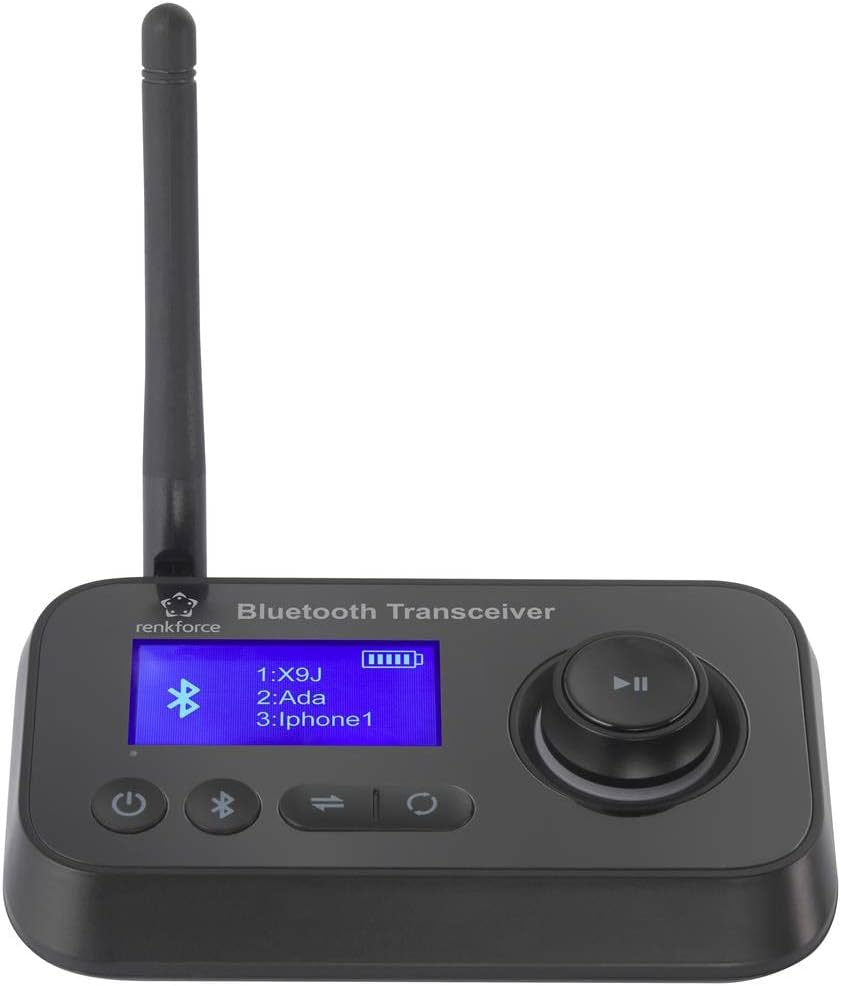
Figure 3: Top-down view of the Renkforce RF-BTR-210, highlighting the LCD screen, rotary knob, and function buttons.
- LCD Screen: Displays current mode, connected devices, and settings.
- Rotary Knob: Used for navigation and selection within menus.
- Power Button: Turns the device on/off.
- Mode Switch Button: Toggles between Transmitter (TX) and Receiver (RX) modes.
- Pairing Button: Initiates Bluetooth pairing.
3. Operating Instructions
3.1 Transmitter (TX) Mode
In TX mode, the RF-BTR-210 transmits audio from a non-Bluetooth source (e.g., TV, CD player) to Bluetooth-enabled headphones or speakers.
- Ensure the device is powered on and set to TX mode (indicated on the LCD screen). If not, press the Mode Switch button.
- Connect your audio source (e.g., TV's audio out, CD player's headphone jack) to the RF-BTR-210's audio input port using the appropriate cable (3.5mm AUX or RCA).
- Put your Bluetooth headphones or speakers into pairing mode.
- On the RF-BTR-210, press the Pairing button. The device will search for nearby Bluetooth devices.
- Use the rotary knob to select your desired headphones/speakers from the list on the LCD screen and press the knob to confirm.
- Once connected, audio from your source will be transmitted wirelessly. The device supports simultaneous connection to two Bluetooth audio outputs.
3.2 Receiver (RX) Mode
In RX mode, the RF-BTR-210 receives audio from a Bluetooth source (e.g., smartphone, tablet) and outputs it to a non-Bluetooth audio system (e.g., wired speakers, car stereo).
- Ensure the device is powered on and set to RX mode (indicated on the LCD screen). If not, press the Mode Switch button.
- Connect the RF-BTR-210's audio output port to your non-Bluetooth audio system's input (e.g., AUX-in on speakers, car stereo) using the appropriate cable.
- On your Bluetooth audio source (e.g., smartphone), enable Bluetooth and search for "RF-BTR-210" (or similar name) in the list of available devices.
- Select "RF-BTR-210" to pair. Once connected, audio from your Bluetooth source will play through your wired audio system.
3.3 Bypass Function
The unique Bypass function allows you to enjoy TV programs through both wired and wireless audio outputs simultaneously, or to pass audio directly through the device without Bluetooth conversion. This is particularly useful when you want to use non-Bluetooth headphones or speakers alongside Bluetooth ones, or when you simply need to route audio without wireless transmission.
Refer to the on-screen menu via the LCD and rotary knob for specific Bypass settings and activation.
4. Maintenance
To ensure the longevity and optimal performance of your Renkforce RF-BTR-210, follow these maintenance guidelines:
- Cleaning: Use a soft, dry cloth to clean the device. Do not use liquid cleaners, aerosols, or solvents, as these may damage the surface or internal components.
- Storage: When not in use for extended periods, store the device in a cool, dry place, away from direct sunlight and extreme temperatures.
- Environment: Avoid exposing the device to moisture, rain, or excessive humidity. Do not place it near heat sources or in dusty environments.
- Handling: Handle the device with care. Avoid dropping it or subjecting it to strong impacts.
5. Troubleshooting
If you encounter issues with your Renkforce RF-BTR-210, consult the following table for common problems and solutions:
| Problem | Possible Cause | Solution |
|---|---|---|
| Device does not power on. | No power supply or faulty cable. | Ensure the USB-C cable is securely connected to a working power source. Try a different USB-C cable or power adapter. |
| Cannot pair with Bluetooth device. | Device not in pairing mode; too far from transceiver; interference. | Ensure both the RF-BTR-210 and the target device are in pairing mode. Move devices closer. Reduce interference from other wireless devices. |
| No audio output/input. | Incorrect cable connection; wrong mode (TX/RX); volume too low. | Verify all audio cables are correctly connected. Ensure the RF-BTR-210 is in the correct TX/RX mode. Check volume levels on all connected devices. |
| Audio quality is poor or intermittent. | Distance too great; obstacles; interference; low battery on connected device. | Move devices closer. Remove obstacles. Check battery levels of connected Bluetooth devices. |
6. Specifications
| Feature | Detail |
|---|---|
| Brand | Renkforce |
| Model Number | RF-BTR-210 (RF-5087934) |
| Bluetooth Version | 5.0 |
| Connectivity Technology | Bluetooth |
| Special Features | Bluetooth Transmitter/Receiver, 4.6 cm (1.8") LCD Screen, Rotary Knob Control, Bypass Function |
| Compatible Devices | Speakers, Televisions, Headphones, Smartphones, Tablets |
| Power Source | USB-C |
| Weight | 70.1 Grams |
7. Warranty and Support
For warranty information, technical support, or service inquiries regarding your Renkforce RF-BTR-210, please refer to the documentation provided at the time of purchase or contact your retailer or the manufacturer directly. Specific warranty terms and support options may vary by region and retailer.


