
Introduction
Thank you for choosing the Devia Smart Series EM028 In-Ear Wired Earbuds. These earbuds are designed to provide high-fidelity audio with a convenient Type-C connection. This manual will guide you through the setup, operation, and maintenance of your new earbuds.
Package Contents
Please check the package for the following items:
- Devia Smart Series EM028 In-Ear Wired Earbuds with Type-C
- Carrying Case
- User Manual (this document)
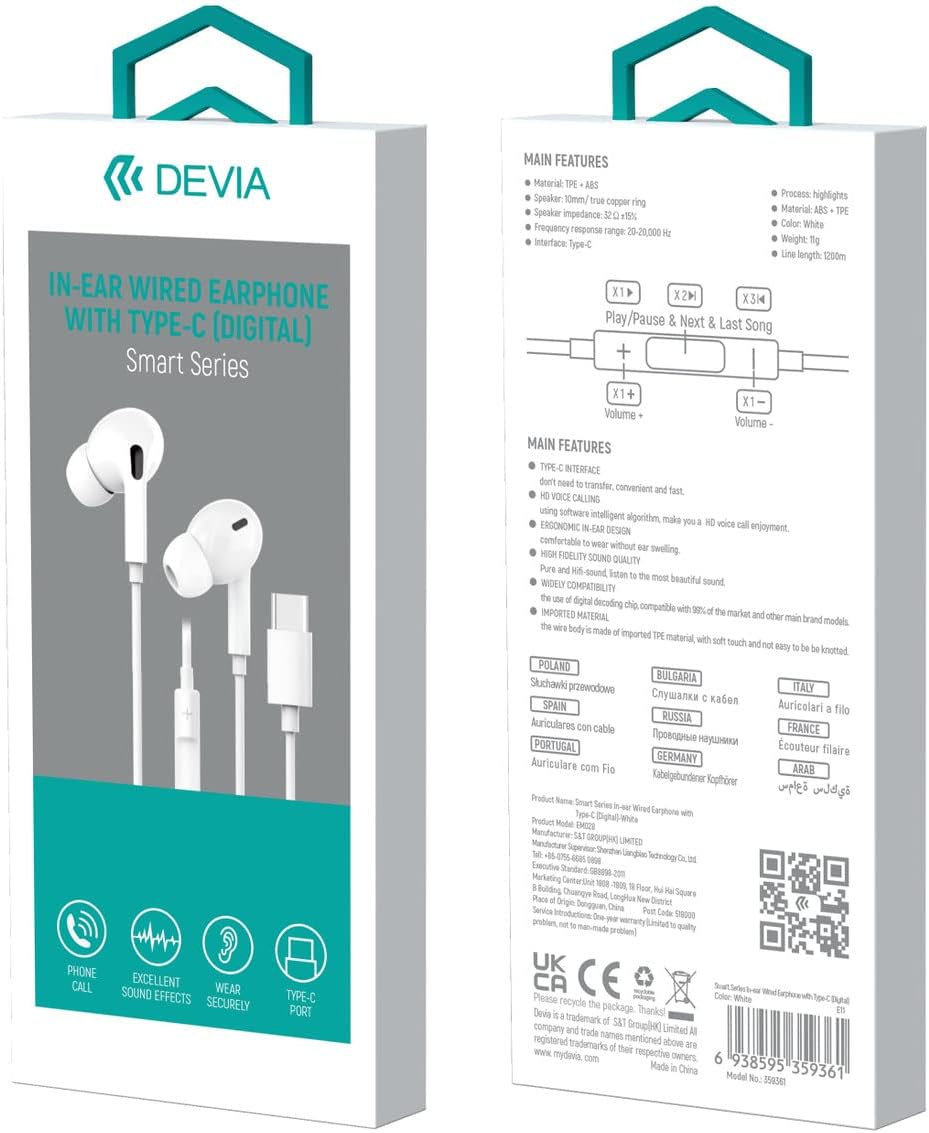
Image: Packaging of the Devia Smart Series EM028 In-Ear Wired Earbuds, showing the earbuds and their features.
Setup
- Identify the Type-C Port: Locate the Type-C USB port on your audio device (smartphone, tablet, laptop, etc.).
- Connect the Earbuds: Insert the Type-C connector of the earbuds firmly into your device's Type-C port.
- Audio Output Selection: Your device should automatically detect the earbuds and route audio through them. If not, check your device's audio settings to select the connected earbuds as the output device.

Image: Devia Smart Series EM028 earbuds with Type-C connector plugged into a smartphone.
Operating Instructions
The Devia Smart Series EM028 earbuds feature an in-line remote for easy control of audio playback and calls.

Image: Diagram illustrating the in-line remote control with labeled function and volume buttons.
In-line Remote Functions:
- Function Button (Center Button):
- Single Press: Play/Pause audio, Answer/End a call.
- Double Press: Next song.
- Triple Press: Previous song.
- Volume Buttons (+ / -):
- Press '+': Increase volume.
- Press '-': Decrease volume.
Compatibility
These Type-C headphones are designed for wide compatibility with devices that feature a USB Type-C audio output and lack a 3.5mm audio port. The digital decoding chip ensures compatibility with a broad range of models from various brands.
Examples of compatible devices include:
- Samsung Galaxy S22 Ultra/S22+/S22, S21 Ultra/S21 Plus/S21, S21 FE, S20 FE/S20/S20+/S20 Ultra, Note 20 Ultra/Note 20/Note 10+/Note 10, Z Flip4/3/2, Z Fold4/3/2
- Google Pixel 7, 7 Pro, 6 Pro, 6, 6a, 5, 4, 4XL, 3, 3XL
- OnePlus Nord 2, 9 Pro, 9, Nord, 8T, 8 Pro, 8, 7T Pro, 7T, 7 Pro
- iPad mini 6 2021, iPad Pro (USB C Jack), iPad Air 4th & 5th Gen
- HUAWEI Mate 40, 40Pro, 40RS, 30Pro, P30 Pro
- Other USB-C devices without a 3.5mm audio port.

Image: Visual representation of the earbuds' compatibility with various devices such as phones, tablets, and laptops.
Maintenance
Proper care will extend the lifespan of your earbuds and maintain optimal sound quality.
- Cleaning: Gently wipe the earbuds and cable with a soft, dry cloth. Do not use harsh chemicals or abrasive materials.
- Storage: When not in use, store the earbuds in the provided carrying case to prevent tangling and damage.
- Avoid Moisture: Keep the earbuds away from water, humidity, and extreme temperatures.
- Handle with Care: Avoid pulling on the cable forcefully or bending the Type-C connector excessively.
Troubleshooting
If you encounter issues with your earbuds, please refer to the following common solutions:
- No Sound:
- Ensure the Type-C connector is fully inserted into your device.
- Check your device's volume settings and ensure it is not muted.
- Verify that the earbuds are selected as the audio output device in your device's sound settings.
- Test the earbuds with another compatible device to rule out a device-specific issue.
- Poor Sound Quality:
- Ensure the earbuds are clean and free of debris, especially the speaker grilles.
- Check the audio source for quality issues.
- Ensure the cable is not damaged or kinked.
- In-line Remote Not Responding:
- Ensure the earbuds are properly connected to your device.
- Some devices or applications may have limited support for in-line remote functions.
Specifications
| Brand | Devia |
| Model Name | Smart Series In-Ear |
| Model Number | EM028 |
| Material | TPE + ABS |
| Speaker Diameter | 10mm (true copper ring) |
| Speaker Impedance | 32Ω ±15% |
| Frequency Response | 20-20,000 Hz |
| Interface | Type-C (Digital) |
| Cable Length | 1.2m |
| Color | White |
| Control Type | Volume Control, Function Button |
| Additional Features | Ergonomic Design, High Fidelity Sound Quality, Digital Decoding Chip |
Warranty Information
This product comes with a factory warranty. For specific details regarding warranty coverage, duration, and claims, please refer to the warranty card included with your purchase or visit the official Devia website.
Support
For further assistance, technical support, or to view more products, please visit the official Devia website:

Image: Devia brand logo.