
Introduction
Thank you for choosing the BELIFE Replacement Remote Control for your Grundig TV. This remote is designed to provide seamless control over your television without the need for complex programming. This manual will guide you through the setup, operation, and maintenance of your new remote control.
Package Contents
- BELIFE Replacement Remote Control (Model ALD187R)
- User Manual (this document)
Setup
1. Battery Installation
The remote control requires two AAA alkaline batteries (not included).
- Push and slide the battery cover down to open the battery compartment.
- Insert two AAA batteries, ensuring the positive (+) and negative (-) terminals align correctly with the markings inside the compartment.
- Replace the battery cover by sliding it back into position until it clicks securely.

Image: Steps for battery installation. The diagram illustrates pushing the cover, inserting batteries with correct polarity, and closing the cover.
2. Initial Pairing
This remote control is designed for immediate use with compatible Grundig TVs without complex programming. Simply insert the batteries, and it should function directly.
For models requiring pairing, especially for voice control functionality, follow these steps:
- Ensure your TV is powered on.
- Press and hold the Home button (labeled ⑩ on the remote diagram) for approximately 30 seconds.
- Release the button and wait for about 60 seconds. The TV should display a "remote connecting success" message, indicating successful pairing.
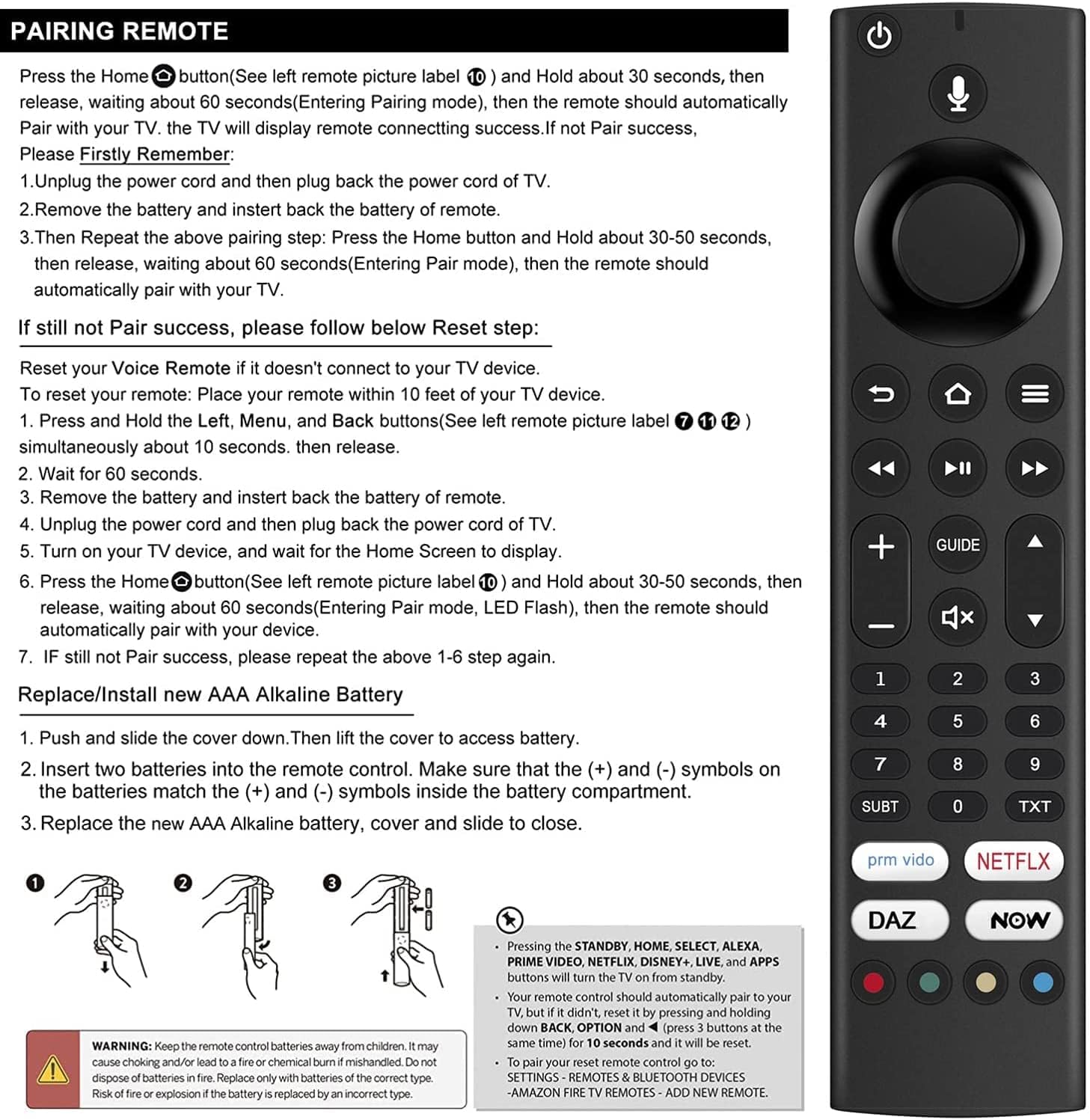
Image: Front view of the remote control, highlighting the button layout.
If initial pairing is not successful, please try the following:
- Unplug the TV's power cord from the wall outlet, wait 30 seconds, then plug it back in.
- Remove the batteries from the remote control, wait a few seconds, and then reinsert them.
- Repeat the pairing step: Press and hold the Home button for 30-50 seconds, then release. Wait for approximately 60 seconds for the remote to enter pairing mode. The remote should automatically pair with your TV.
Operating Instructions
Once paired, your BELIFE remote control provides full functionality for your Grundig TV.
Basic Functions
- Power Button: Turns the TV on or off.
- Volume Up/Down: Adjusts the TV's volume.
- Channel Up/Down: Changes TV channels.
- Navigation Pad (Up/Down/Left/Right/Select): Used to navigate menus and select options on the TV screen.
- Back Button: Returns to the previous screen or menu.
- Home Button: Accesses the TV's home screen or main menu.
Voice Control
This remote supports voice control. After successful pairing, press the dedicated voice control button (if present and labeled) and speak your commands clearly into the remote.
App Buttons
Dedicated buttons for popular streaming services (e.g., Prime Video, Netflix, Disney+, etc.) allow for quick access to these applications. Pressing these buttons will also turn on the TV from standby.
Troubleshooting
Remote Not Responding / Pairing Issues
If the remote control does not respond or voice control is not functioning after initial setup, perform a reset:
- Ensure the remote is within 10 feet (approximately 3 meters) of your TV.
- Simultaneously press and hold the Left, Menu, and Back buttons (labeled ⑦, ⑧, and ⑫ respectively on the remote diagram) for approximately 10 seconds. Then release all buttons.
- Wait for 60 seconds.
- Remove the batteries from the remote control, wait a few seconds, and then reinsert them.
- Unplug the TV's power cord from the wall outlet, wait 30 seconds, then plug it back in.
- Turn on your TV and wait for the Home Screen to display.
- Press and hold the Home button (labeled ⑩) for 30-50 seconds. Release the button and wait for 60 seconds (the LED may flash, indicating pairing mode). The remote should automatically pair with your device.
- If pairing is still unsuccessful, repeat steps 1-7.
Image: Remote control layout with button labels for pairing and reset.
Battery Issues
- If the remote's indicator light does not flash or the remote is unresponsive, replace the batteries with new AAA alkaline batteries.
- Ensure batteries are inserted with correct polarity (+/-).
Maintenance
Cleaning
Wipe the remote control with a soft, dry cloth. Do not use liquid cleaners or abrasive materials, as they may damage the remote's surface or internal components.
Battery Replacement
Refer to the "Battery Installation" section under Setup for instructions on replacing batteries.
Specifications
| Brand | BELIFE |
| Model Number | ALD187R |
| Compatible Devices | Grundig TV |
| Connectivity Technology | Infrared |
| Controller Type | Voice Control |
| Number of Buttons | 25 |
| Maximum Range | 10 Meters |
| Batteries Required | 2 AAA (Alkaline recommended) |
| Special Feature | No programming required (for basic functions) |
Safety Information
WARNING:
- Keep remote control batteries away from children. They may cause choking and/or lead to a fire or chemical burn if mishandled.
- Do not dispose of batteries in fire.
- Replace only with batteries of the correct type (AAA alkaline).
- Risk of fire or explosion if the battery is replaced by an incorrect type.
Warranty and Support
For warranty information or technical support, please refer to the documentation provided at the point of purchase or contact your retailer. Keep your purchase receipt for proof of purchase.