
1. Introduction
Thank you for choosing the LOCOCO LC-U13A UHF Wireless Headset Microphone. This manual provides essential information for the proper setup, operation, and maintenance of your device. Please read it thoroughly before use to ensure optimal performance and longevity of the product.
2. Package Contents
Please check the package carefully to ensure all items are present:
- 1 x Wireless Microphone Headset (Transmitter)
- 1 x Wireless Receiver
- 1 x 3.5mm Converter
- 1 x 2-in-1 USB Charging Cable
- 1 x User Manual

Image: All components included in the LOCOCO LC-U13A package.
3. Product Features
- Digital LED Display: The microphone features a digital LED screen that clearly shows microphone volume, frequency, and battery status.
- UHF Wireless Technology: Utilizes UHF frequency conversion technology for stable and interference-free wireless transmission. Multiple microphones can operate simultaneously without interference.
- Extended Wireless Range: Offers a stable wireless connection up to 50 meters (165 feet) in open areas.
- Rechargeable Battery: Built-in rechargeable battery in both the transmitter and receiver. Provides 5-6 hours of operation on a full charge.
- Plug and Play: Automatic connection between transmitter and receiver upon power-on.
- Wide Compatibility: Compatible with speakers, power amplifiers, audio equipment, and PA sound systems.

Image: Digital display indicating power, volume, and frequency.

Image: UHF wireless connection technology with a 50-meter range.
4. Setup and Pairing
Follow these steps to set up and pair your LOCOCO LC-U13A microphone:
- Power On: Manually turn on both the transmitter (headset microphone) and the receiver at the same time.
- Connect Receiver: Plug the receiver into the 6.35mm microphone input jack of your audio device (e.g., speaker, amplifier). If your device has a 3.5mm input, use the provided 3.5mm converter.
- Automatic Pairing: The devices will automatically start pairing. The blue indicator light on the receiver will flash during pairing. Once successfully connected, the blue light will stop flashing and remain solid.
- Adjust Volume/Frequency: Use the "+" and "-" buttons on the transmitter to adjust the microphone volume and change the frequency if needed. The digital screen will display the current settings and remaining power.
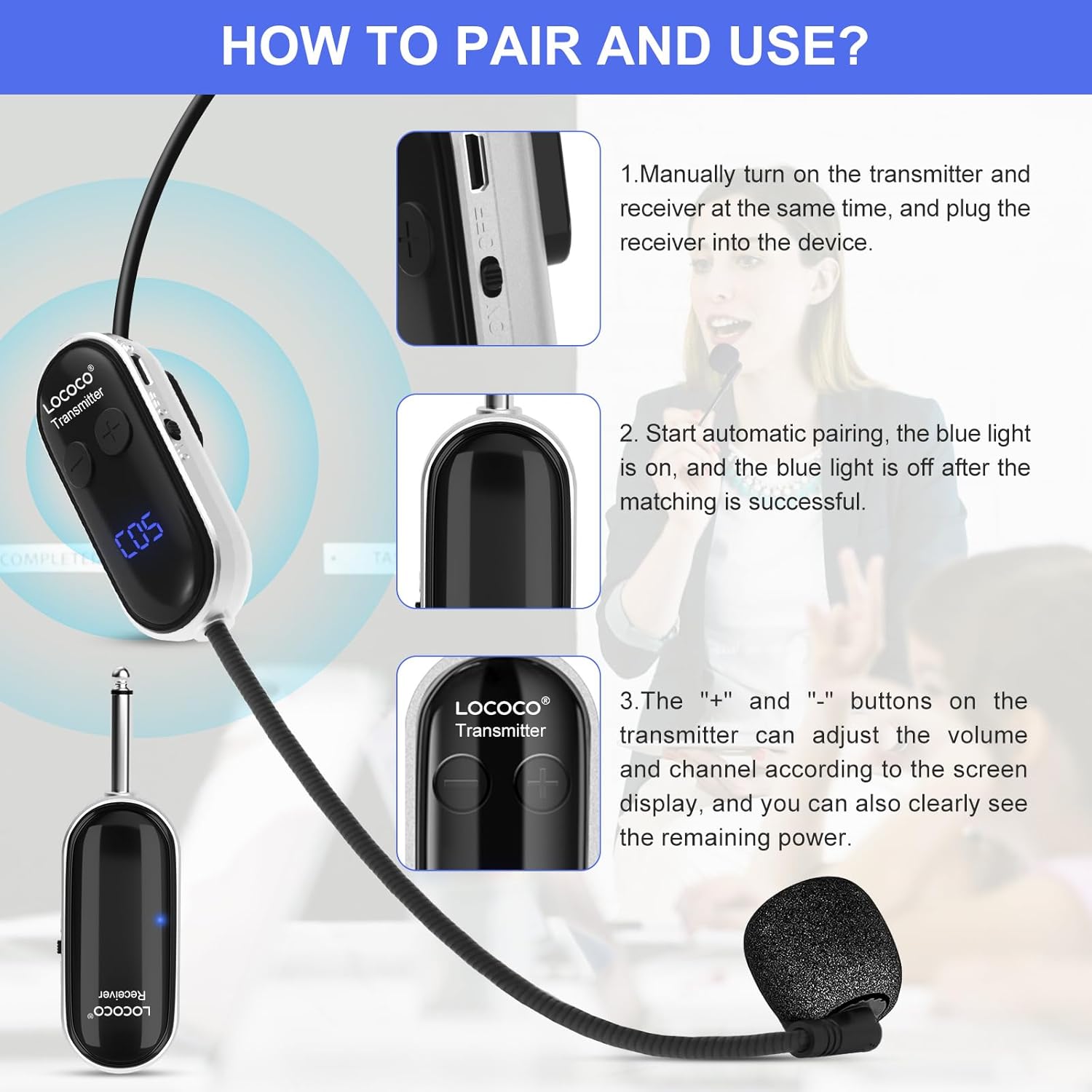
Image: Instructions for pairing and using the microphone system.

Image: The microphone can be worn as a headset or used handheld.
5. Operating Instructions
Once paired, the microphone is ready for use. Ensure the microphone is positioned correctly for clear audio capture.
- Volume Adjustment: Use the "+" and "-" buttons on the transmitter to increase or decrease the microphone's output volume. Monitor the digital display for the current volume level.
- Frequency Adjustment: If you experience interference, you can change the operating frequency using the buttons on the transmitter. The digital display will show the current frequency channel.
- Optimal Placement: For best sound quality, position the microphone close to your mouth.

Image: Examples of the microphone in use for teaching, conferences, and tour guiding.
6. Charging
The LOCOCO LC-U13A features built-in rechargeable batteries for both the transmitter and receiver.
- Charging Process: Connect the 2-in-1 USB charging cable to both the transmitter and receiver, then plug the USB end into a standard USB power adapter (not included) or a computer USB port.
- Charging Indicator: The digital display on the transmitter will show charging status.
- Charging Time: A full charge typically takes approximately 2 hours.
- Operating Time: Once fully charged, the microphone system can operate for 5-6 hours.

Image: Charging process and battery life information.
7. Important Notes and Compatibility
Please observe the following important information regarding compatibility and usage:
- Incompatibility: This microphone system cannot be used with computers or mobile phones.
- No Bluetooth: The system does not support Bluetooth connections. It uses UHF wireless technology for direct pairing.
- Compatible Devices: The LOCOCO LC-U13A is designed for use with audio equipment such as:
- Trolley speakers
- Outdoor speakers
- Voice amplifiers
- Bus speakers
- Multimedia classroom speakers
- Power amplifier devices

Image: Compatible and incompatible devices for the microphone system.
8. Maintenance
Proper maintenance ensures the longevity and performance of your microphone system.
- Cleaning: Use a soft, dry cloth to clean the microphone and receiver. Do not use liquid cleaners or abrasive materials.
- Storage: Store the device in a cool, dry place away from direct sunlight and extreme temperatures.
- Battery Care: If not used for an extended period, charge the batteries at least once every three months to maintain battery health.
- Avoid Moisture: Keep the device away from water and high humidity to prevent damage.
9. Troubleshooting
If you encounter issues, refer to the following common problems and solutions:
| Problem | Possible Cause | Solution |
|---|---|---|
| No sound from microphone | Microphone or receiver not powered on; Not paired; Low battery; Incorrect input on audio device. | Ensure both devices are on; Re-pair the devices; Charge batteries; Check audio device input. |
| Interference or poor sound quality | Other wireless devices nearby; Operating too far from receiver; Low battery; Incorrect frequency. | Change frequency channel; Move closer to receiver; Charge batteries; Ensure no strong interference sources. |
| Receiver blue light flashing continuously | Devices are not paired. | Ensure both transmitter and receiver are powered on simultaneously for automatic pairing. |
| Short battery life | Batteries not fully charged; Old batteries. | Ensure a full 2-hour charge; If issues persist, contact support for battery replacement options. |
10. Specifications
| Feature | Detail |
|---|---|
| Model Number | LC-U13A (also referred to as LC-W3) |
| Microphone Form Factor | Headset |
| Connectivity Technology | UHF Wireless |
| Wireless Range | Up to 50 meters (165 feet) in open areas |
| Number of Channels | 40 |
| Frequency Response | 3000 MHz |
| Power Source | Rechargeable Lithium Polymer Battery |
| Battery Capacity | 400 mAh (estimated from image) |
| Charging Time | Approx. 2 hours |
| Operating Time | 5-6 hours |
| Material | Plastic |
| Product Dimensions (L x W x H) | 17.7 x 14 x 3.9 cm (6.97 x 5.51 x 1.54 inches) |
| Product Weight | 150 g (0.33 lbs) |
| Polar Pattern | Omnidirectional |
11. Warranty and Support
LOCOCO products are designed for reliability and performance. For warranty information or technical support, please refer to the contact details provided with your purchase or visit the official LOCOCO website. Keep your purchase receipt as proof of purchase for any warranty claims.