
1. Introduction
This manual provides essential information for the safe and effective use of your JUYOON 20V 1.5A 30W Power Supply Charger. Please read these instructions carefully before using the product to ensure proper function and to prevent damage to the charger or your devices.

Image 1.1: Overview of the JUYOON 20V 1.5A 30W Power Supply Charger. This image displays the white power adapter with its attached DC barrel connector cable, coiled neatly.
2. Setup Instructions
2.1 Unpacking
- Carefully remove the charger from its packaging.
- Inspect the charger for any visible damage. If damage is present, do not use the product and contact customer support.
- Ensure all components are present: 1 x AC adapter.
2.2 Compatibility Check
This charger is specifically designed for certain Lenovo Smart Clock, Smart Display, and Smart Frame models requiring a 20V 1.5A (30W) power input. It is crucial to verify your device's power requirements before connecting.
- Compatible Models:
- Lenovo Smart Display: SD-8501F, SD-X701B, SD-X501F
- Lenovo Smart Clock: CD-24501F ZA4R
- Lenovo Smart Frame: CD-3L501F ZA6G
- Compatible Part Numbers (P/N): Lenovo PA-1300-42, SA18C27239, SA18C27240, SA18C47124
- NOT Compatible With:
- Lenovo PA-1300-41 (12V charger)
- Lenovo Smart Clock Essential: CD-4N341Y, CD-4N342Y, ZAA3, ZA74
- Lenovo Smart Clock 2: CD-24502F, ZA97
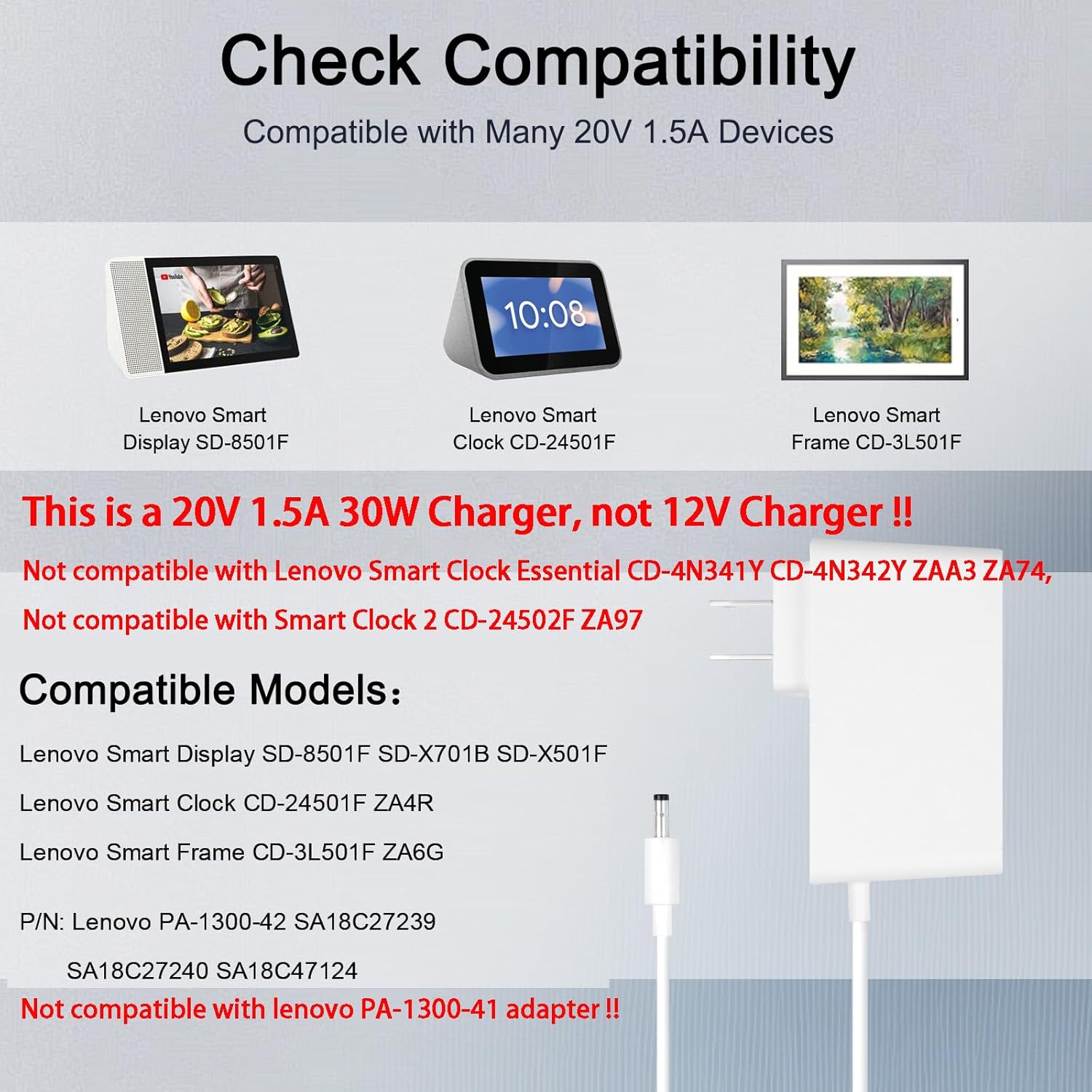
Image 2.1: Visual guide for checking device compatibility. This image highlights compatible Lenovo Smart Display, Smart Clock, and Smart Frame models, and explicitly lists incompatible models and charger types.
3. Operating Instructions
3.1 Connecting the Charger
- Ensure your device is powered off or in standby mode before connecting the charger.
- Insert the DC barrel connector (4.0*1.7mm) firmly into the power input port of your compatible Lenovo device.
- Plug the AC adapter into a standard 100-240V wall outlet.
3.2 Charging Process
- Once connected, your device should indicate that it is receiving power or charging. Refer to your device's manual for specific charging indicators.
- The charger provides a stable 20V 1.5A output for efficient charging.
- Disconnect the charger from the wall outlet and your device when not in use or when the device is fully charged.

Image 3.1: The JUYOON charger plugged into a wall outlet and connected to a Lenovo Smart Clock, demonstrating proper usage.
4. Care and Maintenance
- Cleaning: Disconnect the charger from power and device before cleaning. Use a soft, dry cloth to wipe the surface. Do not use liquid cleaners or abrasive materials.
- Storage: Store the charger in a cool, dry place away from direct sunlight and extreme temperatures. Avoid tightly coiling the cable to prevent damage.
- Safety: Do not expose the charger to water or high humidity. Do not attempt to disassemble or repair the charger. Keep out of reach of children.
- Cable Integrity: The charger features a sturdy card tail designed to resist deformation when bent, enhancing durability.

Image 4.1: Close-up view highlighting the metal plug for safety and the sturdy card tail design of the charger, which prevents cable deformation.
5. Troubleshooting
| Problem | Possible Cause | Solution |
|---|---|---|
| Device not charging. | Incorrect voltage/amperage, loose connection, faulty outlet, incompatible device. | Verify device compatibility (20V 1.5A). Ensure connections are secure. Test the outlet with another device. |
| Charger feels hot. | Normal operation, excessive load, poor ventilation. | A slight warmth is normal. Ensure adequate ventilation around the charger. If excessively hot, disconnect immediately and contact support. |
| Device charges slowly. | Device drawing less power, background processes on device. | Ensure no high-power applications are running on the device. Verify the charger is fully seated. |
6. Product Specifications
- Model: FL030
- Input: 100-240V ~ 50-60Hz
- Output: 20V 1.5A
- Power: 30W
- Connector Size: 4.0mm x 1.7mm (Barrel Connector)
- Cable Length: Approximately 1.6 meters (5.24 feet)
- Item Weight: 6.4 ounces (approx. 181 grams)
- Package Dimensions: 5.79 x 3.98 x 1.46 inches
- Special Features: Lightweight Design, Short Circuit Protection

Image 6.1: Detailed view of the DC output specifications (20V 1.5A 30W) and the precise connector size (4.0*1.7mm) of the charger.

Image 6.2: Visual representation of the charger's compact dimensions, indicating its portability.
7. Warranty and Support
For warranty information or technical support, please contact the manufacturer, JUYOON, or your retailer. Keep your purchase receipt as proof of purchase.
Manufacturer: Shenzhen Shi QuanXinKeJi Youxiangongsi