
Introduction
The Losuudy 10.1" Wired Backup Camera System is designed to enhance driving safety and convenience for large vehicles such as trucks, RVs, buses, and trailers. This system features a high-definition 10.1-inch IPS touch screen monitor and AHD1080P cameras, providing clear and comprehensive views around your vehicle. With support for up to four cameras and DVR recording capabilities, it helps reduce blind spots and offers valuable visual data for safer maneuvering and monitoring.
What's in the Box
Please verify that all components are present and in good condition upon opening the package:
- 10.1-inch IPS Touch Monitor (x1)
- AHD 1080P Rear View & Side View Camera (x3)
- 49ft Cable (x1)
- 23ft Cable (x2)
- Car Charger (x1)
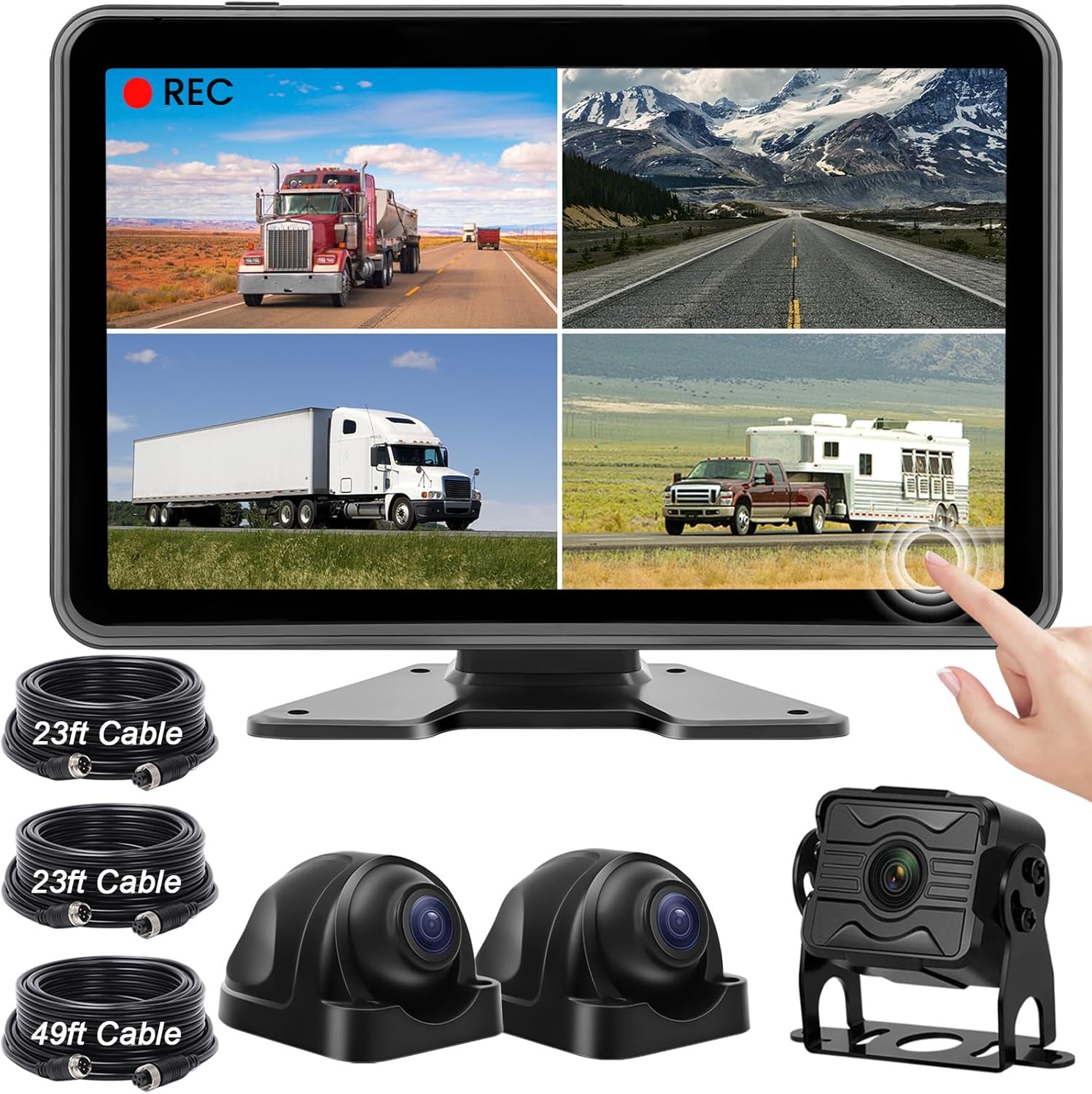
Image: Overview of the Losuudy 10.1" Wired Backup Camera System components.
Specifications
| Feature | Detail |
|---|---|
| Model Number | L-A1 |
| Screen Size | 10.1 Inches |
| Display Technology | LCD, IPS Touch Screen |
| Video Capture Resolution | 1080p AHD |
| Camera Rating | IP68 Waterproof, Dustproof |
| Night Vision | Yes |
| Power Source | 12V-36V (Car Charger or Hardwired ACC) |
| Recording Function | DVR Recording (supports 4 cameras simultaneously) |
| Compatible Devices | RVs, Trucks, Trailers, Box trucks, Pickup trucks, Vans |
| Product Dimensions | 17.3"L x 11.5"W x 4.1"H |
| Item Weight | 6.82 pounds |
Setup and Installation
The Losuudy Backup Camera System is designed for straightforward installation, primarily requiring a single cable connection between the monitor and cameras. It can be powered via a cigarette lighter adapter or hardwired to an ACC power source (12V-36V).
Installation Steps:
- Mount the Monitor: Choose a suitable location on your dashboard or windshield for the 10.1-inch touch screen monitor. Ensure it does not obstruct your view and is easily accessible for operation.
- Install Cameras: Strategically place the AHD 1080P cameras for optimal rear and side views. The IP68 waterproof rating ensures durability in various weather conditions. Securely mount each camera using the provided hardware.
- Connect Wiring: Connect the cameras to the monitor using the provided 49ft and 23ft cables. These cables are designed for a single-cable connection, simplifying the wiring process.
- Power Connection: Connect the monitor to your vehicle's power supply. You can use the included cigarette lighter adapter for a quick setup or hardwire it to an ACC (Accessory) power source for a more permanent installation. The system supports 12V-36V power input.
- Test the System: Before finalizing the installation, power on your vehicle and test all camera views and functions to ensure proper operation.

Image: Recommended camera placement for different vehicle types.

Image: IP68 Waterproof Cameras, designed for all weather conditions.
Operating Instructions
The 10.1-inch full touch screen monitor provides intuitive control over the system's features.
Monitor Functions:
- Power On/Off: The monitor can automatically turn on/off with your vehicle's ignition when connected to an ACC power source. Alternatively, use the physical power button.
- Touch Screen Interface: Navigate through menus and settings by touching the screen. The 2.5D IPS panel offers a responsive and clear display.
- Split Screen Display: The monitor supports various split-screen modes, allowing you to view feeds from multiple cameras simultaneously. You can display up to four camera views at once for comprehensive monitoring.
- Camera Selection: Easily switch between individual camera views or select different split-screen layouts via the touch interface.
- Adjustable Guide Lines: For backup cameras, you can enable or disable guide lines. These lines are customizable in height and width to accurately reflect your vehicle's dimensions, aiding in precise maneuvering.
- Image Flip (Mirror/Normal): Adjust the camera view to be mirrored or normal, depending on the camera's position and your preference (e.g., rear view camera typically uses mirror image).

Image: The 10.1" Full Touch Screen Monitor with key features highlighted.

Image: Examples of colorful split display modes and DIY guide line calibration.

Image: Demonstration of adjustable guide lines and mirror/normal image settings.
DVR Recording and Playback:
The system includes a DVR recording function, allowing you to record footage from all connected cameras simultaneously. A 64GB high-speed memory card is typically included in the package.
- Automatic Recording: Recording begins automatically when the system is powered on.
- Loop Recording: When the memory card is full, the system will automatically overwrite the oldest files to continue recording, ensuring continuous coverage.
- Playback: Access recorded videos directly from the monitor's interface for review.

Image: Illustration of the DVR recording and loop recording functionality.
Maintenance
Regular maintenance ensures the longevity and optimal performance of your Losuudy Backup Camera System.
- Clean Lenses: Periodically clean camera lenses with a soft, damp cloth to ensure clear image quality. Avoid abrasive materials that could scratch the lens.
- Check Connections: Inspect all cable connections for tightness and signs of wear or corrosion. Secure any loose connections to prevent signal loss.
- Monitor Cleaning: Clean the monitor screen with a screen-safe cleaner and a microfiber cloth. Do not spray liquid directly onto the screen.
- Software Updates: Check the Losuudy official website or contact customer support for any available firmware or software updates that may improve performance or add features.
- Memory Card Management: While the system features loop recording, it is good practice to occasionally back up important footage and format the memory card to maintain optimal recording performance.
Troubleshooting
If you encounter issues with your Losuudy Backup Camera System, refer to the following common troubleshooting steps:
| Problem | Possible Cause / Solution |
|---|---|
| No image on monitor |
|
| Flickering or distorted image |
|
| DVR not recording |
|
| Trigger wires not functioning as expected (e.g., for turn signals) |
|
| Water ingress into camera |
|
If the problem persists after attempting these solutions, please contact Losuudy customer support for further assistance.
Warranty and Support
The Losuudy 10.1" Wired Backup Camera System comes with a 2-year manufacturer's warranty. This warranty covers defects in materials and workmanship under normal use.
For warranty claims, technical support, or any inquiries regarding your product, please contact Losuudy customer service through their official channels. You can often find support information on the product packaging, the Losuudy brand store on Amazon, or their official website.
Losuudy Brand Store: Visit Losuudy Store on Amazon