1. Introduction
This manual provides instructions for the Generic replacement remote control designed for various Samsung DVD Karaoke System models. This remote operates using infrared (IR) technology and is intended to provide essential control functions for your compatible device. Please note that as a replacement unit, some advanced or specific functions of your original remote may not be fully supported.
2. Setup: Battery Installation
The remote control requires two (2) AAA batteries for operation. No programming or pairing is necessary; simply install the batteries correctly, and the remote will be ready for use.
- Locate the battery compartment on the back of the remote control.
- Press down on the latch and slide the battery cover downwards to open it.
- Insert two (2) AAA batteries, ensuring the positive (+) and negative (-) terminals align correctly with the markings inside the compartment.
- Slide the battery cover back into place until it clicks securely.
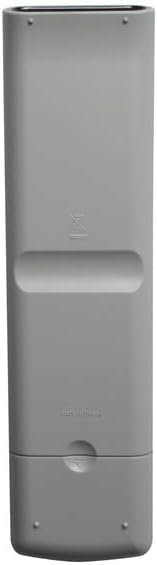
Image 2.1: Back view of the remote control, illustrating the location of the battery compartment.

Image 2.2: The remote control with the battery cover removed, showing the correct orientation for AAA battery insertion.
3. Operating the Remote Control
Point the remote control directly at the infrared receiver on your Samsung DVD Karaoke System. Ensure there are no obstructions between the remote and the device. The effective range is typically up to 20 feet (6 meters).
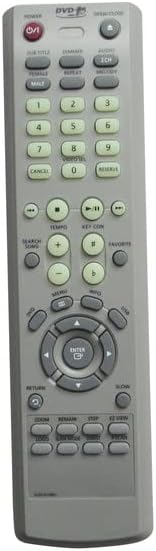
Image 3.1: Front view of the remote control, displaying the layout of all buttons.
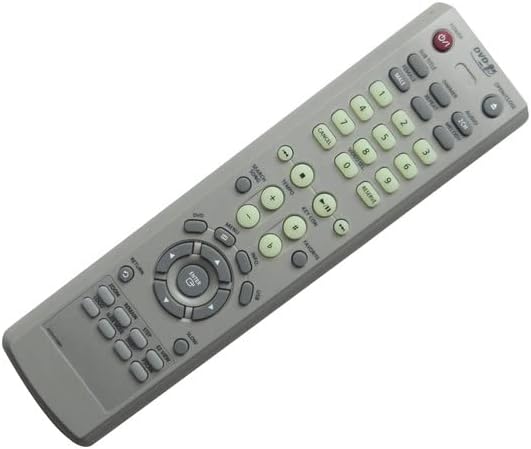
Image 3.2: Angled perspective of the remote control, providing a clearer view of the button labels and design.
Key Functions:
- POWER (①): Turns the DVD Karaoke System on or off.
- OPEN/CLOSE: Opens or closes the disc tray.
- Number Buttons (0-9): Used for direct track selection or inputting numbers.
- Navigation Buttons (▲ ▼ ◄ ►): Used to navigate menus and selections.
- ENTER: Confirms a selection.
- PLAY (▶), PAUSE (⏸), STOP (■): Standard playback controls.
- REWIND (⏪), FAST FORWARD (⏩): Skips backward or forward through content.
- VOLUME (+/-): Adjusts the audio volume.
- MUTE: Silences the audio output.
- MENU: Accesses the main menu of the DVD.
- RETURN: Goes back to the previous screen or menu.
Important Note: As a replacement remote, certain advanced features or specific buttons present on your original equipment remote may not function identically or at all. Please refer to your DVD Karaoke System's original manual for detailed information on its specific functions.
4. Maintenance
Cleaning:
- Wipe the remote control with a soft, dry cloth.
- Do not use abrasive cleaners, solvents, or chemical wipes, as these can damage the surface or internal components.
Battery Care:
- Replace batteries when the remote's response becomes sluggish or stops working.
- If the remote will not be used for an extended period (e.g., one month or more), remove the batteries to prevent leakage and potential damage to the remote.
- Dispose of used batteries responsibly according to local regulations.
5. Troubleshooting
Remote Not Responding:
- Check Batteries: Ensure batteries are inserted correctly with the correct polarity (+/-) and are not depleted. Replace with fresh AAA batteries if necessary.
- Line of Sight: Make sure there is a clear path between the remote control and the infrared sensor on your DVD Karaoke System. Remove any obstructions.
- Distance: Ensure you are within the effective operating range of the remote (typically up to 20 feet).
- Infrared Interference: Bright sunlight or other strong infrared sources can interfere with the remote's signal. Try operating the remote in a different lighting condition.
Some Functions Do Not Work:
- This is a generic replacement remote. It may not support all advanced or specific functions that were available on your original equipment remote. Its primary purpose is to provide essential control.
- Verify that your specific Samsung DVD Karaoke System model is listed as compatible with this remote. If your model is not listed, full functionality cannot be guaranteed.
6. Specifications
- Brand: Generic
- Connectivity Technology: Infrared (IR)
- Power Source: 2 x AAA batteries (not included)
- Compatible Models: Samsung AH59-01588A, DVD-K170, DVD-K150, AH59-01588B, AH59-01644G, AH59-01644F Ultra Slim DVD Karaoke System
7. Warranty and Support
As a generic replacement product, specific warranty details may vary. For any issues, questions, or support regarding this remote control, please contact the seller directly through your purchase platform. They can provide assistance with product functionality and returns if necessary.


