
Dura Faucet DF-RK602
Dura Faucet Ceramic Disc Cartridge Replacement Manual
Model: DF-RK602
1. Introduction
This manual provides detailed instructions for the installation, maintenance, and troubleshooting of the Dura Faucet Ceramic Disc Cartridge, Model DF-RK602. This cartridge is designed as an authentic replacement part for Dura Faucet models DF-NMK530 and DF-NMK531, ensuring optimal performance and leak-free operation.

Figure 1: Dura Faucet Ceramic Disc Cartridge (Model DF-RK602)
2. Compatibility
This ceramic disc cartridge (Model DF-RK602) is specifically engineered for direct replacement in the following Dura Faucet models:
- Dura Faucet DF-NMK530
- Dura Faucet DF-NMK531
Using this cartridge with other faucet models may result in improper fit or function.
3. Product Features
- Durable Construction: Manufactured with high-quality ceramic and robust rubber washers to prevent leaks and ensure long-lasting performance.
- Smooth Operation: Features an easy-gliding ceramic disc for effortless control of water flow and temperature.
- Easy Installation: Designed for DIY replacement, eliminating the need for professional plumbing services.
- Authentic Replacement: Guarantees compatibility and restores original faucet functionality for specified models.
- Lead-Free and Tarnish Resistant: Constructed with materials that are safe and maintain their appearance over time.

Figure 2: Top view of the cartridge, highlighting the ceramic disc and rubber seals.
4. Installation Guide
Before beginning installation, ensure you have the necessary tools: adjustable wrench, flathead screwdriver, Phillips head screwdriver, and a clean cloth.
Safety Precautions:
- Always turn off the main water supply to the faucet before starting any work.
- Cover the drain opening to prevent small parts from falling into the drain.
- Wear appropriate personal protective equipment, such as gloves and eye protection.
Step-by-Step Installation:
- Turn Off Water Supply: Locate the hot and cold water shut-off valves under the sink and turn them clockwise until the water flow stops completely. Open the faucet handle to relieve any remaining pressure.
- Remove Faucet Handle: Depending on your faucet model (DF-NMK530 or DF-NMK531), carefully remove the decorative cap (if present) and unscrew the handle screw. Lift the handle off.
- Access the Cartridge: Remove any retaining nuts or clips that secure the existing cartridge. You may need an adjustable wrench for the retaining nut.
- Remove Old Cartridge: Gently pull the old ceramic disc cartridge straight up and out of the faucet body. Note its orientation for reference.
- Clean Faucet Body: Inspect the faucet body for any debris or mineral buildup. Clean the area thoroughly with a cloth.
- Insert New Cartridge: Align the new Dura Faucet DF-RK602 cartridge with the slots in the faucet body. Ensure it is seated correctly and fully inserted. The flat side of the cartridge should face the front of the faucet.
- Secure Cartridge: Reinstall the retaining nut or clips, tightening them securely but do not overtighten.
- Reattach Handle: Place the faucet handle back onto the cartridge stem, align it properly, and secure it with the handle screw. Reattach any decorative caps.
- Restore Water Supply: Slowly turn the hot and cold water shut-off valves counter-clockwise to restore water flow.
- Check for Leaks: Turn on the faucet and check for any leaks around the base of the handle or the faucet body. Test both hot and cold water flow.
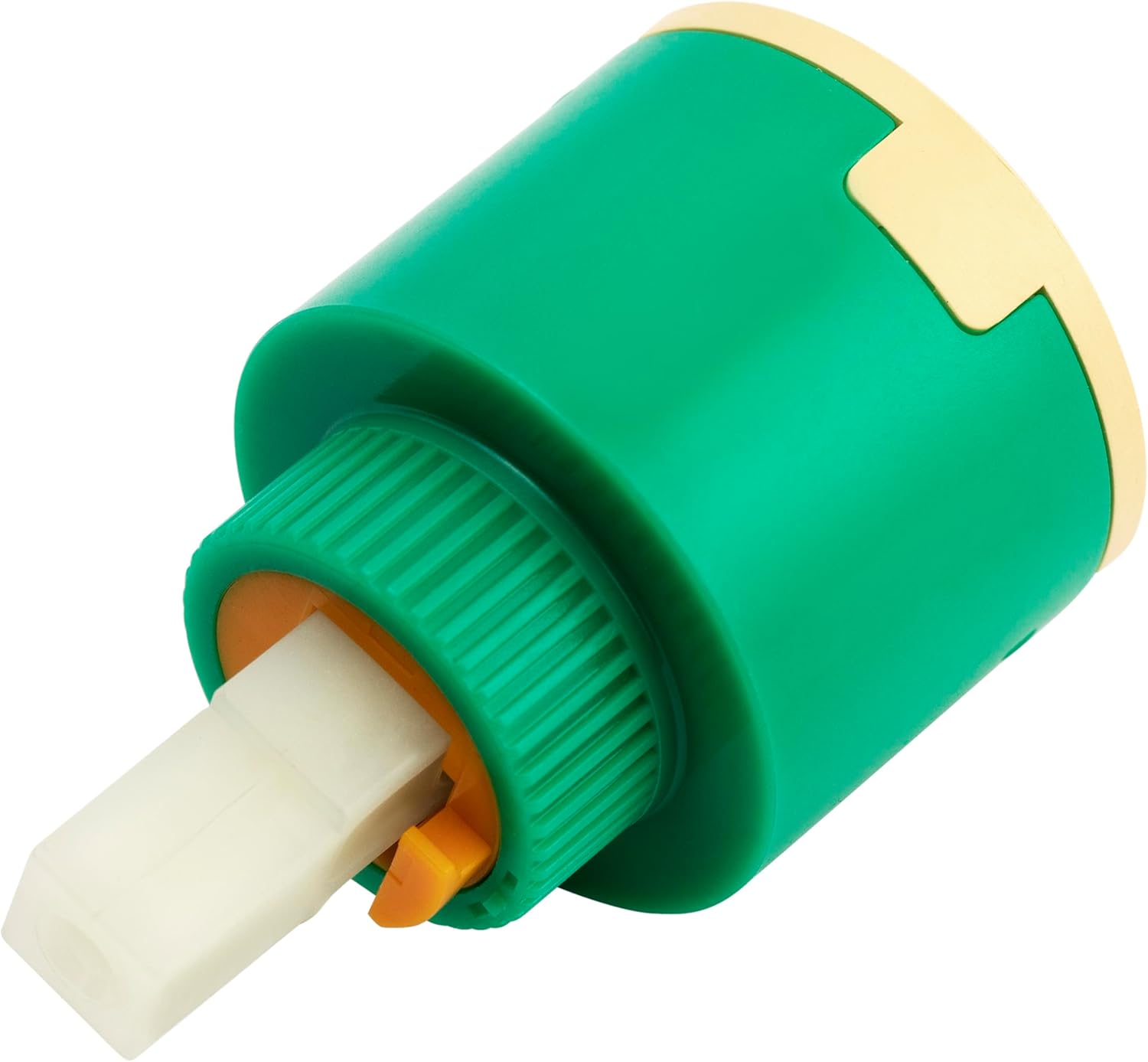
Figure 3: Side view of the cartridge, showing the stem and base for proper alignment during installation.
5. Operating Instructions
Once installed, the Dura Faucet Ceramic Disc Cartridge operates seamlessly within your DF-NMK530 or DF-NMK531 faucet. The ceramic disc design allows for precise control of water temperature and flow with a single lever handle.
- Water Flow Control: Lift the handle to increase water flow; push down to decrease and shut off.
- Temperature Control: Move the handle left for hot water and right for cold water. The ceramic discs mix the water to achieve the desired temperature.
6. Maintenance
The Dura Faucet Ceramic Disc Cartridge is designed for minimal maintenance. However, periodic checks can extend its lifespan and ensure optimal performance.
- Cleaning: If water flow becomes restricted or erratic, it may indicate mineral buildup. Turn off the water supply and carefully remove the cartridge as per installation steps. Rinse the cartridge under running water to dislodge any debris. Do not use harsh chemicals or abrasive cleaners on the cartridge.
- Leak Checks: Periodically check around the faucet base and connections for any signs of leaks. Address any leaks promptly by ensuring connections are tight or by re-seating the cartridge if necessary.
- Handle Operation: If the handle becomes stiff or difficult to move, ensure the retaining nut is not overtightened. The ceramic discs are self-lubricating and should provide smooth operation.
7. Troubleshooting
| Problem | Possible Cause | Solution |
|---|---|---|
| Faucet leaks from handle base | Cartridge not seated properly; worn O-rings; retaining nut loose. | Turn off water, remove handle, check cartridge seating and O-rings. Tighten retaining nut. Replace cartridge if O-rings are damaged. |
| Reduced water flow | Debris or mineral buildup in cartridge or aerator. | Turn off water, remove cartridge and rinse. Clean or replace aerator if necessary. |
| Difficulty moving handle | Retaining nut overtightened; debris in cartridge. | Loosen retaining nut slightly. Remove and clean cartridge. |
| Water temperature inconsistent | Cartridge not fully aligned; issue with hot/cold water supply. | Turn off water, re-seat cartridge ensuring proper alignment. Check hot and cold water supply lines. |
8. Specifications
| Attribute | Detail |
|---|---|
| Model Name | DF-RK602 |
| Compatibility | Dura Faucet DF-NMK530, DF-NMK531 |
| Material | Ceramic, Plastic |
| Color | Polished Green |
| Item Weight | 1.76 ounces |
| Product Dimensions | 4 x 4 x 1 inches |
| Special Features | Easy to Install, Lead Free, Tarnish Resistant |
| UPC | 810127821491 |
9. Warranty and Support
Dura Faucet products are backed by a commitment to quality. For specific warranty information regarding your ceramic disc cartridge or for technical support, please refer to the official Dura Faucet website or contact their customer service directly.
Customer Support: Dura Faucet is an American company with USA-based Customer Support. For assistance, visit Dura Faucet Store on Amazon or their official website.
Related Documents - DF-RK602
 |
Фритюрница электрическая Foodatlas серии DF: Паспорт и Руководство по эксплуатации Подробное руководство по эксплуатации и паспорт для электрической фритюрницы Foodatlas серии DF, охватывающее безопасность, технические характеристики, эксплуатацию, обслуживание и гарантию. |
 |
Aliyiqi DF Series Digital Push-Pull Meter Operation Manual Comprehensive operation instructions for the Aliyiqi Digital Push-Pull Meter, covering product introduction, functional characteristics, specifications, screen display, key functions, testing procedures, software connection, and safety precautions for models DF-2 to DF-1000. |
 |
Daihatsu Terios J100 Front & Rear Differential Service Manual Comprehensive service manual for the Daihatsu Terios J100, detailing front and rear differential components, in-vehicle service, removal, disassembly, inspection, assembly, installation, special service tools (SSTs), and tightening torque specifications. |
 |
Lexman DF-1720/1721/1722/1723/1724/1725 Category 5e RJ45 Computer Socket Installation and Operation Manual This manual provides installation and operation instructions for Lexman Category 5e RJ45 computer sockets (models DF-1720 through DF-1725). It covers technical specifications, safety precautions, wiring diagrams (T568A/T568B), troubleshooting, and care instructions. |
 |
Iskra DF-001C/D/002/003/003D Desk Fan User Manual and Safety Instructions This document provides comprehensive instructions for the Iskra DF-001C, DF-001D, DF-002, DF-003, and DF-003D desk fans. It includes assembly, operation, safety precautions, cleaning, maintenance, technical specifications, and warranty information. |
 |
Yosemite Home Décor Electric Fireplace Instruction Manual Comprehensive instruction manual for Yosemite Home Décor wall-mount electric fireplaces, covering safety, installation, operation, and maintenance for various models including DF-EFP148, DF-EFP400, DF-EFP600, DF-EFP700, DF-EFP800, DF-EFP900, and DF-EFP1313. |
Ask a question about this manual
Ask about setup, troubleshooting, compatibility, parts, safety, or missing instructions. Manuals+ will review the question and use this page’s manual context to help answer it.