
ZIYOU LANG K3
ZIYOU LANG K3 Mechanical Gaming Wired Keyboard User Manual
Model: K3 | Brand: ZIYOU LANG
Introduction
The ZIYOU LANG K3 Mechanical Gaming Wired Keyboard is designed for an enhanced gaming and typing experience. Featuring a compact 100-key layout, linear red switches, and vibrant rainbow backlighting, this keyboard offers both performance and aesthetic appeal. Its ergonomic design and durable construction ensure comfortable and long-lasting use for various applications, from intense gaming sessions to daily office tasks.

Image: The ZIYOU LANG K3 Mechanical Gaming Wired Keyboard, showcasing its compact layout, two-tone keycaps, and the distinctive green coiled Type-C to USB cable.
Setup
Follow these steps to set up your ZIYOU LANG K3 keyboard:
- Unpack the Keyboard: Carefully remove the keyboard and its coiled Type-C to USB cable from the packaging.
- Connect the Cable:
- Locate the Type-C port on the keyboard.
- Connect the Type-C end of the coiled cable to the keyboard's Type-C port.
- Connect the USB-A end of the coiled cable to an available USB port on your computer (Desktop, Laptop, PC, PS5/PS4, Chromebook).
- Detachable Aviation Connector: The coiled cable features a metal aviation connector for quick attachment and detachment, allowing for personalized cable management. Ensure the connector is securely fastened.
- Initial Recognition: Your operating system should automatically detect and install the necessary drivers for the keyboard. No additional software installation is typically required.
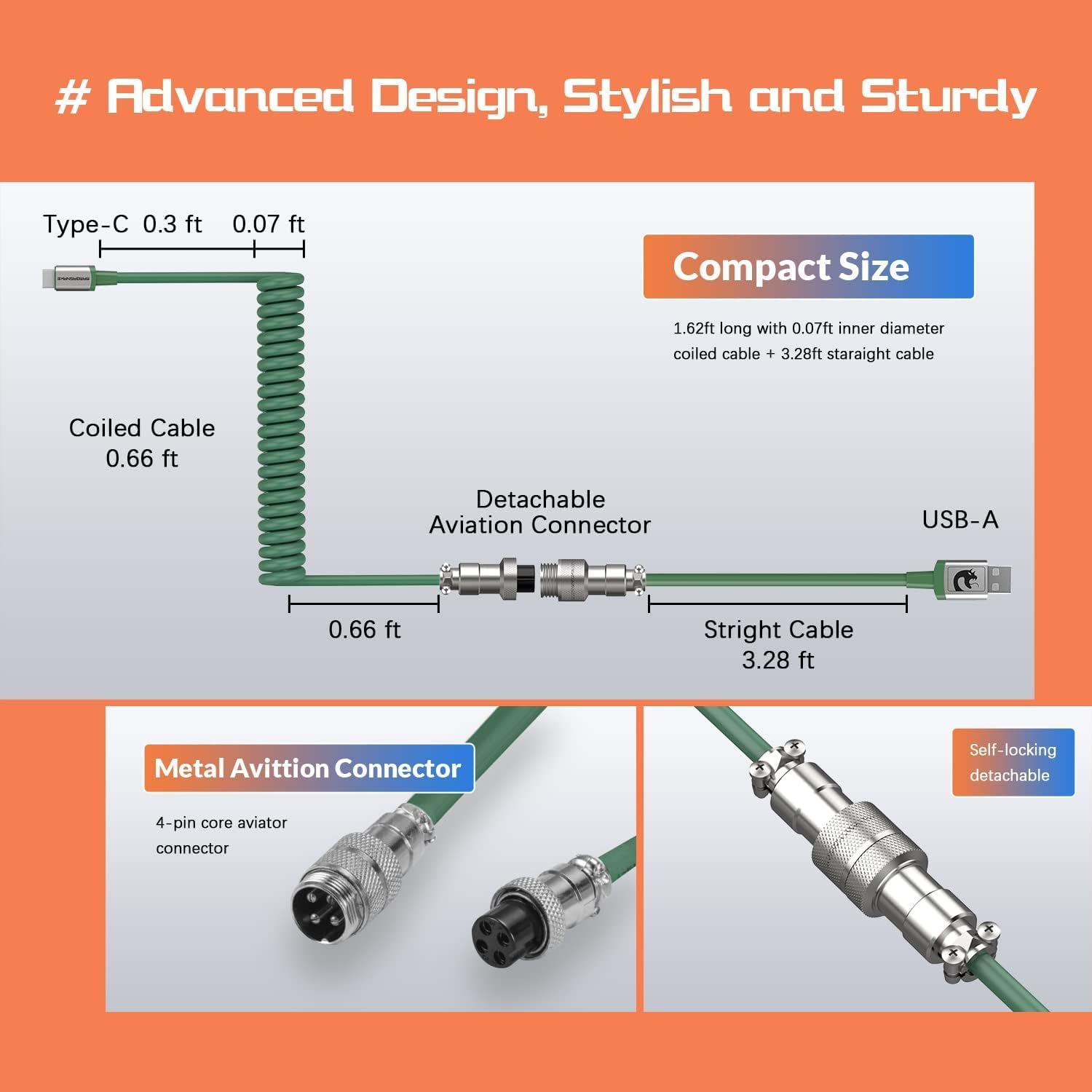
Image: Diagram illustrating the coiled Type-C to USB cable with its detachable metal aviation connector, highlighting its components and dimensions.
Operating Instructions
Keyboard Layout and Features
The K3 keyboard features a compact 100-key layout, which includes a number pad while saving desk space compared to full-sized keyboards. It is equipped with linear red mechanical switches, providing a smooth and quiet typing experience with a low actuation force (45g±5).

Image: An illustration highlighting the compact 100-key layout of the keyboard, emphasizing space-saving and anti-ghosting features.
Backlight Control
The keyboard features vibrant rainbow backlighting with ten distinct lighting effects. To cycle through these effects:
- Press Fn + INS to switch between the ten available rainbow backlight modes.
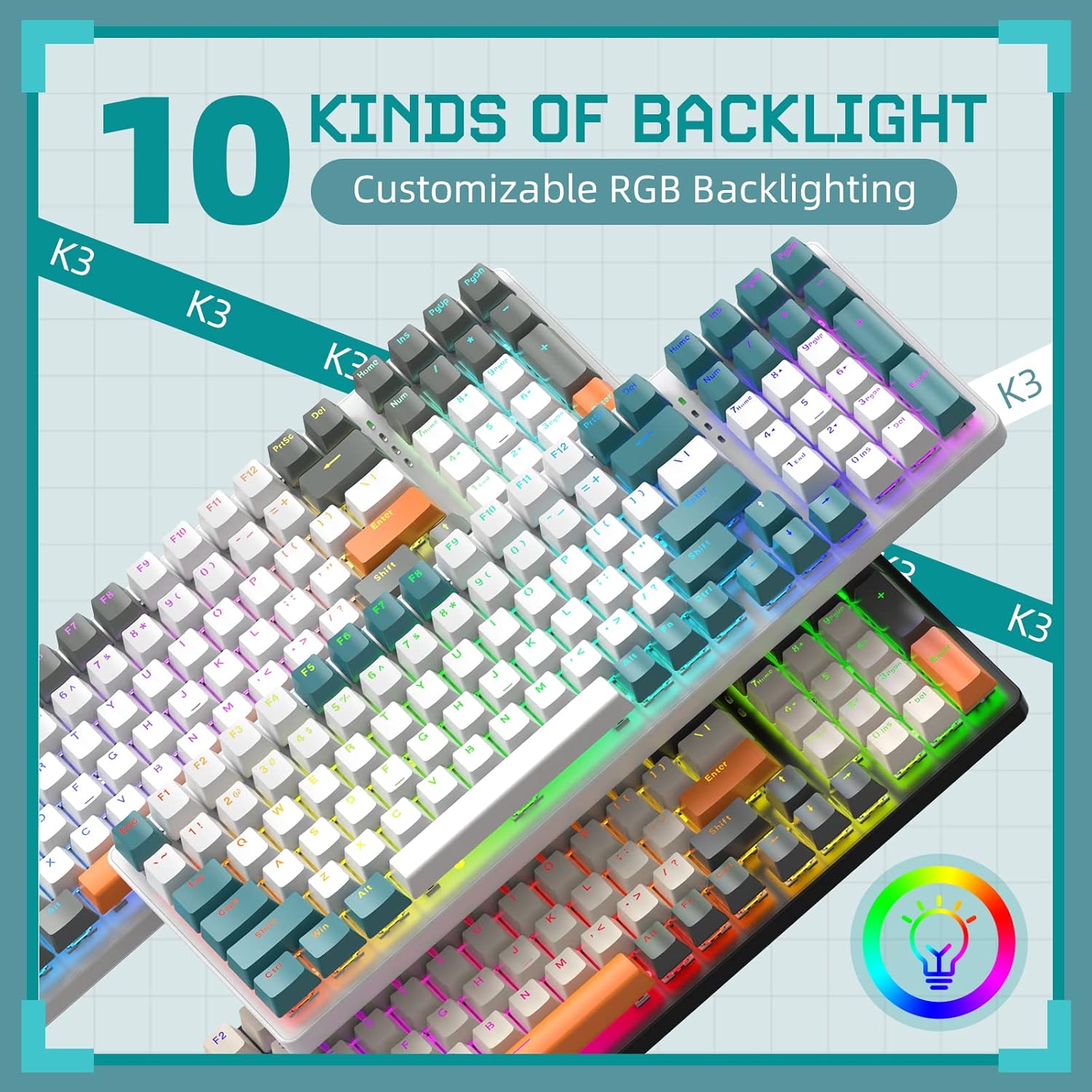
Image: Two keyboards displaying different rainbow backlight patterns, illustrating the variety of lighting effects available.

Image: A close-up of the keyboard highlighting the 'Fn' and 'Ins' keys, indicating their use for backlight mode adjustments.
Ergonomic Design
The K3 keyboard is designed with ergonomics in mind. It features ABS mixed-color keycaps and an adjustable foot support at the bottom, allowing you to set the keyboard angle for optimal comfort during extended use.

Image: A perspective view of the keyboard showing its high and low key layout and the adjustable stand for ergonomic positioning.
Maintenance
Proper maintenance ensures the longevity and optimal performance of your keyboard:
- Cleaning: Use a soft, dry cloth to wipe down the keycaps and keyboard surface regularly. For deeper cleaning, you may use a can of compressed air to remove dust and debris from between the keys. Avoid using harsh chemicals or abrasive materials.
- Keycap Removal: The keycaps can be removed for cleaning or replacement. Use a keycap puller (not included) to gently pull keycaps straight up. Be careful not to damage the switches.
- Cable Care: Handle the coiled Type-C cable with care. Avoid sharp bends or excessive pulling, especially at the connectors, to prevent damage.
- Storage: When not in use, store the keyboard in a clean, dry environment away from extreme temperatures and direct sunlight.

Image: A close-up view of the keyboard's PBT color-blocking keycaps, with some keycaps removed to show the red switches and a keycap puller, illustrating components for maintenance.
Troubleshooting
If you encounter issues with your ZIYOU LANG K3 keyboard, refer to the following common solutions:
| Problem | Possible Cause | Solution |
|---|---|---|
| Keyboard not responding | Loose cable connection, incorrect USB port, driver issue. | Ensure the Type-C and USB-A ends of the cable are securely connected. Try a different USB port on your computer. Restart your computer. |
| Backlight not working or stuck | Backlight turned off, specific mode selected. | Press Fn + INS repeatedly to cycle through backlight modes and ensure it's not off. |
| Keys not registering or double-typing | Dust/debris under keycap, faulty switch. | Remove the keycap and use compressed air to clean the switch area. If the issue persists, the switch may need replacement (requires technical expertise). |
| Keyboard feels wobbly | Uneven surface, loose feet. | Ensure the keyboard is on a flat, stable surface. Check if the adjustable feet are fully extended or retracted as desired. |
Specifications
- Model: K3
- Keys: 100-key layout with number pad
- Switch Type: Linear Red Mechanical Switches (50 million clicks lifespan)
- Actuation Force: 45g ± 5
- Keycaps: ABS Mixed-Color Keycaps
- Backlight: Rainbow LED Backlight (10 modes)
- Connectivity: Wired, Coiled Type-C to USB Cable with Metal Aviation Connector
- Anti-Ghosting: Full Key Conflict-Free
- Ergonomics: Adjustable Foot Support
- Dimensions: 14.95 x 5.2 x 1.63 inches
- Weight: 2.35 pounds
- Compatibility: Windows XP/Vista/7/8/10/X, Mac, Desktop, Chromebook, PC, Laptop, PS5/PS4
- What's in the Box: USB Cable (Coiled Type-C to USB Cable)
Warranty and Support
For warranty information and technical support, please refer to the official ZIYOU LANG website or contact their customer service directly. Keep your purchase receipt as proof of purchase for any warranty claims.
For further assistance, you may visit the ZIYOU LANG Store on Amazon: ZIYOU LANG Store
Related Documents - K3
 |
Ziyoulang Mechanical Keyboard User Manual User manual for the Ziyoulang mechanical keyboard, covering setup, safety precautions, features, and troubleshooting. |
 |
Ziyoulang Mechanical Keyboard User Manual - Features, Setup, and Support Comprehensive user manual for the Ziyoulang Mechanical Keyboard, covering safety information, instructions for use, features, troubleshooting FAQs, and after-sales service. |
 |
M2 Wired RGB Gaming Mouse - User Manual and Specifications Detailed specifications and features of the M2 Wired RGB Gaming Mouse by ZIYOULANG. Learn about its DPI settings, button functions, RGB lighting, and system compatibility. |
 |
VALKYRIE VK M5 Pro Lite Wireless Gaming Mouse User Manual This document provides instructions for the ziyoulang VALKYRIE VK M5 Pro Lite Wireless Gaming Mouse. It guides users on how to operate the product by following the included manual and offers customer service assistance if needed. |
 |
Ziyoulang Mechanical Keyboard User Manual and Safety Guide Comprehensive user manual for the Ziyoulang Mechanical Keyboard, covering safety information, instructions for use, precautions, features, FAQs, and after-sales service. |
 |
Ziyoulang Mechanical Keyboard User Manual User manual for the Ziyoulang mechanical keyboard, covering safety, usage, features, and troubleshooting. |
Ask a question about this manual
Ask about setup, troubleshooting, compatibility, parts, safety, or missing instructions. Manuals+ will review the question and use this page’s manual context to help answer it.