
mcoplus YT1200
Mcoplus YT1200 Intelligent Rotation Remote Control Pan Tilt Head User Manual
Model: YT1200
1. Introduction
This manual provides detailed instructions for the safe and effective use of your Mcoplus YT1200 Intelligent Rotation Remote Control Pan Tilt Head. Please read this manual thoroughly before operating the device to ensure optimal performance and to prevent damage.
2. Safety Information
- Do not exceed the maximum load capacity of 1kg (2.2 lbs). Overloading can cause damage to the device and connected equipment.
- Keep the device away from water and moisture to prevent electrical shock or malfunction.
- Avoid exposing the device to extreme temperatures or direct sunlight for prolonged periods.
- Do not attempt to disassemble or repair the device yourself. Contact qualified service personnel for assistance.
- Ensure the device is securely mounted on a stable surface or tripod before attaching any equipment.
- Keep out of reach of children.
3. Package Contents
Verify that all items are present in your package:
- Mcoplus YT1200 Pan Tilt Head
- Wireless Remote Control (with 2 AAA batteries)
- Type-C Charging Cable
- Mobile Phone Clip
- 1/4 Quick Release Plate
- User Manual (this document)
4. Product Overview
4.1 Pan Tilt Head Components

Figure 1: Mcoplus YT1200 Pan Tilt Head and Remote Control with labeled components.
- Pan Tilt Head:
- 1/4" Screw: For attaching cameras or phone clips.
- Quick Release Plate: Mounts to camera/phone clip, then slides into the pan tilt head.
- Channel Selection Buttons (CH+ / CH-): Long press to select channels.
- On/Off Key: Long press to power on/off, short press to display battery.
- Display: Shows current settings and battery level.
- 3.5mm Release Cable Interface: For connecting an external shutter release cable (not included).
- Type-C Charging Port: For charging the built-in battery.
- 1/4" Screw Hole (bottom): For mounting on a tripod.
- Remote Control:
- OLED Display: Shows mode, speed, battery, and other settings.
- Setup Button (S): Accesses settings menu.
- Mode Selection Button (M): Cycles through operating modes.
- Shutter Release Button: Triggers camera shutter in remote photography mode.
- Directional Buttons: Controls pan and tilt movement.
- Shortcut Key (M1): Programmable shortcut.
- Stop Button.
- Start/Pause Button.
5. Setup
5.1 Charging the Pan Tilt Head
The YT1200 Pan Tilt Head has a built-in rechargeable lithium battery. Before first use, fully charge the device.
- Connect the provided Type-C charging cable to the Type-C charging port on the side of the pan tilt head.
- Connect the other end of the cable to a USB power adapter (not included) or a computer USB port.
- The display will indicate charging status. A full charge typically takes approximately 2-3 hours.
- To check the remaining battery power, short press the power button on the gimbal. The display will show the current battery level.
5.2 Installing Remote Control Batteries
The remote control requires 2 AAA batteries (included). Open the battery compartment on the back of the remote control and insert the batteries, observing the correct polarity.
5.3 Mounting the Pan Tilt Head
The pan tilt head can be mounted on a tripod or placed on a flat surface.
- On a Tripod: Use the 1/4" screw hole located at the bottom of the pan tilt head to securely attach it to a compatible tripod.
- On a Flat Surface: Ensure the surface is stable and level to prevent the device from tipping over.
5.4 Attaching a Camera or Smartphone
The YT1200 supports cameras and smartphones weighing up to 1kg.
- Attach the 1/4" quick release plate to the bottom of your camera or to the mobile phone clip.
- If using a smartphone, insert your phone into the mobile phone clip, ensuring it is held securely. The clip supports both horizontal and vertical phone orientations.
- Slide the quick release plate (with camera or phone clip attached) into the slot on the pan tilt head until it clicks into place. Ensure it is firmly secured.

Figure 2: Pan Tilt Head with smartphone and remote control.

Figure 3: Pan Tilt Head with a DSLR camera mounted.
6. Operating Instructions
6.1 Powering On/Off
- To power on the pan tilt head, long press the On/Off key on the device.
- To power off, long press the On/Off key again.
- The remote control powers on automatically when buttons are pressed.
6.2 Pairing and Channel Selection
The YT1200 uses 99 remote control channels to minimize interference.
- Ensure both the pan tilt head and the remote control are powered on.
- On the pan tilt head, long press the CH+ or CH- button to select a channel. The display will show the current channel number.
- On the remote control, press the 'S' (Setup) button, then navigate to the channel selection option and set it to match the pan tilt head's channel.
- Once channels match, the devices are paired.
6.3 Remote Control Modes
Press the 'M' (Mode) button on the remote control to cycle through the available operating modes:
- Horizontal & Vertical Rotation Speed Adjustment:
In this mode, you can adjust the rotation speed of both horizontal (pan) and vertical (tilt) movements. There are 9 adjustable speed levels. Use the directional buttons to control movement and adjust speed via the remote's settings.

Figure 4: Controlling the pan tilt head with the remote.
- Remote Photography Mode:
This mode requires a separate shutter release cable (not included) connected between your camera and the 3.5mm interface on the pan tilt head. Use the Shutter Release Button on the remote to trigger your camera's shutter.
- Auto Video Mode:
The pan tilt head will perform continuous, smooth movements suitable for video recording. Specific movement patterns can be configured via the remote control settings.
- Panorama Mode:
Designed for capturing panoramic photos. The device will rotate incrementally, allowing you to take multiple overlapping shots that can be stitched together later. The remote control allows for setting the rotation angle and steps.
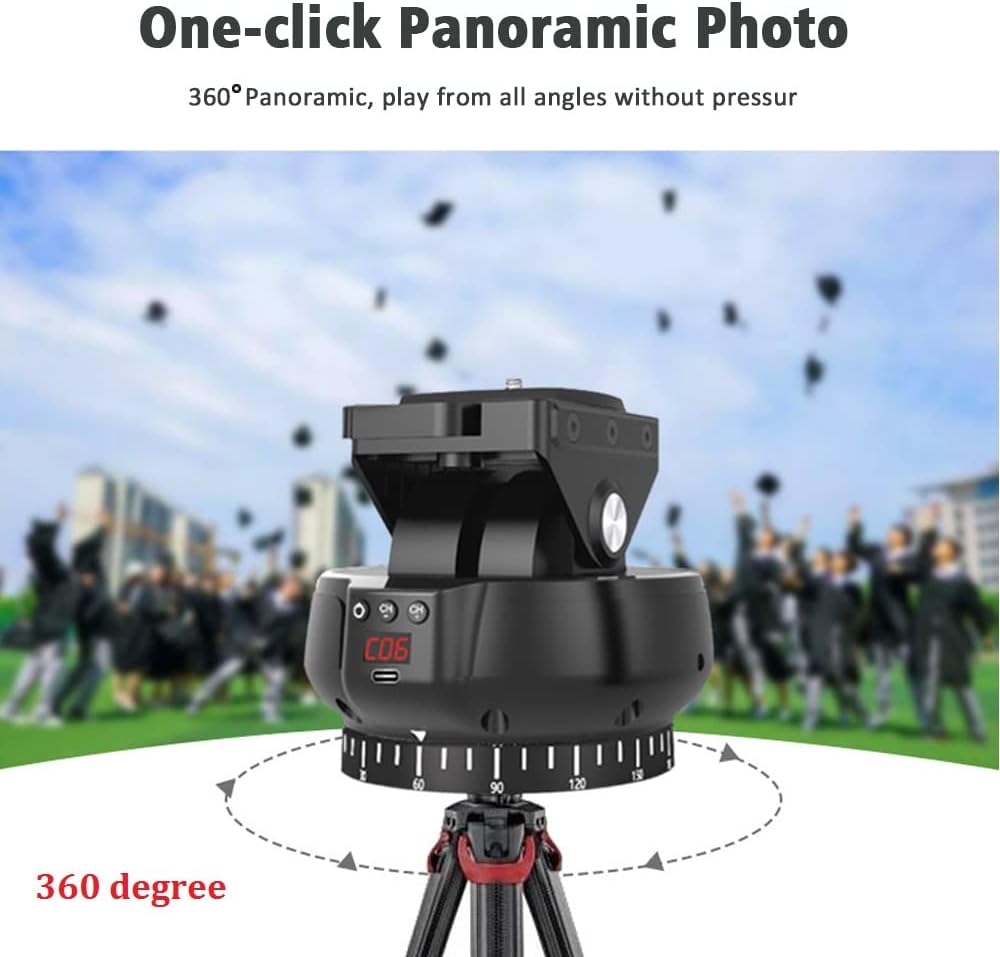
Figure 5: Pan Tilt Head in Panorama Mode.
- A-B Point Round Trip Mode:
In this mode, you can set two specific points (A and B) for the pan tilt head to move between. The device will automatically cycle between these two points, providing continuous, repeatable motion. This is useful for time-lapse or video sequences.

Figure 6: A-B Point Round Trip Mode in action.
6.4 Time-Lapse Photography (with Shutter Cable)
For cameras that support it, the pan tilt head can be used for advanced time-lapse photography when connected via a shutter release cable (not included).
- Connect a compatible shutter release cable from your camera to the 3.5mm release cable interface on the pan tilt head.
- In the remote control's settings (accessed via 'S' button), you can configure parameters such as:
- Interval time between photos.
- Total number of photos to be taken.
- Countdown timer before starting.
- Exposure time (if supported by camera and cable).
- Start the time-lapse sequence using the remote control.
7. Compatibility
The Mcoplus YT1200 is designed for wide compatibility with various photographic equipment, provided the total weight does not exceed 1kg (2.2 lbs).
- Cameras: Compatible with most DSLR, mirrorless, and compact cameras within the weight limit.
- Smartphones: Compatible with most smartphones when used with the included mobile phone clip.
- Other Devices: Can be used with small action cameras, microphones, or LED lights, provided they have a 1/4" screw mount and are within the weight limit.

Figure 7: Wide compatibility with various devices.
8. Specifications
| Feature | Specification |
|---|---|
| Model Number | YT1200 |
| Max Load Capacity | 1 kg (2.2 lbs) |
| Pan Tilt Head Weight | 518 g (1.14 lbs) |
| Rotation | 360-degree horizontal, adjustable vertical tilt |
| Remote Control Channels | 99 channels |
| Remote Control Distance | Up to 100 meters (line-of-sight) |
| Speed Levels | 9 adjustable levels for rotation speed |
| Battery (Pan Tilt Head) | Built-in Lithium Polymer (rechargeable) |
| Charging Port | Type-C |
| Battery (Remote Control) | 2 x AAA batteries (included) |
| Shutter Release Interface | 3.5mm port |
| Mounting Thread | 1/4" screw hole (bottom) |
| Dimensions (Package) | 6.89 x 5.55 x 5.24 inches |
| Color | Black |
9. Troubleshooting
| Problem | Possible Cause | Solution |
|---|---|---|
| Device does not power on. | Low battery or device is off. | Charge the pan tilt head using the Type-C cable. Long press the On/Off key to power on. |
| Remote control not responding. | Remote batteries are dead or channels do not match. | Replace AAA batteries in the remote. Ensure the remote and pan tilt head are set to the same channel (refer to Section 6.2). |
| Pan tilt head movement is erratic or stops. | Overload, low battery, or obstruction. | Ensure attached equipment does not exceed 1kg. Charge the device. Check for any physical obstructions. |
| Shutter release not working. | Incorrect mode, cable not connected, or incompatible camera. | Ensure Remote Photography Mode is selected. Verify the shutter release cable is securely connected to both the camera and the pan tilt head. Confirm camera compatibility with external shutter release. |
| Poor remote control range. | Obstructions or interference. | Ensure a clear line of sight between the remote and the pan tilt head. Avoid areas with strong electromagnetic interference. |
10. Maintenance
- Clean the device with a soft, dry cloth. Do not use liquid cleaners or solvents.
- Store the pan tilt head and remote control in a cool, dry place when not in use.
- Avoid dropping or subjecting the device to strong impacts.
- If storing for an extended period, charge the battery periodically to maintain its health.
11. Warranty and Support
Mcoplus products are designed for reliability and performance. For warranty information, technical support, or service inquiries, please refer to the warranty card included with your purchase or visit the official Mcoplus website. Please retain your proof of purchase for warranty claims.
Ask a question about this manual
Ask about setup, troubleshooting, compatibility, parts, safety, or missing instructions. Manuals+ will review the question and use this page’s manual context to help answer it.