
AVM 20002988
FRITZ!Repeater 3000 AX Instruction Manual
Extend your Wi-Fi 6 network with high performance and seamless connectivity.
1. Product Overview
The FRITZ!Repeater 3000 AX is a high-performance Wi-Fi 6 repeater designed to significantly extend the range and improve the stability of your existing Wi-Fi network. With its triband technology and two Gigabit LAN ports, it ensures fast and reliable connections for all your devices, even in large homes or offices.

Front view of the FRITZ!Repeater 3000 AX, showing the Wi-Fi and Connect buttons.
Key Features:
- Ultra-fast Wi-Fi 6: Supports 2x 5 GHz bands (up to 3,600 MBit/s) and a 2.4 GHz band (up to 600 MBit/s) for a total of up to 4,200 MBit/s.
- Triband Repeater: Three radio units and eight antennas ensure extensive coverage and high data throughput.
- WLAN Mesh: Integrates seamlessly into an existing FRITZ!Box Mesh network for optimal performance and seamless roaming.
- Gigabit LAN Ports: Two ultra-fast Gigabit LAN connections for wired devices or creating a LAN bridge.
- Easy Setup: Simple and secure installation via WPS button.
- Energy Efficiency: Features like night mode for Wi-Fi and ECO mode help save energy.
2. Setup and Installation
Setting up your FRITZ!Repeater 3000 AX is straightforward, especially when used with a FRITZ!Box. Follow these steps for a quick and secure connection.
2.1 Initial Connection (WPS)
- Plug the FRITZ!Repeater 3000 AX into a power outlet near your FRITZ!Box or existing Wi-Fi router.
- Wait for the Wi-Fi LED on the repeater to flash.
- Press the Connect button on the FRITZ!Repeater for about 1 second. The Wi-Fi LED will start flashing rapidly.
- Within 2 minutes, press the WPS button on your FRITZ!Box (or other Wi-Fi router). The WPS button is usually labeled 'WPS' or has a Wi-Fi symbol.
- Once connected, the Wi-Fi LED on the repeater will light up continuously, indicating a successful connection.

Rear view of the FRITZ!Repeater 3000 AX, showing the power input and two Gigabit LAN ports.
2.2 Optimal Placement
For best performance, place the repeater approximately halfway between your FRITZ!Box and the area where you need improved Wi-Fi coverage. Ensure it is not obstructed by large metal objects or thick walls. The signal strength indicator on the repeater can help you find the ideal location.

Illustration of how the FRITZ!Repeater extends Wi-Fi coverage across different rooms and floors.
3. Operating the Repeater
Once set up, the FRITZ!Repeater 3000 AX operates automatically to provide extended Wi-Fi coverage. Here's how to maximize its capabilities.
3.1 Wi-Fi 6 and Triband Technology
The repeater utilizes Wi-Fi 6 (802.11ax) for faster speeds and improved efficiency, especially in environments with many connected devices. Its triband design dedicates one 5 GHz band for communication with the router (backhaul), ensuring that client devices on the other 5 GHz and 2.4 GHz bands receive maximum available bandwidth.
3.2 Using the Gigabit LAN Ports
The two Gigabit LAN ports (LAN 1 and LAN 2) on the back of the repeater allow you to connect wired network devices such as smart TVs, gaming consoles, or desktop computers. This provides a stable and high-speed connection for devices that benefit from a direct Ethernet link.
3.3 Mesh Wi-Fi Integration
When integrated into a FRITZ! Mesh network, the repeater works seamlessly with your FRITZ!Box. Devices automatically switch between the FRITZ!Box and the repeater to maintain the best possible connection as you move around your home. This creates a single, unified Wi-Fi network name (SSID) for convenience.

Diagram illustrating a FRITZ!Box and FRITZ!Repeater working together in a Mesh Wi-Fi setup.
3.4 Energy Saving Features
The FRITZ!Repeater 3000 AX includes energy-saving features such as a configurable night mode for Wi-Fi, which can automatically turn off the Wi-Fi radio during specific hours, and an ECO mode to reduce power consumption when network activity is low.
4. Maintenance
To ensure optimal performance and longevity of your FRITZ!Repeater 3000 AX, consider the following maintenance tips:
- Keep Firmware Updated: AVM regularly releases free firmware updates that improve performance, add new features, and enhance security. You can check for updates via the FRITZ!Box interface or the FRITZ!App WLAN.
- Clean Regularly: Gently wipe the device with a dry, soft cloth to remove dust. Do not use liquid cleaners or abrasive materials.
- Ensure Proper Ventilation: Do not block the ventilation slots on the device to prevent overheating.
- Avoid Extreme Conditions: Keep the repeater away from direct sunlight, excessive heat, and moisture.
5. Troubleshooting
If you encounter issues with your FRITZ!Repeater 3000 AX, try the following troubleshooting steps:
- No Wi-Fi Connection:
- Ensure the repeater is powered on and the Wi-Fi LED is solid.
- Verify that the repeater is within range of your main router.
- Try re-establishing the WPS connection (see Section 2.1).
- Restart both the repeater and your main router.
- Slow Connection Speed:
- Relocate the repeater to a more central position between your router and devices.
- Check for interference from other electronic devices (e.g., microwaves, cordless phones).
- Ensure your main router is also Wi-Fi 6 compatible to fully utilize the repeater's capabilities.
- LAN Port Not Working:
- Check the Ethernet cable connection at both ends.
- Try a different Ethernet cable.
- Ensure the connected device's network settings are correct.
- Repeater Not Recognized by FRITZ!Box:
- Ensure both devices have the latest firmware.
- Perform a factory reset on the repeater (refer to the AVM website for specific instructions for your model).
For more detailed troubleshooting or advanced configurations, please visit the official AVM support website or consult the comprehensive online manual.
6. Technical Specifications
| Feature | Specification |
|---|---|
| Brand | AVM |
| Model/Series | FRITZ!Repeater 3000 AX |
| Wireless Communication Standard | Wi-Fi 6 (802.11ax), 5 GHz Radiofrequency, 2.4 GHz Radiofrequency |
| Data Transfer Rate | Up to 4200 Megabits per second (2x 5 GHz: 3600 MBit/s, 2.4 GHz: 600 MBit/s) |
| Frequency Band Class | Triband |
| Special Feature | WLAN Mesh |
| LAN Ports | 2 x Gigabit Ethernet |
| Product Dimensions | 8.95 x 14.45 x 19 cm |
| Item Weight | 180 g |
| Color | White |
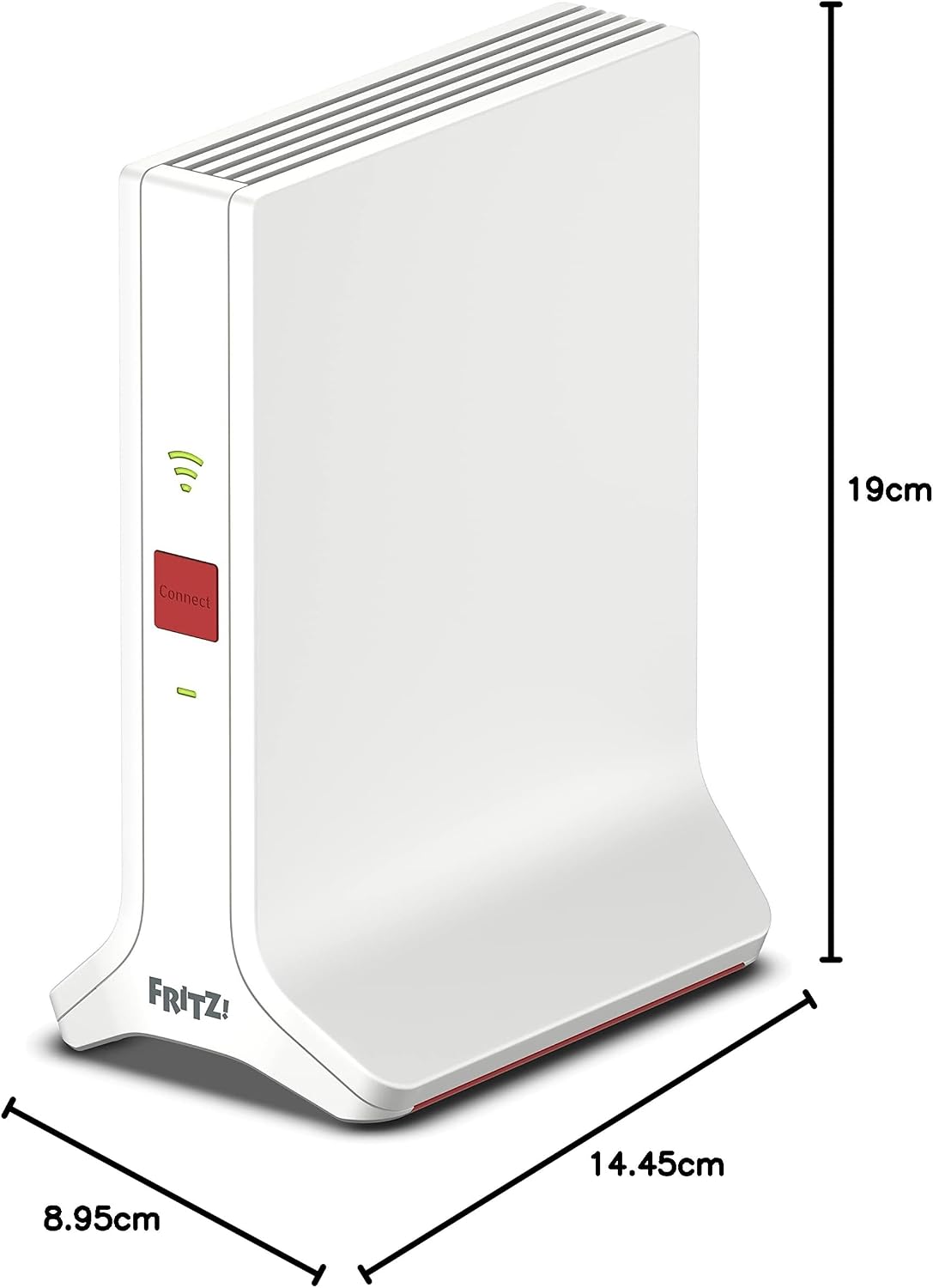
Dimensions of the FRITZ!Repeater 3000 AX.
7. Warranty and Support
AVM provides comprehensive support for its products. For detailed warranty information, please refer to the warranty card included with your product or visit the official AVM website. AVM also offers free software updates and a dedicated support team to assist with any queries or issues.
Online Resources:
- AVM Support Website: https://en.avm.de/service/
- FRITZ!App WLAN: Available for download on app stores for easy setup and management.
Related documents20002988


Ask a question about this manual
Ask about setup, troubleshooting, compatibility, parts, safety, or missing instructions. Manuals+ will review the question and use this page’s manual context to help answer it.