1. Introduction
Thank you for choosing the MXT CXP-202 Professional Speaker Tripod Stand. This manual provides essential information for the safe and effective assembly, operation, and maintenance of your new speaker stand. Please read this manual thoroughly before use and retain it for future reference.
The MXT CXP-202 is designed to provide stable and reliable support for professional loudspeakers, with a maximum load capacity of 25 kg. Its robust construction ensures durability and performance in various settings.
2. Safety Information
Always observe the following safety precautions to prevent injury or damage to the equipment:
- Weight Capacity: Do not exceed the maximum load capacity of 25 kg (55 lbs). Overloading can cause the stand to become unstable and collapse.
- Stable Surface: Always place the stand on a flat, stable, and level surface. Uneven surfaces can lead to instability.
- Leg Spread: Ensure the tripod legs are fully extended and locked into position to maximize stability.
- Secure Speaker: Always ensure the speaker is securely seated on the stand's top plate and, if applicable, secured with any provided locking mechanisms.
- Adjustments: Make height adjustments carefully. Ensure all locking pins and knobs are fully tightened after adjustment.
- Children and Pets: Keep children and pets away from the stand, especially during assembly and operation.
- Transport: Disassemble the stand before transport to prevent damage and ensure safety.
3. Package Contents
Verify that all components are present and undamaged upon opening the package:
- 1 x MXT CXP-202 Speaker Tripod Stand (Main Assembly)
- 1 x Safety Pin (Attached to the stand)

Figure 3.1: Exploded view of the MXT CXP-202 Speaker Stand components.
4. Assembly and Setup
Follow these steps to assemble and set up your speaker stand:
- Unfold the Legs: Place the stand on a flat surface. Gently pull the tripod legs outwards until the leg brace is fully extended and the legs are spread to their maximum stable position. Ensure the brace is locked.
- Adjust Height: Loosen the height adjustment knob on the main pole. Carefully extend the inner pole to the desired height. Ensure the safety pin is inserted through the corresponding hole in the inner pole for added security.
- Secure Height: Tighten the height adjustment knob firmly to lock the inner pole in place. The safety pin acts as a secondary lock.
- Place Speaker: Carefully lift your speaker and place it onto the top mounting plate of the stand. Ensure the speaker is centered and stable.

Figure 4.1: Fully assembled MXT CXP-202 Speaker Stand.
5. Operating Instructions
The MXT CXP-202 stand is designed for straightforward operation:
- Height Adjustment: The stand offers an adjustable height range from approximately 99 cm to 176 cm. To adjust, remove the safety pin, loosen the knob, set the desired height, reinsert the safety pin, and tighten the knob.
- Speaker Placement: The top plate is designed to accommodate most professional loudspeakers. Ensure the speaker's weight is evenly distributed on the plate.
- Stability Check: Before and after placing a speaker, gently rock the stand to ensure it is stable and all locking mechanisms are secure.
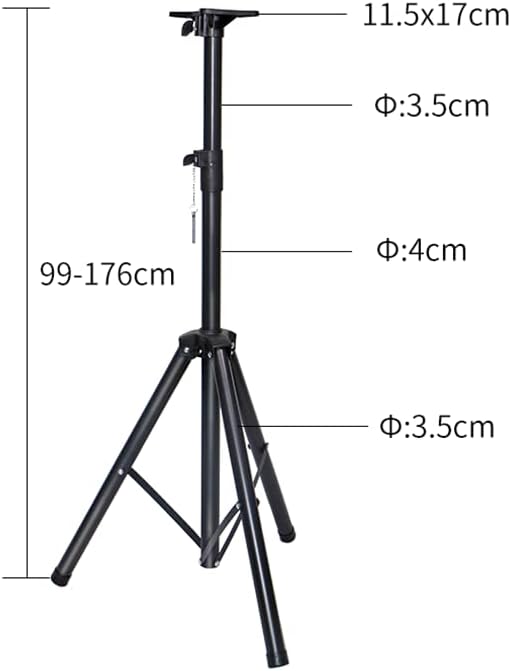
Figure 5.1: Height and dimension details of the MXT CXP-202 Speaker Stand.
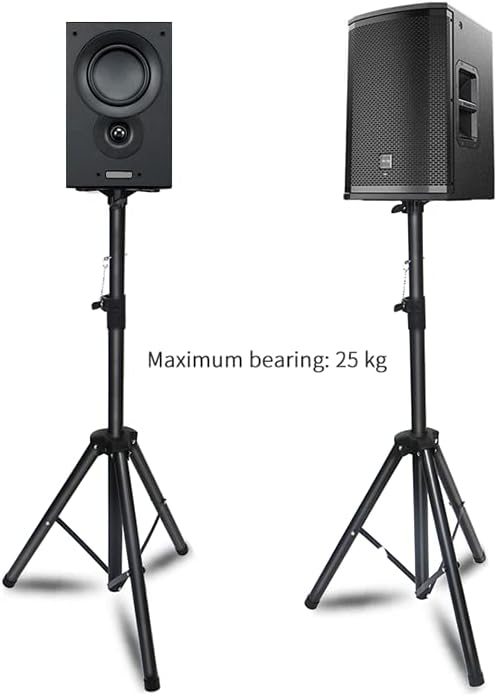
Figure 5.2: Example of speaker placement and maximum load capacity.
6. Maintenance
Proper maintenance will extend the life of your speaker stand:
- Cleaning: Wipe the stand with a soft, dry cloth to remove dust and dirt. For stubborn marks, use a slightly damp cloth and mild soap, then dry thoroughly. Avoid abrasive cleaners.
- Lubrication: Periodically apply a small amount of silicone-based lubricant to the inner pole to ensure smooth height adjustment.
- Inspection: Regularly inspect all bolts, knobs, and the safety pin for tightness and wear. Replace any worn or damaged parts immediately.
- Storage: When not in use, collapse the stand and store it in a dry, cool place to prevent rust and damage.
7. Troubleshooting
If you encounter issues with your speaker stand, refer to the following common problems and solutions:
- Stand is Unstable:
- Ensure the tripod legs are fully extended and locked.
- Verify the stand is on a flat and level surface.
- Check that the height adjustment knob is fully tightened and the safety pin is inserted.
- Ensure the speaker's weight does not exceed 25 kg and is evenly distributed.
- Difficulty Adjusting Height:
- Loosen the height adjustment knob completely.
- Check for any obstructions or debris inside the pole.
- Apply a small amount of silicone lubricant to the inner pole.
- Safety Pin Does Not Fit:
- Ensure the inner pole is aligned correctly with the outer pole's holes.
- Check if the safety pin is bent or damaged.
8. Specifications
| Model: | CXP-202 |
| Brand: | MXT |
| Maximum Load Capacity: | 25 kg (55 lbs) |
| Adjustable Height Range: | Approx. 99 cm - 176 cm (39 in - 69 in) |
| Materials: | Steel, Carbon, Plastic |
| Product Weight: | Approx. 1.86 kg (4.1 lbs) |
| Package Dimensions: | 92 x 13 x 13 cm (36.2 x 5.1 x 5.1 in) |
9. Warranty and Support
MXT products are manufactured to high-quality standards. For information regarding warranty coverage, technical support, or replacement parts, please refer to the contact information provided with your purchase or visit the official MXT website.
Please retain your proof of purchase for any warranty claims.


