Introduction
This manual provides detailed instructions for the safe and efficient use of your Civaza 2-Pack Cordless Rechargeable LED Light Bulbs. These bulbs are designed for versatile lighting, offering both daily illumination and emergency backup during power outages. Please read this manual thoroughly before operation.

Image: Contents of the Civaza 2-Pack, including two bulbs, two remotes, and two USB charging cables.
Product Features and Applications
- Rechargeable Battery: Built-in battery provides up to 30 hours of light on a single charge (depending on brightness level).
- Emergency Function: Automatically illuminates during power failures when installed in a powered E26/E27 socket.
- Remote Control: Adjust brightness and color temperature (3000K Warm Light, 4500K Warm White, 6000K White Light) from up to 16 feet away.
- Manual Control: On/off and brightness adjustment via a button on the bulb.
- USB-C Charging: Each bulb includes a Type-C USB charging cable for convenient recharging.
- Energy Efficient: 12W LED bulbs provide 500-700 lumens, equivalent to a 60W incandescent bulb.
- Versatile Use: Suitable for E26/E27 screw-in base fixtures, or as a portable light source for outdoor activities like camping, night fishing, and hiking.

Image: Overview of the bulb's main features and benefits.
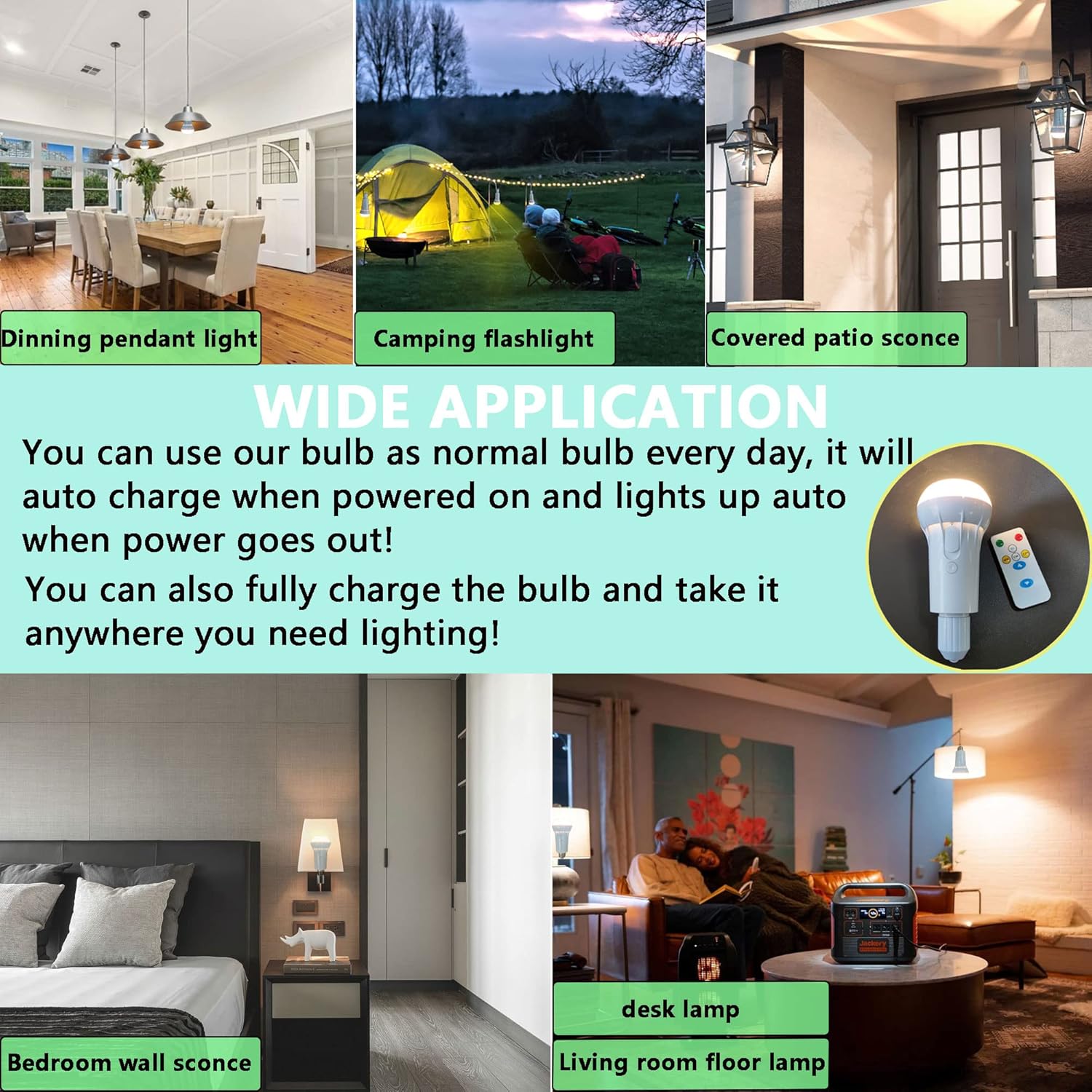
Image: Wide range of applications for the rechargeable light bulbs.
Setup and Charging
- Initial Charge: Before first use, fully charge the light bulb. Connect the provided Type-C USB charging cable to the bulb's charging port and to a USB power source (e.g., computer, USB wall adapter). The charging indicator light will show charging status. A full charge typically takes 7-10 hours.
- Installation (for continuous power/emergency function): Screw the bulb into any standard E26/E27 light fixture. Ensure the fixture's power switch is in the "ON" position for the bulb to charge and function as a normal bulb, as well as to activate the emergency lighting feature during a power outage.
- Portable Use: For portable use, ensure the bulb is fully charged. It can be used without being screwed into a fixture. Each bulb comes with a cover for protection and portability.

Image: Detailed diagram of the bulb's features and remote control functions.
Operating Instructions
Using the Remote Control:
- ON/OFF: Press the "ON" or "OFF" button to turn the bulb on or off.
- Brightness Adjustment: Use the up/down arrow buttons to increase or decrease brightness. There are three brightness levels.
- Level 1: Provides over 12 hours of battery life.
- Level 2: Provides over 18 hours of battery life.
- Level 3: Provides over 30 hours of battery life.
- Color Temperature Selection:
- "WW" (Warm White): Activates 3000K warm light.
- "CW" (Cool White): Activates 6000K white light.
- "C/W" (Cycle White): Cycles through 3000K warm light, 4500K warm white light, and 6000K white light.
- Emergency Function (EL): Press the "EL" button to activate the emergency mode. The bulb will light up automatically during a power outage if the fixture switch is on.
Manual Operation (Button on Bulb):
- Power Button: Press the main switch button on the bulb to turn it on/off or to cycle through brightness levels and color temperatures.

Image: Examples of the three available color temperatures.
Maintenance
- Cleaning: Ensure the bulb is off and cool before cleaning. Wipe with a soft, dry cloth. Do not use liquid cleaners or abrasive materials.
- Battery Care: To prolong battery life, avoid fully discharging the bulb frequently. Recharge promptly when the light dims. If storing for an extended period, charge the bulb every 3-6 months.
- Storage: Store bulbs in a cool, dry place away from direct sunlight and extreme temperatures.
Troubleshooting
| Problem | Possible Cause | Solution |
|---|---|---|
| Bulb does not turn on. | Battery is discharged. Fixture switch is off. Bulb not screwed in properly. | Charge the bulb using the USB-C cable. Ensure the light fixture switch is in the "ON" position. Tighten the bulb into the E26/E27 socket. |
| Remote control not working. | Remote battery is dead. Obstruction between remote and bulb. Remote too far from bulb. | Replace the remote control battery. Ensure a clear line of sight. Operate the remote within 16 feet of the bulb. |
| Emergency function not activating. | Fixture switch is off. Bulb not fully charged. "EL" mode not activated. | Ensure the light fixture switch is in the "ON" position. Fully charge the bulb. Press the "EL" button on the remote. |
| Short battery life. | Bulb used on highest brightness setting. Battery not fully charged. Aging battery. | Reduce brightness level for longer duration. Ensure a full 7-10 hour charge. Battery performance may degrade over time. |
Specifications
| Feature | Detail |
|---|---|
| Brand | Civaza |
| Light Type | LED |
| Special Feature | Rechargeable |
| Wattage | 12 Watts |
| Bulb Shape Size | A19 |
| Bulb Base | E26/E27 |
| Incandescent Equivalent Wattage | 60 Watts |
| Specific Uses For Product | Lamp, Emergency, Outdoor |
| Light Color Options | Warm White (3000K), Neutral White (4500K), White Light (6000K) |
| Brightness | 500-700 Lumens |
| Control Method | Remote, Manual Button |
| Average Life | 35,000 Hours |
| Product Dimensions | 2.95"W x 5.91"H |
| Power Source | Battery Powered |
| Battery Type | Lithium Polymer (3 required per bulb) |
| Charging Cable | Type-C USB (50cm) |
Warranty and Support
For warranty information or technical support, please refer to the product packaging or contact Civaza customer service directly. Keep your purchase receipt for warranty claims.
For further assistance, please visit the manufacturer's official website or contact their support team through the contact details provided with your product.