
LP LIVING PLUS LP-IR18A
LP LIVING PLUS 1800W Induction Cooktop Countertop Burner User Manual
Model: LP-IR18A
Introduction
Thank you for choosing the LP LIVING PLUS 1800W Induction Cooktop Countertop Burner. This manual provides essential information for the safe and efficient operation of your new appliance. Please read it thoroughly before first use and retain it for future reference.
Important Safety Instructions
To prevent injury or damage, always follow these basic safety precautions:
- Induction Cookware Only: This appliance requires induction-compatible cookware. If a non-induction pot is used, an error message will display, and the cooktop will not operate. To check compatibility, use a magnet; if it sticks to the bottom of your pot, it is induction-ready.
- Electrical Requirements: The cooktop operates on a standard 120V electrical outlet, common in North American homes. Ensure the outlet is properly grounded.
- No Open Flame: Induction cooking generates heat directly in the cookware, eliminating an open flame. This reduces the risk of burns and damage to surrounding surfaces.
- Automatic Shut-Off: The cooktop features an automatic shut-off function after 2 hours if no pot is detected, or after the set timer expires (up to 3 hours).
- Placement: Place the cooktop on a stable, flat, heat-resistant surface. Ensure adequate ventilation around the unit.
- Children and Pets: Keep the appliance out of reach of children and pets. The surface can remain hot for a short period after use.
- Cleaning: Always unplug the cooktop before cleaning. Wipe with a damp towel; do not immerse in water.
- Damage: Do not operate the cooktop if the power cord or appliance is damaged. Contact customer support for assistance.
Product Overview
The LP LIVING PLUS Induction Cooktop features a sleek design with intuitive controls. Below are the main components and their functions.

Image: Front view of the LP LIVING PLUS Induction Cooktop, showcasing its round, wood-grain base and control panel.

Image: Close-up of the cooktop's control panel, showing the digital display, touch buttons for mode and power, and the central dial knob.
Components:
- Cooking Surface: Smooth ceramic glass surface where cookware is placed.
- Control Panel: Features a digital display, touch buttons, and a rotary dial for settings adjustment.
- Power Button: To turn the unit on or off.
- Mode Button: To switch between wattage and temperature settings.
- Rotary Dial: Used to adjust power (wattage) or temperature settings, and to set the timer.
- Ventilation Openings: Located on the sides or bottom to ensure proper airflow.
Setup
- Unpack: Carefully remove the cooktop and all packaging materials.
- Placement: Position the cooktop on a dry, stable, and level countertop. Ensure there is at least 4-6 inches of clear space around all sides for proper ventilation.
- Power Connection: Plug the power cord into a standard 120V AC electrical outlet.
- Initial Cleaning: Wipe the cooking surface with a soft, damp cloth before first use.
Operating Instructions
1. Power On/Off
- Place an induction-compatible pot or pan on the center of the cooking surface.
- Press the Power button () to turn the cooktop on. The display will illuminate.
- To turn off, press the Power button again.

Image: The LP LIVING PLUS Induction Cooktop in use, with a stainless steel pot containing food placed on its surface.
2. Adjusting Temperature and Wattage
- After powering on, the cooktop will typically default to a wattage setting.
- Use the Mode button to switch between wattage (W) and temperature (T) settings.
- Wattage Settings: The power can be adjusted from 200W to 1800W. Rotate the Rotary Dial to increase or decrease the wattage.
- Temperature Settings: The temperature can be adjusted from 140°F to 464°F (60°C to 240°C). Rotate the Rotary Dial to select your desired temperature. There are 10 temperature settings available.
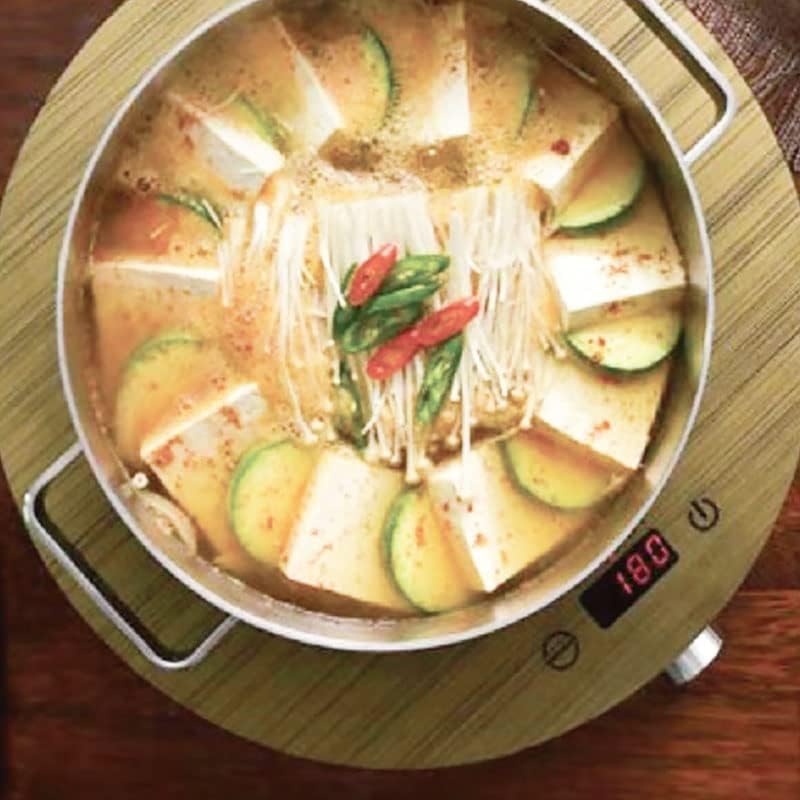
Image: Overhead view of the cooktop with a pot, displaying a numerical setting on the digital screen, indicating active cooking.
3. Using the Timer Function
- While the cooktop is operating, press the Timer button (often integrated with the Mode button or a separate icon).
- Rotate the Rotary Dial to set the desired cooking time, up to a maximum of 3 hours (180 minutes).
- The cooktop will automatically shut off once the timer expires.

Image: A pot of soup cooking on the induction cooktop, with the digital display showing "180", indicating a 180-minute timer setting.
Care and Maintenance
Proper care ensures the longevity and performance of your induction cooktop.
- Cleaning the Surface: After each use, allow the cooktop to cool completely. Unplug the unit. Wipe the ceramic glass surface with a soft, damp cloth. For stubborn stains, a mild non-abrasive cleaner designed for glass cooktops can be used.
- Do Not Immerse: Never immerse the cooktop in water or any other liquid.
- Avoid Abrasives: Do not use abrasive cleaning pads, powders, or harsh chemicals, as these can scratch or damage the surface.
- Ventilation: Keep the ventilation openings clear of dust and debris to prevent overheating.
- Storage: Store the cooktop in a dry, safe place when not in use.
Troubleshooting
If you encounter issues with your cooktop, refer to the following common problems and solutions:
| Problem | Possible Cause | Solution |
|---|---|---|
| Cooktop does not turn on. | Not plugged in; power outage; faulty outlet. | Ensure the power cord is securely plugged into a working 120V outlet. Check your circuit breaker. |
| Error message displayed / Cooktop not heating. | Non-induction compatible cookware; no pot detected; pot not centered. | Use only induction-compatible cookware. Ensure the pot is placed centrally on the cooking zone. |
| Cooktop automatically shuts off. | Timer expired; no pot detected for 2 hours; overheating. | Check if the timer has run out. Ensure a pot is on the surface. If overheating is suspected, unplug and allow to cool before restarting. Ensure proper ventilation. |
| Unusual noise during operation. | Normal fan operation; vibration from cookware. | A low humming sound from the cooling fan is normal. Some cookware may vibrate slightly. If the noise is excessive or unusual, contact support. |
Specifications
| Model | LP-IR18A |
| Power Source | 120V AC, 60Hz |
| Wattage | 1800 watts |
| Temperature Range | 140°F - 464°F (60°C - 240°C) |
| Timer | Up to 3 hours (180 minutes) |
| Dimensions (D x W x H) | 13"D x 13"W x 2"H (33cm D x 33cm W x 5cm H approx.) |
| Item Weight | 6.42 pounds (2.91 kg) |
| Material | Ceramic Glass, Tempered Glass |
| Special Feature | Automatic Shut-Off, Pot Detection |
| Controls Type | Touch, Rotary Dial |
| UPC | 850033358926 |
Warranty and Support
For warranty information or technical support, please refer to the documentation included with your purchase or contact LP LIVING PLUS customer service. Keep your purchase receipt as proof of purchase for any warranty claims.
Contact Information: Please visit the official LP LIVING PLUS website or refer to your product packaging for the most current customer support contact details.