
1. Introduction
The Sensky BS010H Mini PIR Motion Sensor Switch is a passive infrared (PIR) device designed to detect human movement by sensing infrared radiation. It operates within a DC 12V-30V range and outputs a voltage equal to the input voltage. This sensor is ideal for automating LED lighting in various applications such as kitchen cabinets, pantries, closets, and under-bed lighting. It features adjustable delay time and sensitivity settings to customize its operation.
2. Product Features
- Motion Activated: Automatically triggers connected lighting upon detecting movement.
- Adjustable Delay Time: Controls how long the light remains on after activation, with a range of 5-25 seconds (adjustable from 2-280 seconds). Motion detected during the delay resets the timer.
- Adjustable Sensitivity: Determines the required proximity for the sensor to activate, with a detection range of 4M-7M (adjustable from 10cm-7M).
- Wide Application: Suitable for various lighting scenarios including entryway, cabinet, pantry, closet, and under-bed lighting.
- Compact Design: Mini size (48mm x 25mm x 14mm) for discreet installation.
3. Specifications
| Parameter | Value |
|---|---|
| Operating Voltage | DC 12V-30V |
| Load Current | ≤ 3A |
| Delay Time | 5-25 seconds (adjustable 2-280 seconds) |
| Detection Range (Sensitivity) | 4M-7M (adjustable 10cm-7M) |
| Trigger Way | Continuous triggering |
| Blockade Time | 0 seconds |
| Dimensions | 48mm x 25mm x 14mm |
| Cable Length | 300mm |
| Connector Size | 5.5mm x 2.1mm |
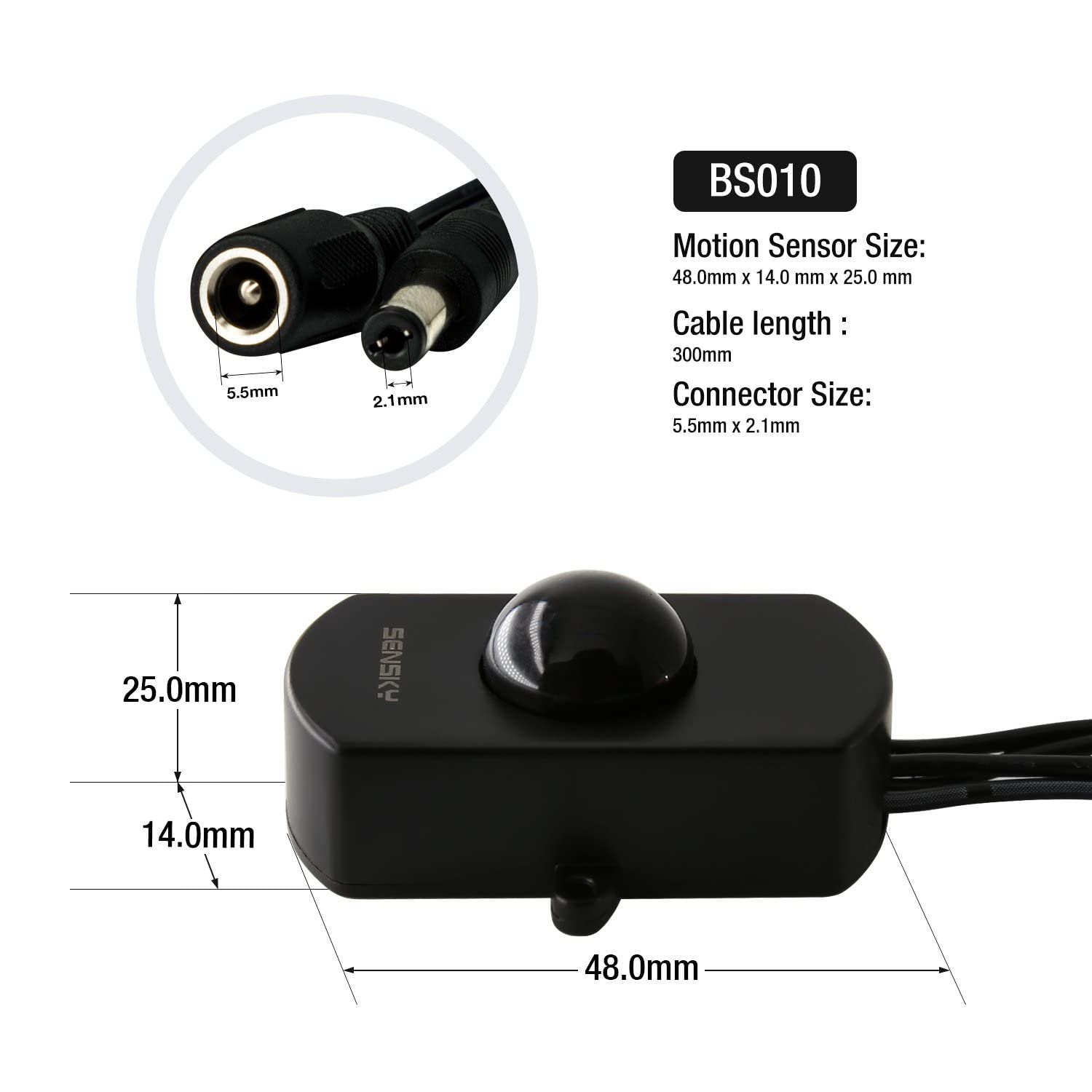
Figure 1: Product dimensions and connector specifications.
4. Installation
The Sensky BS010H is designed for easy integration into existing low-voltage LED lighting systems. Ensure all power is disconnected before installation.
- Connect Input: Connect the female connector of the motion sensor switch to your DC 12V-30V power supply.
- Connect Output: Connect the male connector of the motion sensor switch to your LED lighting load.
- Mounting: Secure the sensor in the desired location. For optimal motion detection, position the sensor so that movement occurs across its detection field rather than directly towards or away from it. This enhances sensitivity and response.
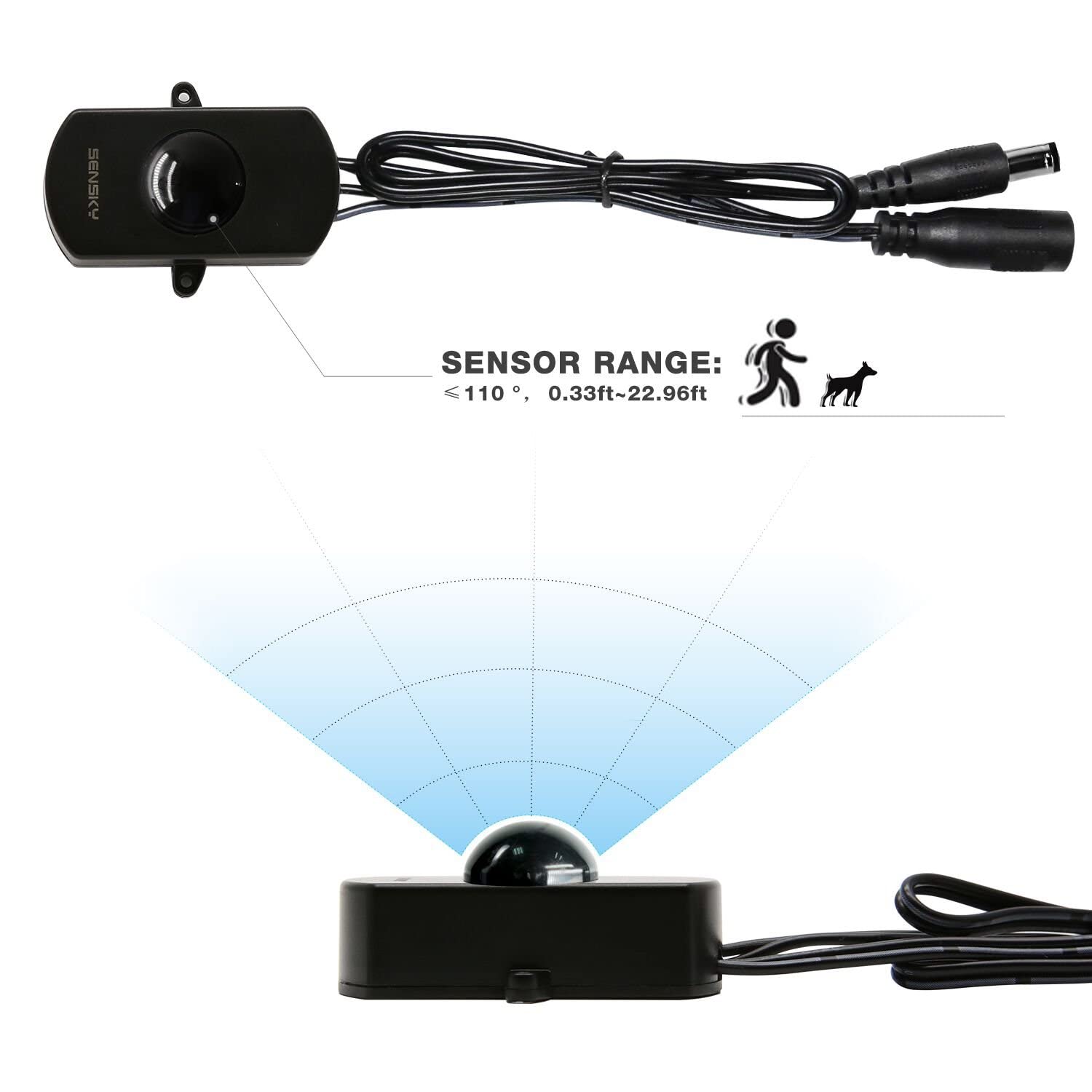
Figure 2: Sensor placement for optimal motion detection. Place the sensor so motion occurs across its field for better response.
5. Operation and Adjustments
The sensor features adjustable settings for delay time, sensitivity, and (for models with light sensor) ambient light threshold. To access these adjustments, carefully open the bottom cover of the sensor unit.

Figure 3: Internal view of the sensor with adjustment potentiometers for delay time, sensitivity, and light sensor (if applicable).
5.1 Delay Time Adjustment
The delay time determines how long the connected light stays on after motion is detected. If new motion is detected during the delay period, the timer will reset and start a new delay cycle.
- Use a small screwdriver to turn the potentiometer labeled "Delay Time".
- Turning clockwise will reduce the delay time.
- Turning anti-clockwise will increase the delay time.
- Tip: To quickly determine optimal sensitivity, set the delay time to its minimum value first. This saves time during testing.
5.2 Sensitivity (Sensor Distance) Adjustment
The sensitivity setting controls the detection range, determining how close an object needs to be to activate the sensor.
- Use a small screwdriver to turn the potentiometer labeled "Sensitivity" or "Sensor Distance".
- Turning clockwise will increase the sensor distance (more sensitive).
- Turning anti-clockwise will decrease the sensor distance (less sensitive).
5.3 Light Sensor Adjustment (For models with light sensor)
This model (BS010H Black-Without Light Sensor) does not include a dedicated light sensor. For models that include this feature, the adjustment works as follows:
- Use a small screwdriver to turn the potentiometer labeled "Light Sensor".
- Turning clockwise will reduce the ambient light threshold (e.g., only activate in very dark conditions).
- Turning anti-clockwise will increase the ambient light threshold (e.g., activate in dim conditions).
- Example: If set to 20 lux, the light will only turn on if motion is detected AND the ambient light is less than 20 lux. If ambient light is above 20 lux, the light will not turn on even with motion.

Figure 4: Adjustment knobs for delay time and sensor distance. Note: Some models may include a light sensor adjustment.
6. Applications
The Sensky BS010H motion sensor switch can be used in various settings to provide convenient, motion-activated lighting.

Figure 5: Examples of wide applications for the motion sensor switch.
- Cabinet Lighting: Automatically illuminates cabinets when opened.
- Wardrobe Lighting: Provides light inside wardrobes upon opening the door.
- Pantry Lighting: Convenient hands-free lighting for pantries.
- Under-Bed Lighting: Soft illumination when stepping out of bed at night.
- Security Systems: Can be integrated into simple motion-activated alarm systems (as demonstrated in the video).
Video 1: Demonstration of the Sensky motion sensor switch in various applications, including cabinet, wardrobe, and under-bed lighting, and its use in a simple alarm system. The video also shows how to adjust the delay time, sensitivity, and light sensor settings.
7. Troubleshooting
- Light does not turn on:
- Check power connections to ensure they are secure.
- Verify the input voltage is within the DC 12V-30V range.
- If your model has a light sensor, ensure the ambient light is below the set threshold. Adjust the light sensor potentiometer if necessary (turn anti-clockwise to increase threshold).
- Increase sensitivity by turning the sensitivity potentiometer clockwise.
- Light stays on too long or not long enough:
- Adjust the delay time potentiometer. Turn clockwise to reduce delay, anti-clockwise to increase.
- Ensure there is no continuous motion within the detection range that might be resetting the timer.
- Sensor is too sensitive or not sensitive enough:
- Adjust the sensitivity potentiometer. Turn clockwise to increase sensitivity, anti-clockwise to decrease.
- Consider the mounting position; ensure motion crosses the sensor's field.
- Sensor activates unexpectedly:
- Check for heat sources or air conditioning vents in the detection area, as PIR sensors respond to temperature changes.
- Reduce sensitivity by turning the sensitivity potentiometer anti-clockwise.
8. Maintenance
The Sensky BS010H motion sensor switch requires minimal maintenance.
- Keep the sensor lens clean and free from dust or obstructions. Use a soft, dry cloth for cleaning.
- Avoid exposing the sensor to excessive moisture or direct water, as it is not waterproof.
- Do not attempt to disassemble the unit beyond opening the bottom cover for adjustments.
9. Warranty and Support
Sensky products are designed for reliability and performance. For warranty information or technical support, please refer to the product packaging or contact Sensky customer service through your retailer.