1. Introduction
The 3Gen DL5 Polarized Dermascope is an advanced handheld device designed for non-invasive visual examination of intact skin. It features a variable polarization system, allowing users to switch between polarized and non-polarized modes and to optically explore a lesion's visual depths by scrolling through the polarization range.
This manual provides essential information for the proper setup, operation, and maintenance of your DL5 Dermascope to ensure optimal performance and longevity.
2. Intended Use
The 3Gen DL5 Dermascope is intended for medical purposes to illuminate body surfaces. It is used for non-invasive visual examination of intact skin within professional healthcare facilities by medical professionals. This battery-operated product is designed for external examination only.
3. Key Features
- Variable Polarization System: Seamlessly switch between polarized and non-polarized modes.
- Depth Exploration: Scroll-and-push button dial for optical exploration of lesion depths.
- Superior Optics: Designed for clear and detailed visualization.
- Superviolet Illumination: Enhanced lighting for specific examinations.
- Smartphone Compatibility: Easily connect to smartphones for image capture and documentation.
- Ergonomic Design: Practical and comfortable for extended use.
4. Components Overview
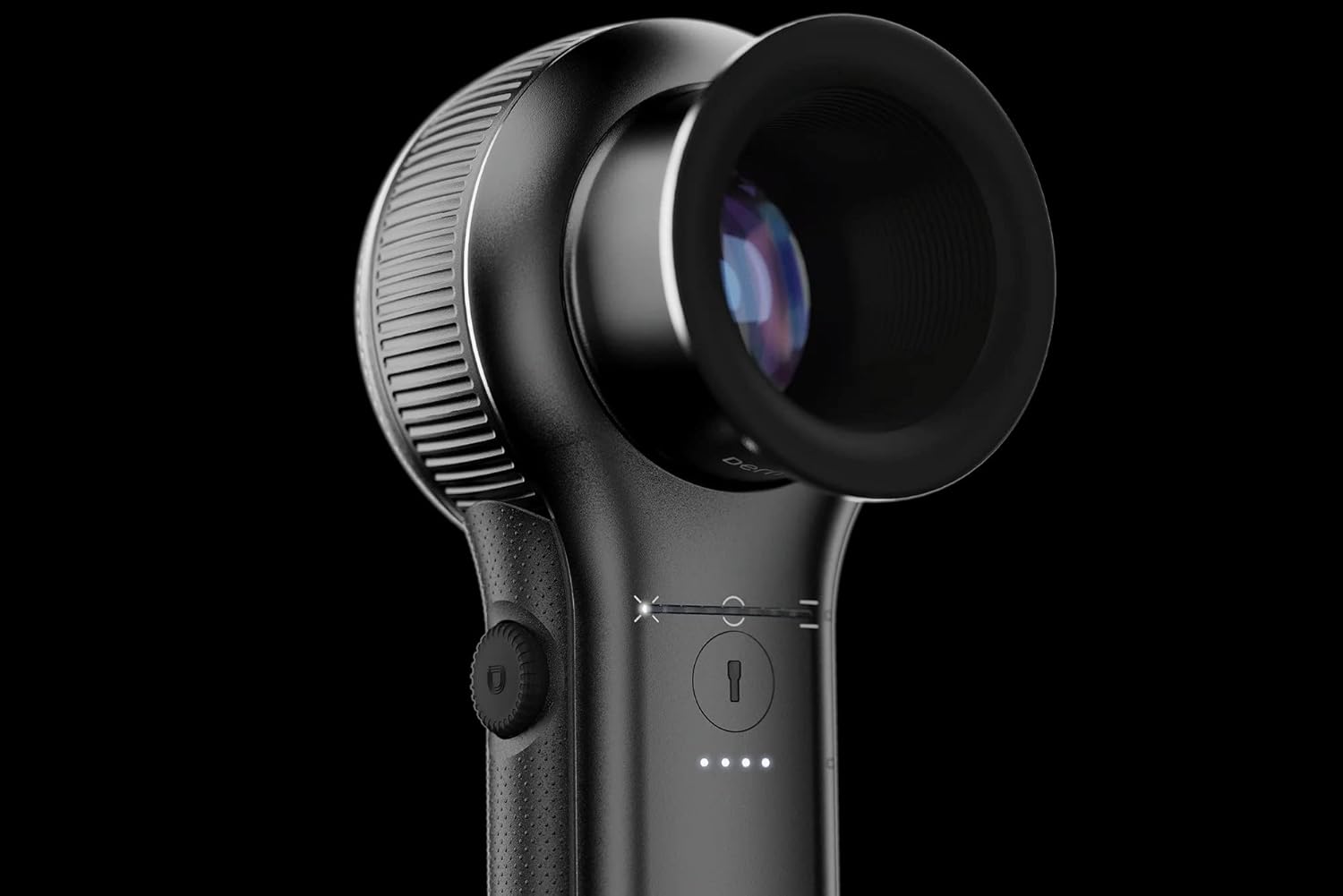
Figure 1: Front view of the 3Gen DL5 Polarized Dermascope, highlighting the main lens and control interface.

Figure 2: The DL5 Dermascope placed in its charging base, showing the device's upright position and charging ports.

Figure 3: Various components of the DL5 system, including the dermascope, charging base, and smartphone adapter, illustrating its modular design.

Figure 4: Top view of the DL5 Dermascope in its charging base, with the illumination light active, demonstrating its readiness for use.
5. Setup
5.1 Initial Charging
Before first use, fully charge the DL5 Dermascope. Connect the provided power adapter to the charging base and plug it into a standard electrical outlet. Place the dermascope into the charging base. The indicator lights on the device will show charging status.
5.2 Attaching Accessories (Optional)
If using with a smartphone, attach the compatible smartphone adapter (sold separately) to the DL5 Dermascope according to the adapter's instructions. Ensure a secure connection.
6. Operating Instructions
6.1 Powering On/Off
Press and hold the power button located on the side of the device to turn the DL5 Dermascope on or off. The illumination lights will activate upon powering on.
6.2 Adjusting Polarization
The DL5 features a variable polarization system. Rotate the scroll-and-push button dial to adjust the level of polarization. This allows for visualization of superficial structures under parallel polarization and deeper exploration by scrolling through the entire polarization range.
6.3 Examination Procedure
- Ensure the patient's skin is clean and free of obstructions.
- Place the dermascope lens gently onto the area of interest.
- Adjust the polarization as needed for optimal visualization.
- Observe the skin structure through the lens.
- If connected to a smartphone, use the associated application to capture images or video.
6.4 Superviolet Mode
Activate the Superviolet illumination mode by pressing the designated button (refer to device markings). This mode provides specific lighting for enhanced visualization of certain skin characteristics.
7. Maintenance
7.1 Cleaning the Device
- Lens: Use a soft, lint-free cloth specifically designed for optical lenses. Gently wipe the lens surface. Do not use abrasive cleaners or solvents.
- Body: Wipe the exterior of the device with a soft cloth dampened with a mild disinfectant solution. Ensure no liquid enters the device openings.
- Always power off the device before cleaning.
7.2 Battery Care
To prolong battery life, avoid fully discharging the device frequently. Store the device in a cool, dry place when not in use for extended periods. Recharge the battery regularly, even if not in active use.
8. Troubleshooting
| Problem | Possible Cause | Solution |
|---|---|---|
| Device does not power on. | Low or depleted battery. | Charge the device fully using the provided charging base and adapter. |
| Image is blurry or unclear. | Dirty lens; incorrect focus/polarization. | Clean the lens. Adjust the polarization dial. Ensure proper contact with skin. |
| Device not connecting to smartphone. | Incorrect adapter attachment; app issues. | Ensure the smartphone adapter is correctly attached. Restart the smartphone and the associated app. |
9. Specifications
- Model Name: DL5
- Manufacturer: 3Gen
- Light Source Type: LED
- Material: Plastic
- Color: Black
- Power Source: Battery Powered
- Voltage: 240 Volts (Charging adapter input)
- Compatible Devices: Smartphone (with adapter)
- Item Weight: 3.63 pounds (approx. 1.65 kg)
- Package Dimensions: 14.17 x 5.83 x 3.98 inches (approx. 36 x 14.8 x 10.1 cm)
- Objective Lens Description: Achromatic
- Real Angle of View: 30 Degrees
10. Warranty and Support
For warranty information and technical support, please refer to the documentation provided with your purchase or contact 3Gen customer service directly. Contact details can typically be found on the manufacturer's official website or on the product packaging.
Note: As per the provided data, specific warranty terms and support contact information are not available in this manual. Please consult your product's original packaging or the manufacturer's website for the most current details.