
XYszpcgs WT-M14
Motion Activated Voice Player - WT-M14 Instruction Manual
Model: WT-M14-Button Recording
Introduction
The XYszpcgs Motion Activated Voice Player (Model WT-M14) is a versatile device designed to play pre-recorded audio messages upon detecting motion. It features a built-in microphone for instant recording, a 1-watt speaker for clear sound, and a wide-angle PIR sensor. This device is suitable for various indoor applications, including home safety reminders, point-of-sale advertising, door greeting, and more.
Its compact size and easy-to-use interface make it an effective tool for communication and security in diverse environments.
Product Overview
Familiarize yourself with the components of your Motion Activated Voice Player.

Figure 1: Labeled components of the WT-M14 Motion Activated Voice Player.
- Inductive Probe (Sensor): Detects motion within its range.
- Indicator Light: Provides visual feedback for operation and recording status.
- Button A: Used for playing and recording audio.
- Button B: Used for navigating audio, adjusting volume, and deleting recordings.
- Built-in Microphone: Captures audio for recording.
- Power/Volume Switch: Controls power and adjusts playback volume.
- Speakers: Outputs the recorded or pre-loaded audio.
- Micro USB Interface: For power supply (DC5V).

Figure 2: Dimensions of the WT-M14 device.
Setup
1. Power Supply
The device can be powered by 3x AAA 1.5V batteries (not included) or a DC5V USB power supply.
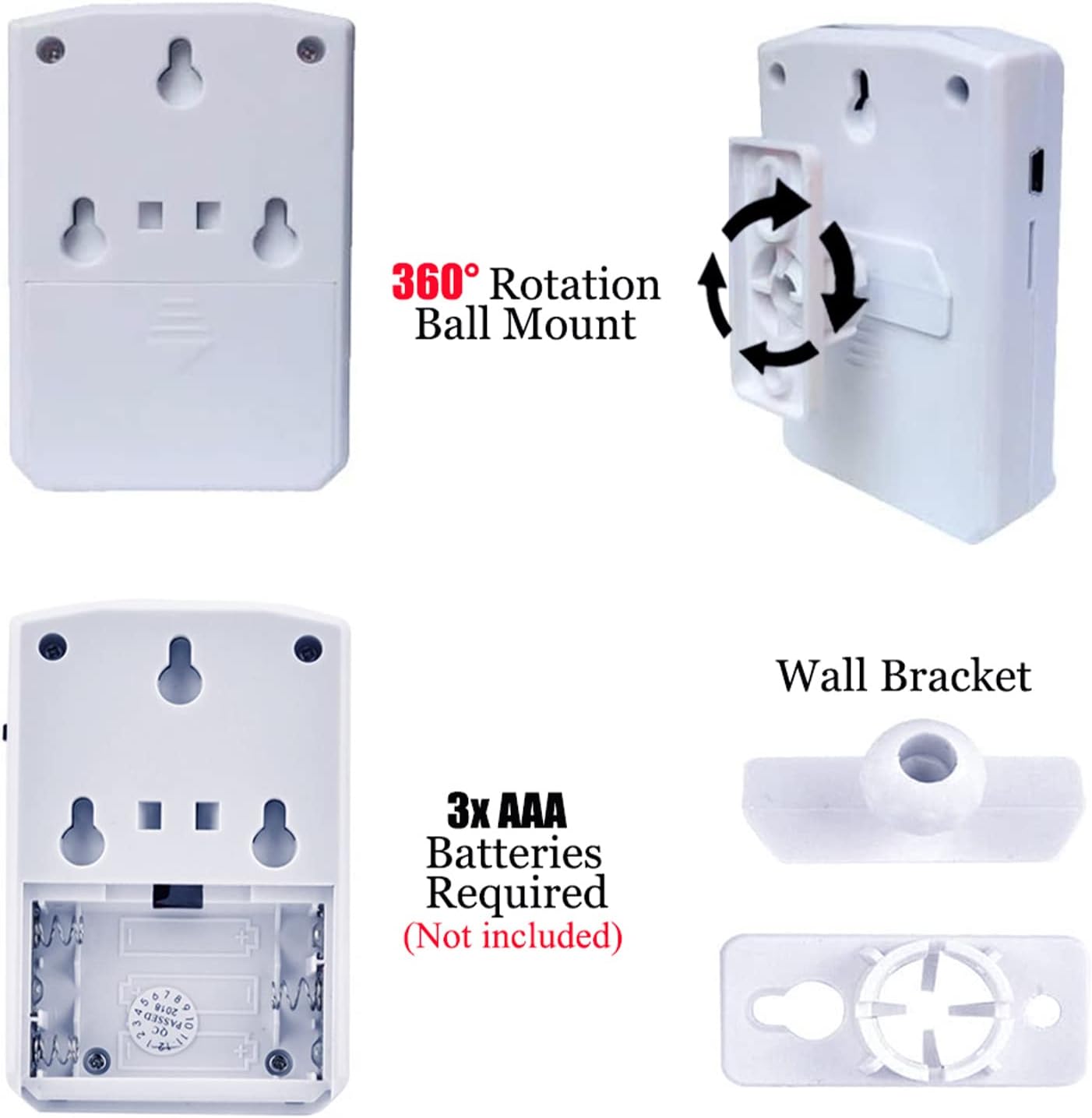
Figure 3: Battery compartment and mounting accessories.
- Open the battery compartment cover on the back of the device.
- Insert 3 AAA batteries, ensuring correct polarity (+/-).
- Close the battery compartment cover.
- Alternatively, connect a DC5V USB cable (not included) to the Micro USB interface for continuous power.
2. Mounting
The device comes with a ball mount and Velcro fasteners for flexible installation.
- Using the Ball Mount: Attach the ball mount to a wall or surface using screws (not included). The device can then be attached to the ball mount, allowing for 360-degree rotation and angle adjustment.
- Using Velcro Fasteners: Apply the provided Velcro fasteners to the back of the device and the desired mounting surface for quick and easy attachment.
- Ensure the device is positioned to allow for optimal motion detection within the desired area. The sensor has a 120° horizontal and 60° vertical detection angle, with a range of up to 13 feet (4 meters).

Figure 4: Infrared detection angles and range.
Operating Instructions
This section details how to record, play, and manage audio messages on your device.

Figure 5: Button functions for WT-M14.
1. Recording Audio
The device allows for instant recording using its built-in microphone. The total recording time is up to 8 minutes (16Mbit/2MB memory). Each new recording overwrites the previous one.
- Ensure the device is powered on.
- To start recording: Long press Button A for 2 seconds. You will hear a "di" sound, indicating recording has started.
- Speak clearly into the built-in microphone.
- To stop recording: Press Button A again. You will hear a "di-di" sound, confirming the recording is saved.
- Important Note: If you hear only one "ding" after pressing Button A to record, it means the recording has started. Press Button A again to stop and save the recording, which will be indicated by two "dings".
2. Playing Audio
- Motion Activated Playback: When motion is detected within the sensor's range, the device will automatically play the recorded message.
- Manual Playback (Button A): Short press Button A to play the current audio. Press again to stop playback.
- Play Next Audio (Button B): Short press Button B to play the next recorded audio if multiple recordings are stored.
3. Adjusting Volume
- Volume Control (Button B): Short press Button B twice rapidly to adjust the volume. There are 3 levels of volume. The highest volume setting will be indicated by a "di" sound from Button B.
4. Deleting Recordings
- Delete Previous Recording (Button B): Long press Button B for 2 seconds to delete the previous recording.
5. Understanding Motion Detection
The device utilizes a Passive Infrared (PIR) sensor to detect movement. It has a 120-degree wide-angle sensor and can detect motion from up to 13 feet (4 meters). The detection range is not adjustable.
Video 1: Demonstration of the motion activated voice player hidden in a Christmas tree, playing a Christmas song when a person walks by. This illustrates its use as a greeter or for festive purposes.
Maintenance
- Cleaning: Wipe the device with a soft, dry cloth. Do not use abrasive cleaners or immerse the device in water.
- Battery Replacement: Replace batteries when the sound quality degrades or the device stops responding. Always use new AAA batteries.
- Storage: If storing the device for an extended period, remove the batteries to prevent leakage. Store in a cool, dry place.
- Environment: This device is designed for indoor use. Avoid exposure to extreme temperatures, direct sunlight, and high humidity. It is not waterproof.
Troubleshooting
| Problem | Possible Cause | Solution |
|---|---|---|
| Device does not power on. | Batteries are dead or incorrectly inserted. No USB power. | Check battery polarity and replace if necessary. Ensure USB power supply is connected and functional. |
| Cannot record or recording is static/empty. | Incorrect recording procedure. Microphone obstruction. | Ensure you long press Button A for 2 seconds to start recording (listen for "di" sound), then press Button A again to stop (listen for "di-di" sound). Speak clearly into the microphone. Ensure microphone is not covered. |
| Motion detection is not working. | Sensor obstructed. Object outside detection range/angle. | Ensure the PIR sensor is clear of obstructions. Verify the object is within the 13-foot range and 120° horizontal / 60° vertical detection angle. Note that the device may not detect through glass. |
| Sound is too low or too loud. | Volume setting is not optimal. | Short press Button B twice rapidly to cycle through the 3 volume levels. |
| Previous recording not deleted. | Incorrect deletion procedure. | Long press Button B for 2 seconds to delete the previous recording. |
Specifications
- Brand: XYszpcgs
- Model: WT-M14-Button Recording
- Color: White
- Power Source: 3x AAA 1.5V batteries (not included) or DC5V USB power supply
- Maximum Detection Range: 4 Meters (13 feet)
- Detection Angle: 120° Horizontal, 60° Vertical
- Speaker: 8Ω 1W built-in speaker
- Memory: 16Mbit (2MB)
- Total Recording Time: Up to 8 minutes
- Product Dimensions: 0.24 x 0.12 x 0.35 inches (approx. 60mm x 90mm x 26.6mm)
- Material: Plastic
- Usage: Indoor
- Included Components: Detector, Ball mount, Velcro fasteners, Quick Guide
- UPC: 757611427732
Warranty and Support
Specific warranty information for the XYszpcgs Motion Activated Voice Player (Model WT-M14) is not provided in this manual. Please refer to the product packaging or contact the manufacturer directly for warranty details and customer support.
For further assistance or inquiries, please visit the official XYszpcgs store or contact their customer service department.
Official Store Link: XYszpcgs Store on Amazon