1. Introduction
Thank you for purchasing the FR-TEC Formula Wheel. This manual provides essential information for setting up, operating, and maintaining your racing wheel. Please read this manual thoroughly before use to ensure proper functionality and a satisfying gaming experience. Keep this manual for future reference.
2. Package Contents
Verify that all items listed below are included in your package:
- FR-TEC Formula Wheel Unit
- Pedal Unit (Accelerator and Brake)
- User Manual (this document)

Figure 2.1: The FR-TEC Formula Wheel, pedal unit, and product packaging.
3. Setup
3.1 Attaching the Wheel to a Surface
The FR-TEC Formula Wheel is designed for stable mounting on a table or desk. Utilize the integrated clamping mechanism to secure the wheel base firmly to your desired surface. Ensure the surface is clean and dry for optimal grip.

Figure 3.1: The FR-TEC Formula Wheel securely mounted to a table, showing the adjustable angle.
3.2 Connecting the Pedal Unit
Connect the pedal unit cable to the designated port on the rear of the FR-TEC Formula Wheel base. Ensure the connection is secure. Place the pedal unit on a flat surface, preferably against a wall or object to prevent movement during use.
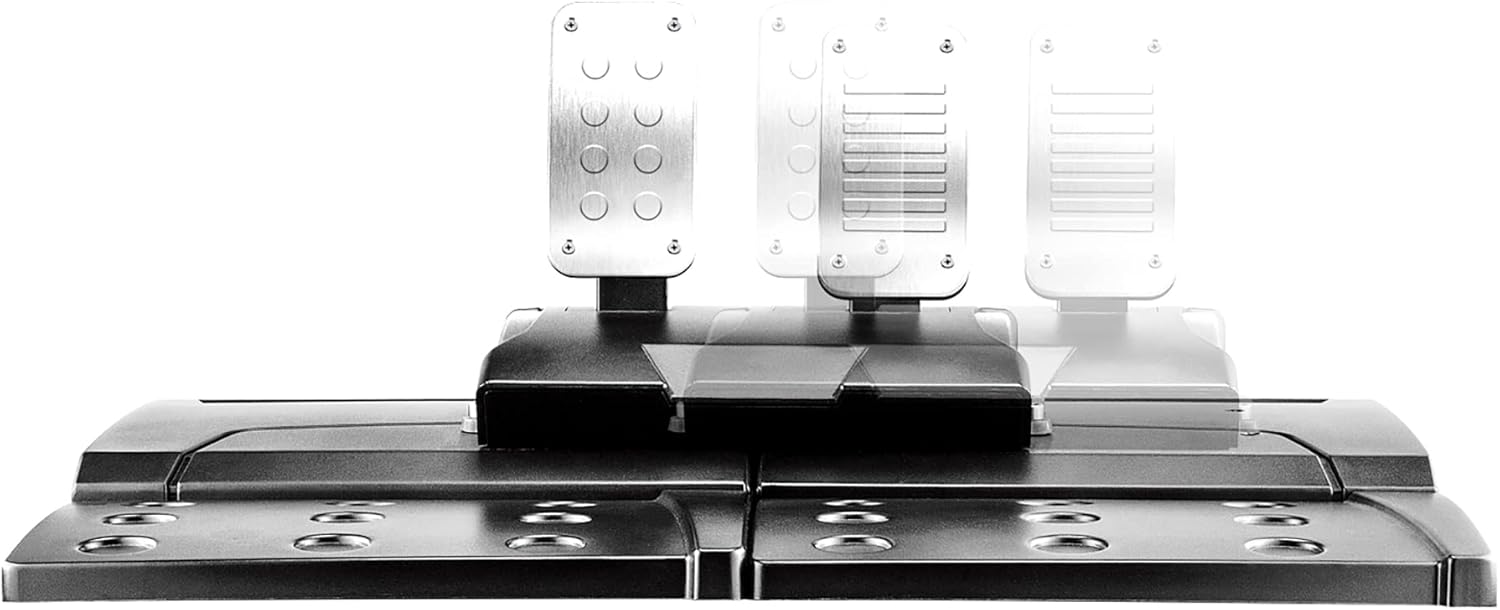
Figure 3.2: The FR-TEC Formula Wheel pedal unit, featuring accelerator and brake pedals.
3.3 Connecting to Your Console/PC
Connect the USB cable from the FR-TEC Formula Wheel to an available USB port on your gaming console (PS4, PS3, Xbox One, Xbox Series X/S, Nintendo Switch) or PC. The system should automatically detect the device. For PC, driver installation may be required, which can typically be found on the manufacturer's website.
4. Operating Instructions
4.1 Basic Controls and Functions
The Formula Wheel features a variety of buttons and controls for an immersive racing experience:
- Action Buttons: Four primary action buttons (e.g., Triangle, Circle, Cross, Square or A, B, X, Y depending on platform).
- 8-Way Directional Pad: For menu navigation and specific in-game controls.
- 3D Thumbstick: Provides additional control input.
- Shoulder Buttons (L1, L2, R1, R2): Located on the wheel for various functions.
- SHARE/OPTIONS Buttons: For system-level functions on compatible consoles.
- HOME Button: To access the console's home menu.

Figure 4.1: Front view of the FR-TEC Formula Wheel, highlighting the various buttons and controls.
4.2 Programmable Keys
The Formula Wheel supports 8 programmable keys, including the right and left cams, brake, accelerator, L3, and R3. Refer to your game's control settings to customize these functions for an optimized experience. The 'PROG' button may be used to initiate programming mode; consult the on-screen prompts or game manual for specific instructions.
4.3 Vibration Feedback
The built-in vibration motors provide realistic feedback for different in-game situations, such as collisions, road textures, and engine RPM. This feature enhances immersion, provided the game supports vibration feedback.
4.4 270-Degree Rotation
The wheel offers a 270-degree rotation angle, allowing for precise steering control. It also features an automatic self-centering function to return the wheel to its neutral position when not actively steered.
4.5 Removable Steering Wheel
The steering wheel can be easily removed from its base. This feature allows for convenient storage and helps save space when the wheel is not in use. To remove, follow the instructions provided with the product, typically involving a release mechanism at the base of the wheel.

Figure 4.2: The FR-TEC Formula Wheel demonstrating its removable steering wheel feature.
5. Compatibility
The FR-TEC Formula Wheel is compatible with the following gaming platforms:
- PC
- PlayStation 3 (PS3)
- PlayStation 4 (PS4)
- Xbox One
- Xbox Series X/S
- Nintendo Switch
6. Maintenance
To ensure the longevity and optimal performance of your FR-TEC Formula Wheel, follow these maintenance guidelines:
- Cleaning: Use a soft, dry cloth to wipe down the wheel and pedal unit. For stubborn dirt, a slightly damp cloth can be used, but ensure no moisture enters any openings. Avoid abrasive cleaners or solvents.
- Storage: When not in use, store the wheel in a clean, dry place away from direct sunlight and extreme temperatures. The removable wheel feature can aid in compact storage.
- Cable Care: Avoid sharp bends or kinks in the cables. Do not pull on the cables to disconnect the device.
7. Troubleshooting
If you encounter issues with your FR-TEC Formula Wheel, refer to the following common problems and solutions:
- Wheel Not Responding:
- Ensure the USB cable is securely connected to both the wheel and the console/PC.
- Try connecting to a different USB port.
- Restart your console or PC.
- Verify that the game you are playing supports racing wheels.
- No Vibration Feedback:
- Check if the game you are playing supports vibration feedback.
- Ensure vibration settings are enabled in the game's options menu.
- Pedals Not Working:
- Ensure the pedal unit cable is firmly connected to the wheel base.
- Test the pedals in a different game or calibration utility if available.
- Incorrect Steering Response:
- Calibrate the wheel through your console's or PC's controller settings, if applicable.
- Adjust steering sensitivity within the game settings.
If these steps do not resolve the issue, please contact FR-TEC customer support for further assistance.
8. Specifications
| Model Number | FT7013 |
| Manufacturer | FR-TEC |
| Rotation Angle | 270 degrees |
| Vibration Feedback | Yes (game dependent) |
| Programmable Keys | 8 (including L3, R3, cams, brake, accelerator) |
| Connectivity | USB |
| Dimensions (Parcel) | 34.29 x 34.2 x 22.7 cm |
| Weight (Parcel) | 4.36 kg |
9. Warranty and Support
FR-TEC products are manufactured to high-quality standards. For information regarding warranty coverage, technical support, or service, please refer to the warranty card included with your product or visit the official FR-TEC website. Keep your proof of purchase for warranty claims.
