
1. Introduction
This manual provides essential instructions for the safe and effective operation of your Ogeto LDM30 Laser Distance Meter. Please read this manual thoroughly before using the device and keep it for future reference.

Figure 1: Ogeto LDM30 Laser Distance Meter with USB cable and wrist strap.
What's in the Box:
- 1 x Ogeto LDM30 Laser Distance Meter
- 1 x USB Charging Cable
- 1 x Wrist Strap
- 1 x User Manual
2. Safety Information
The Ogeto LDM30 is a Class 2 laser product. Observe the following safety precautions:
- Do not stare directly into the laser beam.
- Do not aim the laser beam at people or animals.
- Do not use optical instruments (e.g., binoculars, telescopes) to view the laser beam.
- Keep the device out of reach of children.
- Do not attempt to modify or disassemble the device.
- Use the device only for its intended purpose as described in this manual.
3. Product Overview
Key Features:
- High accuracy: ±2mm
- Measurement range: 0-30m
- Multiple measurement modes: Length, Area, Volume, Pythagorean Theorem
- Type-C USB charging
- Quick response: 0.25s
- Lightweight and portable (approx. 40g)
- Memory function for storing measurements

Figure 2: Device highlighting high accuracy (±2mm), 0-30m range, Type-C charging, and 0.25s quick response.
Device Layout:

Figure 3: Front view of the Ogeto LDM30, showing the display, power button, and Ogeto branding, along with key features.
Compact Design:

Figure 4: Size comparison illustrating the compact and portable design of the Ogeto LDM30.
4. Setup
4.1. Charging the Device:
The Ogeto LDM30 features a built-in rechargeable Lithium-ion battery. Use the provided Type-C USB cable to charge the device.
- Connect the Type-C end of the cable to the device's charging port.
- Connect the USB-A end to a power bank, adapter, or computer USB port.
- The battery indicator on the display will show charging status.

Figure 5: Type-C charging port and various charging options for the device.
4.2. Power On/Off:
- To power on: Press and hold the power button (usually marked with a circle and a vertical line) for a few seconds.
- To power off: Press and hold the power button again, or the device may automatically power off after a period of inactivity to conserve battery.
5. Operating Instructions
5.1. Changing Measurement Modes:
The device supports various measurement modes. Press the 'FUNC' or mode button to cycle through the available options: Length, Area, Volume, and Pythagorean Theorem.
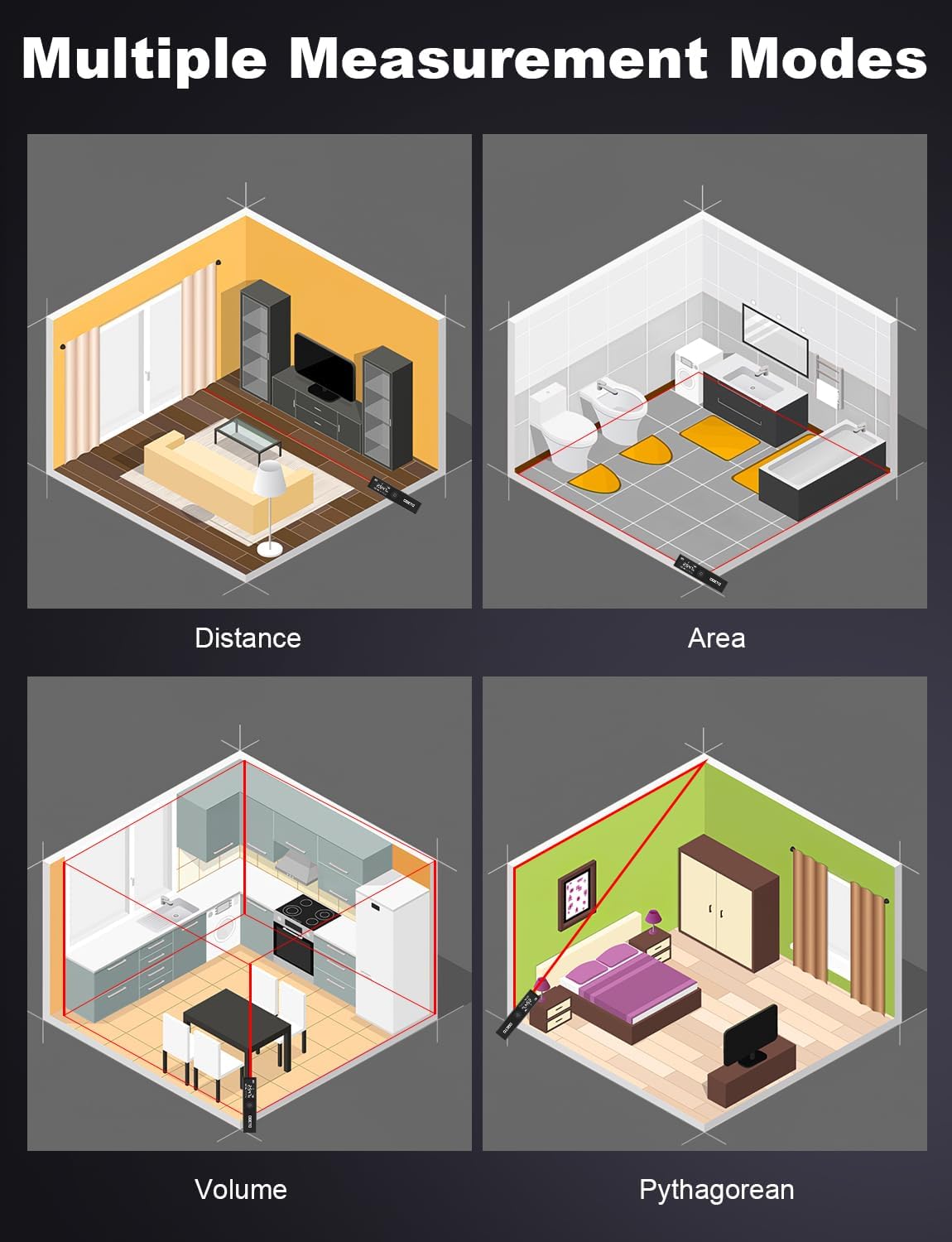
Figure 6: Visual representation of the different measurement modes.
5.2. Changing Reference Point:
The measurement can be taken from the front or the rear of the device. Press the reference point button (often labeled with an icon showing the device and an arrow) to switch between these two options.

Figure 7: Illustration of selecting the front or rear reference point for measurements.
5.3. Unit Conversion:
To change the unit of measurement (e.g., meters, feet, inches), press the 'UNIT' button. The current unit will be displayed on the screen.
5.4. Continuous Measurement:
In continuous measurement mode, the device will constantly update the distance as you move it, allowing for dynamic measurements.
5.5. Memory Function:
The device can store up to 99 sets of measurement data. Refer to the on-screen indicators to access and review stored measurements.
6. Measurement Modes in Detail
6.1. Single Distance Measurement:
Point the laser at the target and press the measurement button (often labeled 'READ' or with a red triangle). The distance will be displayed instantly.

Figure 8: Examples of Distance, Area, Volume, and Pythagorean measurements.
6.2. Area Measurement:
Select the area measurement mode. Measure the length and width of the area. The device will automatically calculate and display the area.
6.3. Volume Measurement:
Select the volume measurement mode. Measure the length, width, and height. The device will automatically calculate and display the volume.
6.4. Pythagorean Theorem Measurement:
This mode allows indirect measurement of heights or distances using the Pythagorean theorem. Follow the on-screen prompts to take the required measurements (e.g., hypotenuse and one side for 2-point, or multiple sides for 3-point). The device will calculate the unknown dimension.

Figure 9: The Ogeto LDM30 in various application scenarios.
7. Care and Maintenance
- Clean the device with a soft, damp cloth. Do not use abrasive cleaners or solvents.
- Ensure the laser lens is clean for accurate measurements.
- Store the device in a dry, cool place, away from direct sunlight and extreme temperatures.
- If the device will not be used for an extended period, ensure it is fully charged before storage.
8. Troubleshooting
| Problem | Possible Cause | Solution |
|---|---|---|
| Device does not power on | Low battery or device malfunction. | Charge the device fully. If problem persists, contact support. |
| Inaccurate measurements | Dirty lens, incorrect reference point, or environmental factors. | Clean the lens. Verify the reference point setting. Avoid strong light sources. |
| Laser beam not visible | Strong ambient light or laser malfunction. | Use in lower light conditions. If problem persists, contact support. |
9. Specifications
| Feature | Detail |
|---|---|
| Brand | Ogeto |
| Model Number | LDM30 |
| Measurement Range | 30 meters |
| Accuracy | ±2mm |
| Material | Plastic |
| Color | Black |
| Weight | 80 Grams |
| Dimensions (L x W x H) | 8 x 2 x 2 cm |
| Battery Type | Lithium-ion (included) |
| Water Resistance Level | Waterproof |
10. Warranty and Support
Ogeto provides a standard manufacturer's warranty for this product. For warranty claims, technical support, or any inquiries, please contact Ogeto customer service through your purchase platform or the official Ogeto website. Please retain your proof of purchase for warranty validation.