1. Introduction
This manual provides essential information for the safe and effective use of your Braun Series 7 71-S7200cc Wet & Dry Shaver. Please read all instructions carefully before using the appliance and retain this manual for future reference. The Braun Series 7 is designed to provide a close and comfortable shave, adapting to your facial contours with its 360° Flex head and AutoSense Technology.
2. Important Safety Information
To reduce the risk of electric shock, injury, or fire, always observe the following safety precautions:
- Always unplug the shaver from the power outlet before cleaning or performing any maintenance.
- Use only a dry cloth for cleaning the shaver body. Do not immerse the SmartCare Center in water.
- Exercise caution when handling the shaver blades to prevent cuts. The foil and cutter cassette are sharp.
- Do not use the shaver near water (e.g., in a bathtub, shower, or sink) while it is connected to the power supply. The shaver is waterproof for wet shaving, but the charger and SmartCare Center are not.
- Do not use the shaver if it is damaged, especially the foil or power cord.
- Keep the appliance out of reach of children.
- Only use the power supply provided with the appliance.
3. Package Contents
Your Braun Series 7 71-S7200cc package includes the following items:
- Braun Series 7 Shaver
- SmartCare Center (5-in-1)
- Precision Trimmer Attachment
- Travel Case
- Cleaning Brush
- SmartPlug (Power Cord)
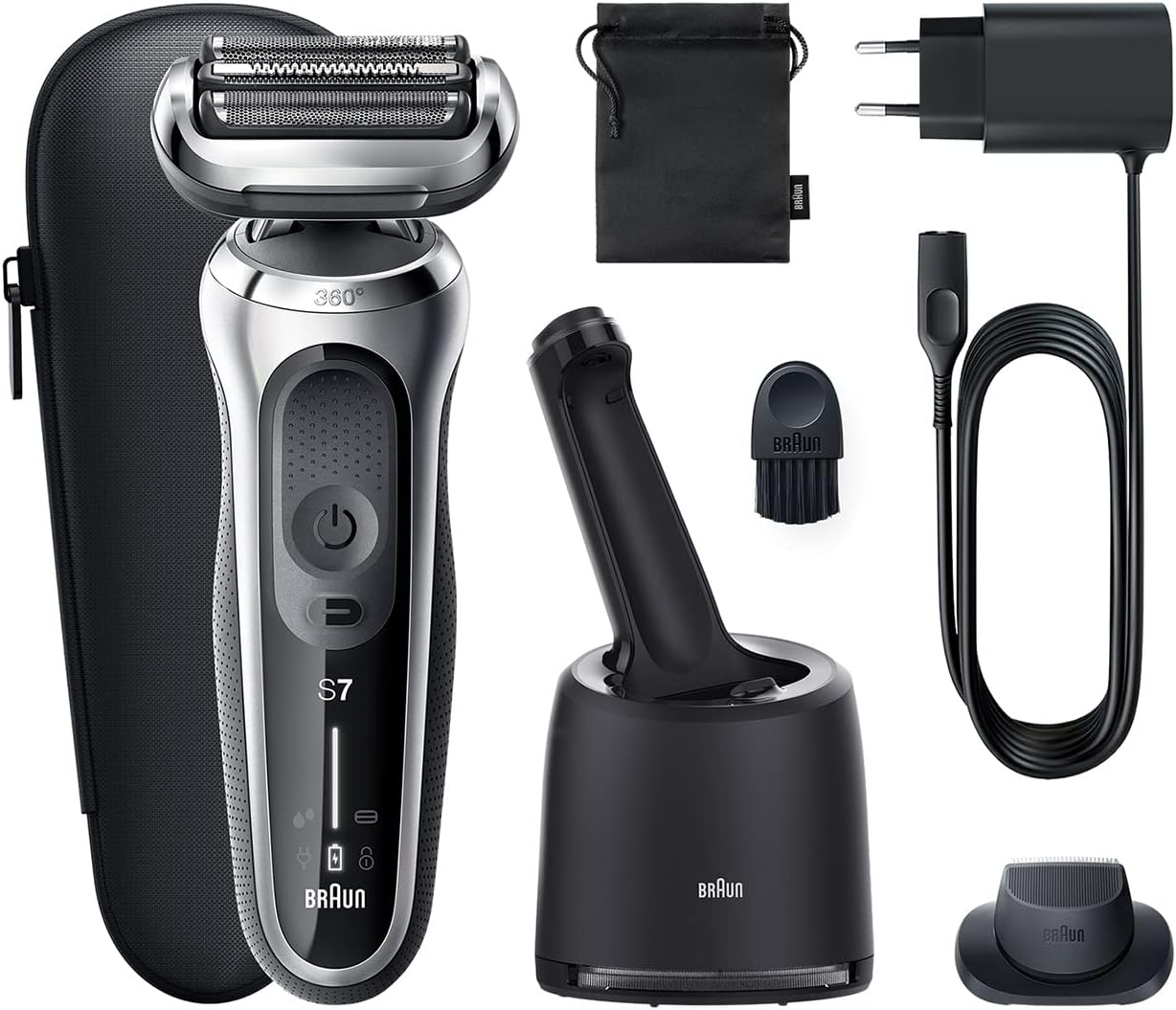
Image 1: Braun Series 7 Shaver with SmartCare Center, precision trimmer, travel case, cleaning brush, and power cord.
4. Getting Started (Setup)
4.1 Charging the Shaver
Before first use, fully charge your shaver. A full charge provides up to 50 minutes of cordless shaving. A 5-minute quick charge is sufficient for one shave.
- Ensure the shaver is dry.
- Connect the SmartPlug to the shaver and then to a power outlet.
- The LED display will indicate the charging status. When fully charged, the battery indicator will show full.
4.2 Setting up the SmartCare Center
The SmartCare Center automatically cleans, lubricates, dries, charges, and stores your shaver.
- Place the SmartCare Center on a flat, stable surface.
- Open the housing of the SmartCare Center and insert a Braun cleaning cartridge until it clicks into place.
- Close the housing.
- Connect the SmartPlug to the SmartCare Center and then to a power outlet.
4.3 Attaching Accessories
To change attachments, simply pull off the shaver head and click on the desired attachment (e.g., precision trimmer).
5. Operating Your Shaver

Image 2: Front view of the Braun Series 7 Shaver, highlighting the power button and LED display.
5.1 Power On/Off
Press the power button to turn the shaver on or off.
5.2 Wet & Dry Shaving
The Braun Series 7 is 100% waterproof and can be used for both dry and wet shaving. For a refreshing shave, use it with water, foam, or gel. For convenience, it can also be used dry.
5.3 Shaving Technique
- Hold the shaver at a right angle (90°) to your skin.
- Stretch your skin and shave against the direction of hair growth.
- Apply gentle, even pressure. Do not press too hard.
- The 360° Flex head and AutoSense Technology will adapt to your facial contours and beard density for optimal results.
5.4 Using the Precision Trimmer Attachment
Attach the precision trimmer for shaping sideburns, mustaches, or for pre-trimming longer hairs before shaving.
- Remove the shaver head.
- Click the precision trimmer attachment into place.
- Turn on the shaver and carefully trim as desired.
6. Cleaning and Maintenance
6.1 Manual Cleaning
For quick cleaning after each dry shave:
- Turn off the shaver.
- Remove the shaver head.
- Tap out any loose hair.
- Use the provided cleaning brush to remove remaining hair from the shaver head and inner housing. Do not use the brush on the foil.
For thorough cleaning (wet):
- Turn on the shaver and rinse the shaver head under hot running water until all residue is removed.
- You may use liquid soap without abrasive particles.
- Rinse thoroughly and turn off the shaver.
- Remove the shaver head and let it air dry completely.
6.2 Using the SmartCare Center
The SmartCare Center provides hygienic cleaning, lubrication, drying, and charging at the touch of a button.
- Ensure the shaver is clean of any large debris.
- Place the shaver head-down into the SmartCare Center.
- Press the start button on the SmartCare Center to initiate the cleaning program. The program will automatically select the appropriate cleaning intensity.
- The shaver will be cleaned, lubricated, dried, and charged.
6.3 Replacing Shaver Parts
To maintain 100% shaving performance, replace the foil and cutter cassette (also known as the shaver head) approximately every 18 months, or when worn. The shaver display will indicate when replacement is due.
- Turn off the shaver.
- Press the release buttons on the sides of the shaver head and pull it upwards to remove.
- Align the new foil and cutter cassette with the shaver body and press it down until it clicks into place.
7. Troubleshooting
If you encounter issues with your Braun Series 7 shaver, refer to the following common solutions:
- Shaver not turning on: Ensure the shaver is charged. If using the SmartCare Center, check if it's properly connected to power.
- Poor shaving performance: The foil and cutter cassette may be worn and require replacement. Ensure the shaver head is clean.
- Skin irritation: Ensure your skin is clean before shaving. Shave against the direction of hair growth with gentle pressure. Consider using a wet shave with foam or gel.
- SmartCare Center not working: Check if the power cord is securely connected. Ensure a cleaning cartridge is correctly inserted.
For further assistance, please contact Braun customer service.
8. Technical Specifications
| Feature | Specification |
|---|---|
| Model Number | 71-S7200cc |
| Brand | Braun |
| Head Type | Foil (360° Flex Head) |
| Shaving Type | Wet & Dry |
| Power Source | Battery Powered (Li-Ion) |
| Battery Life | Up to 50 minutes cordless use |
| Quick Charge | 5 minutes for one shave |
| Special Features | AutoSense Technology, 5-in-1 SmartCare Center |
| Included Components | Shaver, SmartCare Center, Precision Trimmer, Travel Case, Cleaning Brush, SmartPlug |
| Item Weight | 1.12 Kilograms |
| Color | Silver |
9. Warranty and Customer Support
Your Braun Series 7 shaver comes with a manufacturer's warranty. Please refer to the warranty card included in your product packaging for specific terms and conditions. For technical support, replacement parts, or any other inquiries, please visit the official Braun website or contact their customer service department.
You can find more information and support at the Braun Store.