
Introduction
The SharkChili Cube Baby BASS is a compact and versatile multi-effects processor designed for bass guitarists. It integrates a wide range of effects, amplifier models, and cabinet simulations, offering a comprehensive solution for practice, recording, and live performance. With its intuitive controls and portable design, it provides powerful sound shaping capabilities in a small footprint.

Image: The Cube Baby BASS pedal, displaying its compact form factor and accessible controls.
Key Features
- Multifunctional Presets: Features 3 editable presets, allowing users to customize and save their preferred effector chains for quick recall.
- Portable Power Supply: Equipped with a built-in battery, providing approximately 6 hours of continuous use after a 2-hour charge, ideal for outdoor performances.
- Wireless Accompaniment: Supports wireless connection for playing along with backing tracks. Activate by pressing and holding the "A+B" footswitch for 2 seconds.
- Extensive Effects & Models: Includes overdrive, distortion, CHORUS/PHASER, delay, and reverb effects. Features 9 Amp preamps and 8 classic IR cabinet models, with support for custom IR loading and deleting.
- 3.5mm Headphone Output: Provides a dedicated headphone jack for clear monitoring and silent practice, minimizing disturbance to others.
What's in the Box
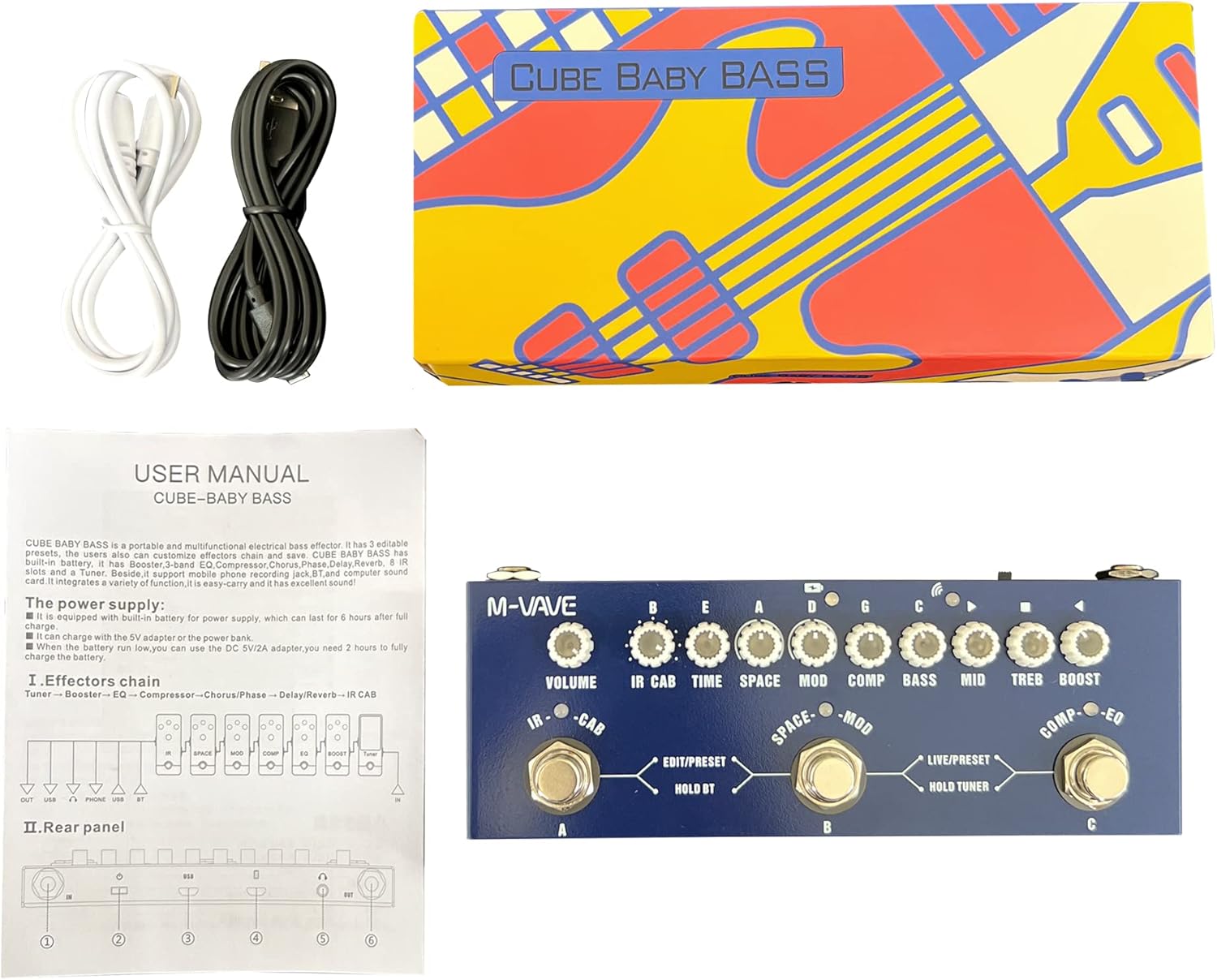
Image: The Cube Baby BASS pedal, user manual, and charging cables as packaged.
Upon opening the package, please ensure all the following items are present:
- SharkChili Cube Baby BASS Multi Effects Pedal
- USB Cable (for charging and data transfer)
- Bluetooth Adapter (if applicable, for wireless connectivity)
- User Manual (this document)
Setup
1. Charging the Device
Before first use, fully charge the Cube Baby BASS pedal. Connect the provided USB cable to the pedal's USB port and to a standard 5V USB power adapter (not included) or a computer USB port. The charging indicator will show the charging status. A full charge typically takes 2 hours and provides up to 6 hours of operation.
2. Connecting to Your Instrument and Amplifier
- Connect your bass guitar to the IN jack on the Cube Baby BASS pedal using a standard 1/4-inch instrument cable.
- Connect the OUT jack of the Cube Baby BASS pedal to your amplifier's input or audio interface using another 1/4-inch instrument cable.
- For silent practice, connect headphones to the 3.5mm Headphone Output jack.
3. Powering On/Off
Press and hold the power button located on the top panel to turn the unit on or off.
Operating Instructions

Image: Detailed view of the pedal's control surface, highlighting each knob and footswitch.
Controls Overview
The Cube Baby BASS pedal features a series of rotary knobs and three footswitches (A, B, C) for comprehensive control over your sound:
- VOLUME: Adjusts the overall output volume.
- IR CAB: Selects and adjusts Impulse Response cabinet simulations.
- TIME: Controls the time parameter for delay and reverb effects.
- SPACE: Adjusts the decay/mix for reverb effects.
- MOD: Controls modulation effects like Chorus and Phaser.
- COMP: Adjusts the compression level.
- BASS, MID, TREB: Equalizer controls for low, mid, and high frequencies.
- BOOST: Controls the boost level for gain effects.
Footswitch Functions
- Footswitch A (IR-CAB): Toggles IR cabinet simulation on/off.
- Footswitch B (SPACE-MOD): Toggles Space (Reverb) and Mod (Chorus/Phaser) effects on/off.
- Footswitch C (COMP-EQ): Toggles Compression and EQ effects on/off.
- Hold A+B: Activates/deactivates wireless (Bluetooth) accompaniment.
- Hold B (EDIT/PRESET): Enters/exits preset editing mode.
- Hold C (LIVE/PRESET & HOLD TUNER): Toggles between Live and Preset modes. Hold longer to activate the built-in tuner.
Managing Presets
The pedal offers 3 editable presets. To customize and save a preset:
- Select the desired preset slot (usually indicated by an LED).
- Adjust the knobs to achieve your desired sound.
- Press and hold Footswitch B (EDIT/PRESET) to save the current settings to the selected preset slot.
IR Loading and Deleting
The Cube Baby BASS supports loading and deleting custom Impulse Responses (IRs). This process typically requires connecting the pedal to a computer via USB and using dedicated software. Refer to the manufacturer's website for the latest software and detailed instructions on IR management.
Wireless Accompaniment (Bluetooth)
To connect a Bluetooth device for playing along with backing tracks:
- Ensure the pedal is powered on.
- Press and hold Footswitches A and B simultaneously for 2 seconds. The Bluetooth indicator light will activate.
- On your mobile device, search for Bluetooth devices and select "Cube Baby BASS" (or similar name).
- Once connected, audio from your device will play through the pedal's output.
Using the Headphone Output
Plug any standard 3.5mm stereo headphones into the dedicated headphone jack for private practice. The headphone output provides a clear and direct signal, allowing you to monitor your sound without an amplifier.
Tuner Function
To activate the built-in tuner, press and hold Footswitch C (HOLD TUNER). The display will show tuning information. Play a single note on your bass, and the tuner will indicate if the note is sharp, flat, or in tune. Press Footswitch C again to exit tuner mode.
Maintenance
Cleaning
Wipe the pedal with a soft, dry cloth. Do not use abrasive cleaners, waxes, or solvents. Avoid spraying liquids directly onto the unit.
Battery Care
To prolong battery life, avoid fully discharging the battery frequently. If storing the pedal for an extended period, charge it to approximately 50% and recharge every few months.
Storage
Store the pedal in a cool, dry place away from direct sunlight, extreme temperatures, and high humidity. Protect it from dust and physical impact.
Troubleshooting
- No Sound Output:
- Check all cable connections (instrument, amplifier, power).
- Ensure the pedal is powered on and charged.
- Verify the VOLUME knob is not set to minimum.
- Test with different cables and amplifier/instrument to isolate the issue.
- Bluetooth Connection Issues:
- Ensure Bluetooth is activated on the pedal (hold A+B footswitches).
- Make sure the pedal is within range of your Bluetooth device.
- Forget the device on your phone/tablet and try pairing again.
- Restart both the pedal and your Bluetooth device.
- Battery Not Holding Charge:
- Ensure you are using a compatible 5V USB power adapter.
- Check the USB cable for damage.
- If the issue persists, the battery may require service.
- Effects Not Working as Expected:
- Check the individual effect knobs and footswitches to ensure they are engaged and set correctly.
- Verify you are in the correct mode (Live/Preset).
- If using custom IRs, ensure they are loaded correctly and compatible.
Specifications
| Model Number | SK013 |
| Item Weight | 12 ounces (0.34 Kilograms) |
| Package Dimensions | 6.97 x 3.27 x 1.46 inches |
| Connector Type | USB |
| Hardware Interface | Bluetooth, USB |
| Signal Format | Analog |
| Power Source | Battery Powered |
| Voltage | 9 Volts |
| Color Name | cube baby BASS |
Warranty and Support
For detailed warranty information and technical support, please refer to the official SharkChili website or contact your retailer. Keep your proof of purchase for any warranty claims.
For further assistance, you may also consult online resources and user communities dedicated to multi-effects pedals, as many common questions and solutions are shared there.
