
1. Important Safety Instructions
Please read all instructions carefully before using the dehumidifier. Keep this manual for future reference.
- Ensure the power supply matches the voltage specified on the rating label.
- Do not operate the unit with a damaged cord or plug.
- Always place the dehumidifier on a stable, level surface.
- Maintain a minimum distance of 20 cm (8 inches) from walls and furniture to ensure proper airflow.
- Do not immerse the unit, power cord, or plug in water or other liquids.
- Unplug the unit before cleaning, moving, or performing any maintenance.
- Keep children and pets away from the unit during operation.
- Do not block the air inlet or outlet.
- This appliance is for indoor use only.
2. Product Overview
Familiarize yourself with the components of your Habitex H1000 Dehumidifier.

Figure 2.1: Front view of the Habitex H1000 Dehumidifier. This image shows the overall design of the unit, including its white casing and the 'habitex' logo on the front.
2.1 Control Panel
The control panel is located on the top of the unit and allows you to manage all functions.

Figure 2.2: Top view of the Habitex H1000 Dehumidifier control panel. This image highlights the buttons and LED display for timer, defrost, compressor, water full indicators, and power controls.
- TIMER Button: Press to set the operating time.
- UP/DOWN Buttons: Adjust timer settings or desired humidity level.
- Display: Shows current humidity, timer settings, or error codes.
- POWER Button: Turns the unit on or off.
- DEFROST Indicator: Illuminates when the unit is in defrost mode.
- COMP (Compressor) Indicator: Illuminates when the compressor is running.
- WATER FULL Indicator: Illuminates when the water tank is full and needs to be emptied.
3. Setup
Follow these steps to set up your dehumidifier for first use.
- Unpacking: Carefully remove the dehumidifier from its packaging. Retain the packaging for future storage or transport.
- Placement: Place the unit upright on a firm, level surface. Ensure there is at least 20 cm (8 inches) of clear space around all sides for proper air circulation. Do not place it near heat sources or in direct sunlight.
- Power Connection: Plug the power cord into a grounded electrical outlet.
- Water Tank: Ensure the water tank is correctly inserted into the unit.
4. Operating Instructions
Learn how to operate your Habitex H1000 Dehumidifier effectively.
- Power On/Off: Press the POWER button to turn the unit on or off. The compressor indicator will light up when the unit is operating.
- Setting Humidity Level: Use the UP and DOWN buttons to set your desired humidity level. The unit will operate until the room humidity reaches the set level, then cycle on and off to maintain it.
- Setting the Timer: Press the TIMER button. Use the UP and DOWN buttons to set the desired operating duration (e.g., 2 hours, 4 hours). The unit will automatically turn off after the set time.
- Water Full Indicator: When the water tank is full, the WATER FULL indicator will illuminate, and the unit will automatically stop operating. Empty the water tank as described in the Maintenance section.
- Defrost Function: If frost builds up on the evaporator coils, the unit will automatically enter defrost mode, and the DEFROST indicator will light up. This is normal operation. The dehumidification process will resume once defrosting is complete.
4.1 Continuous Drainage (Optional)
For continuous operation without emptying the water tank, you can connect a drainage hose (not included).
- Locate the continuous drainage outlet on the back of the unit.
- Remove the rubber stopper (if present).
- Connect a suitable hose to the outlet, ensuring it is securely fastened.
- Route the hose to a floor drain or a larger container, ensuring a continuous downward slope for water flow.
5. Maintenance
Regular maintenance ensures optimal performance and extends the life of your dehumidifier.
5.1 Emptying the Water Tank
When the 'WATER FULL' indicator lights up, the tank needs to be emptied.
- Turn off the unit and unplug it from the power outlet.
- Carefully pull out the water tank from the front of the unit.
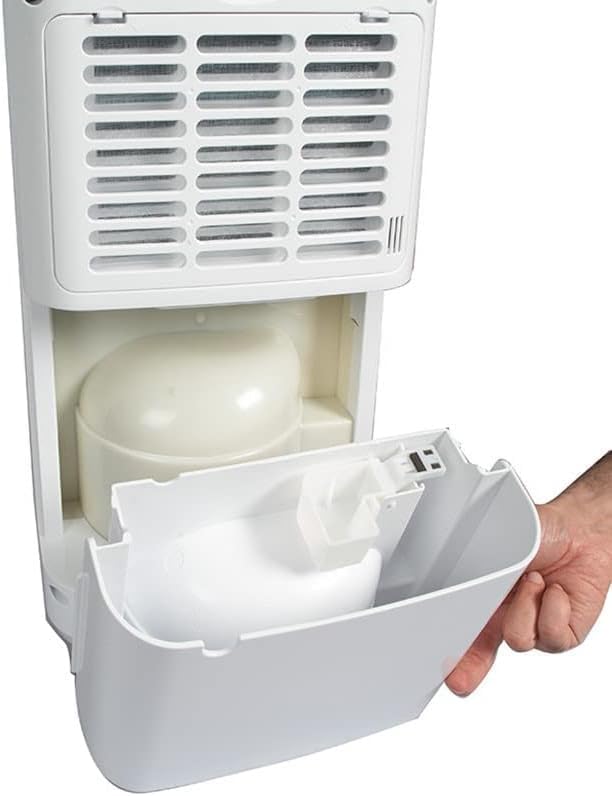
Figure 5.1: Hand removing the water tank from the Habitex H1000 Dehumidifier. This image illustrates the process of pulling out the water collection tank from the unit's rear compartment.
- Pour out the collected water.
- Rinse the tank with clean water if necessary. Do not use harsh detergents.
- Reinsert the empty water tank firmly into the unit until it clicks into place.
5.2 Cleaning the Air Filter
Clean the air filter every two weeks or more frequently if used in a dusty environment.
- Turn off the unit and unplug it.
- Locate the air filter cover on the back of the unit.
- Gently remove the filter cover and pull out the air filter.

Figure 5.2: Hands removing the air filter from the Habitex H1000 Dehumidifier. This image shows how to access and detach the washable air filter from the back of the unit.
- Clean the filter with a vacuum cleaner or wash it with warm, soapy water.
- Rinse thoroughly and allow it to air dry completely before reinserting.
- Place the dry filter back into its slot and close the cover.
5.3 Cleaning the Exterior
Wipe the exterior of the unit with a soft, damp cloth. Do not use abrasive cleaners or solvents.
5.4 Storage
If storing the unit for an extended period:
- Empty and clean the water tank.
- Clean the air filter.
- Ensure the unit is completely dry.
- Store in an upright position in a cool, dry place, preferably in its original packaging.
6. Troubleshooting
Refer to this section for common issues and their solutions.
| Problem | Possible Cause | Solution |
|---|---|---|
| Unit does not turn on. | No power supply. Power cord not properly connected. | Check if the unit is plugged in. Check the power outlet. |
| No dehumidification. | Air filter is clogged. Room temperature is too low. Humidity setting is too high. | Clean the air filter. Dehumidifiers are less effective below 5°C (41°F). Lower the desired humidity setting. |
| Water tank is full, but indicator is off. | Water tank not properly seated. Float switch malfunction. | Reinsert the water tank correctly. Contact customer support. |
| Unit is noisy. | Unit not on a level surface. Air filter is clogged. | Place the unit on a flat, stable surface. Clean the air filter. |
7. Specifications
Technical details of the Habitex H1000 Dehumidifier.
| Feature | Specification |
|---|---|
| Model Name | H1000 |
| Brand | Habitex |
| Moisture Removal Capacity | 10 Liters per day |
| Water Tank Volume | 2 Liters |
| Recommended Floor Area | Up to 20 square meters |
| Special Features | Timer |
| Operating Mode | Comfort |
| Color | White |
| Product Weight | 10.5 kg |
| Manufacturer | HABITEX_2018 |
| Year of Manufacture | 2018 |
8. Warranty and Support
For warranty information or technical support, please refer to the warranty card included with your purchase or contact your retailer. Keep your proof of purchase for any warranty claims.
For further assistance, please visit the official Habitex website or contact their customer service department.