
Canglan Technology WSME-200 TIG-200
WSME-200 TIG-200 AC DC Pulse TIG Welder User Manual
Model: WSME-200 TIG-200
Introduction
This manual provides comprehensive instructions for the safe and effective operation, setup, and maintenance of your Canglan Technology WSME-200 TIG-200 AC DC Pulse TIG Welder. This versatile machine is designed for both AC and DC TIG welding, including pulse functionality, and also supports MMA (Stick) welding. It is ideal for welding various materials such as carbon steel, stainless steel, copper, and aluminum alloys.
Please read this manual thoroughly before operating the welder to ensure proper usage and to prevent injury or damage to the equipment.
Safety Instructions
WARNING: Welding can be dangerous. Always follow safety precautions to prevent serious injury or death.
- Electric Shock: Can kill. Do not touch live electrical parts. Wear dry insulating gloves and protective clothing. Ensure proper grounding.
- Fumes and Gases: Can be hazardous to your health. Keep your head out of the fumes. Use ventilation or exhaust to remove fumes from the breathing zone.
- Arc Rays: Can burn eyes and skin. Wear a welding helmet with a proper shade of filter lens to protect your eyes and face. Wear protective clothing to protect your skin.
- Fire and Explosion: Hot metal and sparks can cause fire. Keep flammable materials away from the welding area. Have a fire extinguisher readily available.
- Hot Parts: Can cause severe burns. Allow equipment to cool before touching.
- Noise: Excessive noise can damage hearing. Wear ear protection.
Always consult local safety regulations and standards before beginning any welding operation.
Product Overview
The WSME-200 TIG-200 is a compact and powerful welding machine designed for precision and versatility. Its intuitive control panel and robust construction make it suitable for a wide range of welding tasks.
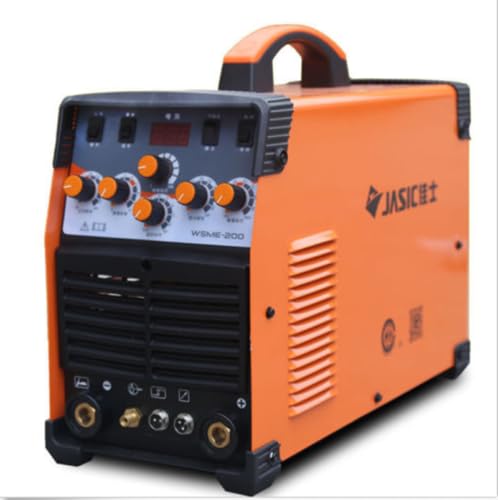
Figure 1: Front Panel of the WSME-200 TIG-200 Welder
This image displays the WSME-200 TIG-200 AC DC Pulse TIG Welder. The machine is predominantly orange with a black front panel. The control panel features several orange knobs for adjustments, a digital display, and various switches. Below the control panel are ventilation grilles and connection ports for welding cables and gas lines. A sturdy handle is visible on top for portability. The side of the machine shows the 'JASIC' logo.
Key Features:
- Versatile TIG Welding: Performs both AC and DC pulse TIG welding, suitable for aluminium and various other materials like stainless steel and copper.
- Precise Pulse Function: Allows for better control over the weld puddle, reducing distortion and ensuring high-quality welds, especially for thin materials.
- Easy Arc Ignition: High-frequency start feature ensures effortless and contamination-free arc ignition, improving welding efficiency.
- Convenient Dual Voltage: Compatible with standard 220V AC electrical outlets, making it suitable for various industrial and domestic applications.
- Portable and Durable Design: Sturdy construction and compact design provide long-lasting performance and easy transportation between job sites.
Setup
- Unpacking: Carefully remove the welder and all accessories from the packaging. Inspect for any shipping damage. Report any damage to your supplier immediately.
- Power Connection: Connect the welder to a suitable 220V AC power supply. Ensure the power outlet is properly grounded and can handle the machine's power requirements.
- Gas Connection (TIG):
- Connect the gas hose from your inert gas cylinder (e.g., Argon) to the gas inlet on the rear of the welder.
- Ensure all connections are tight to prevent gas leaks.
- Install a gas regulator on your cylinder and set the appropriate flow rate for your welding application.
- Welding Cable Connections:
- TIG Torch: Connect the TIG torch cable and gas line to the corresponding ports on the front panel.
- Work Clamp: Connect the work clamp cable to the appropriate terminal (usually negative for DC TIG, or as per AC TIG setup) and attach the clamp securely to the workpiece.
- Electrode Holder (MMA): For MMA welding, connect the electrode holder cable to the positive terminal and the work clamp to the negative terminal.
- Tungsten Electrode Installation (TIG):
- Select the correct size and type of tungsten electrode for your application.
- Grind the tungsten to a sharp point for DC TIG or a blunted cone for AC TIG.
- Insert the tungsten into the collet body of the TIG torch and tighten the cap.
Operating Instructions
Control Panel Overview:
The front panel features various controls for selecting welding modes and adjusting parameters. Refer to Figure 1 for visual reference.
- Digital Display: Shows current welding parameters (e.g., amperage).
- Mode Selection Switches: Select between AC TIG, DC TIG, Pulse TIG, and MMA.
- Current Adjustment Knob: Controls the welding amperage.
- Pulse Frequency/Width Knobs: Adjust pulse parameters for pulse TIG welding.
- Gas Post-Flow Knob: Sets the duration of gas flow after the arc is extinguished to protect the weld puddle.
Welding Procedures:
DC TIG Welding (for Carbon Steel, Stainless Steel, Copper):
- Select "DC TIG" mode.
- Set the desired welding amperage based on material thickness and tungsten size.
- Ensure proper gas flow.
- Initiate the arc using the high-frequency start.
- Maintain a consistent arc length and travel speed.
AC TIG Welding (for Aluminum & Aluminum Alloys):
- Select "AC TIG" mode.
- Adjust amperage and AC balance (if available) for optimal cleaning action and penetration.
- Use a blunted or balled tungsten electrode.
- Proceed with welding, observing the molten puddle.
Pulse TIG Welding:
- Select "Pulse TIG" mode (AC Pulse or DC Pulse).
- Adjust peak current, base current, pulse frequency, and pulse width according to the material and desired heat input.
- Pulse welding helps control heat input, reduce distortion, and improve penetration on thin materials.
MMA (Stick) Welding:
- Select "MMA" mode.
- Connect the electrode holder and work clamp as described in the Setup section.
- Insert the appropriate electrode into the holder.
- Set the amperage based on the electrode type and diameter.
- Strike the arc and maintain a consistent arc length and travel speed.
Maintenance
Regular maintenance ensures the longevity and optimal performance of your welding machine.
- Cleaning: Periodically clean the exterior of the machine with a dry, soft cloth. Use compressed air to blow out dust and debris from the ventilation grilles. Ensure the machine is unplugged before cleaning.
- Cable Inspection: Regularly inspect all welding cables, gas hoses, and power cords for cuts, abrasions, or damage. Replace damaged components immediately.
- Tungsten Electrode Care: Always ensure your tungsten electrodes are properly ground and free of contamination for optimal arc stability and weld quality.
- Storage: Store the welder in a clean, dry environment, away from excessive dust, moisture, and extreme temperatures.
Troubleshooting
This section provides solutions to common issues you might encounter. For problems not listed here, contact customer support.
| Problem | Possible Cause | Solution |
|---|---|---|
| No power to the machine | Power cord unplugged, circuit breaker tripped, faulty power switch. | Check power cord connection. Reset circuit breaker. Contact service if power switch is faulty. |
| No arc ignition (TIG) | Work clamp not connected, gas flow incorrect, tungsten contaminated, wrong mode selected. | Ensure work clamp is securely attached. Check gas flow and connections. Re-grind or replace tungsten. Verify correct welding mode. |
| Poor weld quality / Unstable arc | Incorrect amperage settings, contaminated material, improper gas shielding, worn-out consumables. | Adjust amperage. Clean workpiece. Check gas flow and torch components. Replace collets, collet bodies, or nozzles as needed. |
| Overheating protection activated | Exceeded duty cycle, insufficient ventilation. | Allow the machine to cool down. Ensure adequate airflow around the welder. Reduce welding time or amperage. |
Specifications
| Parameter | Value |
|---|---|
| Model | WSME-200 TIG-200 |
| Input Voltage | 220V AC |
| Welding Processes | AC TIG, DC TIG, Pulse TIG, MMA |
| Manufacturer | Canglan Technology |
| ASIN | B0BJH3RF4J |
| Date First Available | October 17, 2022 |
Warranty and Support
For warranty information, technical support, or service inquiries, please contact Canglan Technology directly. Refer to the contact information provided with your purchase or visit the official Canglan Technology website.
Note: The international air shipping regulations prohibit the shipment of liquids, powders, and batteries. If your purchased goods originally contained such items, they would not have been included in the packaging.
Ask a question about this manual
Ask about setup, troubleshooting, compatibility, parts, safety, or missing instructions. Manuals+ will review the question and use this page’s manual context to help answer it.