
Introduction
This manual provides instructions for the proper setup, operation, and maintenance of your Digiflex HE16-4X-75 75 Foot 16/4 Channel Snake with XLR Returns. This professional-grade audio snake is designed to efficiently transmit multiple audio signals over a single cable, simplifying stage and studio wiring.
Setup
Follow these steps to correctly set up your Digiflex HE16-4X-75 channel snake:
- Unpack the Unit: Carefully remove the snake from its packaging. Inspect the stage box, fanout, and cable for any signs of damage.
- Position the Stage Box: Place the stage box (the larger box with multiple connectors) on the stage or near the audio sources (e.g., microphones, instruments).
- Connect Inputs: Connect your microphones or instrument direct boxes to the 16 XLR female input connectors on the stage box. These are typically labeled 1 through 16. Ensure a secure connection for each input.
- Route the Cable: Carefully uncoil and route the 75-foot main cable from the stage box to your mixing console or audio interface. Avoid sharp bends or kinks in the cable.
- Connect Returns: At the mixing console end, connect the 4 XLR male return connectors (labeled A, B, C, D) from the fanout to the appropriate output channels on your mixer or audio interface. These are typically used for sending monitor mixes or effects back to the stage.
- Connect Outputs: Connect the 16 XLR male output connectors from the fanout to the corresponding input channels on your mixing console.
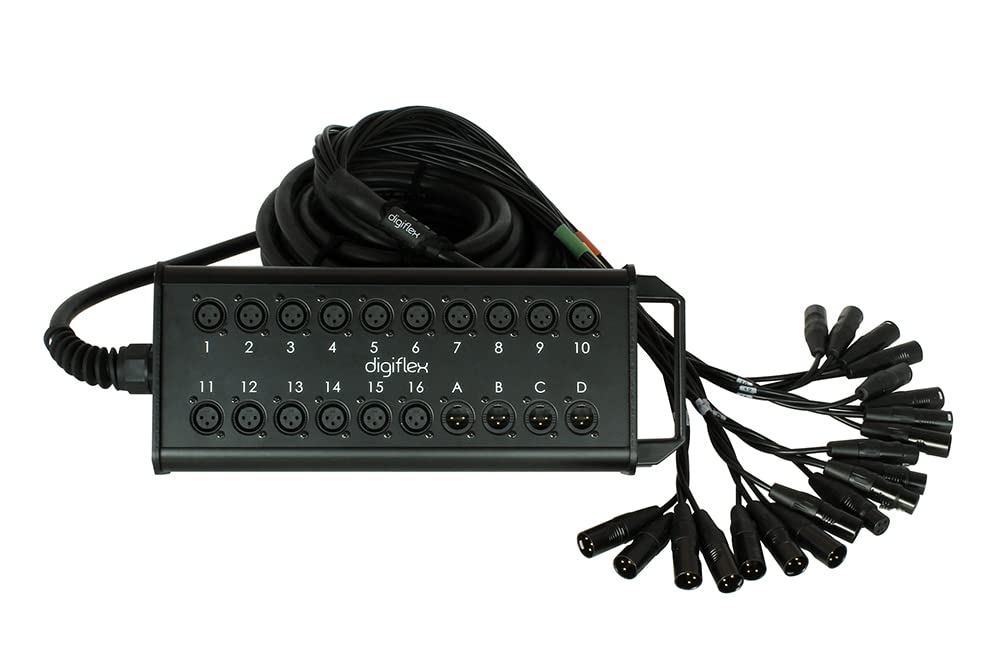
This image displays the stage box component of the Digiflex HE16-4X-75 snake. It features 16 XLR female input connectors, numbered 1 through 16, arranged in two rows. Below these inputs are 4 XLR male return connectors, labeled A through D. The Digiflex brand logo is visible in the center. A strain relief boot is visible on the left, where the main cable exits the box. A handle is present on the right side for portability.
Operating Instructions
Once the Digiflex HE16-4X-75 snake is connected, follow these guidelines for optimal performance:
- Signal Flow: Understand that channels 1-16 on the stage box are inputs (XLR female) that send signals to the corresponding XLR male outputs on the fanout. Channels A-D on the stage box are returns (XLR male) that receive signals from the corresponding XLR female inputs on the fanout.
- Cable Management: Secure the main cable to prevent tripping hazards and accidental disconnections. Use cable ties or tape as needed.
- Avoid Strain: Do not pull on the cable or connectors to disconnect them. Always grasp the connector housing firmly.
- Signal Levels: Ensure that input and output signal levels are appropriate for your connected equipment to prevent clipping or noise.
Maintenance
Proper maintenance will extend the life and performance of your Digiflex HE16-4X-75 snake:
- Cleaning: Use a soft, dry cloth to wipe down the stage box and connectors. For stubborn dirt, a slightly damp cloth can be used, ensuring all moisture is removed before use. Avoid abrasive cleaners or solvents.
- Connector Inspection: Regularly inspect XLR connectors for bent pins, corrosion, or loose connections. Clean pins with a specialized contact cleaner if necessary.
- Cable Inspection: Check the entire length of the cable for cuts, fraying, or damage to the outer jacket. Damaged cables should be repaired by a qualified technician or replaced.
- Storage: When not in use, coil the cable neatly without tight bends. Store the snake in a clean, dry environment, away from extreme temperatures and direct sunlight.
Troubleshooting
If you encounter issues with your Digiflex HE16-4X-75 snake, consider the following:
- No Signal:
- Verify all connections are secure at both the stage box and the mixing console.
- Test individual channels with a known working microphone/instrument and mixer input.
- Check the source device (microphone, DI box) and the receiving device (mixer input) for proper function.
- Intermittent Signal or Noise:
- Inspect connectors for dirt, corrosion, or loose pins.
- Ensure the cable is not damaged or pinched.
- Check for ground loops or interference from power cables running parallel to the snake.
- Incorrect Channel Routing:
- Double-check that each input on the stage box is connected to the intended input on the mixing console.
- Confirm that return channels are connected to the correct mixer outputs.
Specifications
| Feature | Detail |
|---|---|
| Model Number | HE16-4X-75 |
| Brand | Digiflex |
| Channels | 16 Inputs / 4 Returns |
| Cable Length | 75 feet |
| Connectors | REAN XLR (Male-to-Female configuration for inputs/returns) |
| Construction | Performance Grade |
| Color | Black |
| Manufacturer | Digiflex |
| Country of Origin | China |
Warranty Information
The Digiflex HE16-4X-75 75 Foot 16/4 Channel Snake is covered by a Limited Lifetime Warranty. Please refer to the warranty documentation included with your purchase or contact Digiflex customer support for full details regarding terms and conditions.
Customer Support
For technical assistance, troubleshooting beyond the scope of this manual, or warranty claims, please contact Digiflex customer support. Refer to the official Digiflex website or your product packaging for the most current contact information.