
1. Introduction
The MAITE Super Slim DVD Player is designed to enhance your home entertainment experience with its compact and innovative design. This HDMI DVD player is smaller and thinner than traditional DVD players, making it ideal for modern home theater setups. Its unique square flip-top design helps prevent disc jamming, and the matte black casing offers a sleek aesthetic.
Equipped with advanced 1080HD resolution technology, the player delivers realistic images with a wide color range and high color accuracy. An upgraded chip ensures broader color decoding capabilities, restoring realistic colors for an immersive visual experience.
The player supports USB 2.0, allowing direct playback of digital files (video and audio) from a USB flash drive up to 16GB (video playback up to 720P). It supports AVI/MPG/MPEG4/VOB/MP3/WMA file formats.
This MAITE DVD player is region-free, enabling playback of movies from all regions (1-6) and supporting most disc formats including DVD/DVD+RW/DVD-R. It features a powerful memory playback function, resuming playback exactly where it stopped previously. Additional practical functions include an integrated unit core for image data recovery, optimized quiet operation, and an A-B clip repeat function for language learning.
1.1 What's in the Box

Image 1.1: Contents of the MAITE Super Slim DVD Player package.
- 1 x MAITE Super Slim DVD Player
- 1 x HDMI Cable
- 1 x RCA Cable
- 1 x Remote Control
- 1 x User Manual
2. Safety Information
Please read all safety instructions carefully before using the MAITE Super Slim DVD Player. Keep this manual for future reference.
- Do not expose the device to rain, moisture, or extreme temperatures.
- Ensure proper ventilation around the player to prevent overheating.
- Do not open the casing; there are no user-serviceable parts inside. Refer all servicing to qualified personnel.
- Use only the provided power adapter or one with identical specifications.
- Keep the player away from strong magnetic fields.
- Avoid placing heavy objects on top of the player.
- Clean the device with a soft, dry cloth. Do not use liquid cleaners or aerosols.
3. Product Overview
Familiarize yourself with the various components and controls of your MAITE Super Slim DVD Player.

Image 3.1: Front, Top, and Rear Panel Overview.
3.1 Front Panel
- LED Display: Shows current status (e.g., "LOAD", "OPEN").
- Open the Cover: Mechanism to open the disc compartment.
3.2 Top Panel
- Pause Button: Pauses playback.
- Volume Adjustment (VOL- / VOL+): Adjusts the audio output volume.
- USB Port: For connecting USB flash drives.
- Play Button: Starts or resumes playback.
- Stop Button: Stops playback.
- AV Port: For connecting RCA cables (Audio/Video).
- Power On/Off Switch: Toggles the device power.
3.3 Rear Panel
- HDMI Port: For connecting to a TV or display via HDMI cable.
- Power Connector: For connecting the power adapter.
4. Setup
Follow these steps to set up your DVD player and connect it to your television or display device.
4.1 Connecting to a TV/Display
Your MAITE DVD player supports both HDMI and RCA connections for video and audio output.

Image 4.1: HDMI and RCA Connection Options.
- HDMI Connection (Recommended for HD Quality):
- Connect one end of the provided HDMI cable to the HDMI port on the back of the DVD player.
- Connect the other end of the HDMI cable to an available HDMI input port on your TV or display.
- Select the corresponding HDMI input on your TV using its remote control.
- RCA Connection (Standard Definition):
- Connect the red, white, and yellow plugs of the provided RCA cable to the corresponding color-coded AV ports on the DVD player.
- Connect the other end of the RCA cable to the matching color-coded AV input ports on your TV.
- Select the corresponding AV input on your TV using its remote control.
4.2 Powering the Device

Image 4.2: Multiple Power Options.
- Connect the power adapter to the Power Connector on the rear of the DVD player.
- Plug the power adapter into a wall outlet.
- Turn on the DVD player using the Power On/Off switch on the top panel. The LED display will light up.
- Alternatively, the player can be powered via USB Type-C from a power bank, laptop, car charger, or TV USB port.
4.3 Remote Control Setup
The remote control requires batteries (not included). Insert two AAA batteries into the remote control, ensuring correct polarity (+/-).
5. Operating Instructions
5.1 Playing a DVD Disc
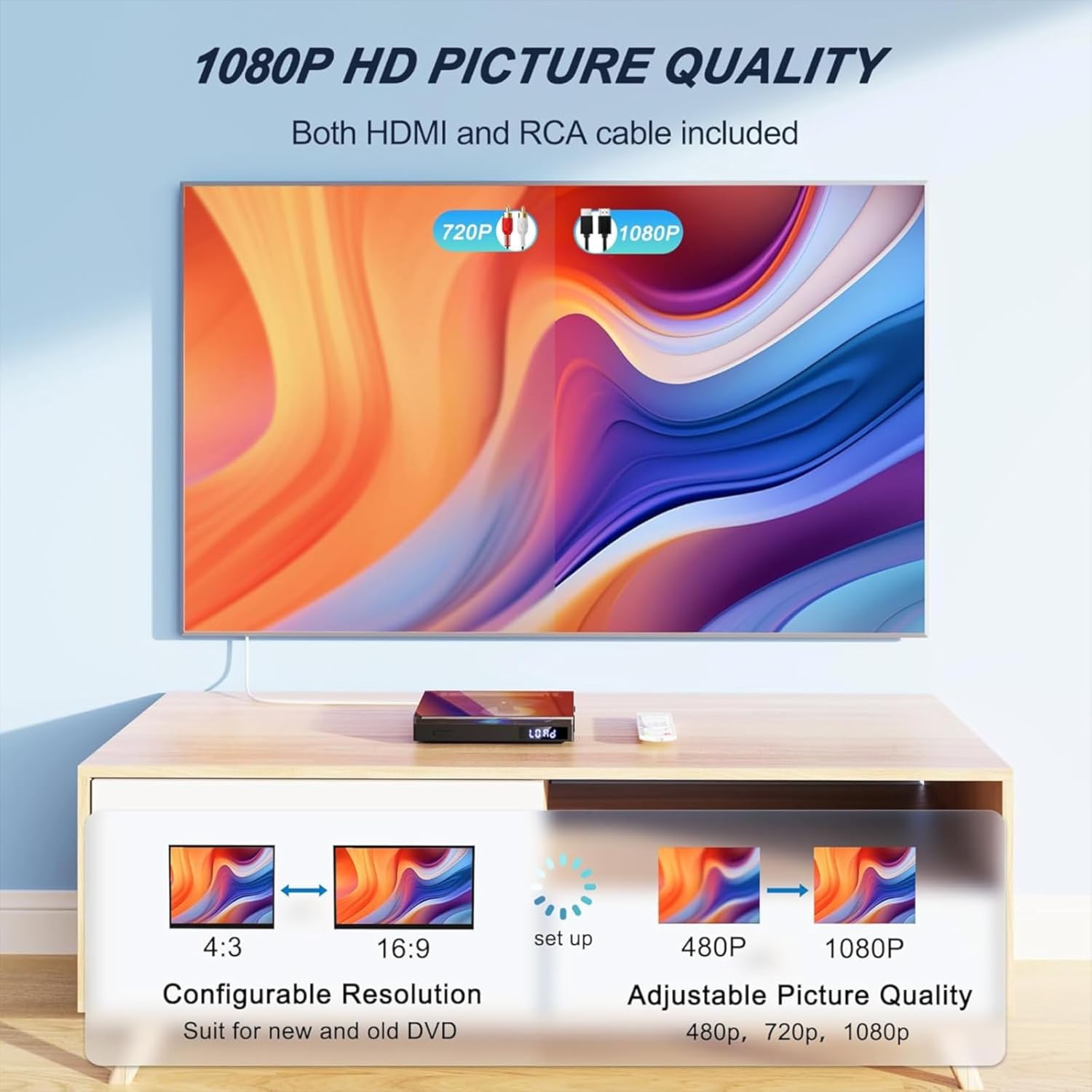
Image 5.1: High Definition Picture Quality.
- Ensure the DVD player is connected to your TV and powered on.
- Gently open the disc cover on the top of the player.
- Place a DVD disc onto the spindle with the label side facing up.
- Close the disc cover. The player will automatically load the disc, and "LOAD" will appear on the LED display.
- Playback should begin automatically. If not, press the Play button on the player or remote control.
- Use the remote control for playback functions such as Play, Pause, Stop, Fast Forward, Rewind, Next/Previous Track, and Volume adjustment.
This MAITE DVD player is Region-Free, allowing you to play DVDs from any region (Regions 1-6). It supports DVD, DVD+RW, and DVD-R formats.

Image 5.2: Region-Free and Advanced Features.
5.2 USB Playback
The player supports direct playback of media files from a USB 2.0 flash drive.

Image 5.3: Supported USB File Formats.
- Insert your USB flash drive (up to 16GB) into the USB port on the top panel of the DVD player.
- Wait 3-5 seconds for the player to recognize the USB device.
- The display will show the USB content. Navigate through your files using the remote control.
- Select the desired video or audio file and press Play.
Note: The player supports video playback up to 720P from USB. Supported file formats include AVI, MPG, MPEG4, VOB, MP3, and WMA.
5.3 Memory Playback Function
The MAITE DVD player features a powerful memory playback function. If playback is stopped or the player is turned off, it will resume from the exact point where it left off when the disc or USB is re-inserted.

Image 5.4: Memory Playback in action.
5.4 A-B Clip Repeat Function
This function allows you to repeatedly play a specific segment of a video or audio track. It is particularly useful for language learning or reviewing specific scenes.
- During playback, press the A-B Repeat button on the remote control at the desired starting point (A).
- Press the A-B Repeat button again at the desired ending point (B).
- The segment between A and B will now loop continuously.
- To cancel A-B repeat, press the A-B Repeat button a third time.
5.5 Audio Output Options
The MAITE DVD player features an integrated HiFi speaker for direct audio output. Additionally, it includes a 3.5mm AUX port for connecting wired headphones or external speakers, providing flexible audio options.

Image 5.5: Connectivity with Projectors and TVs.
Image 5.6: Versatile Audio Output via AUX.
5.6 Portability and Use Cases
The compact and lightweight design of the MAITE Super Slim DVD Player makes it highly portable, suitable for various environments beyond the traditional living room setup.

Image 5.7: Diverse Applications of the DVD Player.
- Travel: Ideal for use in cars, RVs, or trucks, powered via USB.
- Outdoor Entertainment: Connect to a projector for movies during camping or backyard gatherings.
- Compact Storage: Its small size allows for easy storage and transport in bags or small compartments.
6. Maintenance
Proper care and maintenance will ensure the longevity and optimal performance of your DVD player.
6.1 Cleaning the Player
- Always unplug the player from the power source before cleaning.
- Use a soft, dry, lint-free cloth to wipe the exterior of the player.
- Do not use liquid cleaners, abrasive cleaners, or chemical sprays, as they may damage the surface or internal components.
- For the disc compartment, use a specialized DVD lens cleaner disc if necessary, following its instructions.
6.2 Disc Care
- Handle discs by their edges to avoid fingerprints and scratches.
- Store discs in their cases when not in use to protect them from dust and damage.
- Clean dirty discs with a soft, lint-free cloth, wiping gently from the center outwards.
- Do not use solvents or abrasive cleaners on discs.
7. Troubleshooting
If you encounter any issues with your DVD player, refer to the following common problems and their solutions.
| Problem | Possible Cause | Solution |
|---|---|---|
| No power | Power cable not connected; Power switch off; Outlet malfunction. | Ensure power cable is securely connected. Turn on the power switch. Try a different power outlet. |
| No picture on TV | Incorrect TV input selected; HDMI/RCA cable loose or faulty. | Select the correct HDMI or AV input on your TV. Check cable connections; try a different cable. |
| No sound | TV/player volume too low; Mute activated; Audio cable loose. | Increase volume on both player and TV. Check if mute is on. Ensure audio cables (HDMI or RCA) are properly connected. |
| Disc not playing / "Open" on display | Disc inserted incorrectly; Disc dirty/scratched; Disc cover not fully closed. | Ensure disc is placed correctly with label side up. Clean the disc. Close the disc cover completely until it clicks. |
| USB not recognized | USB drive not formatted correctly; USB drive too large (>16GB); Unsupported file format. | Ensure USB is FAT32 formatted. Use a USB drive 16GB or smaller. Check if file formats are supported (AVI/MPG/MPEG4/VOB/MP3/WMA). |
| Remote control not working | Batteries dead or inserted incorrectly; Obstruction between remote and player. | Replace batteries, ensuring correct polarity. Remove any obstructions. Point remote directly at the player's front. |
8. Specifications
Below are the technical specifications for the MAITE Super Slim DVD Player.

Image 8.1: Key Specifications and Included Accessories.
| Feature | Detail |
|---|---|
| Brand | MAITE |
| Model Name | MT-EUmini-NR BLK |
| Product Dimensions | 15 x 13 x 3 cm |
| Item Weight | 310 grams |
| Resolution | 1080p, Full HD |
| Compatible Devices | Tablet, Television |
| Included Components | DVD player, HDMI cable, RCA cable, Remote control, User manual |
| Audio Output Mode | Stereo with support for MP3, WMA, AVI, MOV formats |
| Supported Audio Formats | MP3, WMA, AVI, MOV |
| Video Resolution | 1080P |
| Connectivity Technology | HDMI |
| Media Type | DVD |
| Supported Disc Formats | DVD/DVD-9/DVD-R/DVD-RW/CD/CD-R/CD-RW/SVCD/VCD/EVD |
| Supported USB File Formats | AVI(Xvid,MP4V,MPEG-1), D2VX, MPG, MPEG, MP3, MOV, ASF |
| USB Support | Up to 16GB, Video up to 720P |
| Power Consumption | <25W |
| Output Voltage | 5V, 2A |
9. Warranty and Support
Specific warranty details are not provided within the product specifications. Please refer to your purchase documentation, retailer's policy, or the manufacturer's official website for information regarding warranty coverage and customer support.
For technical assistance or inquiries, please contact MAITE customer support through the channel provided by your point of purchase.