
RC-CAS07 (Replacement)
Remote Control User Manual
For Aiwa Compact Disc Carry Component Stereo Audio Systems
Models: CX-LEM57, CX-LEM52, RC-CAS07, XR-EM30, XR-EM31, XR-EM20, CX-LEM30, CX-LEM31, CX-LEM20, XR-M918, XR-M919, MX-LM918
Brand: Generic
Introduction
This manual provides essential instructions for the setup, operation, and maintenance of your replacement remote control for various Aiwa Compact Disc Carry Component Stereo Audio Systems. This remote is designed as an infrared replacement. Please ensure your original remote matches the appearance of this replacement for optimal compatibility.
Setup
Battery Installation
The remote control requires two (2) AA batteries (not included).
- Locate the battery compartment on the back of the remote control.
- Slide the battery compartment cover downwards or in the direction indicated by an arrow to open it.
- Insert two AA batteries, ensuring the positive (+) and negative (-) terminals align correctly with the markings inside the compartment.
- Close the battery compartment cover by sliding it back into place until it clicks securely.
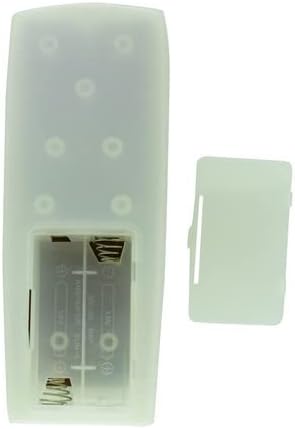
Figure 1: Rear view of the remote control with the battery cover removed, illustrating the battery compartment.
Operating Instructions
General Use
This remote control is an infrared (IR) replacement. Point the remote directly at the IR receiver on your Aiwa stereo system. Ensure there are no obstructions between the remote and the stereo system.

Figure 2: Front view of the remote control.
Key Functions
- POWER: Turns the stereo system on or off.
- VOLUME +/-: Adjusts the audio output level.
- PLAY/PAUSE: Starts or pauses playback of audio.
- SKIP/SEARCH: Navigates between tracks or fast-forwards/rewinds within a track.
- Numerical Buttons (0-9, +10): For direct track selection or input.
- FUNCTION: Selects different audio sources or modes (e.g., CD, Radio, MD).
- DISPLAY/CHARACTER: Changes display information or enters characters.
- ENTER: Confirms selections.
- MD EDIT/REC: Functions related to MiniDisc recording and editing (if applicable to your system).
Note on Compatibility: This is a replacement remote. While designed to be compatible, it may not offer all the exact same functions as your original remote. Refer to your stereo system's original manual for specific functions if needed.
Maintenance
Cleaning
To clean the remote control, wipe it with a soft, dry cloth. Do not use abrasive cleaners, solvents, or chemical sprays, as these can damage the surface or internal components.
Battery Replacement
Replace batteries when the remote's response becomes sluggish or stops working. Always replace both batteries at the same time with new AA batteries. Do not mix old and new batteries, or different types of batteries. Remove batteries if the remote will not be used for an extended period to prevent leakage.
Troubleshooting
- Remote not responding:
- Check if batteries are inserted correctly with the correct polarity.
- Replace old batteries with new ones.
- Ensure there are no obstructions between the remote and the stereo system's IR receiver.
- Confirm you are pointing the remote directly at the stereo system.
- Some functions not working:
- This remote is a replacement and may not support all functions of your original remote. Verify if the specific function was present on the original remote and if this replacement is designed to support it.
- Ensure your stereo system model is listed as compatible.
- Interference:
- Strong light sources (like direct sunlight or fluorescent lights) can interfere with IR signals. Try operating the remote in a different lighting condition.
If issues persist, please contact the seller for further assistance.
Specifications
| Feature | Detail |
|---|---|
| Connectivity Technology | Infrared |
| Compatible Devices | Aiwa Stereo System (Specific models listed in title) |
| Power Source | 2 x AA Batteries (not included) |
| Color | Random (as per product listing) |
| Manufacturer | Easytry |
| ASIN | B0BJDVGDWJ |
Warranty and Support
This product is a replacement remote control. Specific warranty details are not provided in the product information. For any questions, concerns, or support regarding this replacement remote, please contact the seller directly through the platform where it was purchased.
Important: As stated by the manufacturer, this replacement remote may not offer all the full same functions as your original remote. Please verify compatibility with your specific Aiwa model before purchase.
Related Documents - RC-CAS07 (Replacement)
 |
Aiwa NSX-AJ70 Service Manual This service manual provides detailed information for the Aiwa NSX-AJ70 Compact Disc Stereo Cassette Receiver, including specifications, troubleshooting, and parts lists. It is intended for qualified service technicians. |
 |
Aiwa XG-V70G, NSX-V71G, NSX-V70 Service Manual Comprehensive service manual for Aiwa XG-V70G, NSX-V71G, and NSX-V70 compact disc stereo systems, detailing specifications, parts, schematics, and repair procedures. |
 |
Aiwa XG-990, NSX-990, NSX-992 Service Manual Official service manual for Aiwa XG-990, NSX-990, and NSX-992 compact disc stereo systems. Contains detailed specifications, electrical and mechanical parts lists, block diagrams, wiring schematics, exploded views, and safety precautions for servicing Aiwa audio equipment. |
 |
Aiwa NSX-BL54 NSX-BL56 Service Manual This service manual provides detailed technical information, specifications, troubleshooting, and parts lists for the Aiwa NSX-BL54 and NSX-BL56 Compact Disc Stereo Systems. |
 |
Aiwa NSX-S201, NSX-S202, NSX-S203 Service Manual This service manual provides detailed information for the Aiwa NSX-S201, NSX-S202, and NSX-S203 CD stereo systems, including specifications, troubleshooting, parts lists, and adjustment procedures. |
 |
Korffe CX-97 RC Car Instruction Manual Comprehensive instruction manual for the Korffe CX-97 remote control RC car, covering operation, charging, troubleshooting, maintenance, and safety guidelines. |
Ask a question about this manual
Ask about setup, troubleshooting, compatibility, parts, safety, or missing instructions. Manuals+ will review the question and use this page’s manual context to help answer it.