
Introduction
This document provides essential instructions for the Generic Easytry15880 replacement infrared remote control. This remote is designed to function with various Aiwa Compact Disc Carry Component Stereo Audio Systems, including models RC-CAS06, XR-EM57, XR-EM52, CA-DW935M, CA-DW635, CA-DW630, CA-DW680, CA-DW539, and CA-DW247. Please ensure your original remote control matches the appearance of this replacement for optimal compatibility and functionality.
Setup
Battery Installation
The remote control requires two (2) AA or AAA batteries (not included) for operation. Follow these steps to install the batteries:
- Locate the battery compartment on the back of the remote control.
- Gently slide the battery compartment cover downwards or outwards to open it.
- Insert two (2) AA or AAA batteries, ensuring the positive (+) and negative (-) terminals align correctly with the markings inside the compartment.
- Slide the battery compartment cover back into place until it clicks securely.
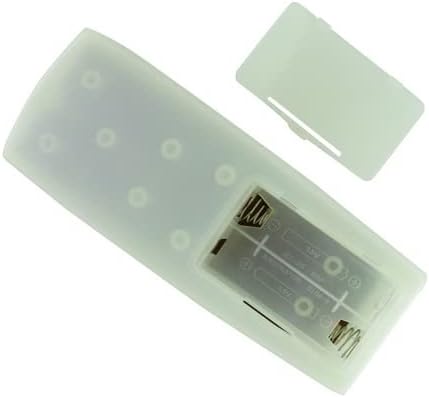
Image: Rear view of the remote control with the battery cover detached, revealing the empty battery slots. This illustrates where to insert the batteries.

Image: An angled perspective of the remote control's back, showing the open battery compartment and the detached cover positioned next to it. This provides another view of the battery installation area.
Operating Instructions
This remote control operates using infrared (IR) technology. For proper function, ensure a clear line of sight between the remote control and the infrared receiver on your Aiwa stereo system.
- Power On/Off: Press the POWER button to turn your stereo system on or off.
- Function Selection: Use the designated function buttons (e.g., CD, Tuner, Tape, Aux) to select the desired audio source.
- Volume Control: Adjust the volume using the VOLUME UP and VOLUME DOWN buttons.
- Playback Controls: For CD or Tape functions, use buttons such as PLAY, PAUSE, STOP, SKIP/TRACK, and FAST FORWARD/REWIND.
- Tuner Controls: For radio functions, use TUNING buttons to change stations and PRESET buttons to select saved stations.
Note: As a replacement remote, some advanced or specific functions present on your original remote may not be replicated. Refer to your Aiwa stereo system's original manual for detailed information on specific functions and their corresponding remote control buttons.
Maintenance
Cleaning
- Wipe the remote control with a soft, dry cloth.
- Do not use abrasive cleaners, solvents, or chemical wipes, as these may damage the surface or internal components.
Battery Care
- Replace batteries when the remote's range decreases or it becomes unresponsive.
- If the remote control will not be used for an extended period (e.g., one month or more), remove the batteries to prevent leakage and potential damage.
- Dispose of used batteries according to local regulations.
Troubleshooting
- Remote not responding:
- Check if the batteries are inserted correctly with the correct polarity (+/-).
- Replace old batteries with new ones.
- Ensure there is a clear line of sight between the remote's IR emitter and the stereo system's IR receiver. Remove any obstructions.
- Make sure you are within the maximum operating range (approximately 10 meters).
- Some functions do not work:
- This replacement remote is designed to cover primary functions. Some specific or advanced features of your original Aiwa system's remote may not be supported.
- Verify that your stereo system model is listed as compatible in the introduction.
Specifications
| Brand | Generic |
| Model Number | Easytry15880 |
| Connectivity Technology | Infrared (IR) |
| Controller Type | Button Control |
| Compatible Devices | Aiwa Stereo System |
| Max Number of Supported Devices | 1 |
| Maximum Range | 10 Meters |
| Battery Type | 2 AA or 2 AAA batteries (not included) |
| Special Feature | Ergonomic, Replacement |
Warranty
This product comes with a 90-day warranty from the date of purchase. This warranty covers manufacturing defects. Please retain your proof of purchase for any warranty claims.
Support
If you encounter any issues or have questions regarding the operation or compatibility of this remote control, please contact the seller directly through the platform where you made your purchase. Provide your order details and a clear description of the problem for assistance.