
1. Introduction and Overview
This manual provides essential information for the safe and efficient operation, installation, and maintenance of your LG LRSOS2706S 27 Cu. Ft. Stainless Side-by-Side Smart Refrigerator. Please read this manual thoroughly before using your appliance.

Figure 1.1: Front view of the LG LRSOS2706S Refrigerator, showcasing its sleek design and integrated dispenser.
Key Features:
- Edge-to-Edge InstaView Design: Allows you to see inside the refrigerator without opening the door by knocking twice on the glass panel.
- Dual Ice Maker with Craft Ice™: Produces both standard cubed/crushed ice and slow-melting spherical Craft Ice™.
- Cool Guard Interior Panel: Helps maintain consistent temperatures inside the refrigerator.
- Smooth Touch Ice Dispenser with UVnano™: Provides filtered water and ice with a touch, featuring UV-C light for nozzle sanitation.
- ThinQ® Technology: Enables smart control and monitoring of your refrigerator via a smartphone app.
2. Setup and Installation
Proper installation is crucial for the performance and longevity of your refrigerator. Ensure the appliance is placed on a level, stable surface.
2.1 Placement and Clearances
Observe the following minimum clearances for proper ventilation and operation:
- Sides: 1/8 inch (0.3 cm)
- Top: 1 inch (2.5 cm)
- Back: 2 inches (5 cm)

Figure 2.1: Refrigerator dimensions for installation planning. Height to top of hinge: 70.25 inches, Depth with handles: 33.44 inches, Width: 35.87 inches.
2.2 Water Line Connection and Filter Installation
Connect the refrigerator to a potable water supply for the ice maker and water dispenser. Install the LT1000P water filter as per the instructions provided with the filter. Flush the water system for several minutes to remove any air or carbon particles before first use.
2.3 Initial Power-On
After connecting the power cord, allow the refrigerator to cool for at least 4 hours before storing food. The internal temperature will stabilize over time.
3. Operating Instructions
Familiarize yourself with the controls and features to optimize your refrigerator's performance.
3.1 InstaView® Door-in-Door®
To illuminate the interior of the InstaView® panel, simply knock twice on the glass. This allows you to view contents without opening the door, reducing cold air loss.
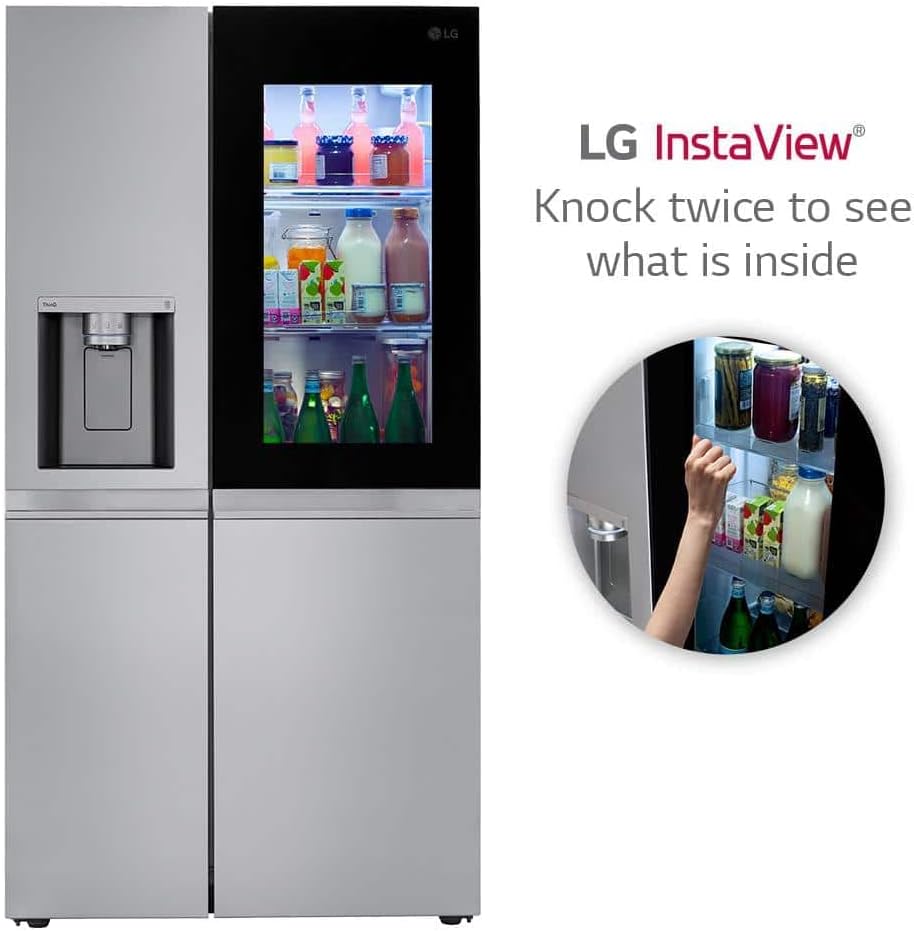
Figure 3.1: Demonstrating the InstaView feature where knocking twice illuminates the interior.
3.2 Dual Ice Maker with Craft Ice™
Your refrigerator is equipped with two ice makers: one for standard cubed/crushed ice and another for Craft Ice™ (spherical ice). The Craft Ice™ maker automatically produces batches of three ice spheres per day.

Figure 3.2: The Craft Ice™ maker producing slow-melting spherical ice.
3.3 Smooth Touch Ice Dispenser with UVnano™
The dispenser provides chilled filtered water and ice. The UVnano™ feature uses UV-C light to help clean the dispenser nozzle automatically after 24 hours of inactivity. This function is designed to reduce bacteria on the nozzle.

Figure 3.3: Detail of the ThinQ UVnano dispenser, highlighting the UV-C light for nozzle sanitation.
3.4 Temperature Controls
The electronic/digital temperature controls allow precise adjustment of the refrigerator and freezer compartments. Refer to the display type (Membrane/White LED) for current settings and adjustments.
3.5 ThinQ® Smart Features
Utilize the ThinQ app on your smartphone to access proactive smart alerts, monitor usage, receive maintenance notifications, and perform early diagnosis for your appliance. This connectivity enhances convenience and helps keep your refrigerator running smoothly.
4. Maintenance
Regular maintenance ensures optimal performance and extends the lifespan of your refrigerator.
4.1 Cleaning the Exterior
The refrigerator features a PrintProof™ Stainless Steel finish, designed to resist fingerprints and smudges. Clean the exterior with a soft, damp cloth and mild detergent. Avoid abrasive cleaners or harsh chemicals.

Figure 4.1: The PrintProof™ finish helps keep the stainless steel exterior clean from fingerprints.
4.2 Cleaning the Interior
Clean interior shelves, bins, and walls with a solution of mild soap and warm water. Remove removable parts for thorough cleaning. Ensure all parts are dry before returning them to the refrigerator.
4.3 Water Filter Replacement
The water filter (LT1000P) should be replaced periodically, typically every six months, or when the filter indicator light illuminates. Refer to the filter replacement instructions provided with the new filter.
4.4 UVnano™ Dispenser Maintenance
The UVnano™ feature automatically cleans the dispenser nozzle. No manual cleaning of the UV-C light component is required. Ensure the dispenser area remains free of debris.
5. Troubleshooting
This section provides solutions to common issues you might encounter. For more complex problems, use the SmartDiagnosis™ feature or contact customer support.
5.1 Ice Maker Issues
- Slow Ice Production: Ensure the water line is properly connected and the water filter is not clogged. Verify the freezer temperature is set correctly.
- Craft Ice™ Maker Not Working: Check if the Craft Ice™ bin is full. The system will stop production if the bin is at capacity. Ensure the water supply is adequate.
5.2 Water Dispenser Issues
- Water Trickle/Low Flow: This often indicates a clogged water filter. Replace the LT1000P water filter. Also, check for kinks in the water supply line.
- No Water Dispensed: Verify the water supply valve is fully open. Ensure the child lock feature is not activated.
5.3 General Operation Issues
- Door Alarm: If the door alarm sounds, ensure all doors are fully closed. Check for obstructions preventing the door from sealing properly.
- Unusual Noises: Modern refrigerators produce various sounds during operation (e.g., fan, compressor, ice dropping). Refer to the noise guide in the full manual if sounds are excessive or unusual.
5.4 SmartDiagnosis™
If you experience a problem with your refrigerator, the SmartDiagnosis™ feature allows LG service center to diagnose issues over the phone. Follow the instructions in the ThinQ app or your full product manual to activate this feature.
6. Specifications
Detailed technical specifications for the LG LRSOS2706S refrigerator.
| Specification | Value |
|---|---|
| Brand Name | LG |
| Model Info | LRSOS2706S |
| Item Weight | 304 pounds |
| Product Dimensions (D x W x H) | 33.44"D x 35.88"W x 70.25"H |
| Total Capacity | 27.1 Cubic Feet |
| Refrigerator Capacity | 17.50 cu.ft. |
| Freezer Capacity | 9.60 cu.ft. |
| Annual Energy Consumption | 694 Kilowatt Hours Per Year |
| ENERGY STAR® Qualified | Yes |
| Installation Type | Freestanding |
| Color | PrintProof™ Stainless Steel |
| Defrost System | Electric |
| Door Hinges | Horizontal (Swing) |
| Door Material Type | Stainless Steel |
| Number of Shelves | 4 (Glass) |
| Number of Doors | 2 |
| Ice & Water Dispenser | Yes |
| Water Filter | LT1000P |
| Linear Compressor | Yes |
| ADA Compliant | Yes |
| Sabbath Mode | Yes |
| Wi-Fi Enabled | Yes |
| SmartDiagnosis™ | Yes |
| UPC | 195174007631 |
| Date First Available | October 14, 2022 |
7. Warranty and Support
LG provides comprehensive warranty coverage for your LRSOS2706S refrigerator.
7.1 Warranty Information
- Parts & Labor: 1 Year
- Sealed System (Parts & Labor): 5 Years
- Compressor (Parts & Labor): 5 Years
- Linear Compressor (Parts Only): 6-10 Years
Please retain your proof of purchase for warranty claims. Warranty terms and conditions may vary; refer to your official warranty document included with the product for complete details.
7.2 Customer Support
For technical assistance, service requests, or further inquiries, please contact LG customer support. Utilize the ThinQ app's SmartDiagnosis™ feature for efficient troubleshooting and support.