
1. Introduction
The Graigar Smart Sensor AR8500 is a handheld digital ammonia gas detector designed to accurately measure ammonia (NH³) concentrations in various environments. This device is crucial for safety systems, providing real-time detection of gas leaks and alerting operators to potentially harmful conditions. It is suitable for industrial applications, including oil rigs, manufacturing processes, and firefighting scenarios, where monitoring combustible, flammable, toxic gases, and oxygen depletion is essential.
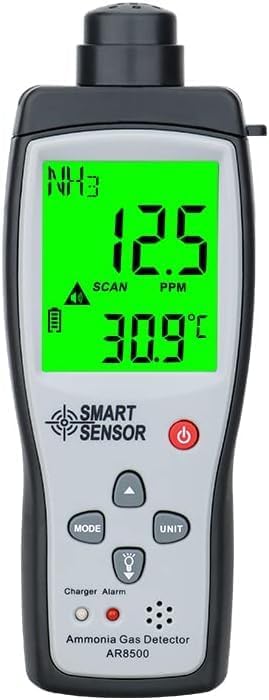
Figure 1: Front view of the AR8500 Ammonia Gas Detector displaying readings.
2. Safety Information
Always prioritize safety when operating gas detection equipment. Ammonia gas can be harmful to organic life. This detector is designed to provide early warnings of ammonia presence. Familiarize yourself with the device's operation and local safety protocols before use.
- Ensure the device is calibrated and functioning correctly before each use.
- Do not expose the detector to extreme temperatures or humidity beyond its specified operating conditions.
- In case of an alarm, follow established safety procedures for evacuation and ventilation.
- Keep the device clean and free from obstructions to ensure accurate readings.
3. Product Features
The AR8500 Ammonia Gas Detector incorporates several features for reliable and user-friendly operation:
- High-Precision Detection: Specifically designed for ammonia (NH³) gas.
- Wide Measuring Range: Detects ammonia concentrations from 0 to 100 PPM.
- Clear LCD Display: Large screen provides real-time readings of gas concentration (PPM) and ambient temperature (°C).
- Audible and Visual Alarms: Features both sound and light alarms to alert users to detected gas leaks. Alarm value is adjustable.
- Fast Response and Recovery: Quick detection and recovery times for efficient monitoring.
- Temperature Measurement: Integrated temperature sensor for environmental monitoring.
- Battery Powered: Operates on a 3.7V Lithium-Ion rechargeable battery, with a low battery indicator.
- Durable Construction: Made from plastic, designed for handheld use in various industrial settings.

Figure 2: Key features and measurement capabilities of the AR8500 detector.

Figure 3: Sound and light alarm indicators on the AR8500.
4. Package Contents
Upon opening the package, verify that all the following items are present:
- Graigar Smart Sensor AR8500 Ammonia Gas Detector
- User Manual
- Calibration Report
- USB Cable
- Lithium-Ion Battery (pre-installed or separate)
- Protective Carrying Case (blue)
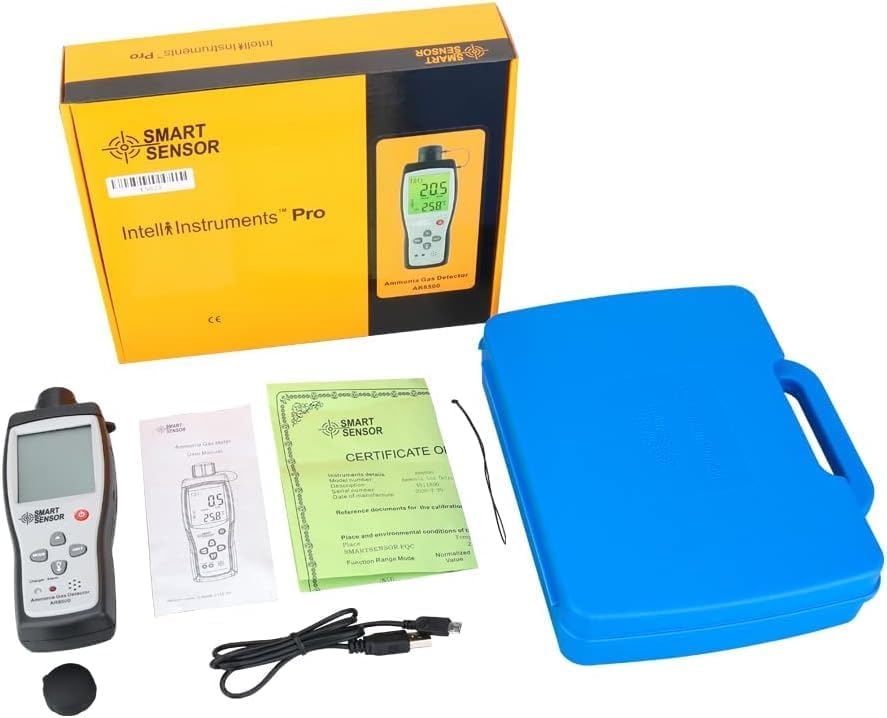
Figure 4: Complete package contents of the AR8500 Ammonia Gas Detector.
5. Setup
5.1 Battery Installation
The AR8500 operates on a 3.7V Lithium-Ion battery. If the battery is not pre-installed:
- Locate the battery compartment cover on the back of the device.
- Slide or unclip the cover to open the compartment.
- Insert the Lithium-Ion battery, ensuring correct polarity (+/-) as indicated inside the compartment.
- Replace the battery compartment cover securely.

Figure 5: Battery compartment with battery installed.
5.2 Charging the Battery
Before first use, ensure the battery is fully charged. Use the provided USB cable for charging:
- Connect the small end of the USB cable to the charging port on the side of the AR8500.
- Connect the larger end of the USB cable to a standard USB power adapter (not included) or a computer's USB port.
- The device's display or an indicator light will show the charging status.
- Once fully charged, disconnect the cable.

Figure 6: Charging the AR8500 detector.
6. Operation
6.1 Powering On/Off
- To power on, press and hold the Power button (red circle icon) until the display illuminates.
- To power off, press and hold the Power button again until the display turns off.
6.2 Understanding the Display
The large LCD display shows critical information:
- NH³: Indicates Ammonia gas detection mode.
- PPM: Displays the current ammonia concentration in parts per million.
- °C: Shows the ambient temperature in degrees Celsius.
- SCAN: Indicates the device is actively scanning for gas.
- Battery Icon: Shows the current battery level. A low battery indicator will appear when charging is needed.
- Alarm Icon: Illuminates when an alarm threshold is met.

Figure 7: Detailed view of the AR8500 LCD display.
6.3 Measurement
Once powered on, the device will automatically begin measuring ammonia concentration. Position the sensor head in the area to be monitored. The PPM reading will update in real-time.
6.4 Alarm Function
The AR8500 features both audible and visual alarms. When the detected ammonia concentration exceeds the preset alarm threshold, the device will emit an audible alert and the alarm icon on the display will illuminate.
- Setting Alarm Value: Refer to the detailed user manual for instructions on how to adjust the alarm threshold. This typically involves using the "MODE" or arrow buttons.
- Alarm Sound: The alarm sound is divided into 80 dB.
6.5 Unit Selection
Use the "UNIT" button to cycle through available measurement units if applicable (e.g., for temperature, though the primary gas reading is fixed at PPM).
6.6 Product Video Overview
Video 1: An overview of the AR8500 Ammonia Gas Detector, demonstrating its appearance and basic functions. This video is provided by GRAIGAR USA.
7. Maintenance
7.1 Cleaning
Wipe the device with a soft, dry cloth. Do not use abrasive cleaners or solvents, as these can damage the casing or display. Ensure the sensor opening is clear of dust and debris.
7.2 Battery Care
- Recharge the battery when the low battery indicator appears.
- Avoid fully discharging the battery frequently to prolong its lifespan.
- If storing the device for an extended period, charge the battery to approximately 50% and store in a cool, dry place.
7.3 Calibration
Regular calibration is essential for maintaining the accuracy of the gas detector. The device comes with a calibration report. Refer to the full user manual or contact Graigar support for detailed calibration procedures and recommended intervals.
8. Troubleshooting
| Problem | Possible Cause | Solution |
|---|---|---|
| Device does not power on. | Battery is discharged or incorrectly installed. | Charge the battery. Ensure the battery is installed with correct polarity. |
| Inaccurate readings. | Sensor obstructed, device needs calibration, or operating outside specified conditions. | Clean the sensor area. Perform calibration. Ensure operating environment is within -10°C to 50°C and <95% RH. |
| Alarm sounds continuously without gas presence. | Alarm threshold set too low or sensor malfunction. | Adjust the alarm threshold. If the issue persists, contact support. |
| Display is dim or flickering. | Low battery. | Recharge the battery. |
9. Specifications
| Parameter | Value |
|---|---|
| Gas Type | Ammonia (NH³) |
| Measuring Range | 0-100 PPM |
| Resolution | 0.1 PPM |
| Basic Error | ±2% |
| Response Time (T90) | ≤120 seconds |
| Recovery Time | < 120 seconds |
| Display Method | LCD display |
| Work Temperature | -10°C to 50°C |
| Work Humidity | < 95% RH (Non Gel) |
| Continuous Operation Time | > 60 hours |
| Alarm Type | Acoustic, Optical (double alarm) |
| Alarm Sound Level | Divided into 80 dB |
| Power Supply | 3.7V Li-ion battery (included) |
| Item Weight | 0.37 Pounds (approx. 170g) |
| Product Dimensions | 7.12 x 2.48 x 1.18 inches (181 x 63 x 30 mm) |
| Material | Plastic |
| Included Components | Meter, manual, calibration report, USB cable |

Figure 8: Summary of product specifications and packing details.
10. Warranty and Support
For detailed warranty information, please refer to the warranty card included in your product package or visit the official Graigar website. For technical support, troubleshooting assistance beyond this manual, or service inquiries, please contact Graigar customer service directly.
Manufacturer: Graigar