
1. Setup
1.1 Unboxing & Initial Charge
Your HHOGene Gpods package includes the following items:
- HHOGene Gpods Earbuds
- Wireless Charging Case
- USB-C Charging Cable
- Ear Cushions (4 sizes: XS, S, M, L)
- Quick User Guide & Safety Information Card

Image: Contents of the HHOGene Gpods package, showing the earbuds, charging case, USB-C cable, and various sizes of ear tips.
Before first use, place the earbuds into the charging case and connect the case to a power source using the provided USB-C cable. Ensure the earbuds and case are fully charged for optimal performance. A full charge for the case takes approximately 1.5 hours.
1.2 Pairing with Your Device
The HHOGene Gpods utilize Bluetooth 5.2 for a stable wireless connection up to 10 meters. To pair your earbuds:
- Open the charging case. The earbuds will automatically enter pairing mode.
- On your smartphone or audio device, navigate to Bluetooth settings and select "HHOGene Gpods" from the list of available devices.
- Once connected, the earbuds will automatically pair with your device whenever the case is opened.
- If manual pairing is required, press and hold the button inside the charging case until the indicator light flashes, then repeat step 2.
1.3 App Installation
Download the official HHOGene app from the App Store (for iOS) or Google Play Store (for Android) to unlock full customization features for your Gpods. The app allows control over light effects, sound equalization, noise control modes, and touch controls.

Image: The HHOGene mobile application displaying options for customizing the earbud lighting, including a color wheel for selection.
2. Operating Instructions
2.1 Power On/Off
The Gpods automatically power on when removed from the charging case and power off when placed back into the case and the lid is closed.
2.2 Touch Controls
The earbuds feature intuitive touch controls on their stems for easy management of audio and calls. These controls can be customized via the HHOGene app.
- Play/Pause: Double-tap either earbud.
- Next Song: Triple-tap the right earbud.
- Previous Song: Triple-tap the left earbud.
- Answer/End Call: Double-tap either earbud.
- Activate Voice Assistant: Tap and hold the right earbud.
- Switch Light On/Off: Tap and hold the left earbud.
- Switch Noise Control Mode: Tap and hold both earbuds simultaneously.

Image: A visual guide to the touch controls on the Gpods, showing tap gestures for music playback, call management, and feature activation.
2.3 Light Control
Personalize your earbuds with over 300,000 color combinations based on 72 basic colors. Use the HHOGene app to:
- Select custom colors and themes.
- Adjust brightness and dimness.
- Choose light rhythm responses (e.g., ripple, pulse, bright, breath) that can sync with your music.
- Utilize the photo recognition feature to apply color schemes from images.

Image: HHOGene Gpods in use, demonstrating various light rhythms and the extensive color combinations available through the app.
2.4 Active Noise Cancellation (ANC) & Transparency Mode
The Gpods feature Active Noise Cancellation (ANC) technology, reducing background noise by up to 25 decibels. The transparency mode allows you to hear your surroundings while still enjoying your audio.
- ANC: Blocks out external sounds, ideal for immersive listening.
- Transparency: Lets in external sounds, keeping you aware of your environment.
- Switch between modes using the touch controls or the HHOGene app.

Image: An earbud visually demonstrating the noise reduction capability of ANC, highlighting a 25dB reduction in ambient sound.
2.5 In-Ear Detection
The earbuds automatically play audio when inserted into your ears and pause when removed. This feature can be enabled or disabled in the HHOGene app.
3. Maintenance
3.1 Cleaning
The silicone ear tips are removable and easy to clean. Regularly clean the ear tips and the earbuds' surfaces with a soft, dry cloth to maintain hygiene and optimal sound quality.
3.2 Water Resistance
The HHOGene Gpods have an IPX4 water resistance rating, meaning they are protected against sweat and light splashes of water. They are suitable for sports and outdoor activities but should not be submerged in water.

Image: Gpods earbuds shown with water splashing around them, indicating their IPX4 water resistance for use in various conditions.
3.3 Interchangeable Shells
The Gpods feature detachable shells, allowing you to change their appearance to match your style. Additional shells can be previewed and ordered directly through the HHOGene app.
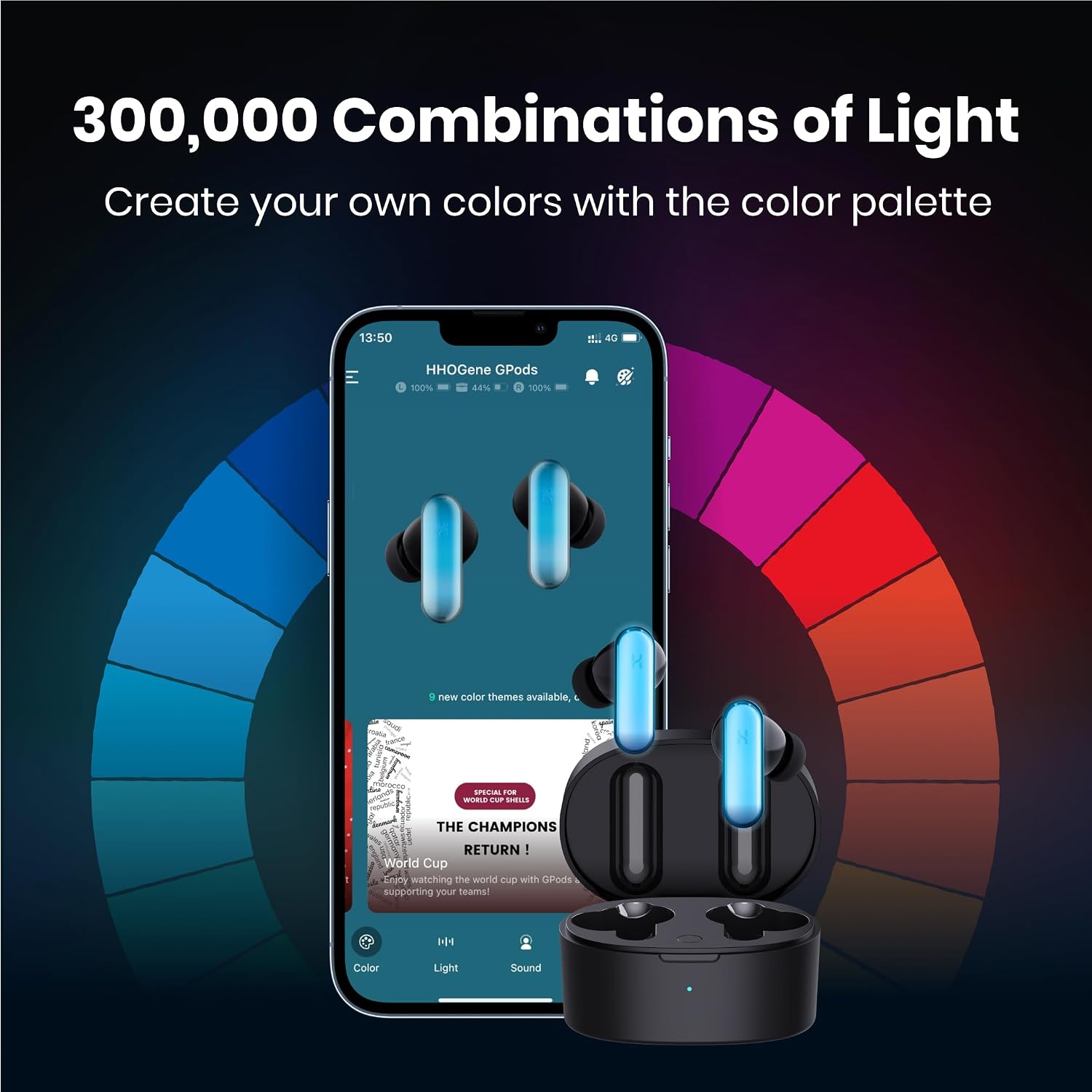
Image: A visual representation of the interchangeable shells for the Gpods, showcasing different patterns and colors that can be swapped.
4. Troubleshooting
4.1 Connectivity Issues
If your Gpods fail to connect, ensure Bluetooth is enabled on your device and the earbuds are charged. Try placing the earbuds back in the case, closing the lid, and then reopening it to re-initiate pairing mode. If issues persist, perform a manual pairing as described in Section 1.2.
4.2 Charging Issues
If the earbuds or case are not charging, verify that the USB-C cable is securely connected to both the case and the power source. Ensure the power source is active. Check the charging indicator light on the case for status.
4.3 Find My GPods
If you misplace your earbuds, use the "Find My GPods" feature within the HHOGene app. This function can cause the earbuds to emit a high-pitched sound or flash their lights, making them easier to locate.
5. Specifications
| Feature | Detail |
|---|---|
| Brand | HHOGene |
| Model Number | Gpods-B-SET |
| Connectivity Technology | Bluetooth 5.2 |
| Bluetooth Range | 10 Meters |
| Earbud Battery Life | 5 Hours (ANC Off, Lights Off) / 3 Hours (ANC On, Lights On) |
| Charging Case Battery Life | Up to 20 Hours total usage |
| Charging Time | 1.5 Hours (Case) / 10 min charge for 2 hours listening |
| Audio Driver Type | 10mm Dynamic Driver |
| Noise Control | Active Noise Cancellation (up to 25dB) |
| Water Resistance Level | IPX4 |
| Item Weight | 0.17 Kilograms |
| Material | Plastic |

Image: A table summarizing the technical specifications of the HHOGene Gpods, such as Bluetooth 5.2, 10mm dynamic drivers, and 25dB ANC.
6. Warranty & Support
6.1 Warranty Information
The HHOGene Gpods come with a 1-Year Limited Warranty from the date of purchase. This warranty covers manufacturing defects and workmanship under normal use. Please retain your proof of purchase for warranty claims.
6.2 Customer Support
For technical assistance, warranty claims, or general inquiries, please visit the official HHOGene website or contact their customer support team. Contact details can typically be found in the Quick User Guide included in your package or on the HHOGene brand store page.
You can also access the HHOGene Shop and customize your shells directly through the HHOGene app.