
Introduction
This manual provides essential information for the safe and efficient use of your Olcorife Ultra Thin Flat Plug Power Strip Surge Protector. Please read these instructions carefully before use and retain them for future reference.

Image: The Olcorife power strip, featuring a flat plug, 6 AC outlets, 2 USB-A ports, and 1 USB-C port, connected to a wall outlet with its 5ft cord.
Setup
Follow these steps to set up your power strip:
- Unpack: Carefully remove the power strip and all accessories from the packaging.
- Inspect: Check the device for any signs of damage. Do not use if damaged.
- Connect to Wall Outlet: Plug the ultra-thin flat plug into a standard 3-prong wall outlet. The flat design allows furniture to sit closer to the wall, saving space.

Image: A visual comparison showing the ultra-thin flat plug allowing furniture to sit flush against the wall, unlike a standard bulky plug.
Optional: Wall Mounting
The power strip can be mounted to a wall or desk using the integrated keyhole slots on the back.
- Mark Positions: Hold the power strip against the desired surface and mark the positions of the two keyhole slots.
- Install Screws: Insert two screws (not included) into the marked positions, leaving a small portion of the screw head exposed.
- Mount Power Strip: Align the keyhole slots with the screw heads and slide the power strip down to secure it.

Image: A close-up of the power strip's back, highlighting the keyhole slots designed for wall mounting.
Operating Instructions
Your Olcorife power strip is designed for convenient and safe power distribution.
- Power On/Off: Use the master power switch located on the top of the unit to turn all connected outlets and USB ports on or off.
- Connecting AC Devices: Plug your devices into any of the 6 widely spaced AC outlets. The 3-sided design helps accommodate larger adapters without blocking adjacent outlets.
- Connecting USB Devices: Use the 2 USB-A ports or the 1 USB-C port to charge compatible devices. Ensure your device's charging cable is properly connected.
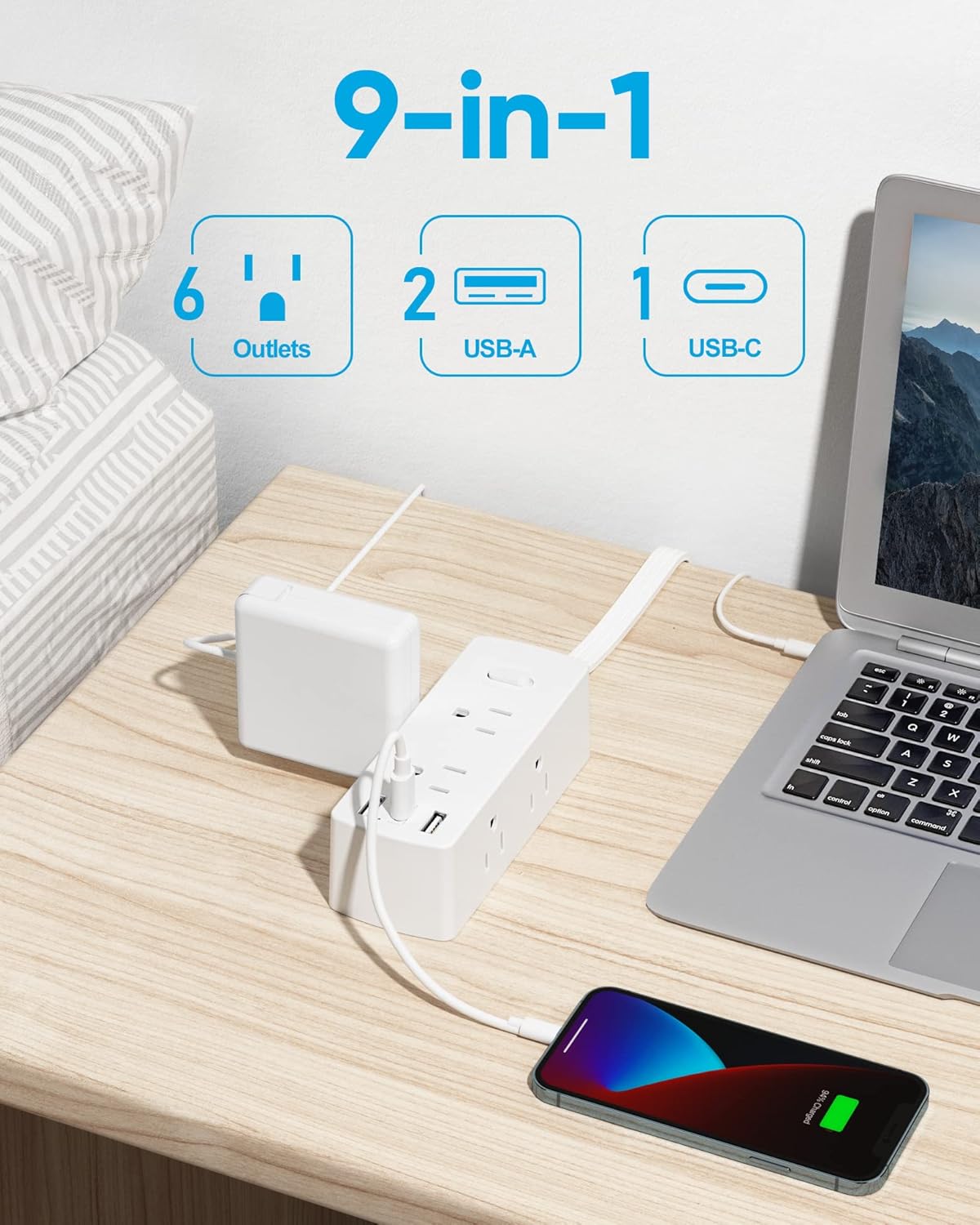
Image: The power strip in use, demonstrating its 9-in-1 functionality with multiple devices connected to AC, USB-A, and USB-C ports.
Overload Protection
The built-in circuit breaker automatically cuts power if the connected devices exceed the rated capacity, preventing overcurrent and overheating. If an overload occurs, disconnect some devices and press the reset button (integrated with the power switch) to restore power.

Image: A visual representation of the overload protection feature, showing a lightning bolt and devices safely connected to the power strip.
Product Video Overview
Video: An official overview of the Olcorife Smart Power Strip, demonstrating its features and functionality.
Maintenance
To ensure the longevity and safe operation of your power strip, follow these maintenance guidelines:
- Cleaning: Disconnect the power strip from the wall outlet before cleaning. Use a dry, soft cloth to wipe the surface. Avoid liquid cleaners or abrasive materials.
- Inspection: Periodically inspect the power cord and the unit for any signs of damage, such as frayed wires, cracks, or loose connections. If any damage is found, discontinue use immediately and contact customer support.
- Storage: When not in use, store the power strip in a cool, dry place away from direct sunlight and moisture.
Troubleshooting
If you encounter any issues with your power strip, refer to the following troubleshooting tips:
- No Power to Devices:
- Ensure the power strip's master switch is in the 'On' position.
- Check if the power strip's plug is securely inserted into the wall outlet.
- Verify that the wall outlet is functioning correctly by plugging in another device.
- Overload Protection Tripped:
- If the power strip suddenly loses power, it may be due to an overload. Disconnect some devices to reduce the total power draw.
- Press the reset button (often integrated with the power switch) to restore power.
- USB Devices Not Charging:
- Ensure the USB cable is properly connected to both the power strip and your device.
- Try a different USB port or cable to rule out a faulty connection.
- Confirm that your device is compatible with the USB charging specifications of the power strip.
Specifications
| Brand | olcorife |
| Model | 5 FT 6AC |
| Input Voltage | 125 Volts |
| Total AC Outlets | 6 |
| USB-A Ports | 2 |
| USB-C Ports | 1 |
| Cord Length | 5 feet |
| Surge Protection | 2000 Joules (Built-in circuit breaker for overload protection) |
| Product Dimensions | 4.72 x 1.77 x 1.57 inches |
| Item Weight | 9.9 ounces |
Warranty and Support
For warranty information or technical support, please refer to the product packaging or contact Olcorife customer service directly. Keep your purchase receipt as proof of purchase.