
Introduction
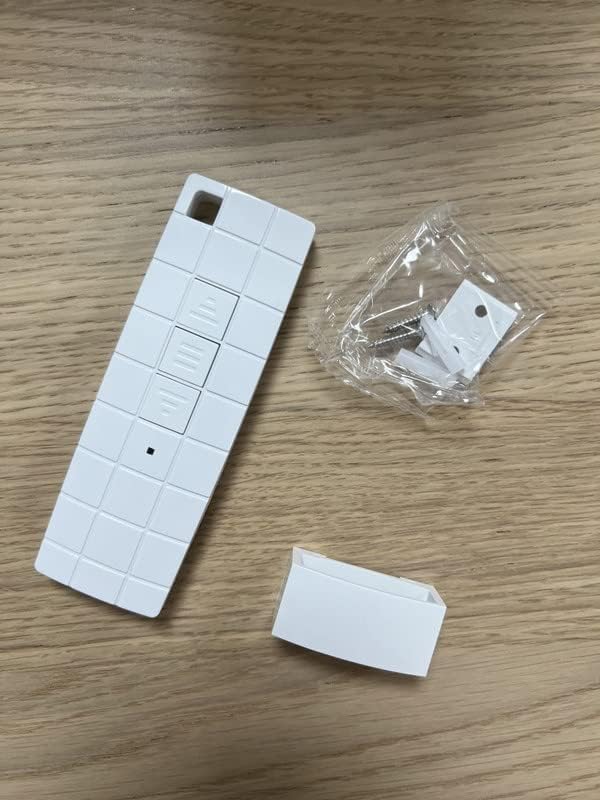
This manual provides comprehensive instructions for the Vana DC90 Wireless Awning Remote Control. This remote is designed to seamlessly connect with Vana electric awnings, including those with integrated lighting. It serves as a replacement remote control for Dooya wireless motor awnings and can control up to 20 receivers simultaneously.
Before proceeding with installation or operation, please read this manual thoroughly to ensure proper use and compatibility with your existing awning motor system.
Package Contents
- 1 x Vana DC90 Wireless Awning Remote Control
- 1 x Wall Mount Bracket
- 1 x Mounting Accessories (screws, anchors)
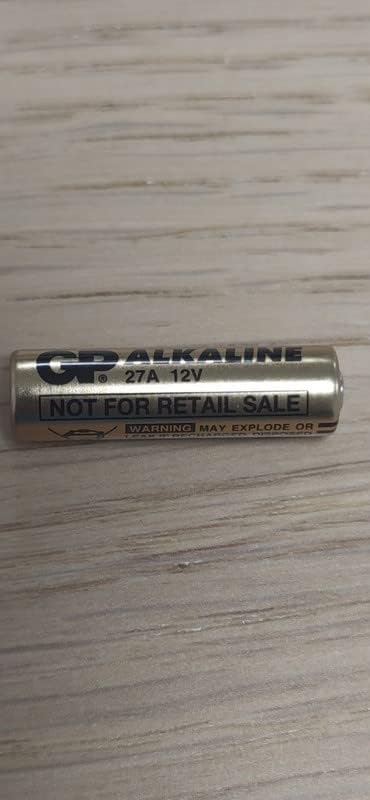
- 1 x 27A 12V Battery (pre-installed or included separately)
- 1 x User Manual
Setup
1. Battery Installation
The Vana DC90 remote control is powered by a 27A 12V battery. The battery is typically included with the product. If not pre-installed, follow these steps:
- Locate the battery compartment cover on the back of the remote control.
- Slide or gently pry open the cover.
- Insert the 27A 12V battery, ensuring the correct polarity (+ and -) as indicated inside the compartment.
- Close the battery compartment cover securely.

2. Pairing with Awning Motor
The pairing process may vary slightly depending on your specific Dooya awning motor model. Refer to your awning motor's user manual for detailed pairing instructions. Generally, the process involves putting the motor into a pairing mode and then activating the remote control.
General Steps (Consult your motor's manual for specifics):
- Ensure the awning motor is powered on.
- Locate the programming button on your Dooya motor (often a small button on the motor head or control box).
- Press and hold the programming button until the motor responds (e.g., jogs slightly, beeps, or an indicator light changes).
- Within a few seconds, press the "Stop" button on your Vana DC90 remote control.
- The motor should respond again, indicating successful pairing.
Note: This remote can control motors with integrated control and external control units. It supports controlling up to 20 receivers simultaneously.
Operating Instructions
The Vana DC90 remote control features three primary buttons for operating your awning:

- ▲ (Up/Extend) Button: Press this button to extend your awning or move it upwards.
- ■ (Stop) Button: Press this button to stop the awning's movement at any desired position.
- ▼ (Down/Retract) Button: Press this button to retract your awning or move it downwards.
Ensure you are within the operational range of the awning motor (up to 150m outdoors, 40m indoors) for reliable control.
Maintenance
- Cleaning: Wipe the remote control with a soft, dry cloth. Do not use abrasive cleaners or solvents.
- Battery Replacement: If the remote's range decreases or it becomes unresponsive, replace the 27A 12V battery. Follow the battery installation steps in the "Setup" section.
- Storage: Store the remote control in a dry place, away from direct sunlight and extreme temperatures. The optimal operating temperature range is -10 °C to +55 °C.
Troubleshooting
| Problem | Possible Cause | Solution |
|---|---|---|
| Remote not responding. | Dead or low battery. | Replace the 27A 12V battery. |
| Remote not responding. | Not paired with the motor. | Refer to the "Pairing with Awning Motor" section and your motor's manual. |
| Limited range. | Obstructions or interference. | Ensure clear line of sight. Move closer to the awning motor. Check for other devices operating on similar frequencies. |
| Awning moves erratically. | Interference or motor issue. | Reposition the remote. If the problem persists, consult your awning motor's manual or a qualified technician. |
Specifications
- Model: DC90
- Brand: Vana
- Compatibility: Dooya wireless motor awnings (integrated and external control)
- Color: White
- Dimensions (L x W x D): 12 cm x 4 cm x 1 cm
- Outdoor Range: Up to 150 m
- Indoor Range: Up to 40 m
- Frequency: 433.92 MHz +/- 100 kHz
- Input Voltage: 12 V (27A 12V battery)
- Transmitter Power: 10 mW
- Operating Temperature: -10 °C to +55 °C
- Material: Plastic
Warranty and Support
Information regarding specific warranty terms is not provided in the product description. Please refer to the warranty card included with your purchase or contact Vana customer support for details.
For further assistance or technical support, please visit the Vana website or contact their customer service department. Contact information may be found on the product packaging or the official Vana website.
Quality and performance guaranteed.