
1. Introduction
Thank you for choosing the UNICOO Multifunctional Kids Step Stool. This manual provides essential information for the safe assembly, operation, and maintenance of your new product. Designed to foster independence and engagement, this step stool allows children to safely participate in various household activities, from kitchen tasks to bathroom routines.
2. Safety Information
Your child's safety is our top priority. Please read and adhere to all safety guidelines.
- Material Safety: The step stool is constructed from environmentally friendly and child-safe HDPE material.
- Stability: Features a double safety rail design and anti-slip foot pads to ensure a stable and secure platform.
- Weight Limit: The stool has a robust load capacity of up to 150 lbs (68 kg).
- Age Range: Suitable for toddlers from 18 months to 60 months.
- Supervision: Always supervise your child when they are using the step stool.
- Placement: Ensure the stool is placed on a flat, stable surface before use.
3. Package Contents
Verify that all components are present before beginning assembly. If any parts are missing or damaged, please contact customer support.
- Main Step Stool Frame (HDPE plastic)
- Adjustable Standing Platform
- Adjustable Step
- Double Safety Rails (removable)
- Dual-sided Game Board (Whiteboard, Ring Toss, Phone Dial, Rotating Gears)
- Assembly Tool (screwdriver)
- Necessary Accessories (screws, anti-slip foot pads)
- Basketball Hoop (note: net may not be included in all packages, a small air pump may be provided instead of a net)
- Small Ball (for basketball hoop)
- Dry Erase Markers and Eraser (for whiteboard)
4. Assembly Instructions
Assembly is straightforward. All necessary accessories and tools are provided. Please follow these steps carefully:
- Unpack Components: Carefully remove all parts from the packaging and lay them out.
- Attach Side Panels: Connect the side panels using the provided screws and the assembly tool. Ensure all connections are secure.
- Install Standing Platform: The standing platform (often labeled 'Part C') does not slide in. It needs to be popped into place from above before screwing it in. Refer to the illustrations for correct positioning.
- Adjust Step Height: Insert the adjustable step into the desired slot. The stool offers 3 adjustable height levels.
- Install Safety Rails: Secure the double safety rails. These can be removed as your child grows.
- Attach Game Board: Install the dual-sided game board. Note: If the whiteboard has a plastic covering, it is recommended to unscrew the whiteboard from its frame to remove the entire covering before final assembly.
- Attach Accessories: Secure the basketball hoop and other interactive elements.
- Final Check: Ensure all screws are tightened and the stool is stable before allowing a child to use it.
User Tip: Some users have found that the provided instructions' illustrations for the standing platform can be misleading. Remember to 'pop' the platform into place from above before securing it with screws.
5. Operating Instructions
The UNICOO Kids Step Stool is designed for ease of use and adaptability.
5.1. Adjusting Height
The standing platform and step can be adjusted to three different height levels to accommodate your child's growth. To adjust, use the provided tool to loosen the screws, reposition the platform/step to the desired slot, and then securely tighten the screws.
5.2. Using Safety Rails
For younger children (under 2 years old), it is recommended to use the double safety rails to provide maximum security. As your child matures and gains more confidence, these rails can be removed, transforming the unit into an 'escalator mode' for easier access.
5.3. Engaging with the Game Board
The dual-sided game board offers various interactive elements:
- Whiteboard: Use dry erase markers for drawing and learning.
- Ring Toss: Practice hand-eye coordination with the included rings.
- Phone Dial: An interactive dial for imaginative play.
- Rotating Gears: Engage fine motor skills by turning the gears.
- Basketball Hoop: Use the small ball for a fun activity.
6. Features and Adjustments
- Adjustable Height: 3 levels for the standing platform and step.
- Double Safety Rails: Provides enhanced security, removable for older children.
- Dual-Sided Game Board: Includes whiteboard, ring toss, phone dial, and rotating gears.
- Anti-Slip Foot Pads: Ensures stability and prevents sliding.
- Storage Space: Integrated storage area for aprons, towels, or small toys.
- Durable Material: Made from lightweight yet robust HDPE plastic.
- Versatile Use: Suitable for kitchen countertops, bathroom sinks, and play areas.

Image: Child using the step stool, illustrating its adjustable height for countertop access.
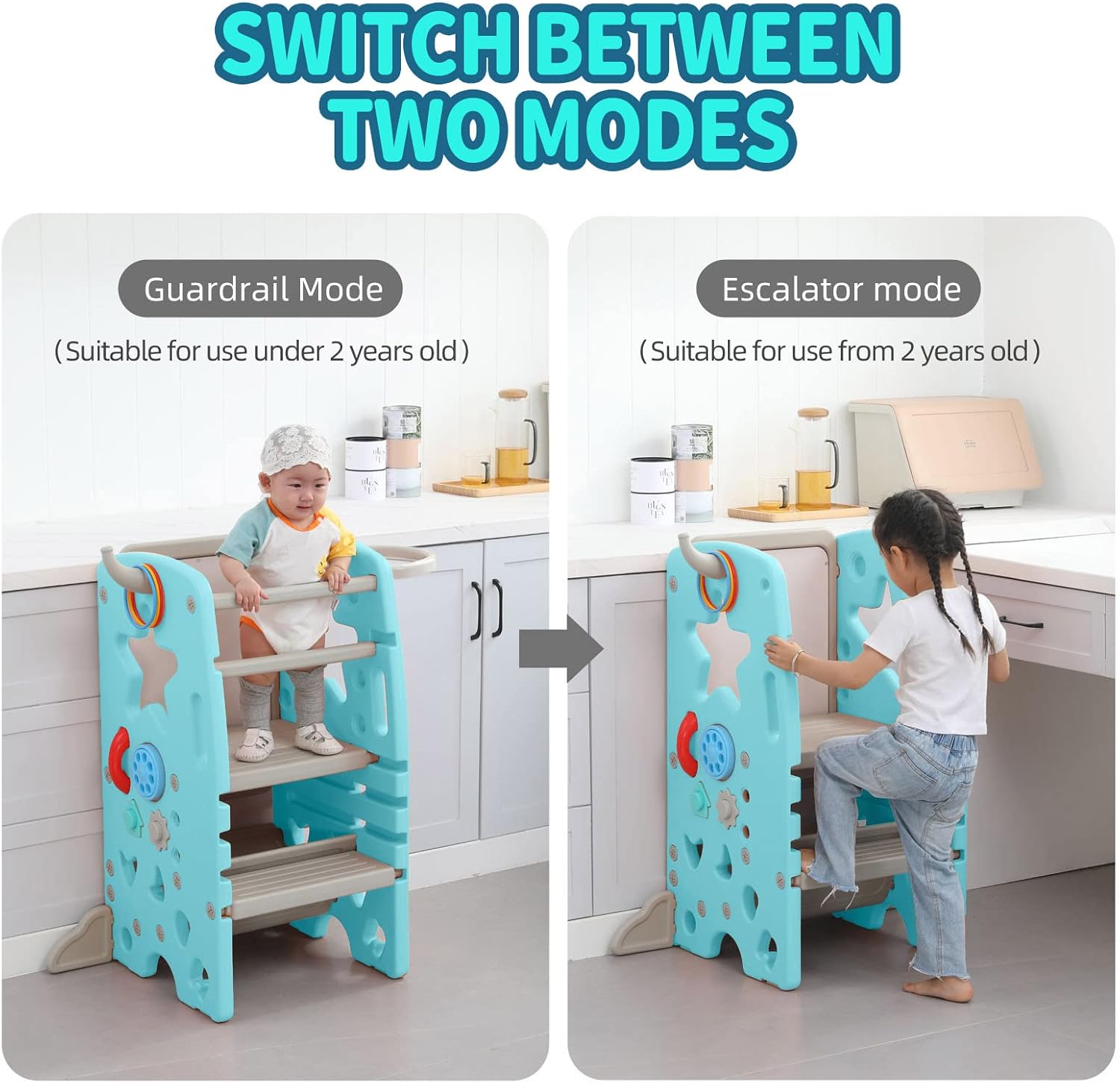
Image: Comparison of Guardrail Mode (for younger children) and Escalator Mode (for older children) with removable safety rails.

Image: Detailed view of the interactive game board features on the side of the step stool.
7. Maintenance and Care
To ensure the longevity and hygiene of your step stool, follow these simple care instructions:
- Cleaning: The plastic material is easy to clean. Use a damp cloth with mild soap and water to wipe down surfaces. Avoid abrasive cleaners.
- Whiteboard Care: For optimal performance, use only dry erase markers. If residue remains, wipe with a damp cloth or a specialized whiteboard cleaner.
- Inspection: Periodically check all screws and connections to ensure they remain tight and secure.
- Storage: Store in a dry place away from direct sunlight when not in use for extended periods.
8. Troubleshooting
Here are solutions to common issues encountered by users:
- Missing Screws/Parts: If you find any missing components upon unboxing, please contact UNICOO customer support immediately for assistance.
- Whiteboard Plastic Film: If the whiteboard appears cloudy or difficult to erase, check for a protective plastic film. It is best removed by unscrewing the whiteboard from its frame before final assembly to ensure complete removal.
- Loose Phone/Accessories: The plastic phone or other small accessories may occasionally separate. Reattach them firmly. If parts are broken, contact customer support.
- Basketball Net: Some packages may not include a net for the basketball hoop, but rather a small air pump. This is a known variation. The slots for a net may still be present.
- Standing Platform Installation: If the standing platform seems difficult to install, remember it needs to be 'popped' into place from above into the designated slots before securing with screws, rather than sliding it in.
9. Specifications
| Feature | Detail |
|---|---|
| Product Dimensions | 18.5"D x 18.1"W x 35.4"H (47cm D x 46cm W x 90cm H) |
| Brand | UNICOO |
| Material | HDPE Plastic |
| Color | Mint Green |
| Special Feature | Multi-function Design, Slip Resistant Step, Adjustable Height |
| Room Type | Kitchen, Bathroom, Playroom |
| Age Range (Description) | Toddler (18 months to 60 months) |
| Maximum Height | 35 Inches (89 cm) |
| Weight Limit | 150 Pounds (68 kg) |
| Model Name | kids step stool |
| Item Weight | 17 Pounds (7.7 kg) |
| Assembly Required | Yes |
| Number of Steps | 2 |

Image: Product dimensions and included accessories.
10. Warranty and Support
For warranty information, missing parts, or any product-related inquiries, please contact UNICOO customer support directly. Refer to the product packaging or the retailer's website for specific contact details.