
Rolanstar hq-dshg018-01
Rolanstar TV Stand with Mount and Power Outlet Instruction Manual
Model: hq-dshg018-01
Brand: Rolanstar
1. Introduction
Thank you for choosing the Rolanstar TV Stand with Mount and Power Outlet. This versatile entertainment center is designed to accommodate flat-screen TVs up to 70 inches, offering a built-in swivel mount, integrated power outlets, and customizable LED lighting. This manual provides detailed instructions for assembly, operation, maintenance, and troubleshooting to ensure safe and optimal use of your new TV stand.
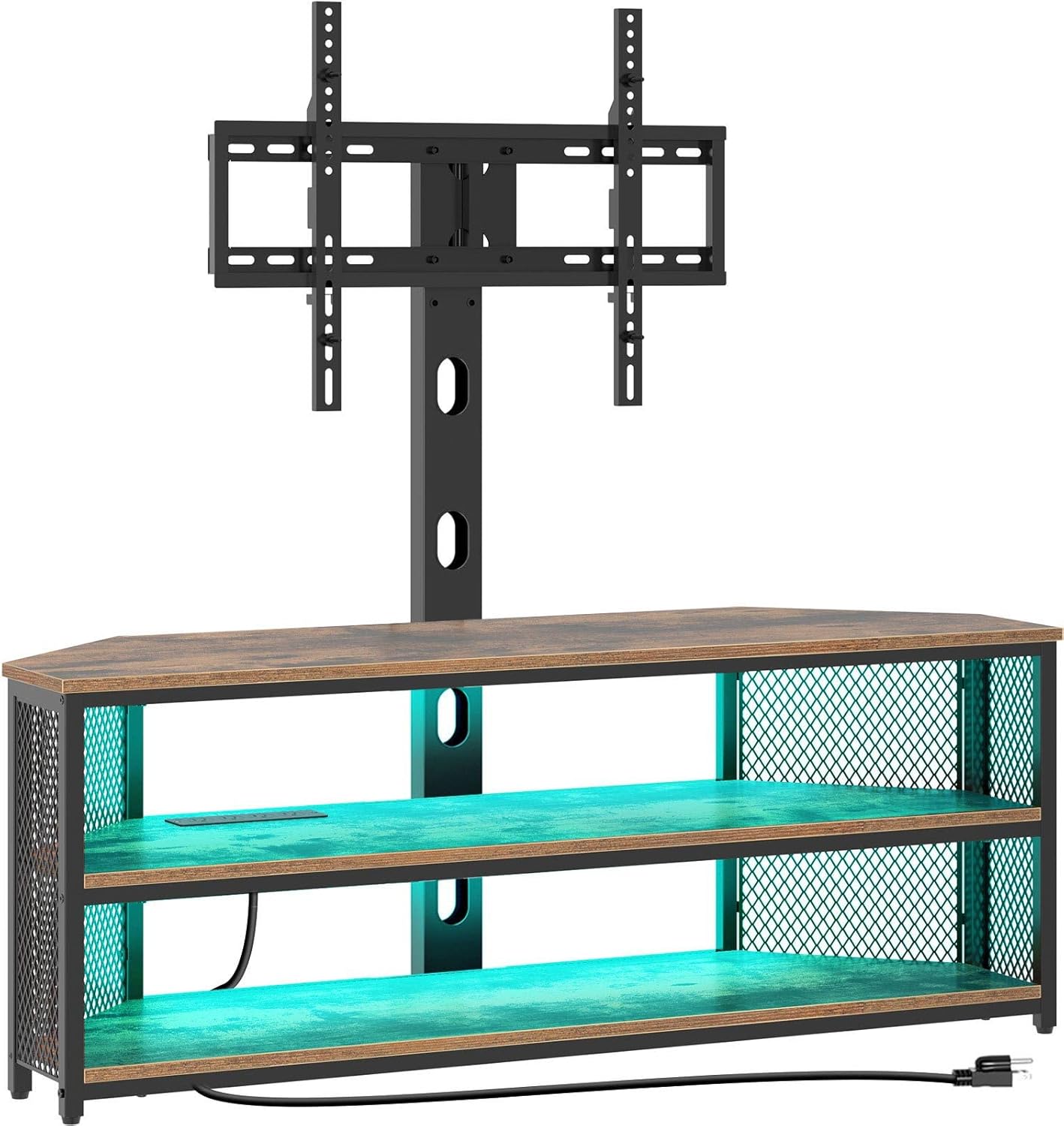
Figure 1: Rolanstar TV Stand with Mount and Power Outlet (Rustic Brown)
2. Safety Information
This product includes safety features to ensure secure mounting of your TV. Ensure proper assembly and positioning to prevent tip-over risks. Keep away from water and other liquids. Always handle with care to avoid damage or injury. For further assistance, refer to the assembly instructions and manufacturer's guidelines.
3. Package Contents
Please verify that all components are present before beginning assembly. If any parts are missing or damaged, please contact customer support.
- TV Stand Panels (Wood/Engineered Wood)
- Metal Frame Components
- TV Mounting Bracket and Hardware
- Integrated Power Outlet Unit
- LED Light Strip with Remote Control
- Assembly Hardware (Screws, Bolts, Wrenches, etc.)
- Instruction Manual
4. Assembly Instructions
4.1 Before You Begin
- Clear a spacious and clean area for assembly.
- Identify all parts and hardware using the provided list.
- Keep children and pets away from the assembly area.
- Do not fully tighten screws until instructed, allowing for adjustments.
4.2 Step-by-Step Assembly
- Assemble the Base Frame: Connect the main metal frame components using the provided screws. Ensure all connections are secure but do not overtighten.
- Attach Side Panels and Shelves: Secure the engineered wood side panels and shelves to the metal frame. The trapezoid design allows for corner placement.
- Install the Power Outlet: Integrate the built-in 4-standard plug outlet unit into the designated slot on the top shelf. Ensure it is flush and secure. This provides convenient charging for your devices.

Figure 2: Integrated Power Outlet
- Mount the TV Bracket: The TV mount can be installed in two ways: directly onto the TV stand or mounted to the wall. Choose the method that best suits your needs. Attach the vertical mounting arms to the back of your TV, then secure the TV to the main support column.

Figure 3: Two Ways of Mounting the TV Mount
- Install LED Lights: Adhere the RGB LED light strip to the underside of the shelves or desired locations. Connect the light strip to the power source and test with the remote control. The lights offer 7 main colors and 21 dynamic modes.

Figure 4: LED Light Strip Detail
- Wire Management: Utilize the integrated wire management features to keep cables organized and prevent tangling.
- Final Tightening: Once all components are in place and aligned, carefully tighten all screws to ensure the stand is stable and secure.
5. Operating Instructions
5.1 Swivel and Height Adjustment
The built-in TV mount allows for a 34-degree swivel angle to the left or right, providing optimal viewing from various positions in your room. Additionally, the mount offers 2 levels of height adjustment, allowing the total height of the TV to change from 53 to 56 inches off the floor.

Figure 5: Swivel and Height Adjustment
5.2 LED Lights Operation
Use the included remote control to manage the LED lights. You can select from 7 main colors and 21 dynamic modes (flash, strobe, fade, smooth) to create the desired ambiance for your entertainment space.
5.3 Power Outlet Usage
The integrated power strip with 4 standard plug outlets allows you to conveniently power your TV, DVD player, game console, WiFi router, and other electronic devices directly from the stand. Ensure devices are properly plugged in and do not exceed the maximum power rating of the outlets.
6. Maintenance
To maintain the appearance and longevity of your Rolanstar TV Stand, wipe surfaces with a dry cloth. Avoid using harsh chemicals or abrasive cleaners, which may damage the finish. Regularly check all screws and connections to ensure they remain tight and secure.
7. Troubleshooting
| Problem | Possible Cause | Solution |
|---|---|---|
| Stand is wobbly/unstable | Loose screws or uneven floor. | Ensure all screws are tightened. Adjust leveling feet if applicable, or place shims under the base on uneven surfaces. |
| LED lights not working | Power connection issue, remote battery dead, or light strip damage. | Check power connection to the LED strip. Replace remote battery. Inspect the light strip for visible damage. |
| Power outlets not functioning | Not plugged into wall outlet, circuit breaker tripped, or internal wiring issue. | Ensure the stand's power cord is securely plugged into a working wall outlet. Check your home's circuit breaker. If issues persist, contact a qualified electrician. |
| TV mount does not swivel/adjust | Adjustment mechanism is too tight or obstructed. | Loosen any locking mechanisms on the swivel or height adjustment points. Ensure no cables or objects are obstructing movement. |
8. Product Specifications
| Feature | Detail |
|---|---|
| Brand | Rolanstar |
| Model Number | hq-dshg018-01 |
| Color | Rustic Browm |
| Material | Engineered Wood |
| Product Dimensions (L x W x H) | 45.3 x 13.8 x 19.7 inches |
| Item Weight | 42.3 pounds |
| TV Size Compatibility | 32"/45"/55"/60"/65"/70" |
| Swivel Angle | ±34 degrees |
| Height Adjustment | 2 levels (53"-56" off floor) |
| Power Outlets | 4 Standard Plugs |
| Special Feature | RGB LED Lights (7 main colors, 21 dynamic modes) |
| Product Care Instructions | Wipe with Dry Cloth |

Figure 6: Product Dimensions
9. Warranty and Support
For warranty information, technical support, or to inquire about replacement parts, please refer to the official Rolanstar website or contact their customer service department directly. Keep your purchase receipt for any warranty claims.