
REBBLO B0BHTP61RK
REBBLO Workout Bench Core and Back Abs Trainer User Manual
Model: B0BHTP61RK
Introduction
The REBBLO Workout Bench is a versatile fitness machine designed for comprehensive core and back training, suitable for both beginners and experienced athletes. This manual provides detailed instructions for assembly, operation, maintenance, and troubleshooting to ensure safe and effective use of your new fitness equipment.
With its integrated workout computer, you can easily track your progress, including calories burned, exercise time, and repetitions per minute, helping you optimize your workouts for maximum effectiveness.
Safety Guidelines
- Read all instructions carefully before assembly and use.
- Consult a physician before starting any new exercise program.
- Keep children and pets away from the equipment during use.
- Ensure all bolts and nuts are securely tightened before each use.
- Do not exceed the maximum weight limit of 100 kg (220 lbs).
- Place the bench on a flat, stable surface.
- Stop exercising immediately if you feel pain, dizziness, or nausea.
Package Contents
Please check the contents of your package against the list below. If any parts are missing or damaged, please contact REBBLO customer support.
- Main Frame Assembly
- Padded Bench Seat
- Foam Rollers (various sizes)
- Workout Computer
- Handlebars
- Assembly Hardware (bolts, nuts, washers, tools)
- User Manual (this document)
Assembly Instructions
Follow these steps carefully to assemble your REBBLO Workout Bench.
Step 1: Unpack and Identify Parts
Carefully remove all components from the packaging. Lay them out on a clean, flat surface and compare them with the package contents list to ensure everything is present.

Figure 1: Fully assembled REBBLO Workout Bench. Use this image as a reference during assembly.
Step 2: Assemble the Main Frame
Connect the various frame sections using the provided bolts and nuts. Ensure all connections are secure but do not fully tighten until all major components are in place.

Figure 2: Detailed view of the bench's frame structure, showing connection points.
Step 3: Attach Padded Bench and Foam Rollers
Secure the padded bench seat to the main frame. Then, slide the foam rollers onto their respective support bars and secure them. These rollers are crucial for comfort and support during exercises.
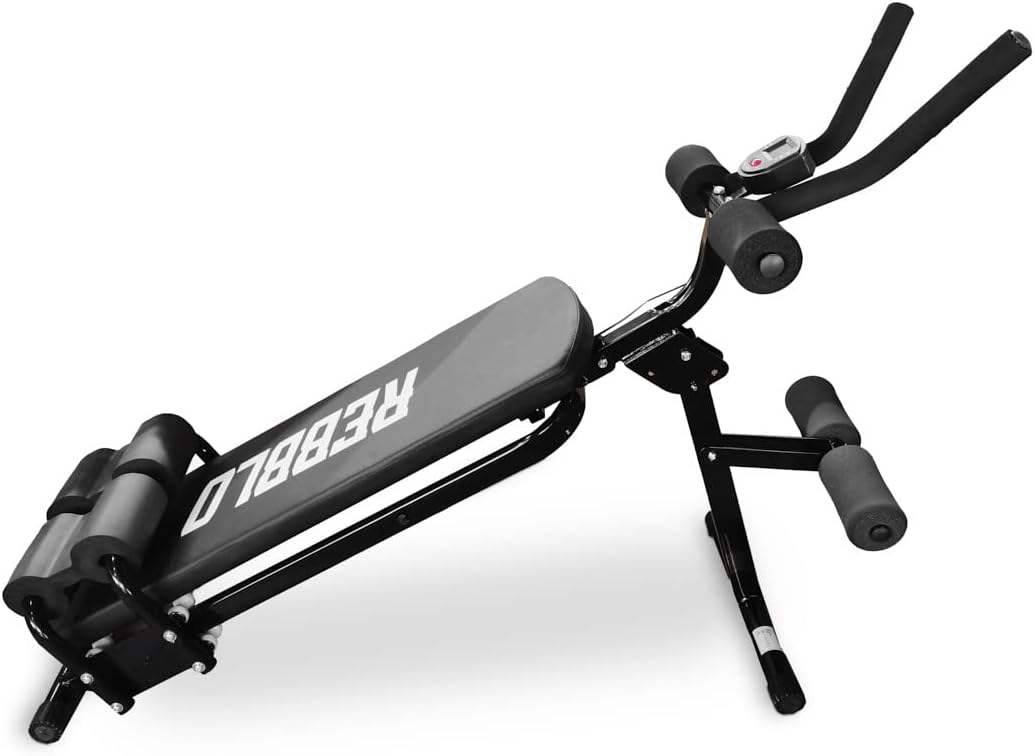
Figure 3: Side view illustrating the attachment of the padded bench and foam rollers.
Step 4: Install Handlebars and Workout Computer
Attach the handlebars to the upper section of the frame. The workout computer typically mounts near the handlebars. Insert one AA battery (not included) into the computer before attaching it. Ensure all cables are properly connected if applicable.

Figure 4: Front view highlighting the handlebars and the workout computer display.
Once all components are assembled, go back and fully tighten all bolts and nuts. Test the stability of the bench before first use.
Operating Instructions
Using the Workout Computer
The integrated workout computer helps you monitor your exercise performance. It displays:
- Calories Burned: An estimate of calories expended during your workout.
- Time: Duration of your exercise session.
- Number of Movements: Counts repetitions per minute.
To power the computer, insert one AA battery (not included) into the battery compartment, usually located on the back or side of the unit. The computer will automatically activate when you begin exercising.
Performing Exercises
The REBBLO Workout Bench is designed for a variety of exercises targeting abdominal muscles, back, arms, legs, and glutes. Ensure your body is completely engaged and tensioned during exercises for optimal results.

Figure 5: Example of a user performing a core exercise on the REBBLO Workout Bench.
Common exercises include various forms of sit-ups, crunches, and back extensions. The bench's design also allows for push-ups and other bodyweight exercises. Always maintain proper form to prevent injury.
Maintenance and Care
- Cleaning: Wipe down the bench with a damp cloth after each use to remove sweat and dirt. Use mild soap if necessary, but avoid harsh chemicals.
- Inspection: Regularly check all bolts, nuts, and moving parts for tightness and wear. Tighten any loose fasteners.
- Storage: Store the bench in a dry, cool place away from direct sunlight and extreme temperatures.
- Battery Replacement: Replace the AA battery in the workout computer when the display becomes dim or stops functioning.
Troubleshooting
| Problem | Possible Cause | Solution |
|---|---|---|
| Workout computer not turning on/displaying | Dead battery; Loose connection | Replace AA battery; Check battery orientation; Ensure all cables are securely connected. |
| Bench feels unstable/wobbly | Loose bolts/nuts; Uneven surface | Tighten all assembly bolts and nuts; Move bench to a flat, level surface. |
| Squeaking noise during use | Loose connections; Lack of lubrication | Tighten all bolts; Apply a small amount of silicone-based lubricant to pivot points if necessary. |
Product Specifications
| Feature | Detail |
|---|---|
| Model | B0BHTP61RK |
| Brand | REBBLO |
| Dimensions (L x W x H) | 120 x 41 x 70 cm (47.2 x 16.1 x 27.6 inches) |
| Weight | 10 kg (22 lbs) |
| Weight Limit | 100 kg (220 lbs) |
| Frame Material | Alloy Steel |
| Color | Black |
| Workout Computer Battery | 1 x AA (not included) |
Warranty and Customer Support
REBBLO stands behind the quality of its products. For specific warranty information, please refer to the documentation included with your purchase or visit the official REBBLO website. If you have any questions, require assistance with assembly, or encounter any issues not covered in this manual, please contact REBBLO customer support.
No official product videos were found in the provided data.
Ask a question about this manual
Ask about setup, troubleshooting, compatibility, parts, safety, or missing instructions. Manuals+ will review the question and use this page’s manual context to help answer it.