
Arafuna CD5189B-04
Arafuna Portable CD Player User Manual
Model: CD5189B-04
1. Introduction
Thank you for purchasing the Arafuna Portable CD Player. This device is designed to provide high-quality audio playback from various sources, including CDs and TF cards, with enhanced features like anti-skip protection and a built-in rechargeable battery. Please read this manual carefully before using the product to ensure proper operation and longevity.
Package Contents
- Arafuna Portable CD Player
- USB Charging Cable
- 3.5mm AUX Cable
- Headphones
- User Manual

Image: The Arafuna Portable CD Player shown with its included accessories: a pair of wired headphones, a USB charging cable, and a 3.5mm AUX cable. The user manual is also visible.
2. Product Layout and Controls
Familiarize yourself with the buttons and ports on your Arafuna Portable CD Player for optimal use.

Image: A detailed diagram of the Arafuna Portable CD Player, highlighting its various buttons and ports with corresponding numbers.
- MODE: Press to cycle through play modes (Repeat a track, Repeat All, Play in random order, Play first 10s of file, Play in order).
- Previous (◀◀): Short press for previous track; long press for fast rewind.
- Play/Pause (►██): Press to play or pause playback.
- Next (►►): Short press for next track; long press for fast forward.
- SPEED-: Decrease playback speed (for language learning).
- PROG (Resume Button): Program playback order; also functions as resume from last position.
- A-B Repeat: Set A-B repeat segment.
- Stop (■): Stop playback.
- EQ (Sound Effects Options): Cycle through sound effects (BBS, Pop, Jazz, Rock, Classic).
- SPEED+: Increase playback speed (for language learning).
- TF Card Slot: Insert TF (Micro SD) card for MP3 playback.
- Power On/Off Switch: Slide to turn the device on or off.
- DC Charging Port (5V): Connect USB charging cable here.
- Charging Indicator: LED light indicates charging status.
- Earphone/AUX Jack: Connect headphones or AUX cable.
- Volume Adjustment Knob: Rotate to adjust volume.
- HOLD On/Off: Slide to lock/unlock buttons to prevent accidental presses.
- Door Open Button: Press to open the CD compartment.
3. Setup
3.1 Charging the Battery
The Arafuna Portable CD Player features a built-in 1400 mAh rechargeable Li-ion battery. Before first use, fully charge the device.
- Connect the included USB charging cable to the DC 5V charging port (13) on the player.
- Connect the other end of the USB cable to a compatible power source such as a wall charger, power bank, car charger, or computer USB port.
- The Charging Indicator (14) will illuminate during charging.
- A full charge takes approximately 4 hours and provides over 12 hours of playback at medium volume.

Image: The Arafuna Portable CD Player connected to a power adapter via its USB charging cable, illustrating different charging options like wall charger, power bank, car charger, and computer.
3.2 Powering On/Off
- To power on the device, slide the Power On/Off Switch (12) to the "ON" position.
- To power off, slide the switch to the "OFF" position.
4. Operating Instructions
4.1 Playing CDs
- Press the Door Open Button (18) to open the CD compartment.
- Carefully place a CD (CD-DA, CD-R, CD-RW, MP3 CD) onto the spindle, label side up.
- Close the CD compartment firmly until it clicks.
- The player will read the disc, and the track number and playback time will appear on the display.
- Press the Play/Pause button (3) to start playback.
- Adjust the volume using the Volume Adjustment Knob (16).
Anti-Skip Protection: The player features anti-skip protection, which helps prevent interruptions during playback, especially useful for on-the-go use. This feature is active only in CD playback mode.

Image: An illustration detailing the player's Anti-Shock Protection (for CD playback), its five Play Modes (Repeat a track, Repeat All, Play in random order, Play first 10s of file, Play in order), five EQ Sound Effects (BBS, Pop, Jazz, Rock, Classic), and Compatible Formats (CD, MP3, CD-R, CD-RW, TF card).
4.2 Playing from TF Card
- Insert a TF (Micro SD) card containing MP3 audio files into the TF Card Slot (11).
- The player will automatically switch to TF card mode or you may need to press the MODE button (1) to select it.
- Use the Previous (2) and Next (4) buttons to navigate tracks.
- Press Play/Pause (3) to control playback.

Image: A close-up view of the Arafuna Portable CD Player with a TF (Micro SD) card being inserted into its dedicated slot. Note: TF card is not included.
4.3 Play Modes and Sound Effects
- MODE (1): Press repeatedly to cycle through playback modes:
- Repeat a track
- Repeat All
- Play in random order
- Play first 10 seconds of file
- Play in order
- EQ (9): Press repeatedly to cycle through sound equalizer effects:
- BBS (Bass Boost System)
- Pop
- Jazz
- Rock
- Classic
4.4 A-B Repeat and Last Position Memory
- A-B Repeat (7):
- During playback, press A-B Repeat once to set point A.
- Press A-B Repeat again to set point B. The player will then repeatedly play the segment between A and B.
- Press A-B Repeat a third time to cancel the A-B repeat function.
This feature is ideal for language learning or repeating specific audio segments.
- Last Position Memory (PROG/6): The player can memorize the last paused position. When you power on the device again, it will resume playback from where you left off.

Image: An illustration highlighting the A-B Repeat function and Last Memory feature, depicted with a child studying, suggesting their utility for language learners and audiobook enthusiasts.
4.5 Connecting to External Devices
- Headphones: Plug the included headphones or any standard 3.5mm headphones into the Earphone/AUX Jack (15).
- External Speakers/Car Audio: Use the included 3.5mm AUX cable to connect the player's Earphone/AUX Jack (15) to the AUX input of an external speaker or your car's audio system.
Note: This portable CD player does not support Bluetooth transmission. Ensure your car audio system or external speaker supports a 3.5mm AUX input before connecting.
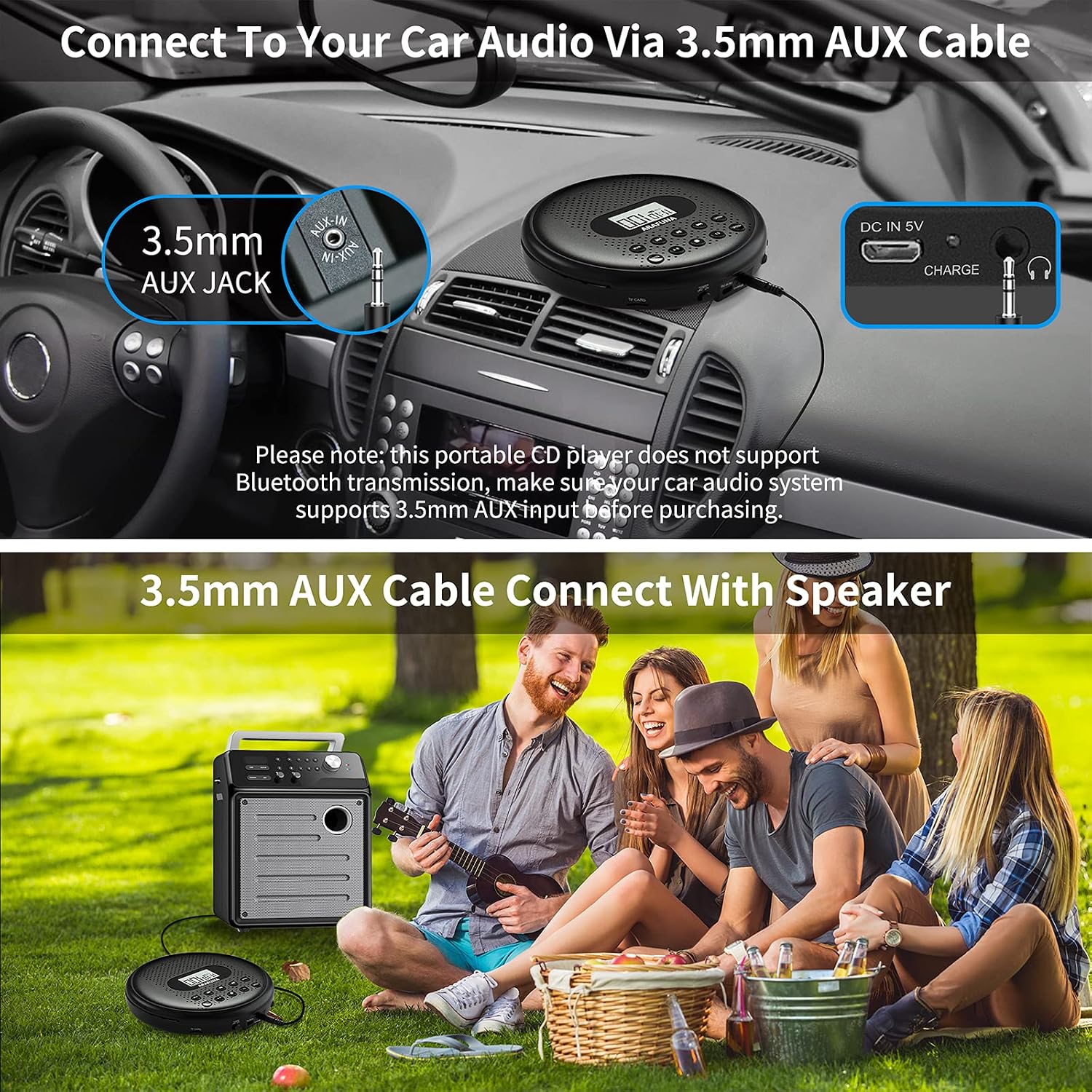
Image: Two scenarios demonstrating connectivity: the top image shows the CD player connected to a car's audio system via a 3.5mm AUX cable, and the bottom image shows the player connected to an external portable speaker, used by a group of people outdoors.
5. Maintenance
- Cleaning: Use a soft, dry cloth to clean the exterior of the player. Do not use abrasive cleaners or solvents. For the optical lens, use a specialized CD lens cleaner if necessary, following its instructions.
- Storage: Store the player in a cool, dry place away from direct sunlight, extreme temperatures, and high humidity.
- Battery Care: To prolong battery life, avoid fully discharging the battery frequently. If storing for a long period, charge the battery to about 50% every few months.
- Handling Discs: Always handle CDs by their edges to avoid fingerprints and scratches. Keep the CD compartment closed when not in use to prevent dust accumulation.
6. Troubleshooting
| Problem | Possible Cause | Solution |
|---|---|---|
| Player does not power on. | Battery is depleted. Power switch is OFF. HOLD switch is ON. | Charge the battery. Slide Power switch to ON. Slide HOLD switch to OFF. |
| No sound or low sound. | Volume is too low. Headphones/AUX cable not properly connected. Damaged headphones/cable. | Increase volume using the knob. Ensure connections are secure. Try different headphones/cable. |
| Disc skipping or not playing. | Disc is dirty or scratched. Disc is not properly seated. Player is on an unstable surface. | Clean the disc with a soft cloth. Re-seat the disc firmly. Place player on a stable surface. |
| TF card not recognized. | TF card not inserted correctly. TF card is corrupted or incompatible format. Files are not MP3 format. | Re-insert TF card. Try a different TF card. Ensure files are MP3. |
7. Specifications
- Model: CD5189B-04
- Brand: Arafuna
- Color: Black
- Dimensions: 14L x 14W x 2.9H centimeters
- Battery: Built-in 1400 mAh Li-ion rechargeable battery
- Charging Time: Approximately 4 hours
- Playback Time: Over 12 hours (at medium volume)
- Compatible Disc Formats: CD, CD-R, CD-RW, MP3 CD
- Compatible Audio Formats (TF Card): MP3
- Connections: 3.5mm AUX Jack, USB (for charging)
- Special Features: Anti-Skip Protection, Built-in Speaker, A-B Repeat, Last Position Memory, EQ Sound Effects, TF Card Support
8. Warranty and Support
Arafuna offers a 24-month warranty for this product, covering manufacturing defects from the date of purchase. This warranty does not cover damage caused by misuse, accidents, unauthorized modifications, or normal wear and tear.
For technical support, warranty claims, or any inquiries regarding your Arafuna Portable CD Player, please contact our friendly customer service team. Refer to the contact information provided on the product packaging or the official Arafuna website.
Related documentsCD5189B-04


Ask a question about this manual
Ask about setup, troubleshooting, compatibility, parts, safety, or missing instructions. Manuals+ will review the question and use this page’s manual context to help answer it.