
1. Introduction
The Getue 1200Mbps Dual Band WiFi Repeater is designed to extend the coverage of your existing WiFi network. It is particularly useful in areas where your router's WiFi signal is weak or unavailable, creating a more stable and faster internet experience throughout your home or office. This device supports both 5GHz and 2.4GHz bands, offering flexible connectivity options.
2. Package Contents
- 1 x Getue 1200Mbps Dual Band WiFi Repeater
- 1 x Installation Guide
3. Product Overview
The Getue WiFi Repeater features a compact design with external antennas for enhanced signal transmission. It is equipped with a signal indicator light to help you find the optimal placement for the device.

Figure 1: Getue 1200Mbps Dual Band WiFi Repeater
3.1 Strong Signal and Coverage
The repeater utilizes four high-gain 360° antennas to ensure strong signal penetration through walls, providing omnidirectional WiFi coverage. It supports two frequency bands, 2.4GHz and 5GHz, with a combined transmission speed of up to 1200Mbps (867Mbps on 5GHz and 300Mbps on 2.4GHz).

Figure 2: Signal Extension Capability
3.2 Multiple Operating Modes
The device supports three operating modes: Repeater, Access Point (AP), and Router, catering to various network requirements.

Figure 3: Repeater and AP Mode Illustration
3.3 Multi-Device Compatibility
The repeater is compatible with a wide range of devices, including smartphones, tablets, computers, and laptops. It can connect up to 10 wireless devices simultaneously while maintaining a stable and smooth signal.

Figure 4: Compatible Devices
3.4 Intelligent Signal Indicator
The device features an intelligent signal indicator light that changes color based on the signal strength. This helps users identify the most suitable installation location for optimal performance.
- Green: Strong signal
- Red: Weak signal
- Blue: Connection unsuccessful
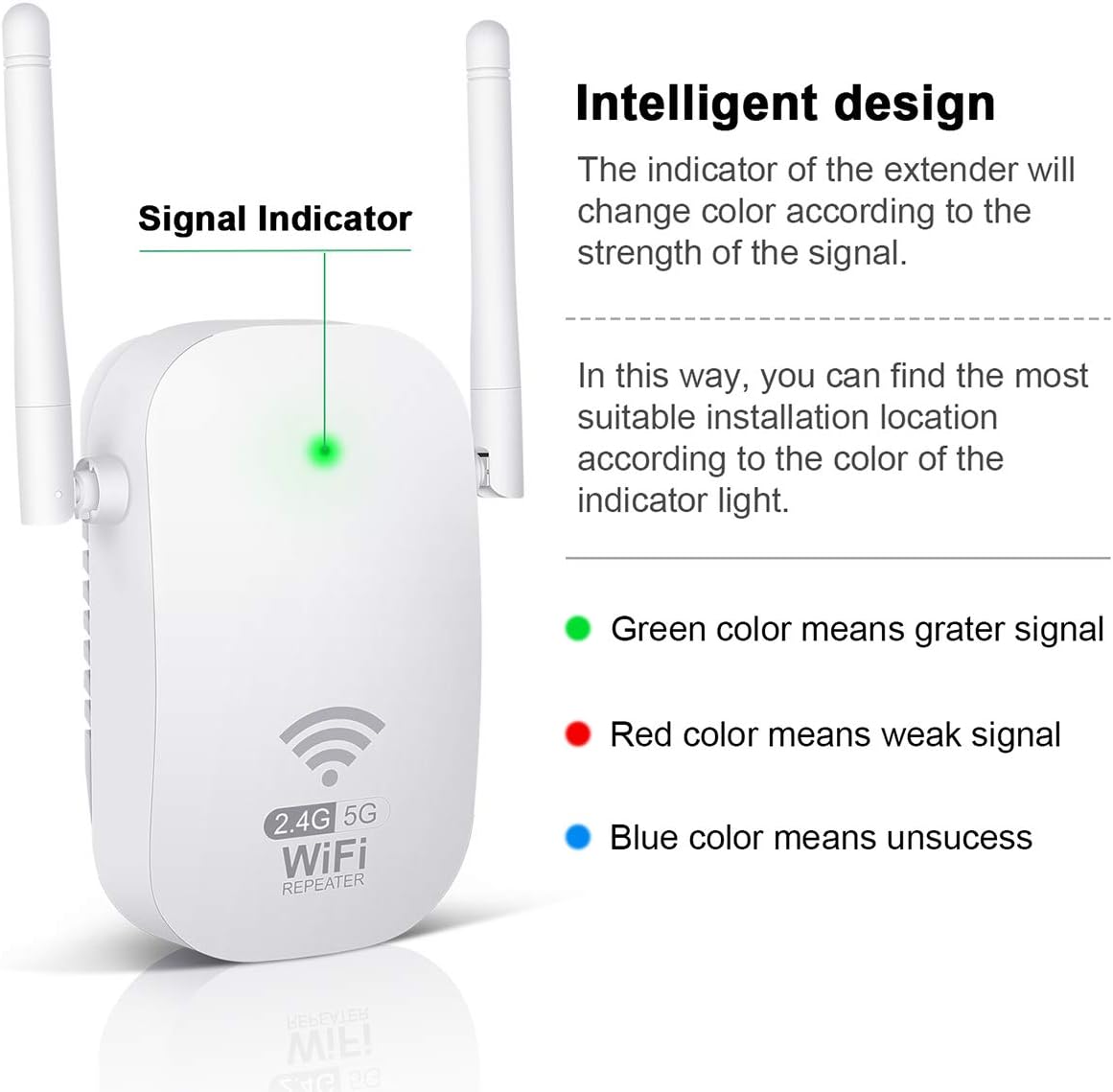
Figure 5: Signal Indicator
3.5 Multiple Scenario Application
The Getue WiFi Repeater is suitable for various environments, including offices, warehouses, hotels, libraries, coffee shops, and homes, effectively addressing signal instability issues in large areas.

Figure 6: Application Scenarios
4. Setup Instructions
Follow these steps to set up your Getue WiFi Repeater:
- Step 1: Power On
Connect the repeater to a power outlet. Wait for the 2.4G and 5G indicator lights to illuminate. - Step 2: Connect to Repeater's WiFi
On your smartphone or computer, connect to the WiFi network named "po5g-xxxxpo" or "po2.4g-xxxxpo". (The exact name may vary slightly). - Step 3: Access Configuration Page
Open a web browser and enter the IP address 192.168.188.1 in the address bar. Enter the default password "admin" and click "Login". - Step 4: Select Host Router and Enter Password
From the configuration page, select the SSID (network name) of your main host router. Enter the password for your host router and click "Connect".
Note: The host router's SSID should not contain spaces for proper configuration. - Step 5: Restart and Reconnect
After the installation is complete, the repeater will restart. Once it has restarted, reconnect your devices to the new extended WiFi network, which will typically be named "XXXX-pro-5G" or "XXXX-pro-2.4G" (where XXXX is your original router's SSID).
5. Operating Modes
The Getue WiFi Repeater supports the following operating modes:
- Repeater Mode: Extends the coverage of an existing wireless network. This is the primary function for boosting your WiFi signal.
- Access Point (AP) Mode: Converts a wired internet connection into a wireless network. Connect an Ethernet cable from your router to the repeater, and it will broadcast a new WiFi signal.
- Router Mode: Functions as a basic router, creating a private network from a modem connection.
6. Resetting the Repeater
If you encounter issues or wish to reconfigure the repeater, you can reset it to factory settings:
- First, unplug the repeater from the power outlet.
- Plug it back in and wait approximately 3 minutes until the wireless repeater's indicator lights illuminate. (This step is important).
- Locate the Reset button on the repeater. Press and hold the Reset button for 10 to 15 seconds.
- Release the button when the lights turn off and then re-illuminate. The repeater has now been restored to factory settings, and you can begin the setup process again.
7. Troubleshooting
If you experience problems with your Getue WiFi Repeater, consider the following:
- No Power: Ensure the repeater is securely plugged into a working power outlet.
- No Signal Extension: Verify that the repeater is placed within the range of your main router's WiFi signal. Use the signal indicator light (Green for strong, Red for weak) to find an optimal location.
- Cannot Access Configuration Page: Double-check the IP address (192.168.188.1) and ensure your device is connected to the repeater's initial WiFi network (e.g., "po5g-xxxxpo"). Try clearing your browser's cache or using a different browser.
- Weak Extended Signal: Reposition the repeater closer to your main router or away from obstructions like thick walls or large metal objects.
- Connection Drops: Ensure your router's firmware is up to date. Try resetting the repeater to factory settings and reconfiguring it.
- Incorrect Password: During setup, ensure you enter the correct password for your main host router.
8. Specifications
| Brand | Getue |
| Model Number | B0BHLKMLCD (WD-R1201U EWIFI AC1200) |
| Wireless Communication Standard | 802.11ac |
| Data Transfer Rate | 1200 Mbps (867 Mbps on 5GHz, 300 Mbps on 2.4GHz) |
| Special Features | Wireless, Stable |
| Compatible Devices | Smartphone, Tablet, Computer, Laptop |
| Security Standards | WPA PSK, WPA2 PSK, WPA/WPA2 (Supports SSID hiding and blacklist) |
9. Warranty and Support
The Getue 1200Mbps Dual Band WiFi Repeater comes with a 60-day warranty against manufacturer defects. For technical support or further assistance, please refer to the contact information provided with your purchase or visit the official Getue support website.