
Introduction
This manual provides instructions for the BoxWave AllReader SD Card Reader. This device is designed to facilitate file transfer between various devices and SD/microSD memory cards. It features multiple connector types for broad compatibility.
Product Overview
The BoxWave AllReader SD Card Reader is a compact device that allows you to read and write data to SD and microSD cards. It integrates four common interface types:
- USB-A: Standard USB connector for computers and laptops.
- USB-C: Reversible connector for modern smartphones, tablets, and laptops.
- Micro-USB: Common connector for older Android devices and peripherals.
- Lightning: Connector for Apple iPhone and iPad devices.
The reader supports both standard SD cards and smaller microSD cards, allowing for versatile data management across different platforms.

Image: A close-up view of the BoxWave AllReader SD Card Reader, showing its compact design and multiple integrated connectors.
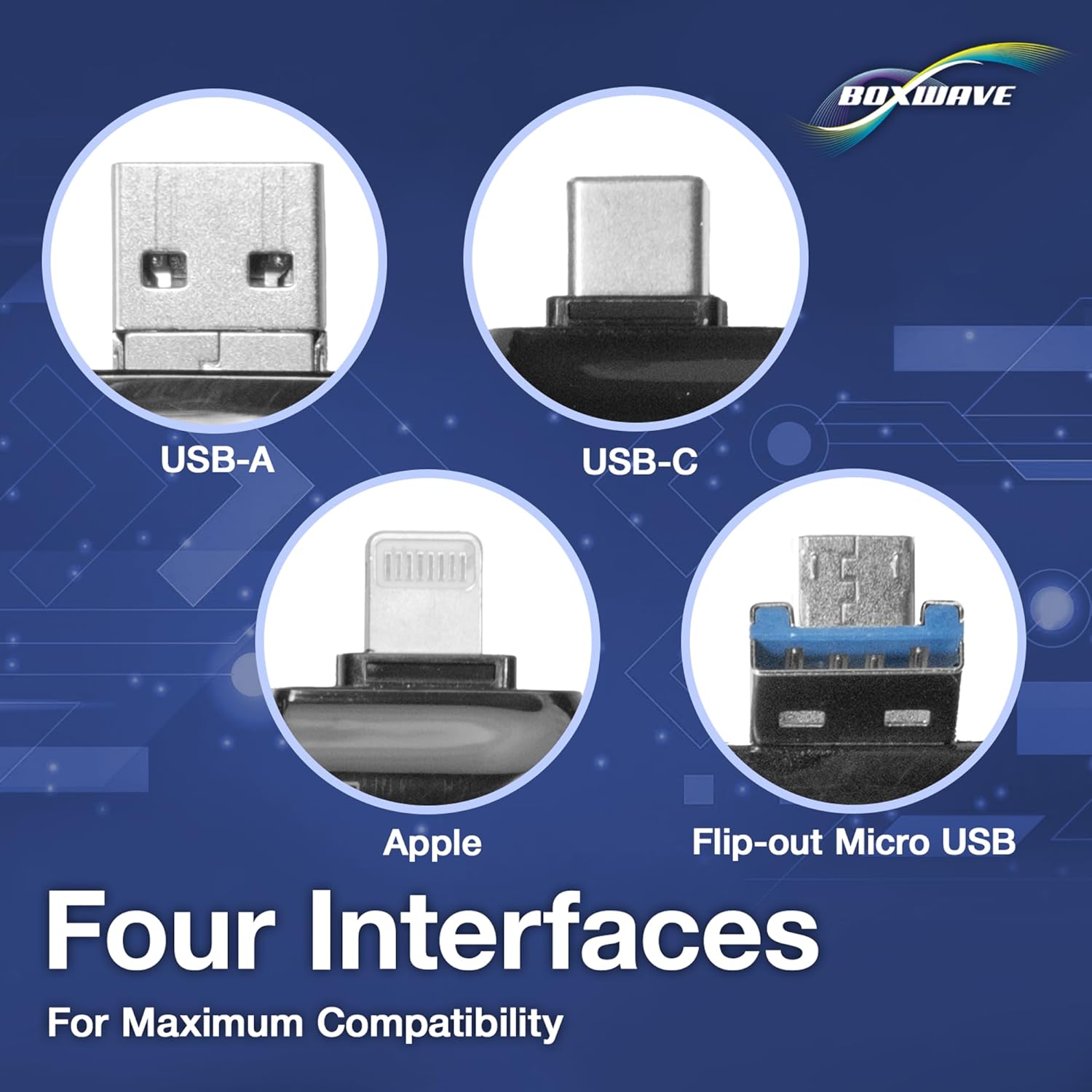
Image: Illustration highlighting the four distinct interfaces of the AllReader: USB-A, USB-C, Lightning, and Micro-USB.
Setup
The BoxWave AllReader SD Card Reader is designed for plug-and-play functionality, requiring no driver installation for most operating systems.
- Insert Memory Card: Gently insert your SD card into the larger slot or your microSD card into the smaller slot until it clicks into place. Ensure the card is oriented correctly to avoid damage.
- Connect to Device: Select the appropriate connector (USB-A, USB-C, Micro-USB, or Lightning) for your host device (e.g., computer, smartphone, tablet). Plug the AllReader into your device's port.
- Access Files: Your device should recognize the card reader as an external storage device. Navigate to its contents through your device's file manager or photo application.

Image: The BoxWave AllReader SD Card Reader with an SD card fully inserted, demonstrating readiness for use.
Operating Instructions
Once connected, the AllReader functions like any standard external storage device.
Transferring Files
- From Card to Device: Locate the files on the inserted memory card using your device's file browser. Copy or move the desired files to a folder on your device's internal storage or another connected drive.
- From Device to Card: Locate the files on your device that you wish to transfer. Copy or move these files to the folder representing the memory card in the AllReader.
Always ensure that file transfers are complete before disconnecting the AllReader or removing the memory card to prevent data corruption.

Image: Visual representation of the AllReader connected to various devices (smartphone, tablet, laptop, desktop PC) facilitating file transfers.
Maintenance
To ensure the longevity and proper function of your BoxWave AllReader SD Card Reader:
- Keep the device clean and free from dust and debris. Use a soft, dry cloth for cleaning.
- Avoid exposing the device to extreme temperatures or moisture.
- Do not force memory cards or connectors into slots.
- Store the reader in a protective environment when not in use to prevent damage to the connectors.
Troubleshooting
| Problem | Possible Cause | Solution |
|---|---|---|
| Device not recognized | Incorrect connection, faulty port, card not inserted correctly. | Ensure the AllReader is fully inserted into the device port. Try a different port or device. Re-insert the memory card. |
| Cannot access files | Corrupted memory card, incompatible file system, card not fully inserted. | Verify the memory card is functional on another device. Ensure the card is fully inserted. Check if your device supports the card's file system (e.g., FAT32, exFAT). |
| Slow transfer speeds | Older memory card, USB 2.0 port, large file sizes. | Use a high-speed memory card. Connect to a USB 3.0 or higher port if available on your device. Transfer smaller batches of files. |
Specifications
- Model: AllReader SD Card Reader
- Brand: BoxWave
- Compatible Media Types: SD Card, microSD Card
- Interfaces: USB-A, USB-C, Micro-USB, Lightning
- Color: Jet Black
- Item Weight: Approximately 6 ounces (170 grams)
- Special Feature: Compact design
- Compatible Devices: Personal Computers, Smartphones, Tablets (with appropriate ports)
Warranty and Support
Information regarding warranty coverage and customer support for the BoxWave AllReader SD Card Reader is typically provided at the point of purchase or on the manufacturer's official website. Please refer to your purchase documentation or visit the BoxWave website for details on warranty terms and how to obtain technical assistance.