
Kuizil K21
Kuizil Smartwatch User Manual
Model: K21
Introduction
Thank you for choosing the Kuizil K21 Smartwatch. This manual provides comprehensive instructions for setting up, operating, and maintaining your device. The K21 Smartwatch is designed to enhance your daily life with features such as health monitoring, fitness tracking, and smart notifications, compatible with both Android and iOS smartphones.

Image: The Kuizil K21 Smartwatch, featuring a black rectangular display and a black silicone strap. The screen shows time, date, weather, heart rate, steps, and calories.
What's in the Box
- Kuizil K21 Smartwatch
- Charging Cable
- User Manual (this document)
Setup
1. Charging the Device
Before first use, fully charge your smartwatch. Connect the magnetic charging cable to the charging contacts on the back of the watch and plug the USB end into a power adapter (not included) or a computer's USB port. A full charge typically takes about 2 hours.

Image: An illustration showing the Kuizil K21 Smartwatch with text indicating "15 Days Standby time", "8 Days Use Time", and "2 Hours Charging time", highlighting its long-lasting battery.
2. App Installation
To unlock the full potential of your smartwatch, download and install the companion application on your smartphone. Search for "QwatchPro" in the App Store (iOS) or Google Play Store (Android).
- For Android: Requires Android 4.4 or higher.
- For iOS: Requires iOS 9.0 or higher.
3. Pairing with Smartphone
- Ensure Bluetooth is enabled on your smartphone.
- Open the QwatchPro app.
- Follow the on-screen instructions to add your device. The app will search for available smartwatches.
- Select "K21" or the corresponding device ID from the list to pair.
- Confirm the pairing request on both your watch and smartphone if prompted.
Once paired, the watch will synchronize data with your phone, including time, date, and notifications.
Operating Instructions
Basic Navigation
- Touchscreen: Swipe left/right, up/down to navigate through menus and features. Tap to select.
- Side Button: Press to wake the screen, return to the home screen, or access the main menu.
Customizing Watch Faces
The K21 Smartwatch features a 1.69-inch HD display (240x280 resolution) with 5 adjustable brightness levels. You can personalize your watch face through the QwatchPro app.
- Open the QwatchPro app.
- Navigate to the "Dial Market" or "Watch Face" section.
- Choose from over 100+ available styles or upload your own photo as a custom background.

Image: A visual demonstrating how to customize the watch dial, showing various watch face options and the process of setting a personal photo as the background via the app.
Smart Features
The K21 Smartwatch offers various smart features when connected to your smartphone:
- Notifications: Receive SMS, call, and app notifications directly on your wrist.
- Music Control: Control music playback on your phone (play, pause, skip tracks).
- Camera Control: Use your watch as a remote shutter for your phone's camera.
- Find Phone: Locate your misplaced phone by triggering an alarm from your watch.
- Weather Forecast: View current weather conditions and forecasts.
- Alarm Clock & Reminders: Set alarms and receive sedentary or hydration reminders.
- Stopwatch & Timer: Built-in tools for timing activities.
- Do Not Disturb: Silence notifications during specific periods.

Image: A user controlling music playback on their smartphone via the smartwatch.

Image: The "Find my phone" feature displayed on the smartwatch screen, showing a phone icon with a search signal.
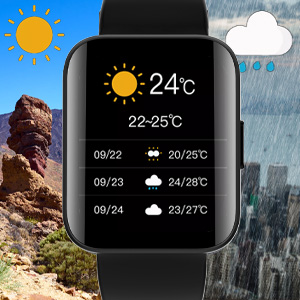
Image: The weather forecast displayed on the smartwatch, showing temperature and daily conditions.
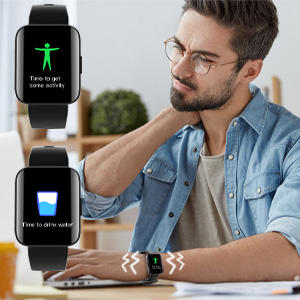
Image: Illustrations of sedentary and water intake reminders appearing on the smartwatch screen.
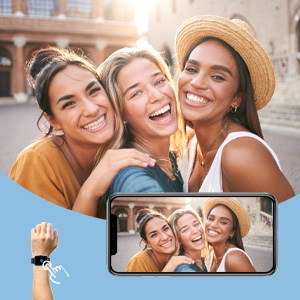
Image: A user using the smartwatch to remotely control their phone's camera for a group photo.
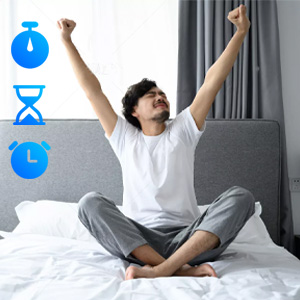
Image: Icons representing stopwatch, timer, and alarm functions, indicating time management features.
Health Monitoring
The Kuizil K21 Smartwatch provides 24/7 real-time health monitoring features to help you track your well-being.

Image: A display of various health monitoring screens on the smartwatch and companion app, including heart rate, blood oxygen, and sleep data.
- Heart Rate Monitoring: Continuously monitors your heart rate throughout the day.
- Blood Oxygen (SpO2) Monitoring: Measures your blood oxygen saturation levels.
- Sleep Monitoring: Tracks your sleep patterns, including deep sleep, light sleep, and awake times.
- Activity Tracking: Records your daily steps, distance traveled, and calories burned.
- Sedentary Reminders: Prompts you to move if you've been inactive for too long.
- Hydration Reminders: Reminds you to drink water at regular intervals.

Image: A split image showing the automatic sleep monitor feature with a person sleeping and the app displaying sleep data, and the heart rate monitor feature with a person running and the watch showing heart rate.
Note: The health data provided by this device is for reference only and should not be used for medical diagnosis or treatment.
Sports Modes
The K21 Smartwatch supports 21 (or 22) different sports modes to accurately track your workouts.

Image: A person cycling with an overlay showing icons for various sports modes like cycling, running, walking, and yoga, along with metrics like distance, heart rate, steps, and calories.
Common modes include:
- Running
- Walking
- Cycling
- Basketball
- Football
- Badminton
- Yoga
- Tennis
- And many more.

Image: A person running with the smartwatch displaying activity data (time, steps, distance, calories, heart rate) and icons representing 22 different sports modes.
Water Resistance (IP67)
The Kuizil K21 Smartwatch is IP67 water-resistant, meaning it is protected against dust and can withstand immersion in water up to 1 meter for up to 30 minutes.
- Suitable for daily use, such as hand washing, rain, or accidental splashes.
- Not suitable for swimming, diving, hot showers, or saunas.
- Avoid contact with hot water, steam, or corrosive liquids.

Image: The Kuizil K21 Smartwatch being splashed with water, illustrating its IP67 waterproof rating.
Maintenance
- Cleaning: Regularly clean the watch and strap with a soft, dry cloth. If necessary, use a slightly damp cloth and then dry thoroughly.
- Charging Contacts: Ensure the charging contacts on the back of the watch are clean and free of dust or debris to ensure proper charging.
- Storage: Store the watch in a cool, dry place when not in use.
- Avoid Chemicals: Do not use harsh chemicals, cleaning solvents, or strong detergents to clean the watch, as they may damage the finish or internal components.
Troubleshooting
| Problem | Possible Cause / Solution |
|---|---|
| Watch does not turn on. | Battery may be depleted. Charge the watch for at least 30 minutes. |
| Watch does not charge. |
|
| Cannot pair with smartphone. |
|
| Notifications are not received. |
|
| Inaccurate health data. |
|
Specifications
| Feature | Detail |
|---|---|
| Brand | Kuizil |
| Model Number | K21 |
| Screen Size | 1.69 inches |
| Display Resolution | 240 x 280 HD |
| Operating System | AsteroidOS (as per product data, likely a custom OS based on it) |
| Connectivity | Bluetooth |
| Battery Capacity | 200 mAh Lithium-polymer |
| Charging Time | Approx. 2 hours |
| Battery Life (Normal Use) | 5-8 days |
| Battery Life (Standby) | 10-15 days |
| Water Resistance | IP67 |
| Compatible Devices | Android 4.4+ / iOS 9.0+ smartphones |
| Special Features | Activity Tracker, Heart Rate Monitor, Sleep Monitor, Blood Oxygen Monitor, Smart Notifications, Music Control, Camera Control, Find Phone, Weather, Alarms, Sedentary/Water Reminders, Multiple Sports Modes. |
Warranty and Support
For warranty information and customer support, please refer to the purchase platform or contact Kuizil customer service directly. Keep your purchase receipt as proof of purchase.
For further assistance, you may visit the official Kuizil website or contact their support team through the contact information provided with your product packaging.
Ask a question about this manual
Ask about setup, troubleshooting, compatibility, parts, safety, or missing instructions. Manuals+ will review the question and use this page’s manual context to help answer it.