
Panasonic ES-NLV98-K
Panasonic Lamdash ES-NLV98-K 5-Blade Electric Shaver User Manual
Model: ES-NLV98-K
1. Introduction
This manual provides essential information for the safe and effective use of your Panasonic Lamdash ES-NLV98-K 5-Blade Electric Shaver. Please read these instructions thoroughly before use and retain them for future reference.

Image 1.1: Panasonic Lamdash ES-NLV98-K Electric Shaver and its automatic cleaning and charging station.
2. Important Safety Information
To reduce the risk of injury, electric shock, fire, or damage to the product, always observe the following safety precautions:
- Do not modify or repair the appliance yourself. Contact an authorized service center for repairs.
- Keep the appliance dry. Do not immerse the AC adapter or charging station in water.
- Ensure the voltage indicated on the AC adapter matches your local power supply before connecting.
- Do not use the appliance if the cord or plug is damaged.
- Keep out of reach of children.
- Unplug the shaver before cleaning the main unit, especially if using the automatic cleaning function.
3. Initial Setup
3.1 Unpacking and Checking Contents
Carefully unpack all items and ensure the following components are present:
- Panasonic Lamdash ES-NLV98-K Electric Shaver
- Automatic Washing and Charging Device
- Pouch
- Dedicated Cleaning Agent (WES4L cleaning agent) - 1 piece
- AC Adapter
- Dedicated Oil (Shell Ondina Oil 32,67)
- Cleaning Brush
3.2 Charging the Shaver
- Connect the AC adapter to the automatic washing and charging device.
- Place the shaver into the charging device. Ensure it is seated correctly.
- The charging indicator will illuminate, indicating that charging has begun. A full charge typically takes approximately 1 hour.
- For optimal battery life, allow the shaver to fully charge before its first use.
4. Operating Instructions
4.1 Basic Shaving
- Press the power button to turn on the shaver.
- Hold the shaver at a right angle to your skin and move it slowly against the direction of hair growth.
- The 3D Active Suspension head will adapt to your facial contours for a close shave.
- For areas with dense beard growth, the beard sensor will automatically adjust power for efficient shaving.
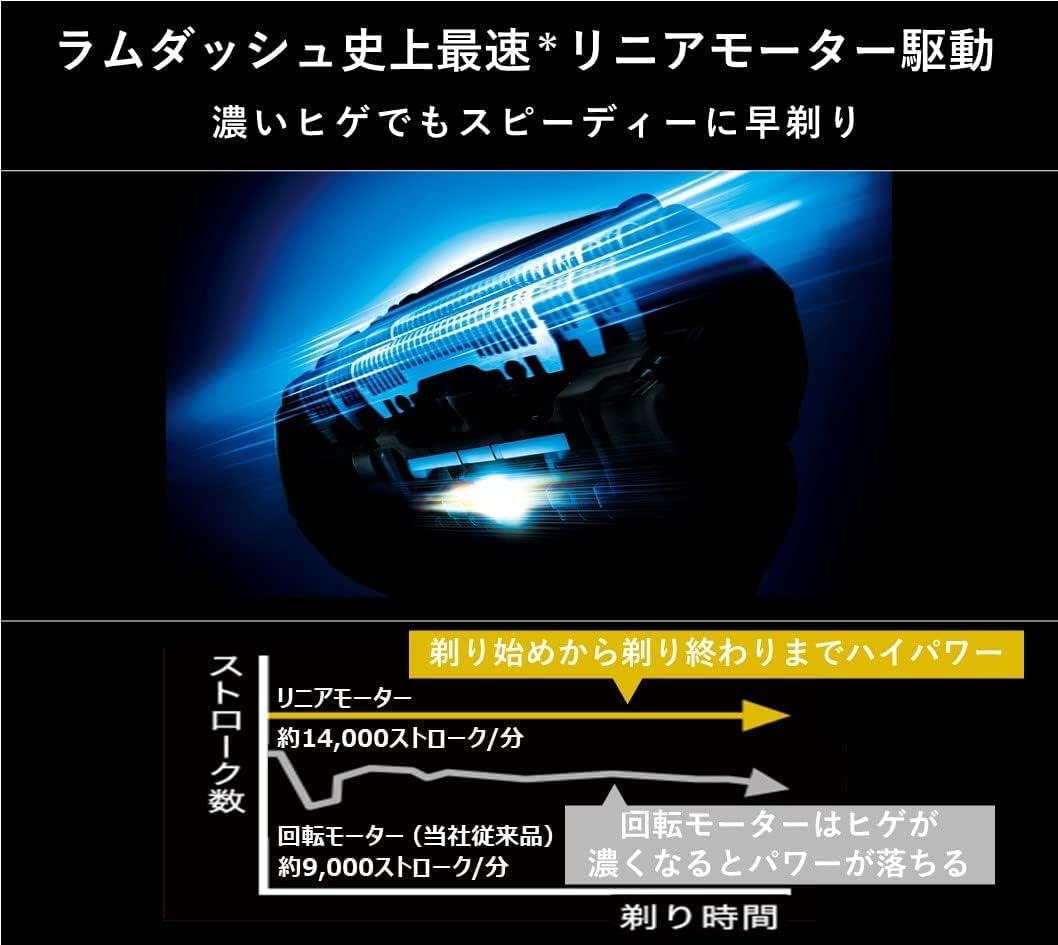
Image 4.1: Illustration of the high-speed linear motor drive, providing consistent power throughout the shave.
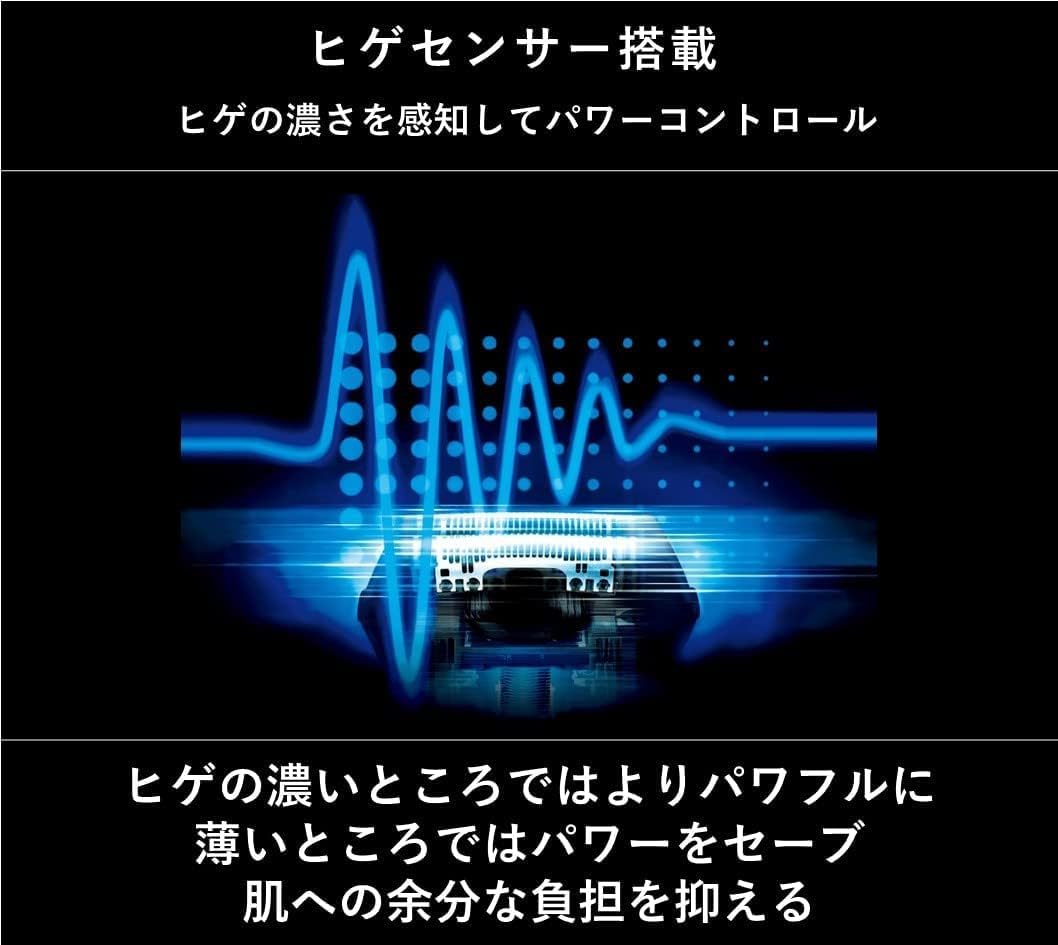
Image 4.2: Visual representation of the beard sensor detecting hair density and adjusting power.

Image 4.3: Diagram showing the multi-directional movement of the 3D Active Suspension head for close skin contact.
4.2 Wet Shaving
The ES-NLV98-K is a WET model and can be used for wet shaving with shaving foam or gel, or even in the shower.
- Apply shaving foam or gel to your face.
- Shave as usual.
- Rinse the shaver head under running water after use.

Image 4.4: The shaver is waterproof (IPX7 standard) and can be used for wet shaving or rinsed under water.
4.3 Using the Trimmer and Specialized Blades
The shaver features various blades for different shaving needs:
- Finish Blade: Designed for a deep shave from the root.
- 30° Sharp Nano-Edge Inner Blade: Cuts hard whiskers cleanly.
- Lift Blade: Lifts flat-lying whiskers for a closer cut.
- Sharp Trimmer: For quick cutting of sideburns or long whiskers.
- Quick-Split Blade: Catches and cuts long whiskers efficiently.
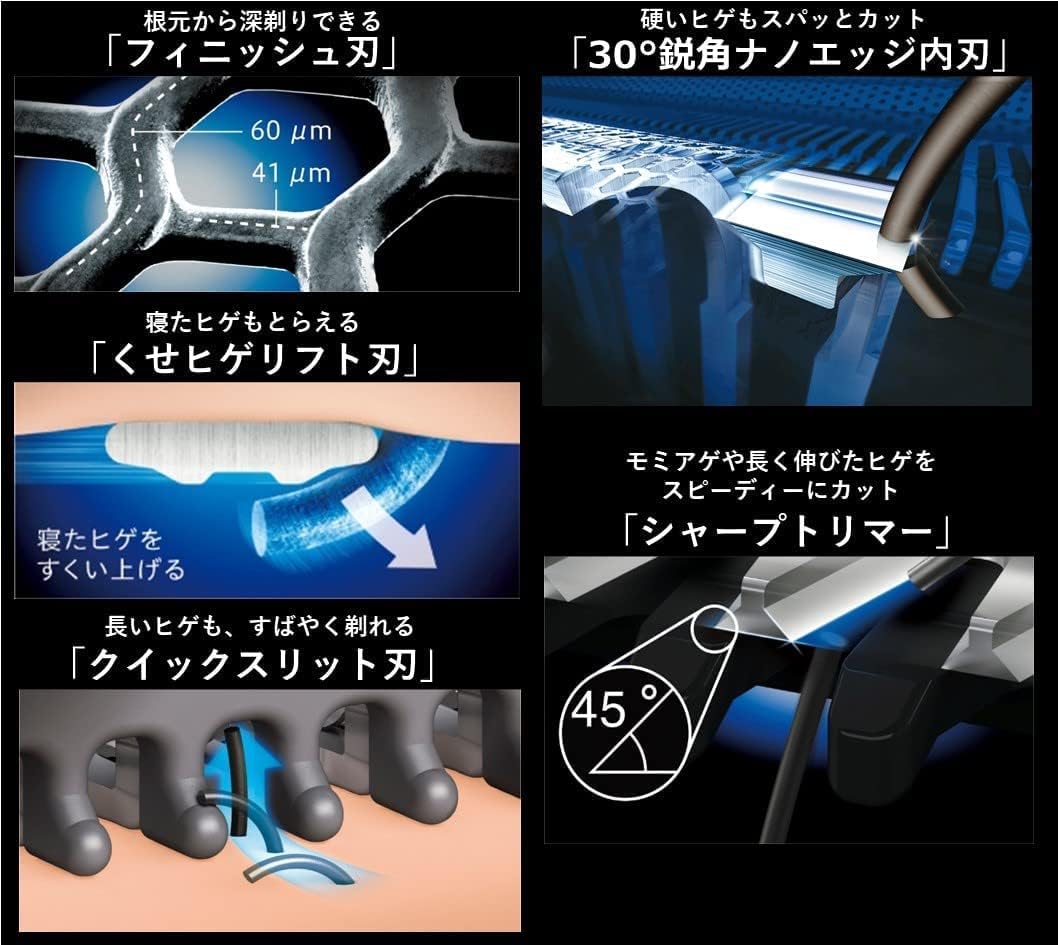
Image 4.5: Detailed view of the specialized blades: Finish blade, 30° sharp nano-edge inner blade, lift blade, sharp trimmer, and quick-split blade.
5. Maintenance
5.1 Automatic Cleaning and Drying
The automatic washing and charging device simplifies cleaning and drying:
- After shaving, rinse the shaver head under running water to remove most hair clippings.
- Place the shaver into the automatic washing and charging device.
- Ensure the dedicated cleaning agent is in the device.
- Press the cleaning button (if available) or allow the device to initiate the cleaning cycle automatically.
- The device will clean, rinse, and dry the shaver.
5.2 Manual Cleaning
If not using the automatic cleaning device, or for supplementary cleaning:
- Turn off the shaver and disconnect it from any power source.
- Remove the outer foil frame.
- Brush away hair clippings from the inner blades and outer foil using the provided cleaning brush.
- Rinse the outer foil and inner blades under running water.
- Allow all parts to air dry completely before reassembling.
5.3 Oiling the Blades
Regular oiling helps maintain blade performance and longevity:
- After cleaning and drying, apply a small drop of the dedicated oil to each inner blade.
- Run the shaver for a few seconds to distribute the oil.
- Wipe off any excess oil.
5.4 Replacing Blades and Foils
For optimal shaving performance, it is recommended to replace the outer foil and inner blades periodically. Refer to the packaging of replacement parts for specific replacement intervals.
6. Troubleshooting
| Problem | Possible Cause | Solution |
|---|---|---|
| Shaver does not turn on. | Battery is depleted. | Charge the shaver fully. |
| Shaver does not charge. | AC adapter not properly connected or damaged. | Check connections. Ensure AC adapter is functional. |
| Poor shaving performance. | Blades/foil are dull or damaged. Hair clippings accumulated. | Clean the shaver thoroughly. Replace outer foil and inner blades if necessary. |
| Shaver stops during use. | Battery is low. | Recharge the shaver. |
7. Specifications
| Feature | Detail |
|---|---|
| Brand | Panasonic |
| Model Number | ES-NLV98-K |
| Color | Black |
| Power Source | Rechargeable Battery (Lithium Ion) |
| Motor Drive | High-speed Linear Motor (approx. 14,000 strokes/min) |
| Number of Blades | 5 |
| Head Type | Reciprocating, 3D Active Suspension |
| Waterproof Rating | IPX7 (Whole body washable) |
| Wattage | 10 W |
| Product Weight | Approx. 200 g |
| Included Components | Automatic washing/charging device, pouch, cleaning agent, AC adapter, oil, cleaning brush |
8. Warranty and Support
8.1 Warranty Information
Your Panasonic Lamdash ES-NLV98-K Electric Shaver is covered by a manufacturer's warranty. Please refer to the warranty card included in your product packaging for specific terms, conditions, and duration. Keep your proof of purchase for warranty claims.
8.2 Customer Support
For technical assistance, replacement parts, or service inquiries, please contact Panasonic customer support. Contact details can typically be found on the Panasonic official website or in your product documentation.
You can also visit the Panasonic Store on Amazon for more information and product accessories.
Related Documents - ES-NLV98-K
 |
Panasonic ES-LT6A/ES-LT2A Shaver: Operating Instructions & User Guide Comprehensive operating instructions and user guide for the Panasonic ES-LT6A and ES-LT2A AC/Rechargeable Shavers. Learn about safety precautions, intended use, parts identification, charging, cleaning, troubleshooting, and maintenance for your Panasonic shaver. |
 |
Panasonic ES-LV9N Rechargeable Shaver: Operating Instructions Get the most out of your Panasonic ES-LV9N rechargeable shaver with these comprehensive operating instructions. Learn about safety, usage, maintenance, and troubleshooting for optimal performance. |
 |
Panasonic ES-LT2N Rechargeable Shaver Operating Instructions and User Manual Comprehensive operating instructions, safety precautions, troubleshooting guide, and specifications for the Panasonic ES-LT2N Rechargeable Shaver. Learn how to use, charge, clean, and maintain your shaver for optimal performance. |
 |
Panasonic ES-RC30 Rechargeable Shaver Operating Instructions Operating instructions for the Panasonic ES-RC30 Household Rechargeable Shaver, covering setup, charging, shaving, cleaning, maintenance, and specifications. |
 |
Panasonic ES-LV69 Rechargeable Shaver Operating Instructions Detailed operating instructions for the Panasonic ES-LV69 rechargeable shaver, covering safety precautions, parts identification, preparation, usage, cleaning, and maintenance. |
 |
Panasonic ES-LT41 Rechargeable Shaver: Operating Instructions Get the most from your Panasonic ES-LT41 Rechargeable Shaver with these operating instructions. Learn about safe usage, WET/DRY technology, charging, cleaning, and maintenance for optimal performance. |
Ask a question about this manual
Ask about setup, troubleshooting, compatibility, parts, safety, or missing instructions. Manuals+ will review the question and use this page’s manual context to help answer it.