
Grandstream GRP2634
Grandstream GRP2634 IP Phone User Manual
Model: GRP2634
Product Overview
The Grandstream GRP2634 is a professional 8-line carrier-grade IP phone designed for high-volume call environments and easy deployment. It integrates advanced features to enhance productivity and communication clarity.
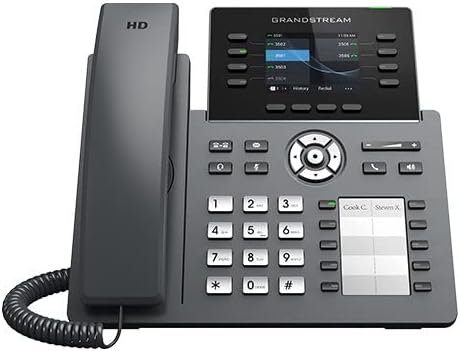
Image: Front view of the Grandstream GRP2634 IP Phone, showing the handset, display screen, keypad, and function buttons.
Key features include 5-way voice conferencing, integrated Power over Ethernet (PoE) and Wi-Fi connectivity, full HD audio on both speaker and handset, and support for EHS (Electronic Hook Switch) and USB headsets. The phone incorporates carrier-grade security features such as secure boot, dual firmware images, and encrypted data storage. Management is streamlined through Grandstream's Device Management System (GDMS) for centralized configuration and monitoring.
Package Contents
Verify that all items are present in the package:
- GRP2634 IP Phone Unit
- Handset with Cord
- Ethernet Cable
- Phone Stand
- Quick Installation Guide
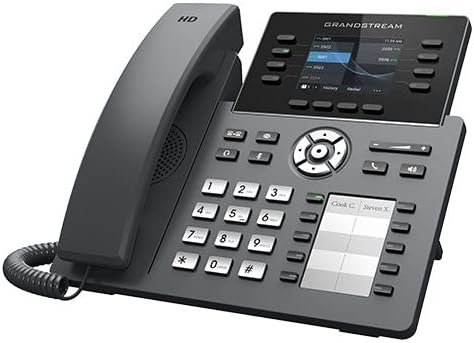
Image: Angled view of the Grandstream GRP2634 IP Phone, highlighting the side profile and button layout.
Setup
Connecting the Phone
- Attach the Phone Stand: Align the stand with the slots on the back of the phone and snap it into place.
- Connect the Handset: Plug one end of the coiled handset cord into the handset and the other end into the handset port on the phone base.
- Connect to Network/Power:
- Using PoE (Power over Ethernet): Connect an Ethernet cable from a PoE-enabled switch or injector to the LAN port on the phone.
- Using Power Adapter (Sold Separately): If PoE is not available, connect a compatible power adapter (not included) to the power port and then to a power outlet. Connect an Ethernet cable from your network to the LAN port.
- Optional: Connect PC: If desired, connect an Ethernet cable from your computer to the PC port on the phone. This allows your computer to share the network connection through the phone.
Initial Configuration
Upon first boot, the phone will attempt to obtain an IP address via DHCP. Once connected, the display will show network status and prompt for initial setup or provisioning. For detailed provisioning, refer to the Grandstream GDMS platform or your service provider's instructions.
Operating Instructions
Making and Receiving Calls
- To Make a Call: Pick up the handset, press the Speaker button, or press a Line key. Dial the number and press the Dial/Send soft key or wait for a few seconds.
- To Answer a Call: Pick up the handset, press the Speaker button, or press the flashing Line key.
- To End a Call: Hang up the handset, press the Speaker button, or press the End Call soft key.
Advanced Features
- 5-Way Conferencing: During an active call, press the Conference soft key. Dial the number of the next participant and press Dial. Once connected, press the Conference soft key again to join all parties. Repeat for up to 5 participants.
- Call Hold: During an active call, press the Hold soft key. Press the flashing Line key again to resume the call.
- Call Transfer: During an active call, press the Transfer soft key. Dial the number to transfer to, then press the Transfer soft key again (blind transfer) or wait for the party to answer and then press Transfer (attended transfer).
- Virtual Multi-Purpose Keys (VPK) and Multi-Purpose Keys (MPK): The GRP2634 features 32 VPKs and 10 MPKs for speed dial, busy lamp field (BLF), and other programmable functions. These are typically configured by your system administrator.
Maintenance
- Cleaning: Use a soft, dry cloth to clean the phone's surface. Do not use abrasive cleaners or solvents.
- Firmware Updates: Firmware updates are typically managed by your system administrator through the GDMS platform to ensure optimal performance and security.
- Environmental Conditions: Operate the phone within recommended temperature and humidity ranges. Avoid exposing the phone to direct sunlight, excessive heat, or moisture.
Troubleshooting
Common Issues and Solutions
- Phone Does Not Power On:
- Ensure the Ethernet cable is securely connected to the LAN port and the PoE source is active.
- If using a power adapter, verify it is correctly plugged into the phone and a working power outlet.
- No Dial Tone/Cannot Make Calls:
- Check network cable connections.
- Verify the phone has obtained an IP address (check the display).
- Contact your service provider or system administrator to confirm account registration and network connectivity.
- Poor Audio Quality:
- Check network connection stability.
- Ensure the handset cord is securely connected.
- Test with another handset or headset if available.
- Display Not Working:
- Restart the phone by unplugging and re-plugging the power/Ethernet cable.
- If the issue persists, contact technical support.
Specifications
| Feature | Description |
|---|---|
| Model | GRP2634 |
| Lines Supported | 8 lines |
| Conferencing | 5-way voice conferencing |
| Audio | Full HD audio on speaker and handset |
| Connectivity | Integrated PoE & Wi-Fi |
| Headset Support | EHS support for Plantronics headsets, USB support for Grandstream GUV Series Headsets |
| Security Features | Carrier-grade security, secure boot, dual firmware images, encrypted data storage |
| Management | Grandstream Device Management System (GDMS) |
| Programmable Keys | 32 Virtual Multi-Purpose Keys (VPK), 10 Multi-Purpose Keys (MPK) |
| Product Dimensions | 30 x 20 x 25 cm; 1.3 kg |
Warranty and Support
For warranty information and technical support, please refer to the official Grandstream website or contact your authorized reseller. Warranty terms and conditions may vary by region and purchase agreement.
Online Resources:
Related Documents - GRP2634
 |
Grandstream GRP2634 Carrier-Grade HD IP Phone Quick Installation Guide This guide provides quick installation instructions for the Grandstream GRP2634 Carrier-Grade HD IP Phone, covering setup, connection, and basic configuration. |
 |
Grandstream GRP261X/GRP2624/GRP2634 Carrier-Grade IP Phones Administration Guide Comprehensive administration guide for Grandstream GRP261X, GRP2624, and GRP2634 Carrier-Grade IP Phones, covering setup, configuration, features, and regulatory information. |
 |
Grandstream GRP2603/GRP2603P Quick Installation Guide Quick installation guide for the Grandstream GRP2603 and GRP2603P 3-Line Essential IP Phone, covering setup, connection, and basic configuration. |
 |
Grandstream GRP2615 Carrier-Grade HD IP Phone Quick Installation Guide This document provides a quick installation guide for the Grandstream GRP2615 Carrier-Grade HD IP Phone. It covers essential setup, connection, configuration, package contents, and regulatory information for enterprise users. |
 |
Grandstream GRP2614 Carrier-Grade HD IP Phone Quick Installation Guide Quick installation guide for the Grandstream GRP2614 Carrier-Grade HD IP Phone. Learn how to set up, connect, and configure your device, along with an overview of its features and package contents. |
 |
Grandstream GRP2616 Quick Installation Guide This guide provides essential information for installing and setting up the Grandstream GRP2616 Carrier-Grade HD IP Phone, including physical setup, network connection, configuration methods, and regulatory compliance details. |
Ask a question about this manual
Ask about setup, troubleshooting, compatibility, parts, safety, or missing instructions. Manuals+ will review the question and use this page’s manual context to help answer it.