
1. Introduction
Welcome to your new VICTOR VWRP-3800 State 7-in-1 Music Center. This versatile system combines a 3-speed record player, CD/MP3 player, cassette player, FM radio, dual Bluetooth In & Out, and built-in stereo speakers. This manual provides detailed instructions for setup, operation, and maintenance to ensure optimal performance and enjoyment of your device.
2. Important Safety Information
Please read all safety instructions before operating this product. Keep this manual for future reference.
- Do not expose this appliance to rain or moisture.
- Do not block any ventilation openings.
- Use only attachments/accessories specified by the manufacturer.
- Refer all servicing to qualified service personnel.
- Unplug this appliance during lightning storms or when unused for long periods.
Proposition 65 Warning: This product may contain chemicals known to the State of California to cause cancer and birth defects or other reproductive harm.
3. What's in the Box
Carefully unpack all items and ensure you have the following:
- VICTOR VWRP-3800 State 7-in-1 Music Center
- 45 RPM Adaptor
- Aux In Cable
- ETL Approved Power Adaptor
- User Manual (this document)
- Quick Set Up Guide
If any items are missing or damaged, please contact customer support.
4. Product Overview
Familiarize yourself with the main components of your music center.
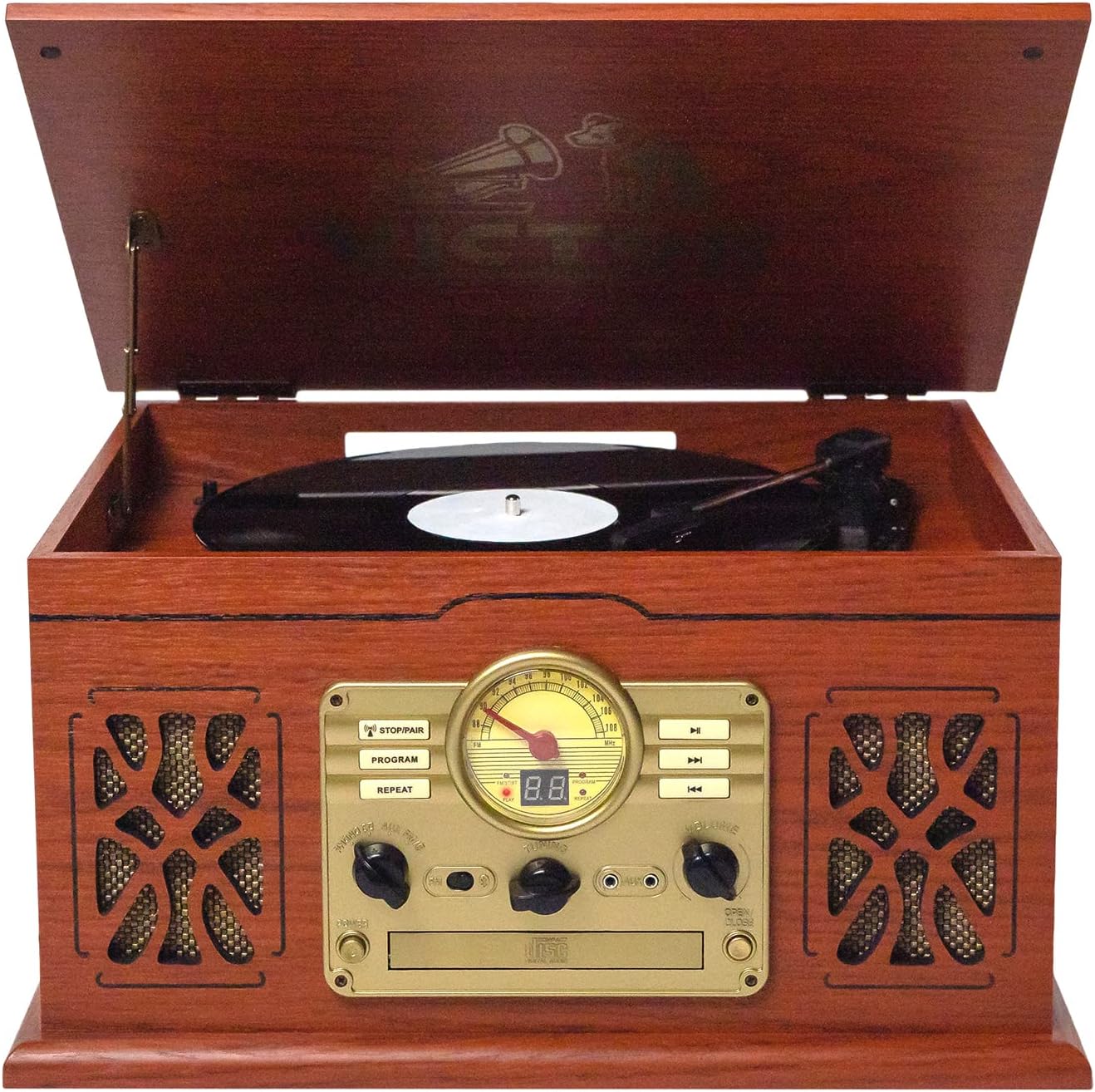
Front view of the VICTOR VWRP-3800 State 7-in-1 Music Center with the lid open, revealing the turntable and the control panel below it. The unit has a mahogany wood finish.

Detailed view of the control panel, including the analog radio tuner, mode selection buttons, volume control, and CD player slot.

Side view of the unit, highlighting the integrated cassette player slot.
5. Setup
- Placement: Place the music center on a stable, level surface away from direct sunlight, heat sources, and excessive dust or moisture.
- Power Connection: Connect the ETL Approved Power Adaptor to the DC IN jack on the back of the unit, then plug it into a standard wall outlet.
- Antenna Connection: Extend the FM wire antenna for optimal radio reception.
- Initial Power On: Press the POWER button to turn on the unit.
6. Operating Instructions
6.1 Turntable Operation
This turntable supports 33 1/3, 45, and 78 RPM records.

The turntable section of the music center with a record spinning, ready for playback.
- Lift the dust cover.
- Place a record on the turntable platter. If playing a 45 RPM single, use the included 45 RPM adaptor.
- Select the appropriate speed (33, 45, or 78 RPM) using the speed selector switch.
- Move the tone arm lock to release the tone arm.
- Lift the tone arm using the cue lever and position it over the desired track on the record.
- Gently lower the tone arm onto the record using the cue lever. The record will begin to play.
- Adjust the volume using the VOLUME knob.
- At the end of the record, the tone arm will automatically return to its rest (auto-stop function). Lift the tone arm, return it to its rest, and secure it with the tone arm lock.
Note: For some records, the auto-stop function may activate prematurely or not at all. In such cases, you may need to manually stop playback and return the tone arm.
6.2 CD/MP3 Player Operation

A hand inserting a compact disc into the front-loading CD player slot.
- Press the FUNCTION button to select CD mode.
- Press the OPEN/CLOSE button to open the CD tray.
- Place a CD or MP3 CD onto the tray with the label side facing up.
- Press the OPEN/CLOSE button again to close the tray. The disc will begin to play automatically.
- Use the SKIP/SEARCH buttons to navigate between tracks.
- Press the PLAY/PAUSE button to pause or resume playback.
- Press the STOP button to stop playback.
6.3 Cassette Player Operation

A cassette tape being inserted into the side-mounted cassette player.
- Press the FUNCTION button to select TAPE mode.
- Insert a cassette tape into the cassette slot on the side of the unit.
- Press the PLAY button to begin playback.
- Use the FAST FORWARD and REWIND buttons to navigate the tape.
- Press the STOP/EJECT button to stop playback and eject the tape.
Recording from other sources to Cassette:
- Select the desired source (e.g., PHONO, CD, AUX, BT IN).
- Insert a blank cassette into the cassette slot.
- Press the RECORD button on the cassette player. Playback from the source will begin, and recording will start simultaneously.
- Press the STOP button on the cassette player to end recording.
6.4 FM Radio Operation

The music center displaying its illuminated FM radio dial during operation.
- Press the FUNCTION button to select FM mode.
- Extend the FM wire antenna for best reception.
- Turn the TUNING knob to select your desired radio station.
- Adjust the volume using the VOLUME knob.
6.5 Bluetooth In Operation

A user streaming music wirelessly from a tablet to the music center via Bluetooth In.
- Press the FUNCTION button to select BT IN mode. The Bluetooth indicator will flash.
- Enable Bluetooth on your smartphone or tablet and search for "VICTOR VWRP-3800".
- Select "VICTOR VWRP-3800" to pair. Once paired, the indicator will stop flashing and remain solid.
- Play music from your device. Audio will stream through the music center's speakers.
- Adjust volume on both your device and the music center.
6.6 Bluetooth Out Operation

A user enjoying music from the music center, wirelessly transmitted to Bluetooth headphones.
- Select the desired source (e.g., PHONO, CD, TAPE, FM, USB).
- Ensure your Bluetooth headphones or speaker are in pairing mode.
- Press and hold the BT OUT button on the music center. The BT OUT indicator will flash.
- The music center will search for and connect to the nearest Bluetooth receiving device. Once connected, the indicator will stop flashing.
- Audio from the selected source will now play through your external Bluetooth device.
6.7 USB Playback and Recording
The USB port allows for MP3 playback and recording from other sources.
- USB Playback: Insert a USB flash drive into the USB port. Press the FUNCTION button to select USB mode. The unit will automatically begin playing compatible audio files.
- USB Recording: Select the desired source (e.g., PHONO, CD, TAPE, AUX, BT IN). Insert a USB flash drive. Press the RECORD button (usually labeled REC) on the unit. Playback from the source will begin, and recording will start simultaneously to the USB drive. Press STOP to end recording.
6.8 AUX Input
Connect external audio devices using the included Aux In Cable.
- Connect one end of the Aux In Cable to the AUX IN jack on the music center.
- Connect the other end to the headphone jack or audio output of your external device (e.g., smartphone, MP3 player).
- Press the FUNCTION button to select AUX mode.
- Play audio from your external device. Adjust volume on both devices.
7. Maintenance
7.1 Cleaning
- Disconnect the power before cleaning.
- Use a soft, dry cloth to clean the exterior surfaces.
- For the turntable stylus, use a soft brush and gently brush from back to front.
- Do not use abrasive cleaners, waxes, or solvents.
7.2 Stylus Replacement
The stylus (needle) should be replaced after approximately 500 hours of use to maintain sound quality and prevent damage to your records. Contact customer support for replacement stylus information.
8. Troubleshooting
| Problem | Possible Cause | Solution |
|---|---|---|
| No power | Power adaptor not connected; Power outlet not active. | Ensure power adaptor is securely connected and plugged into a working outlet. |
| No sound | Volume too low; Incorrect function selected; External device not playing. | Increase volume; Select correct function (PHONO, CD, TAPE, FM, BT IN, AUX, USB); Ensure external device is playing. |
| Turntable not spinning or skipping | Speed setting incorrect; Stylus dirty or worn; Record damaged. | Check speed setting; Clean or replace stylus; Try a different record. |
| CD player not reading disc | Disc inserted incorrectly; Disc dirty or scratched; Incompatible disc format. | Reinsert disc correctly; Clean disc; Ensure disc is a standard audio CD or MP3 CD. |
| Bluetooth pairing failed | Device too far; Bluetooth not enabled on external device; Incorrect pairing mode. | Move devices closer; Enable Bluetooth on your device; Ensure music center is in BT IN pairing mode or external device is in pairing mode for BT OUT. |
9. Specifications
| Feature | Detail |
|---|---|
| Model | VWRP-3800 |
| Brand | VICTOR |
| Dimensions (L x W x H) | 18.1" x 13.6" x 9.5" |
| Weight | 14.08 lbs |
| Turntable Speeds | 33 1/3, 45, 78 RPM |
| Connectivity | Dual Bluetooth (In & Out), AUX In, USB |
| Media Playback | Vinyl records, CDs, MP3 CDs, Cassette tapes, FM Radio, USB MP3 |
| Speakers | Built-in Stereo Speakers |
| Power Source | Corded Electric |
| Material | Plastic, Wood |
10. Warranty and Support
This VICTOR VWRP-3800 Music Center comes with a 1 Year Parts, 90 Days Labor warranty.
For technical support, warranty claims, or replacement parts (e.g., stylus), please contact VICTOR customer service.
Online Support: Visit the official VICTOR website for FAQs and support resources.
Contact Information: Refer to the Quick Set Up Guide or product packaging for specific contact details.
11. Product Videos
Video demonstrating the VICTOR VWRP-3800 State 7-in-1 Music Center in a room setting, showcasing its aesthetic appeal and placement options.
A 360-degree view video of the VICTOR VWRP-3800 State 7-in-1 Music Center, highlighting its design from all angles.

