
Introduction
This manual provides essential instructions for the proper setup, operation, and maintenance of your BOROFONE BD1 Smart Sports Watch (Call Version). Please read this guide thoroughly before using your device to ensure optimal performance and longevity.
The BOROFONE BD1 is a smart sports watch designed for active lifestyles, featuring Bluetooth connectivity for calls, comprehensive sleep pattern monitoring, and a high-resolution display for clear visual interaction.
Getting Started
Package Contents
Verify that all items are present in your product packaging:
- BOROFONE BD1 Smart Watch
- Magnetic Wireless Charger

Image: Front and side view of the BOROFONE BD1 Smart Watch packaging, displaying the watch image and brand logo.
Charging the Device
Before initial use, fully charge your BOROFONE BD1 Smart Watch. Connect the magnetic wireless charger to a compatible USB power source. Align the watch with the charging contacts on the charger until it magnetically snaps into place. The watch display will indicate charging status.
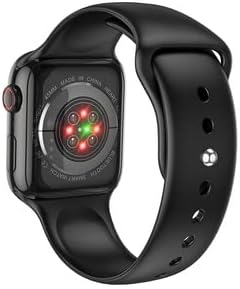
Image: Rear view of the BOROFONE BD1 Smart Watch, highlighting the heart rate sensors and magnetic charging contacts.
Adjusting the Watch Strap
The watch features an adjustable strap with a stainless steel metal buckle. To adjust, slide the buckle along the strap until it fits comfortably and securely on your wrist. No specific wrist measurement is required for fitting.
Initial Power On
Press and hold the side button on the watch until the BOROFONE logo appears. The watch will then boot up to the main display.
Pairing with Your Smartphone
- Ensure your smartphone's Bluetooth is enabled.
- On your watch, navigate to the Bluetooth settings or pairing mode.
- On your smartphone, search for available Bluetooth devices and select "BOROFONE BD1" (or similar name).
- Follow any on-screen prompts to complete the pairing process.
- For full functionality, download and install the recommended companion application for the BOROFONE BD1 from your smartphone's app store.

Image: A BOROFONE BD1 Smart Watch with a white strap positioned next to a smartphone, suggesting device pairing or app interaction.
Operation Guide
Basic Navigation
The BOROFONE BD1 features a touchscreen display for primary interaction. Swipe across the screen to navigate through menus and functions. A side button provides additional control, typically for returning to the home screen or accessing specific features.

Image: Front view of the BOROFONE BD1 Smart Watch, showcasing its main watch face with time, date, and various functional icons.
Making and Receiving Calls
As a call version smart watch, the BD1 allows you to make and receive calls directly from your wrist when connected to your smartphone via Bluetooth. Access the call function through the watch's menu. You can view incoming call notifications and answer or reject calls using the touchscreen.
Monitoring Sleep Patterns
The watch automatically monitors your sleep patterns. Wear the watch while sleeping to track deep and light sleep hours. This data can be viewed on the watch or through the companion app on your smartphone, providing insights into your sleep quality.
Display Features
The BD1 features a high-resolution LCD display, offering clear and colorful visuals. The larger screen size enhances the visual and touch control experience, allowing for more detailed information to be displayed.

Image: A close-up view of the BOROFONE BD1 Smart Watch face, displaying a digital time and a clean, modern interface.
Other Functions
The watch includes various other functions typical of a smart sports watch, such as activity tracking, notification alerts from your smartphone, and potentially different sports modes. Refer to the companion app for a complete list of features and customization options.
Care and Maintenance
Cleaning Your Watch
To clean your BOROFONE BD1, gently wipe the screen and body with a soft, lint-free cloth. For stubborn dirt, slightly dampen the cloth with water. Avoid using harsh chemicals or abrasive materials, as these can damage the watch's finish and display.
Battery Care
To prolong battery life, avoid fully discharging the watch frequently. Charge the device regularly, and if storing for an extended period, ensure it has at least a 50% charge. Avoid exposing the watch to extreme temperatures.
Water Resistance
While the watch is designed for sports, specific water resistance ratings are not provided. It is generally recommended to avoid prolonged submersion in water and exposure to high-pressure water jets. Dry the watch thoroughly if it gets wet.
Troubleshooting
Common Issues and Solutions
- Watch Not Turning On: Ensure the watch is fully charged. Connect it to the magnetic charger and wait a few minutes before attempting to power it on again.
- Bluetooth Connectivity Issues: Check that Bluetooth is enabled on both your watch and smartphone. Ensure the devices are within range. Try unpairing and re-pairing the watch with your phone. Restarting both devices can also resolve connectivity problems.
- Charging Problems: Verify that the magnetic charger is properly connected to both the watch and the power source. Ensure the charging contacts on the watch and charger are clean and free of debris. Try a different USB power adapter or port.
- Display Not Responding: If the touchscreen is unresponsive, try restarting the watch by holding down the side button. If the issue persists, ensure the watch is charged.
Product Specifications
| Feature | Specification |
|---|---|
| Brand | BOROFONE |
| Model Name | BD1 |
| Operating System | Android Wear 2.0 |
| Connectivity Technology | Bluetooth |
| Wireless Communication Standard | Bluetooth |
| Display Technology | LCD |
| Display Type | LCD |
| Scanner Resolution | 240 x 240 |
| Human Interface Input | Touchscreen |
| GPS | No GPS |
| Special Features | Display |
| Item Weight | 150 g |
| Package Dimensions | 22 x 6.8 x 3 cm |
| Color | Bright Black |
| Item Shape | Round |
| Style | Modern |
Warranty and Support
Warranty Information
The BOROFONE BD1 Smart Sports Watch is covered by a manufacturer's warranty. Please refer to the warranty card included in your product packaging or contact your retailer for specific details regarding warranty terms and conditions.
Customer Support
For technical assistance, troubleshooting not covered in this manual, or warranty claims, please contact the retailer where you purchased the product or visit the official BOROFONE website for support resources.


